7 Best AI Tools to Chat with PDF in 2026 (Free & Paid)

The volume of PDF-based content in academic and professional settings continues to grow in 2026. Research papers, legal contracts, technical reports, and institutional documents are overwhelmingly published and shared as PDFs, and reading them cover to cover remains one of the most time-consuming parts of any knowledge workflow. For students, researchers, and professionals who work with these documents daily, manually searching for specific information across dozens of pages is neither efficient nor scalable.
This is where AI tools to chat with PDF documents have become essential. These tools allow users to upload a PDF, ask questions in natural language, and receive AI-generated answers drawn directly from the document's content. Instead of scanning pages manually, users can interact with PDFs conversationally, extracting key findings, verifying claims, and understanding complex sections in a fraction of the time. Some tools are designed for quick, general-purpose questions, while others are built specifically for academic and scientific research workflows with features like source verification, multi-document analysis, and citation support.
In this guide, we evaluate the best AI tools to chat with PDF in 2026, covering both free and paid options. Each tool is assessed based on PDF chat accuracy, free tier usability, pricing, multi-document support, research features, and security. Whether you need a fast answer from a single document or a structured research workflow across multiple papers, this comparison will help you choose the right tool for your needs.
TL;DR
The best AI tools to chat with PDF in 2026 are Paperguide ChatWithPDF, ChatPDF, AskYourPDF, Smallpdf, Adobe Acrobat, PDF AI, and Humata AI. For academic and scientific research workflows, Paperguide ChatWithPDF stands out as the most complete option, combining PDF chat with literature review, AI search across 220M+ papers, and citation-backed answers. For quick, free PDF questions without sign-up, ChatPDF and Smallpdf are the fastest options. For developers who need embeddable PDF chat, PDF AI is the only tool with a full API and SOC2 certification.
Key Takeaways
- The best AI tools to chat with PDF in 2026 include Paperguide ChatWithPDF, ChatPDF, AskYourPDF, Smallpdf, Adobe Acrobat, PDF AI, and Humata AI, each suited to different workflows and budgets.
- Paperguide ChatWithPDF is the strongest option for academic and scientific research, offering PDF chat alongside literature review, deep research reports, AI writing, and reference management in one platform.
- Most tools offer free tiers, but limits vary significantly. Some restrict daily uploads, others cap questions or file size.
- Multi-document chat is available in Paperguide ChatWithPDF, AskYourPDF, PDF AI, and Humata AI, which matters for literature reviews and cross-document analysis.
- Tools designed for research workflows provide source verification and cited answers, while general-purpose tools may not reference specific pages or passages.
- Security and data privacy vary across platforms. Researchers working with sensitive documents should review each tool's data retention and encryption policies before uploading.
- AI-generated answers from any PDF chat tool should always be verified against the original document, especially for academic and professional use.
- Choosing the right tool depends on your document type, whether you need research-specific features, and how many PDFs you work with regularly.
What Are the Best AI Tools to Chat with PDF in 2026?
The best AI tools to chat with PDF in 2026 include Paperguide ChatWithPDF, ChatPDF, AskYourPDF, Smallpdf, Adobe Acrobat, PDF AI, and Humata AI. These tools help users upload PDF documents, ask questions in natural language, and receive AI-generated answers based on the document's actual content.
While all seven tools support basic PDF chat, they differ significantly in research depth, free tier generosity, multi-document support, and whether they are built for academic workflows or general-purpose use. Some focus on speed and simplicity, others on developer integrations, and a few are designed specifically for students, researchers, and academics who need citation-backed answers and structured research features alongside PDF chat.
Best AI Tools to Chat with PDF in 2026
| Tool | Best For | Free Tier | Multi-Doc Chat | Source Citations | Research Features | Accuracy |
|---|---|---|---|---|---|---|
| Paperguide ChatWithPDF | Academic and scientific research | ✅ 5 AI generations/day | ✅ | ✅ | ✅ AI Search, Literature Review, AI Writer, Reference Manager | High |
| ChatPDF | Quick, free single-document Q&A | ✅ 2 PDFs/day, no sign-up | ❌ (paid only) | ✅ | ❌ | Medium–High |
| AskYourPDF | Power users and ChatGPT integration | ✅ 1 doc/day | ✅ | ✅ | ❌ | Medium–High |
| Smallpdf | All-in-one PDF management + AI chat | ✅ Limited daily chats | ❌ | ✅ | ❌ | Medium |
| Adobe Acrobat | Enterprise and existing Adobe users | ⚠️ Limited free queries | ✅ | ✅ | ❌ | High |
| PDF AI | Developers and custom integrations | ✅ 1 upload, 100 questions/mo | ✅ | ✅ | ❌ | Medium–High |
| Humata AI | Students on a budget | ✅ 60 pages/mo | ✅ | ✅ | ❌ | Medium |
Top AI PDF Chat Tools (Quick Summary)
- Paperguide ChatWithPDF – Best overall for academic and scientific research. Combines PDF chat with AI search across 220M+ papers, literature review tables, deep research reports, AI writing with citations, and reference management.
- ChatPDF – Best for quick, free PDF questions. No account required, instant upload, clickable source citations, and the simplest interface among all tools compared.
- AskYourPDF – Best for power users who want ChatGPT integration. Supports multi-format uploads (PDF, PPT, EPUB, CSV), offers a ChatGPT plugin, Chrome extension, and multiple AI model choices.
- Smallpdf – Best for all-in-one PDF management. Offers 30+ PDF tools (compress, convert, merge, edit, sign) alongside AI-powered PDF chat in a single platform.
- Adobe Acrobat – Best for enterprise teams and existing Adobe users. Full PDF editing, e-signatures, and AI chat within the world's most widely used PDF platform.
- PDF AI – Best for developers and businesses. The only tool with an embeddable chatbot, full developer API, and SOC2 Type II certification for custom PDF chat integrations.
- Humata AI – Best for students on a budget. Offers the lowest student pricing at $1.99/month with a verified .edu email, plus enterprise-grade security and multi-document analysis.
Best AI Tools to Chat with PDF in 2026 (Detailed Reviews)
1. Paperguide ChatWithPDF
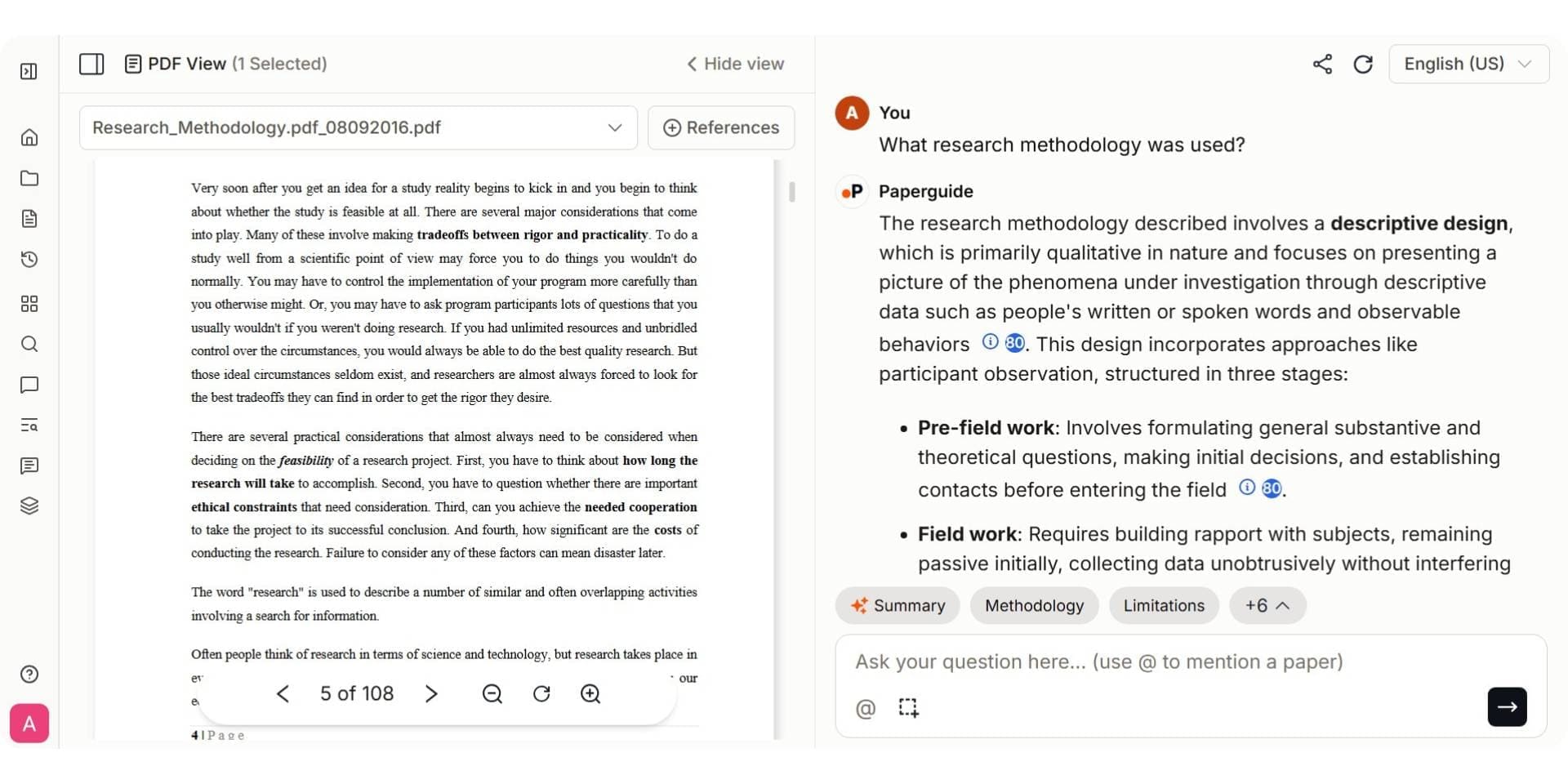
Paperguide ChatWithPDF is an AI-powered tool built specifically for academic and scientific research workflows. It allows users to upload research papers, theses, technical reports, and other PDF documents and interact with them using natural language commands. Instead of reading a lengthy document cover to cover, users can type a question or command and let the AI fetch relevant details, summaries, and extracted data directly from the content.
Unlike general-purpose PDF chat tools that focus only on quick Q&A, Paperguide ChatWithPDF is part of a broader research platform that includes AI Search across 220M+ academic papers, Deep Research reports, AI Literature Review, AI Paper Writer, and Reference Management. This means users can move from chatting with a PDF to running a literature review, generating citations, or drafting research content without switching tools. For researchers who regularly work with multiple papers across a project, this integrated approach reduces friction and keeps the entire workflow in one place.
Key Features
- Instant PDF queries that return answers from the document with just a few clicks
- PDF summarization to get a quick overview of lengthy documents without a full read
- Document navigation to move freely to any page and access relevant information
- Information extraction from any page of the document, including numerical data
- Multi-language support across 14 different global languages
- Privacy and security with a secure environment for document analysis
- Supports up to 3 PDF uploads per session for cross-document interaction
- Part of the broader Paperguide platform with AI Search, Literature Review, Deep Research, AI Writer, and Reference Manager
Pros
- Purpose-built for academic and scientific research, not general-purpose PDF Q&A
- Saves time by surfacing only the significant information from complex documents
- Conversation-format interaction allows follow-up questions for more specific responses
- Full research workflow in one platform, from PDF chat to literature review, writing, and citations
- Free plan available with 5 AI generations per day
Cons
- Free plan is limited to 5 AI generations per day and 2 Deep Research reports per month
- PDF uploads are limited to 3 documents per session on the chat interface
- Advanced features like unlimited AI generations require the Plus or Pro plan
Best For
Students, researchers, graduate scholars, and academics who need to chat with research papers and scientific documents as part of a broader academic workflow that includes literature review, citation management, and research writing.
Pricing
Paperguide offers a free plan that includes 5 AI generations per day, 500 MB storage, 2 Deep Research reports per month, and access to core features including Chat with PDF, Reference Manager, and AI Writer. The Plus plan starts at $12 per month and unlocks unlimited AI generations, 10 GB storage, and 10 Deep Research reports per month. The Pro plan at $24 per month (billed annually) adds 50 Deep Research reports, up to 20 full document generations monthly, and 100 papers per workbook. Paperguide also offers a 40% student discount on paid plans.
Verdict
Paperguide ChatWithPDF is the most complete option in 2026 for researchers who need more than just basic PDF Q&A. Its combination of document chat, PDF summarization, information extraction, and integration with literature review, academic search, and citation-backed writing makes it the strongest choice for academic and scientific research workflows. While the free plan has daily limits, it provides enough access for researchers to evaluate whether the platform fits their needs before upgrading.
2. ChatPDF
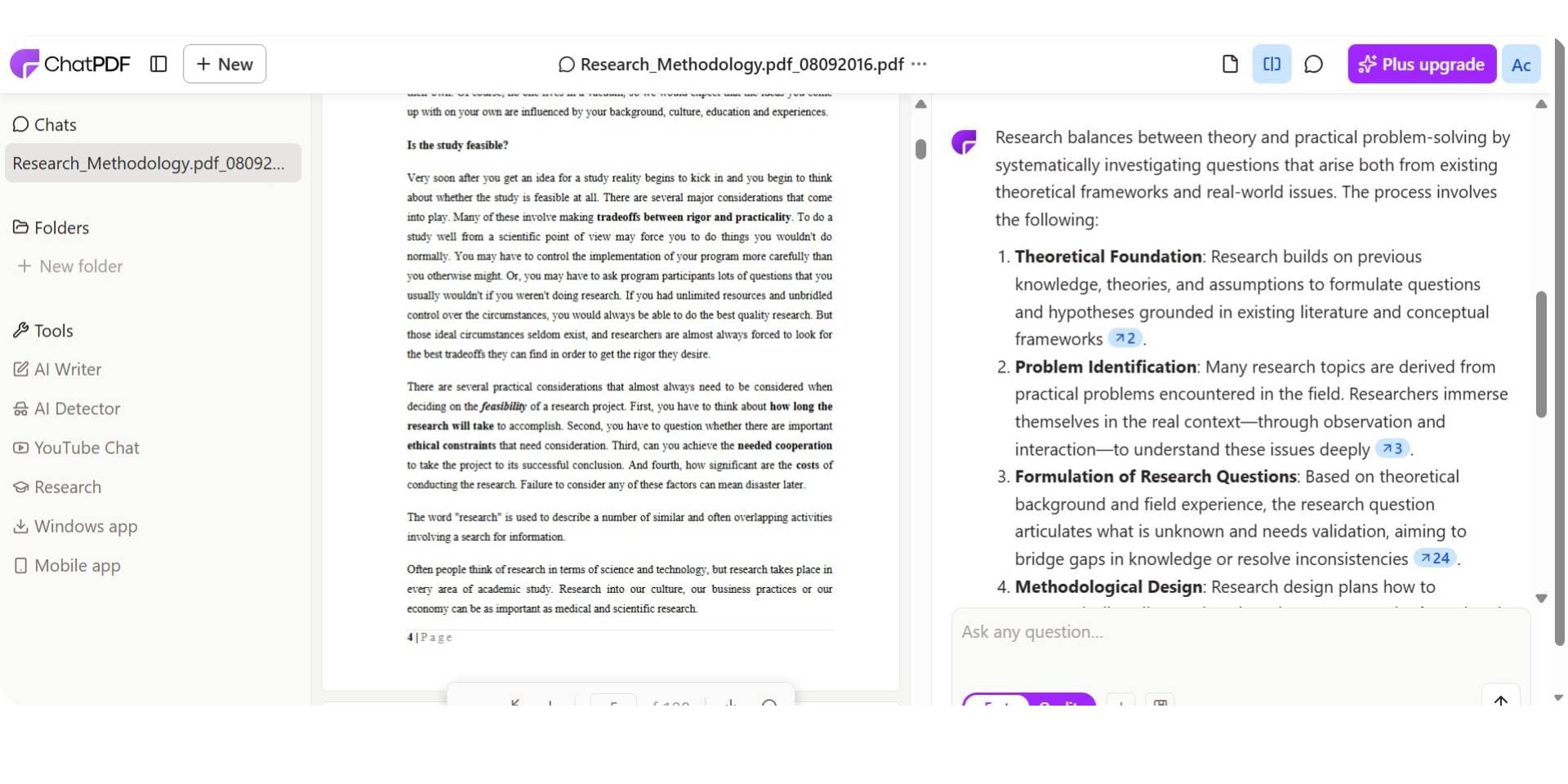
ChatPDF is one of the most widely used AI tools to chat with PDF documents, known for its extreme simplicity and no-sign-up free experience. Users can upload a PDF and start asking questions immediately without creating an account, making it one of the fastest ways to interact with a document using AI. The tool generates an automatic summary upon upload and provides clickable source citations that link back to the relevant sections of the PDF.
ChatPDF focuses entirely on PDF chat and does not include broader research features like literature review, academic search, or citation management. This makes it a lightweight, single-purpose tool that works best for users who need quick answers from individual documents rather than structured research across multiple papers.
Key Features
- Instant PDF upload with no account or sign-up required for free use
- Automatic document summary generated upon upload
- Clickable source citations that reference specific sections of the PDF
- Side-by-side chat and document view for easy verification
- Supports PDF, Word, PowerPoint, Markdown, and text files
- Multi-document folders available on the paid plan (up to 50 PDFs per folder)
Pros
- Simplest onboarding among all tools compared, no registration needed
- Fast processing and quick responses for single-document Q&A
- Source citations are clickable and link directly to the relevant PDF section
- Free tier allows 2 PDFs per day with up to 120 pages each
Cons
- Free plan limits uploads to 2 PDFs per day with a 120-page and 10 MB cap per file
- Multi-document chat is only available on the paid plan
- No research features like literature review, academic search, or reference management
- Limited depth for highly technical or scientific documents
Best For
Students and professionals who need quick, no-friction answers from individual PDF documents without setting up an account or managing a broader research workflow.
Pricing
ChatPDF offers a free plan with 2 PDFs per day, 120 pages per PDF, 10 MB file size limit, and 50 questions per day. The Plus plan starts at $5 per month and unlocks unlimited PDFs, up to 2,000 pages per PDF, 32 MB file size, 1,000 questions per day, and multi-document folders with up to 50 PDFs each.
Verdict
ChatPDF is the fastest way to start chatting with a PDF in 2026 if you value simplicity and speed above everything else. However, researchers who need multi-document analysis, academic search, or a complete research workflow will find Paperguide ChatWithPDF to be a more capable and research-focused option.
3. AskYourPDF
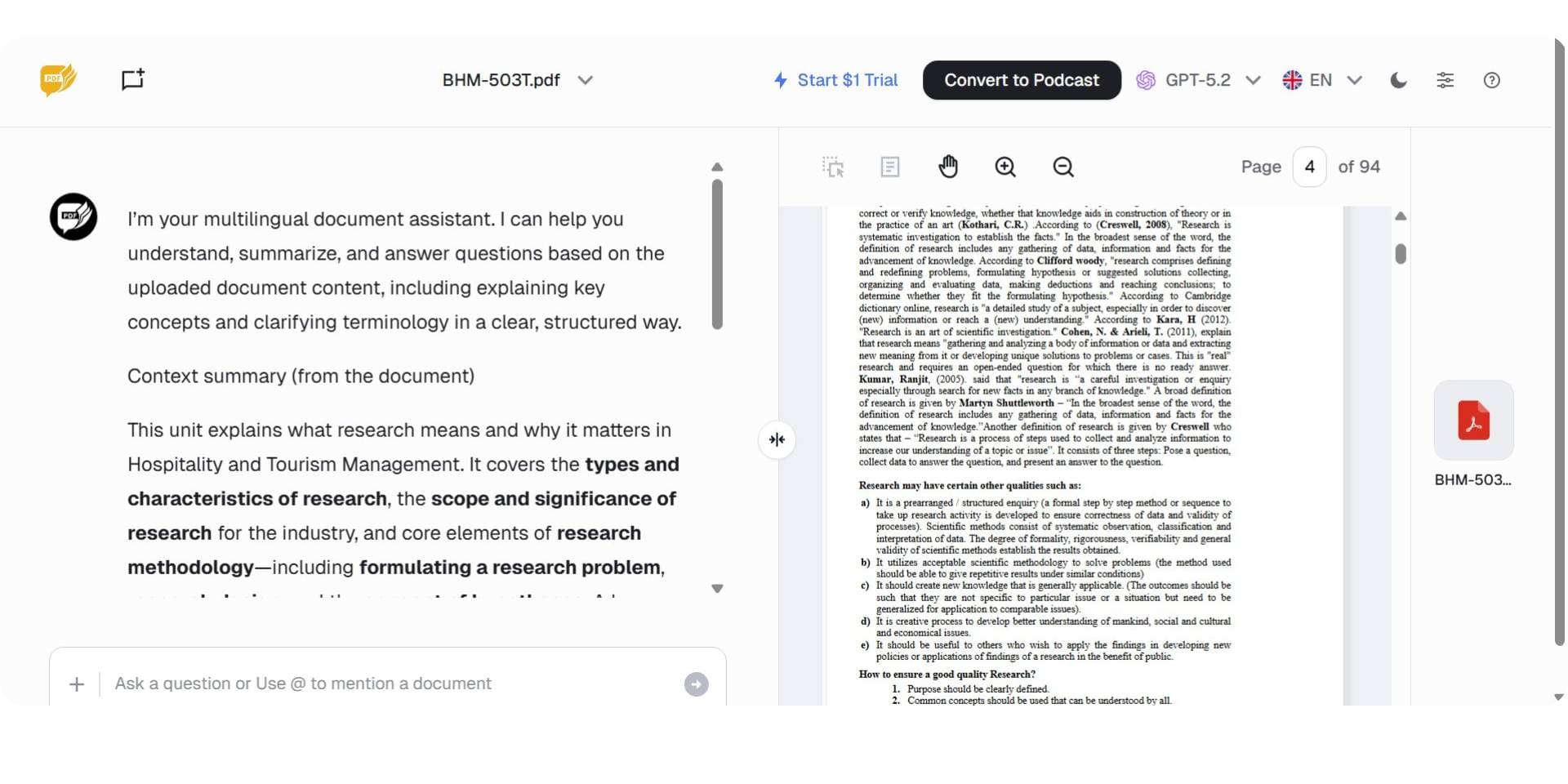
AskYourPDF is an AI-powered PDF chat tool designed for power users who want multi-format document support and integration with ChatGPT. Unlike tools that only accept PDFs, AskYourPDF supports uploads in PDF, PPT, EPUB, CSV, TXT, and other formats, making it one of the most versatile options for document-based Q&A. Its ChatGPT plugin and Chrome extension allow users to interact with documents directly within the ChatGPT interface or while browsing the web.
AskYourPDF also offers a Knowledge Base feature that allows users to chat across multiple uploaded documents simultaneously. This makes it suitable for users who work with diverse document types and want to ask questions across several files in a single session.
Key Features
- Multi-format upload support including PDF, PPT, EPUB, CSV, and TXT
- Knowledge Base feature for chatting across multiple documents simultaneously
- ChatGPT plugin for interacting with PDFs directly inside ChatGPT
- Chrome extension for chatting with PDFs while browsing
- Multiple AI model choices on paid plans
- OCR support for scanned documents
Pros
- Widest format support among all tools compared
- ChatGPT integration is unique and convenient for users already in that ecosystem
- Knowledge Base enables multi-document Q&A in one session
- Chrome extension adds flexibility for on-the-go document interaction
Cons
- Free tier is very limited at 1 document per day, 100 pages, and 50 questions
- Multiple user reviews on Trustpilot flag billing and auto-renewal issues
- No dedicated research features like literature review, academic search, or citation management
- Interface can feel complex compared to simpler tools like ChatPDF
Best For
Power users, professionals, and students who work with multiple document formats and want ChatGPT integration for PDF chat, especially those who already use ChatGPT as part of their daily workflow.
Pricing
AskYourPDF offers a free plan with 1 document per day, 100 pages per document, and 50 questions per day. The Premium plan starts at $9.99 per month with up to 2,500 pages per document and 50 documents per day. The Pro plan at $14.99 per month adds unlimited questions, higher document limits, and priority support. An API Pro plan starts from $19.99 per month for developer integrations.
Verdict
AskYourPDF is the strongest choice for users who want multi-format document chat and native ChatGPT integration. However, it lacks dedicated academic features and its free tier is restrictive. Researchers who need structured research workflows alongside PDF chat will find Paperguide ChatWithPDF to be a better fit for academic and scientific use cases.
4. Smallpdf
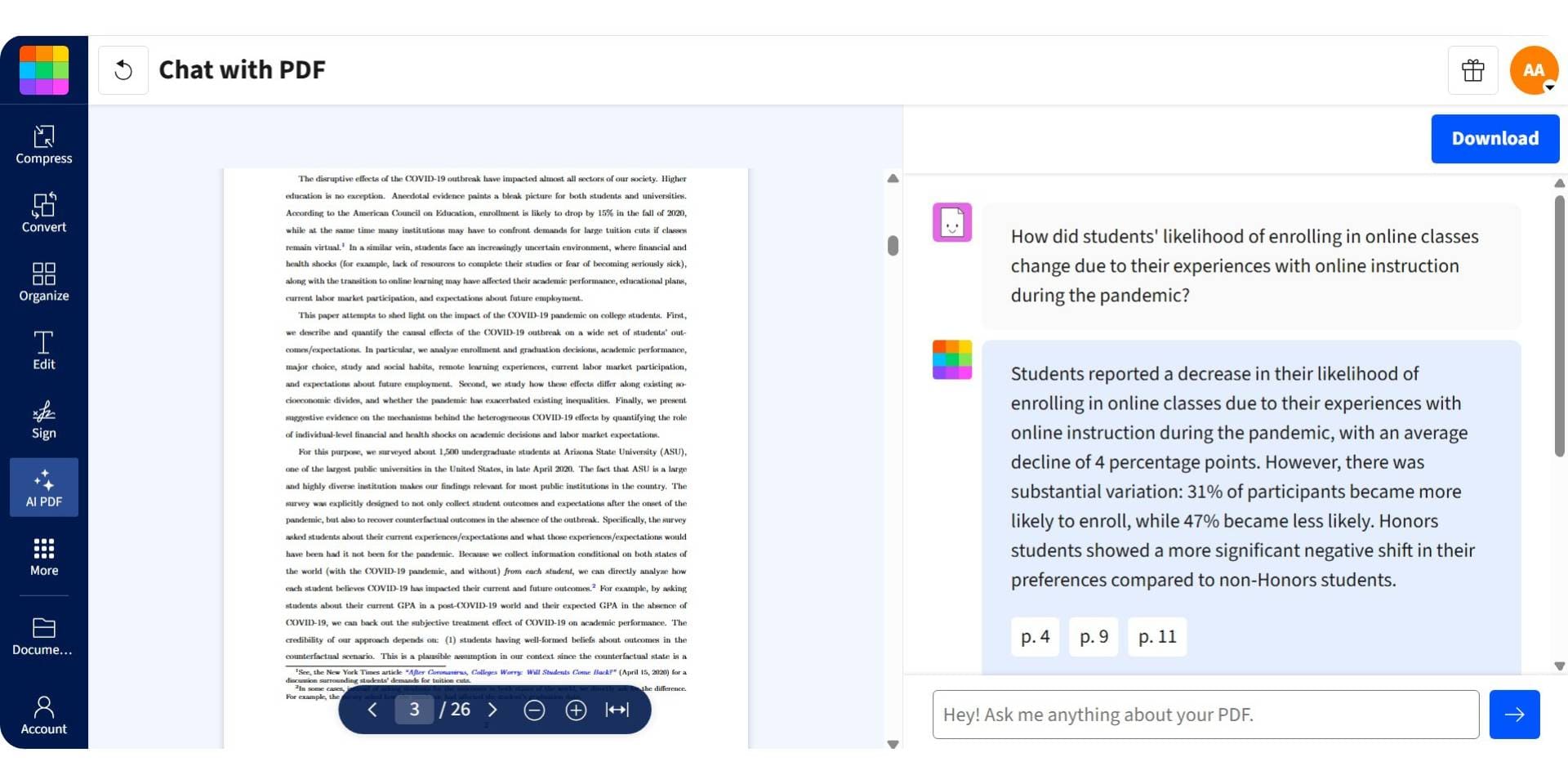
Smallpdf is an all-in-one PDF management platform that includes AI-powered chat as one of its many features. It is primarily known for its 30+ PDF tools covering compression, conversion, merging, editing, and e-signing, with AI chat added as a newer capability. Users can upload a PDF and ask questions about the content, though the chat feature is secondary to Smallpdf's core document management tools.
Smallpdf is ISO 27001 certified, which makes it a reliable option for users concerned about document security. However, because AI chat is not the primary focus of the platform, the feature is less developed compared to dedicated PDF chat tools.
Key Features
- AI-powered PDF chat for asking questions about uploaded documents
- 30+ PDF tools including compress, convert, merge, split, edit, and e-sign
- ISO 27001 certified for data security and compliance
- No sign-up required for basic PDF chat on the website
- Desktop app and mobile app available
- Team plans with collaboration features
Pros
- Most comprehensive PDF toolkit alongside AI chat
- ISO 27001 certification provides strong security assurance
- No account needed for basic free usage
- Useful for users who need PDF management and AI chat in one platform
Cons
- AI chat is a secondary feature, not the core focus of the platform
- Limited chat depth compared to dedicated PDF chat tools
- Free tier restricts daily usage of AI features
- No multi-document chat, academic search, or research-specific features
Best For
Office workers, professionals, and teams who need a complete PDF management suite with compression, conversion, editing, and signing tools, and want AI chat as an added convenience within the same platform.
Pricing
Smallpdf offers a free tier with limited daily access to AI chat and basic PDF tools. The Pro plan starts at $12 per month (billed annually) and unlocks unlimited PDF tools and expanded AI chat access. The Team plan at $10 per user per month (billed annually) adds collaboration features and shared document management.
Verdict
Smallpdf is the best choice if you need a full PDF management suite and want AI chat as a bonus feature. However, for users whose primary goal is chatting with PDFs for research or academic work, dedicated tools like Paperguide ChatWith PDF offer significantly deeper chat capabilities and research-specific features.
5. Adobe Acrobat
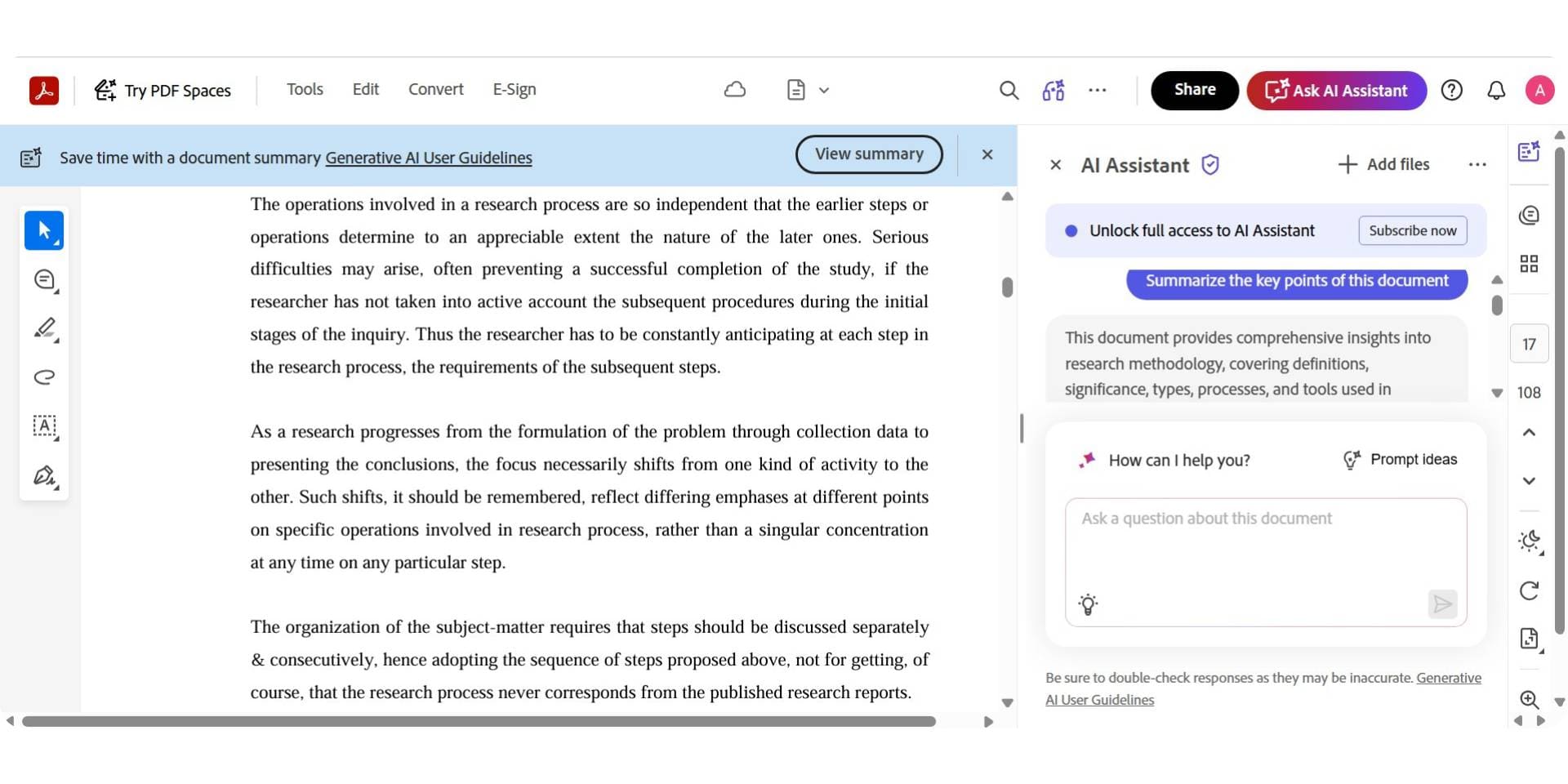
Adobe Acrobat brings AI-powered PDF chat directly into the world's most widely used PDF platform. It allows users to ask questions about uploaded PDFs, generate AI summaries, and interact with documents conversationally within Acrobat Reader or Acrobat Pro. Adobe also introduced PDF Spaces, which act as knowledge hubs where users can organize multiple documents and assign AI roles for team-based document analysis.
Because Adobe Acrobat is already the default PDF tool in most enterprise environments, the AI Assistant integrates naturally into existing workflows. However, the free tier is extremely limited, and accessing AI features requires a paid add-on or a higher-tier Acrobat subscription.
Key Features
- AI chat directly inside Adobe Acrobat Reader and Acrobat Pro
- AI-generated summaries with clickable citations referencing specific document sections
- PDF Spaces for organizing multiple documents into knowledge hubs with assignable AI roles
- Full PDF editing, annotations, form filling, and e-signatures alongside AI chat
- Integration with Adobe's broader ecosystem (Creative Cloud, Document Cloud)
- Enterprise-grade security and compliance
Pros
- Native to the most widely used PDF platform in the world
- Full professional PDF editing, signing, and AI chat in one application
- PDF Spaces with assignable roles is unique for team-based document analysis
- Enterprise-grade security and compliance standards
Cons
- Very limited free tier with only a handful of lifetime AI queries
- AI features require a paid add-on ($4.99/month) or a higher-tier Acrobat plan
- Expensive when AI is bundled with Acrobat Pro or Studio subscriptions
- No academic search, literature review, or research-specific features
Best For
Enterprise teams, legal professionals, financial analysts, and existing Adobe subscribers who want AI-powered PDF chat within the tool they already use for document management, editing, and signing.
Pricing
Adobe offers a limited number of free AI queries for Acrobat users. The AI Assistant add-on costs $4.99 per month when added to an existing Acrobat subscription. Acrobat Pro starts at $19.99 per month, and the newer Acrobat Studio plan at $24.99 per month bundles AI features with advanced PDF editing and creative tools.
Verdict
Adobe Acrobat is the default choice for organizations already invested in the Adobe ecosystem. However, its limited free tier and add-on pricing make it expensive for individual users. Researchers who need academic-focused PDF chat without the cost of an enterprise subscription will find Paperguide ChatWithPDF to be a more accessible and research-centric alternative.
6. PDF AI
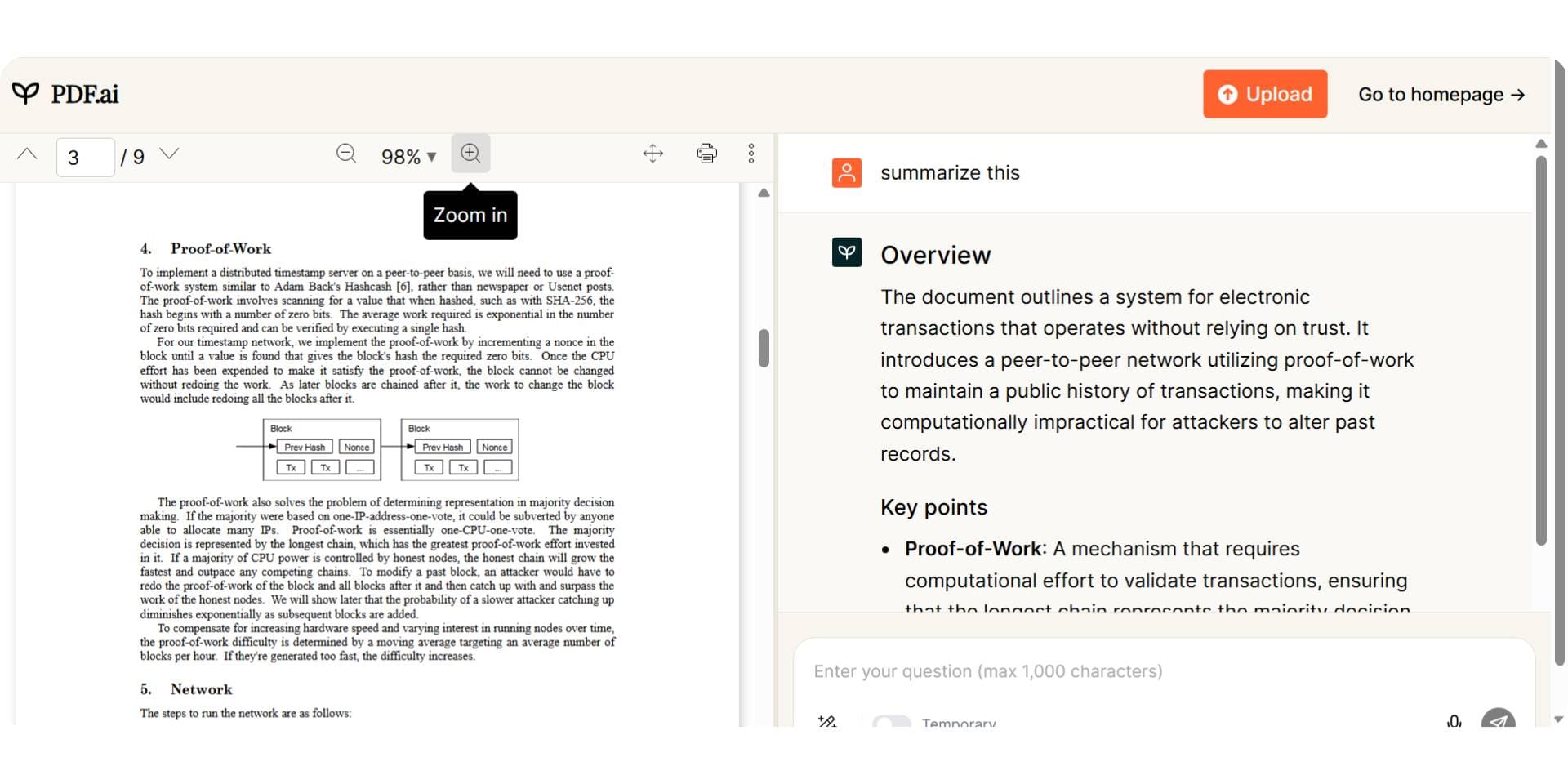
PDF AI is an AI-powered PDF chat tool designed primarily for developers and businesses that want to embed PDF chat functionality into their own products or websites. It allows users to upload a PDF, ask questions, and receive answers with highlighted source passages. What sets PDF AI apart is its embeddable chatbot widget and full developer API, making it the only tool in this comparison that supports custom integrations at scale.
PDF AI is SOC2 Type II certified, which provides enterprise-grade security assurance for organizations handling sensitive documents. However, the tool is priced higher than most alternatives for individual use, and its free tier is quite limited.
Key Features
- AI chat with PDF documents including source-linked highlighted answers
- Capture and Ask feature for screenshot-based Q&A from specific document sections
- Embeddable chatbot widget for adding PDF chat to any website
- Full developer API for custom integrations and automated workflows
- SOC2 Type II certified for enterprise-grade security and compliance
- Supports multiple industry-specific AI agents (legal, finance, healthcare)
Pros
- Only tool with an embeddable chatbot and full developer API for custom builds
- SOC2 Type II certification provides strong security for enterprise use
- Source-linked highlights make answer verification straightforward
- Useful for businesses building customer-facing PDF chat products
Cons
- Free tier is very limited at 1 upload and 100 questions per month
- Pricing is higher than most alternatives for individual or student use
- Not designed for academic research workflows like literature review or citation management
- Platform complexity may be unnecessary for users who only need basic PDF chat
Best For
Developers, businesses, and technical teams who want to build custom PDF chat products, embed document Q&A into websites, or integrate PDF chat into existing software using an API.
Pricing
PDF AI offers a Hobby plan (free) with 1 PDF upload and 100 questions per month. The Pro plan starts at $17 per month with higher upload and question limits. The Ultimate plan at $27 per user per month adds team features and expanded usage. The Enterprise plan at $37 per user per month includes priority support and advanced security features.
Verdict
PDF AI is the only tool in this comparison that offers a developer API and embeddable chatbot, making it the clear choice for businesses building custom PDF chat products. However, individual users and researchers who need straightforward PDF chat for academic and scientific work will find Paperguide ChatWithPDF to be a more practical and affordable option.
7. Humata AI
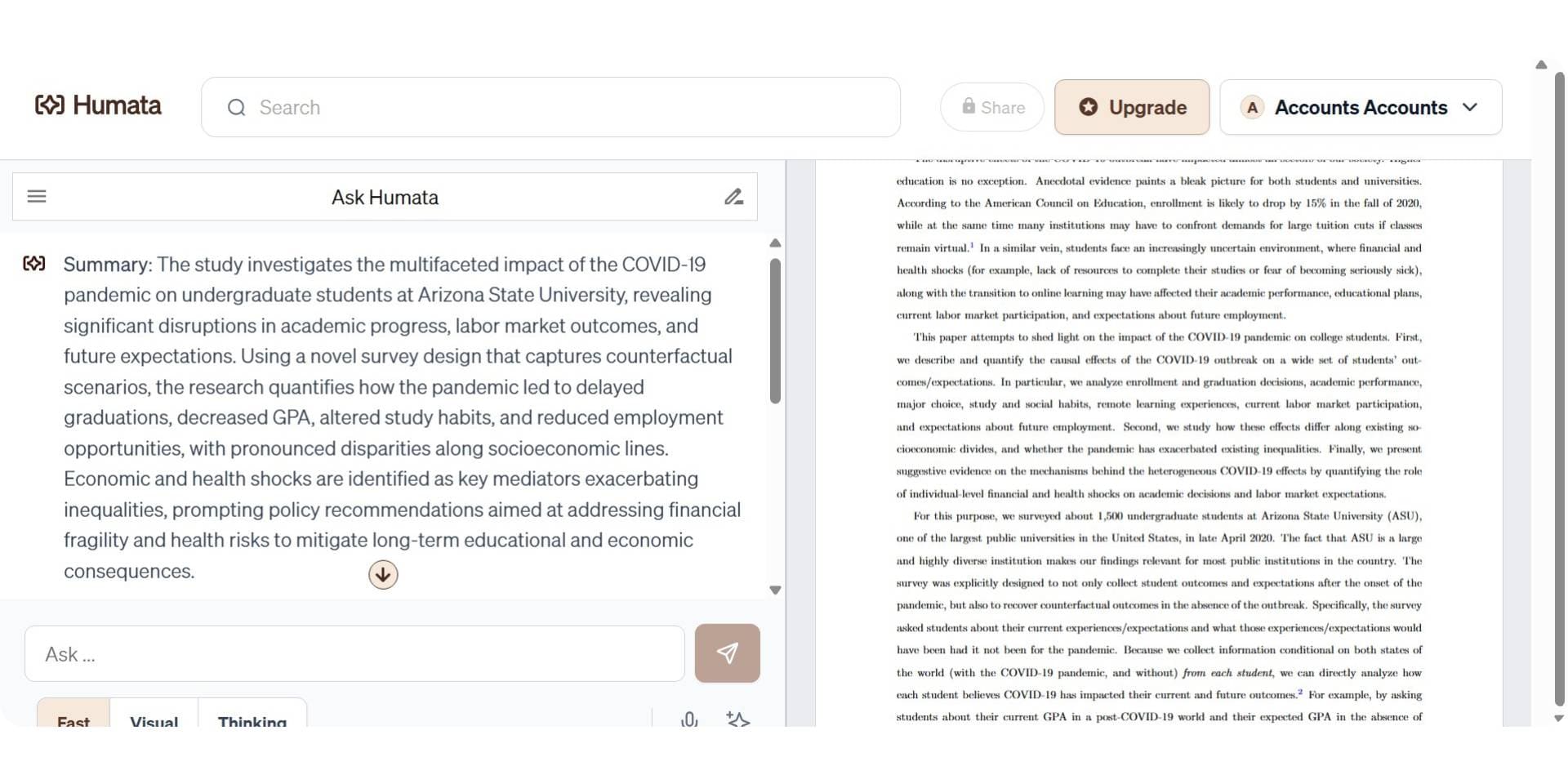
Humata AI is a document-focused AI tool designed to help users chat with PDFs, summarize long documents, and extract insights through a simple conversational interface. It positions itself as an accessible option for students, offering the lowest student pricing among all tools compared at $1.99 per month with a verified .edu email. Humata also emphasizes security, with enterprise-grade encryption and role-based access controls for team use.
The tool supports multi-document analysis and collaboration features, making it suitable for small research teams. However, its free tier limits are less clearly defined than competitors, and the platform is less established than tools like ChatPDF or AskYourPDF.
Key Features
- AI-powered PDF chat with question-and-answer interaction
- Document summarization for quickly understanding long PDFs
- Multi-document analysis across uploaded files
- Collaboration features with team-based access and sharing
- Enterprise-grade security with encrypted storage and role-based access controls
- Embeddable AI for integrating document chat into web pages
Pros
- Lowest student pricing at $1.99 per month with verified .edu email
- Enterprise-grade security makes it suitable for sensitive documents
- Multi-document analysis supports cross-paper comparison
- Clean, simple interface that is easy to navigate
Cons
- Free tier limits are less transparent and may vary
- Less established than ChatPDF, AskYourPDF, or Adobe in the PDF chat space
- No academic search, literature review, or citation management features
- Expert and Team plans become significantly more expensive ($9.99 and $49/user per month)
Best For
Budget-conscious students who need basic PDF chat and document summarization at the lowest possible price, and small research teams that require secure document analysis with collaboration features.
Pricing
Humata AI offers a free plan with up to 60 pages per month and limited question access. The Student plan at $1.99 per month (requires verified .edu email) provides 200 pages per month and basic chat support. The Expert plan at $9.99 per month supports up to 500 pages and 3 users with premium support. The Team plan at $49 per user per month allows up to 10 users, 5,000 pages monthly, OCR support, and advanced permissions. Enterprise pricing is custom.
Verdict
Humata AI is the most affordable paid option for students who need more than free tiers offer, and its security features make it reliable for handling sensitive documents. However, for students and researchers who need deeper research capabilities alongside PDF chat, including literature review, academic search, and citation support, Paperguide ChatWithPDF provides a more complete academic workflow at a competitive price point with its 40% student discount.
Pricing Comparison: AI Tools to Chat with PDF (2026)
| Tool | Free Plan | Paid Plans Start At | Best Value For |
|---|---|---|---|
| Paperguide Chat with PDF | ✅ 5 AI generations/day, 500 MB storage | $12/month (Plus, billed annually) | Researchers who want a complete academic workflow with PDF chat, literature review, AI writing, and citation management |
| ChatPDF | ✅ 2 PDFs/day, no sign-up | $5/month (Plus) | Users who want the cheapest paid upgrade for unlimited single-document PDF chat |
| AskYourPDF | ✅ 1 doc/day, 50 questions | $9.99/month (Premium) | Power users who need multi-format support and ChatGPT integration |
| Smallpdf | ✅ Limited daily AI chat | $12/month (Pro, billed annually) | Professionals who need 30+ PDF management tools alongside AI chat |
| Adobe Acrobat | ⚠️ Limited lifetime queries | $4.99/month (AI add-on) | Enterprise users already paying for Adobe Acrobat subscriptions |
| PDF AI | ✅ 1 upload, 100 questions/mo | $17/month (Pro) | Developers and businesses building custom PDF chat integrations |
| Humata AI | ✅ 60 pages/mo | $1.99/month (Student, .edu required) | Budget-conscious students who need basic PDF chat at the lowest price |
Most AI tools to chat with PDF offer a free tier, but the value of paid upgrades varies significantly. Some platforms charge primarily for higher usage limits, while others unlock entirely different capabilities.
Paperguide ChatWithPDF stands out because its paid plan is built around a complete research workflow, not just more questions or uploads. Starting at $12 per month, the Plus plan extends beyond PDF chat to include unlimited AI generations, Deep Research reports, literature review workflows, AI writing with citations, and reference management. This makes it not only a competitive free option for PDF chat, but also the most cost-effective upgrade for researchers who need to move from document Q&A to structured academic writing. Instead of paying separately for a PDF chat tool, a literature review tool, and a citation manager, users get all three in one platform.
Final Comparison: Best AI Tools to Chat with PDF in 2026
| Use Case | Best Tool | Why This Tool |
|---|---|---|
| Best overall for academic and scientific research | Paperguide Chat with PDF | Purpose-built for research with PDF chat, literature review, AI search, and citation management in one platform |
| Best free AI tool to chat with PDF | Paperguide Chat with PDF | Free plan includes PDF chat, AI search, reference manager, and AI writer without restricting core features |
| Best for quick, no-sign-up PDF chat | ChatPDF | Fastest onboarding with no account required and instant document interaction |
| Best for ChatGPT users | AskYourPDF | Native ChatGPT plugin and Chrome extension for in-ecosystem document chat |
| Best for all-in-one PDF management | Smallpdf | 30+ PDF tools (compress, convert, edit, sign) with AI chat as an added feature |
| Best for enterprise teams | Adobe Acrobat | Full PDF editing, e-signatures, and AI chat within the most widely used PDF platform |
| Best for developers and custom integrations | PDF AI | Only tool with an embeddable chatbot, developer API, and SOC2 Type II certification |
| Best for students on a budget | Humata AI | Lowest student pricing at $1.99/month with verified .edu email |
When comparing the best AI tools to chat with PDF in 2026, the most important distinction is not pricing but whether the tool is built for your specific workflow. Most platforms offer basic PDF chat, where you upload a document and ask questions. The difference lies in what happens after the initial Q&A.
For academic and scientific research, Paperguide Chat with PDF is the strongest option because it connects PDF chat directly to literature review, academic search across 220M+ papers, and citation-backed writing. Researchers can move from reading a paper to synthesizing findings to drafting content without leaving the platform. For general-purpose PDF questions, ChatPDF and Smallpdf provide fast, accessible options. For enterprise or developer needs, Adobe and PDF AI serve those workflows specifically.
How to Chat with PDF Using AI
To chat with a PDF using AI, start by choosing a tool that matches your workflow and document type. Upload your PDF to the platform, either by dragging and dropping the file or using a file browser. Most AI tools to chat with PDF accept standard text-based PDFs, and some also support scanned documents through OCR.
Once the document is uploaded, the AI processes it by reading the full content and preparing it for conversational interaction. You can then type a question in natural language, such as "What methodology was used in this study?" or "Summarize the key findings from section 3," and the AI returns an answer based on the document's actual content. Many tools also show which pages or passages the answer was drawn from, allowing you to verify the response.
For better results, ask specific questions rather than broad ones, use follow-up questions to narrow down answers, and always verify AI-generated responses against the original document. Research-focused tools like Paperguide Chat with PDF are designed to support this workflow for academic and scientific documents, with features like source verification and multi-document chat that go beyond basic Q&A.
How to Choose the Right AI Tool to Chat with PDF
When comparing the best AI tools to chat with PDF, it is important to match each tool to its actual strength. Not every PDF chat tool is designed for the same workflow.
- Best for academic and scientific research: Paperguide Chat with PDF is designed specifically for research workflows, combining PDF chat with literature review, AI search, and citation management in one platform.
- Best free tool to chat with PDF with no sign-up: ChatPDF offers the fastest free experience with no account creation, instant upload, and clickable source citations.
- Best for multi-format documents and ChatGPT integration: AskYourPDF supports PDF, PPT, EPUB, CSV, and other formats with a native ChatGPT plugin and Chrome extension.
- Best for professionals who need PDF management alongside chat: Smallpdf provides 30+ PDF tools with AI chat as an integrated feature within a broader document management suite.
- Best for enterprise teams and existing Adobe users: Adobe Acrobat integrates AI chat directly into the world's most widely used PDF platform with full editing and compliance features.
- Best for developers building custom PDF chat products: PDF AI is the only tool with an embeddable chatbot, full developer API, and SOC2 Type II certification.
- Best for students who need the lowest possible price: Humata AI offers student plans starting at $1.99 per month with a verified .edu email.
How We Evaluated the Best AI Tools to Chat with PDF
To identify the best AI tools to chat with PDF in 2026, we evaluated each tool using criteria that matter most to students, researchers, and professionals who work with PDF documents regularly. The goal was not just to test which tools can answer questions, but which ones deliver accurate, verifiable answers within a practical workflow.
First, we assessed PDF chat accuracy and source verification. Tools that provide answers with clickable citations or highlighted source passages scored higher than those that generate responses without clear traceability to the original document. This is especially important for academic and scientific use, where answer verification is essential.
Next, we evaluated free tier usability. Many tools advertise free plans, but limits on uploads, questions, pages, or file size can make free tiers impractical for regular use. We prioritized tools where the free plan provides enough access to genuinely evaluate the platform before upgrading.
Finally, we compared research depth and workflow integration. Basic PDF chat covers single-document Q&A, but researchers often need to work across multiple papers, manage citations, run literature reviews, and produce written output. Tools that support these broader workflows, like Paperguide ChatWithPDF, ranked higher than single-purpose chat tools because they reduce the need to switch between multiple platforms.
Conclusion
Choosing the right AI tool to chat with PDF in 2026 depends on your workflow, document type, and whether you need features beyond basic Q&A. For quick, free PDF questions, ChatPDF and Smallpdf offer the fastest entry points. For power users who want ChatGPT integration, AskYourPDF is the strongest choice. For enterprise teams, Adobe Acrobat fits naturally into existing workflows. For developers, PDF AI is the only option with a full API and embeddable chatbot. For students on a budget, Humata AI provides the lowest pricing.
For academic and scientific research workflows, Paperguide ChatWithPDF is the most complete option available. It connects PDF chat directly to literature review, AI search across 220M+ papers, citation management, and AI writing, allowing researchers to move from document analysis to structured output without switching platforms. Whether you are a student working on a thesis, a graduate researcher conducting a literature review, or a professional analyzing technical reports, choosing a tool that matches the depth of your work will save time and improve the quality of your results.
Frequently Asked Questions (FAQs)
What is Chat with PDF?
Chat with PDF is a feature in AI-powered tools that lets users upload a PDF and ask questions in natural language. The AI reads the document and returns answers based on the actual content, making it faster than manual reading for extracting key information.
What is the best free AI tool to chat with PDF in 2026?
For academic and scientific research, Paperguide Chat with PDF offers the most capable free plan with PDF chat, AI search, and reference management included. For quick, general-purpose questions without sign-up, ChatPDF is the fastest free option.
Can I chat with multiple PDFs at once?
Some tools support multi-document chat. Paperguide Chat with PDF supports up to 3 PDFs per session, AskYourPDF offers a Knowledge Base for multi-document Q&A, and Humata AI includes multi-document analysis. ChatPDF requires a paid plan for multi-document folders.
Are AI PDF chat tools safe for confidential documents?
Security varies by platform. PDF AI is SOC2 Type II certified, Smallpdf is ISO 27001 certified, and Humata AI offers enterprise-grade encryption. Always review a tool's data retention policy and encryption practices before uploading sensitive documents.
Can I chat with a scanned or image-only PDF?
It depends on the tool. AskYourPDF and Humata AI offer OCR support on paid plans. Other tools require the PDF to contain selectable text. If your document is scanned, check for OCR support or convert it to a text-based PDF before uploading.
Which is better, ChatPDF or AskYourPDF?
ChatPDF is better for quick, single-document questions with no sign-up. AskYourPDF is better for power users who need multi-format support (PDF, PPT, EPUB, CSV) and ChatGPT integration. The right choice depends on whether you prioritize simplicity or flexibility.
Do PDF chat tools work with research papers?
Yes, most tools can process research papers. However, tools built for academic use, like Paperguide Chat with PDF, handle research paper structure (methodology, findings, citations) more effectively than general-purpose tools.
What is the best AI tool to chat with PDF for students?
Humata AI offers the lowest paid plan at $1.99/month with a verified .edu email. For students who also need literature review, citation management, and AI writing, Paperguide Chat with PDF offers a 40% student discount on paid plans.
Which is the best PDF Summarizer in 2026?
Paperguide Chat with PDF includes built-in PDF summarization that generates structured summaries covering objectives, methodology, key findings, and conclusions directly within the chat interface.