How to Use Claude Science in 2026: Step-by-Step Guide for Scientific Research


Anthropic launched Claude Science on June 30, 2026 as a scientific AI workbench for computational biologists, bioinformatics researchers, and life sciences labs. It unifies scientific databases, code, HPC compute, and manuscript drafting inside a single research environment, with every analysis traced back to the code and environment that produced it.
Unlike a general AI chatbot, Claude Science ships with 60+ scientific database connectors, native rendering of proteins and molecular structures, HPC and Slurm job orchestration over SSH, on-demand cloud compute through Modal, and reproducible artifacts that preserve the code, environment, and conversation history behind every result.
This guide walks through Claude Science end to end in five steps. It also covers where a purpose-built systematic review and evidence synthesis platform like Paperguide is the better fit, especially for HEOR consultancies, CROs, medical writers, and evidence teams running PRISMA-compliant workflows.
TL;DR
Claude Science is Anthropic's scientific AI workbench, purpose-built for compute-heavy scientific research: code-driven analysis, HPC and Slurm job orchestration, native rendering of proteins and molecular structures, and reproducible artifacts. To use it, install the app on macOS or Linux, sign in with an eligible paid Claude account, connect databases and compute resources, and start a session. For evidence synthesis teams, HEOR consultancies, CROs, and medical writers, Paperguide is the purpose-built platform for systematic reviews, PRISMA reporting, and citation-grounded writing. The two work well side by side.
Key Insights
- Launched June 30, 2026 in beta on macOS and Linux, bundled with Claude Pro, Max, Team, or Enterprise (no separate pricing).
- Not a new model, Claude Science is an app that runs on the Claude Sonnet, Haiku, and Opus models already inside a user's paid plan.
- Ships with 60+ scientific database connectors, native rendering of proteins and molecular structures, HPC and Slurm orchestration over SSH, on-demand cloud compute through Modal, and reproducible artifacts that preserve the code, environment, and conversation history behind every result.
- Best fit for computational biologists, bioinformatics researchers, structural biology and cheminformatics teams, and life science labs running code-driven pipelines (single-cell RNA-seq, protein structure, genomics, CRISPR screens, bulk RNA-seq differential expression).
- Not built for systematic reviews, PRISMA 2020 reporting, blind dual-reviewer screening, structured data extraction with quote-level citations, reference management with Zotero import, or citation-grounded AI writing with library-verified citations.
- For evidence synthesis, systematic reviews, and PRISMA-compliant workflows, Paperguide is the purpose-built platform for HEOR consultancies, CROs, medical writers, and regulated evidence teams.
- The winning 2026 stack for scientific research teams: Claude Science for compute-heavy scientific analysis, Paperguide for evidence synthesis and citation-grounded scientific writing, both side by side.
What Is Claude Science?
Claude Science is Anthropic's AI workbench for scientists, released in beta on June 30, 2026 for macOS and Linux. It is an app, not a new model. Claude Science uses the same Claude Sonnet, Haiku, and Opus models already inside a user's Pro, Max, Team, or Enterprise plan. What is new is everything around the model: 60+ scientific skills and database connectors, native scientific renderers for proteins and molecular structures, HPC and Slurm compute integration, persistent Python and R kernels, and a full provenance model where every artifact ships with the code, environment, and conversation history that produced it.
Claude Science is designed around three core pillars:
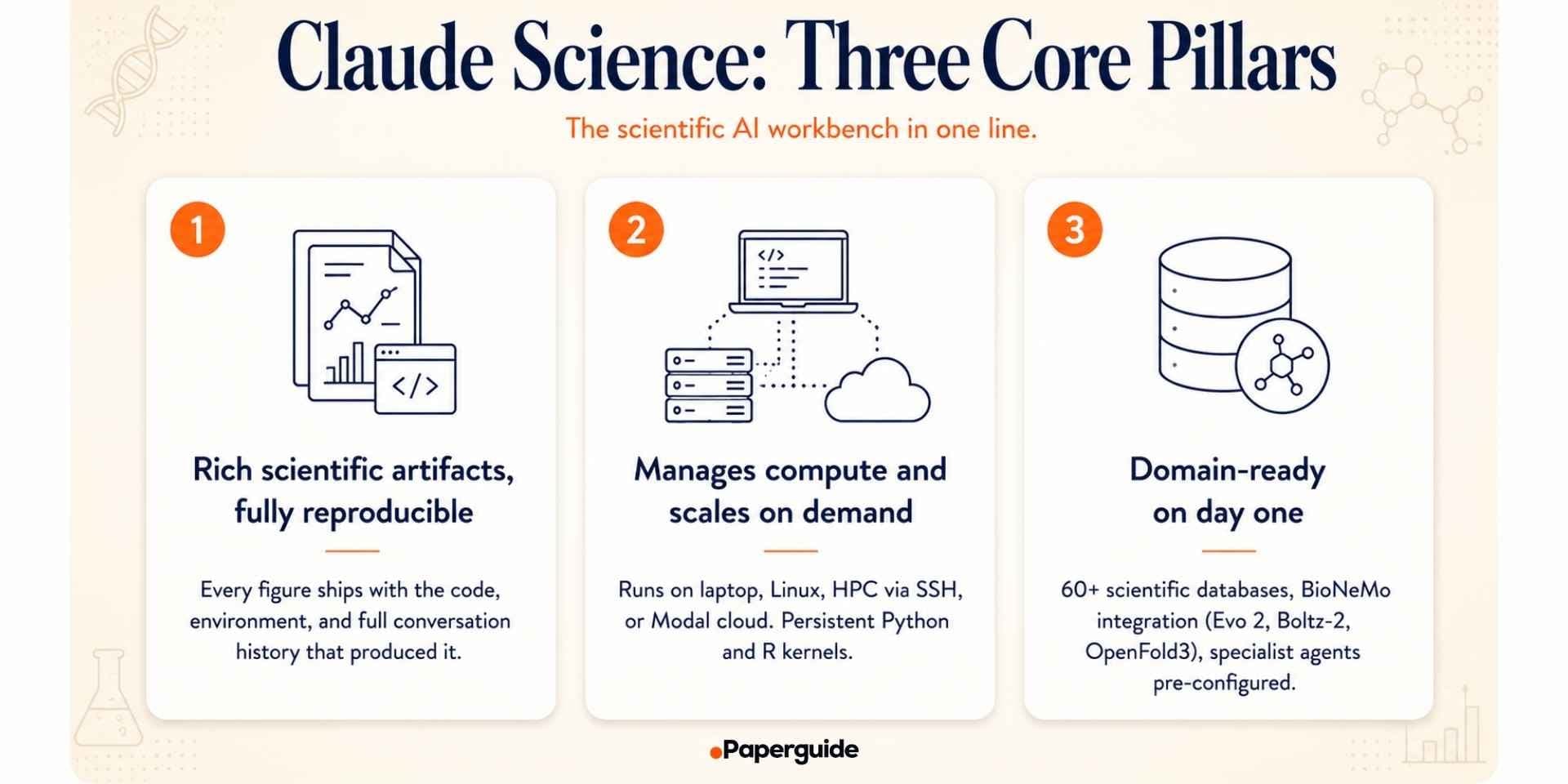
- Rich scientific artifacts, fully reproducible. Every figure, table, or analysis ships with the exact code and environment that produced it, plus a plain-language description and the full conversation history. Figures can be iterated on in plain language while the agent edits the underlying code.
- Manages compute and scales on demand. Claude Science runs on a laptop, a Linux box, an HPC login node, or a cloud VM. It submits batch scripts over SSH to a Slurm cluster or sends jobs to Modal for on-demand cloud compute. Persistent Python and R kernels keep variables and dataframes in memory across the whole analysis.
- Domain-ready on day one. Pre-configured specialist agents cover genomics, single-cell, proteomics, structural biology, cheminformatics, and more. Claude Science queries 60+ scientific databases (UniProt, PDB, Ensembl, Reactome, ClinVar, ChEMBL, GEO) directly, and integrates with NVIDIA's BioNeMo Agent Toolkit for Evo 2, Boltz-2, and OpenFold3.
Best For
- Computational biologists
- Bioinformatics researchers
- Structural biology and protein modeling teams
- Cheminformatics and molecular design researchers
- Single-cell RNA-seq analysts
- Genomics and epigenomics researchers
- Life science labs running Slurm or HPC pipelines
- Scientific research teams that value reproducible code artifacts
Key Features
- AI-powered scientific reasoning across 60+ pre-configured skills
- Native rendering of proteins, molecules, alignments, and genome browser tracks
- 60+ scientific database connectors (UniProt, PDB, Ensembl, ChEMBL, GEO, and more)
- BioNeMo integration (Evo 2, Boltz-2, OpenFold3)
- Local, remote Linux, HPC via SSH, and Modal cloud compute integration
- Persistent Python and R kernels across the analysis
- Reproducible artifacts with code, environment, and conversation history preserved
- Background reviewer agent flags incorrect citations, untraceable numbers, and figures that do not match their code
- Figure iteration in plain language with the agent editing the underlying code
- Manuscript drafting alongside code and analysis with Markdown and LaTeX previews
- Custom skill creation with session-inherited reuse
- Custom connectors to internal ELN, lab APIs, and proprietary pipelines
Prerequisites: Before You Install Claude Science
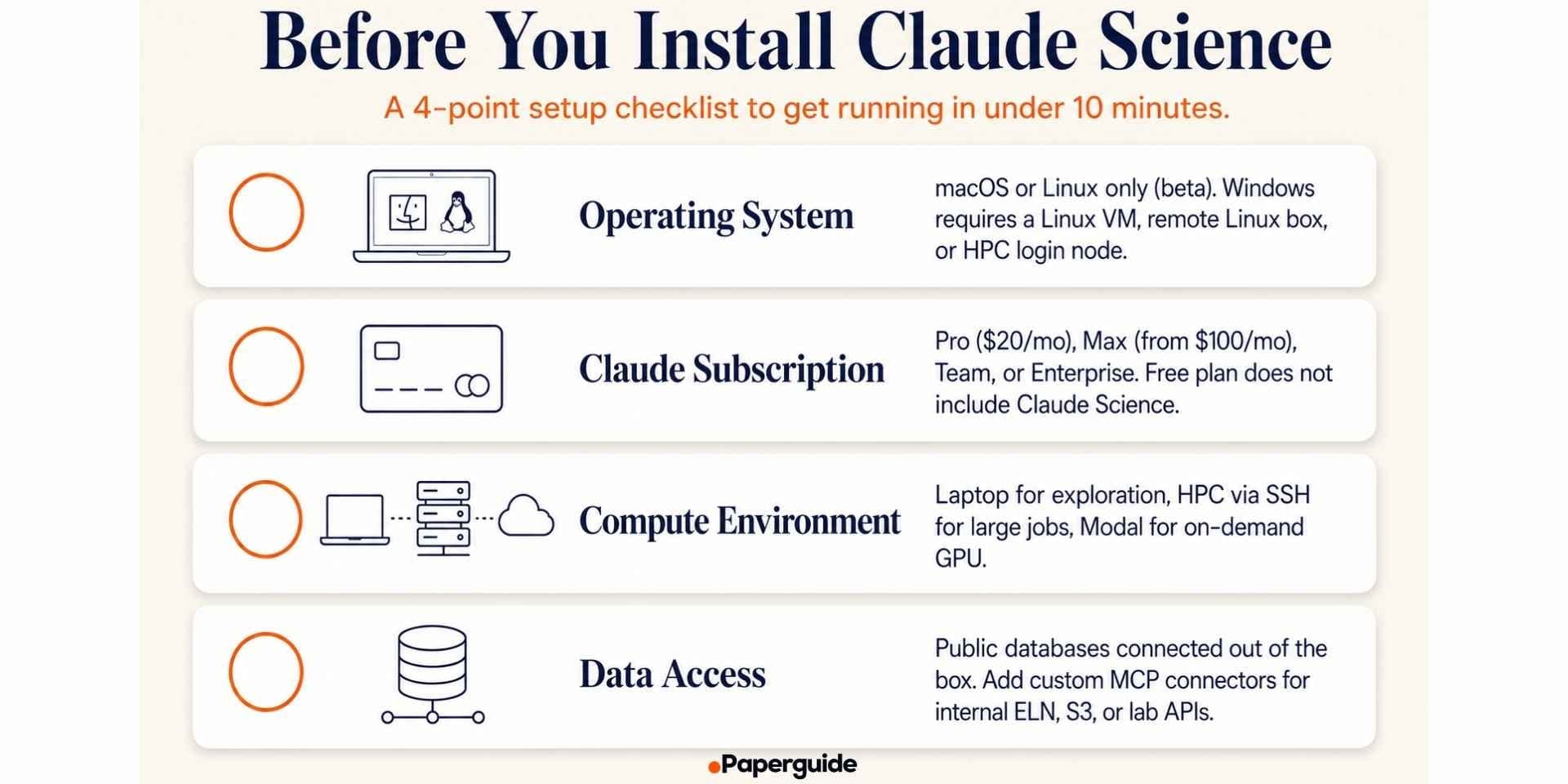
Before installing Claude Science, make sure you have the following ready:
- Operating system: Claude Science is currently available in beta on macOS and Linux. Windows is not supported at launch. If you work on Windows, you will need a macOS or Linux workstation, a Linux VM, or an HPC login node to install the app on.
- Claude subscription: Claude Science is bundled with eligible paid Claude subscriptions:
- Claude Pro at $20/month
- Claude Max starting at $100/month
- Claude Team by contact with sales
- Claude Enterprise by contact with sales
The Free plan does not include Claude Science access. If you are on Team or Enterprise, your admin needs to enable Claude Science for your workspace before you can install it. Anthropic also offers a discounted Team plan for eligible academic research labs and nonprofit research organizations, with eligibility verified through the lab's principal investigator.
- Compute environment: Decide where Claude Science will run:
- Laptop. Best for exploratory analysis and small to medium datasets.
- Remote Linux box. Best if your data lives on a lab server or you need more memory than your laptop.
- HPC login node. Best for large-scale computational biology pipelines that submit jobs to a Slurm cluster.
- Cloud VM (Modal, AWS, GCP). Best for on-demand GPU compute for protein folding or single-cell workflows.
- Data access: Claude Science can only work with data it has access to. If your lab's data lives in a specific ELN, S3 bucket, or internal database, plan how you will connect it. Claude Science supports MCP connectors and custom skills for internal systems.
How to Use Claude Science: Step-by-Step Guide
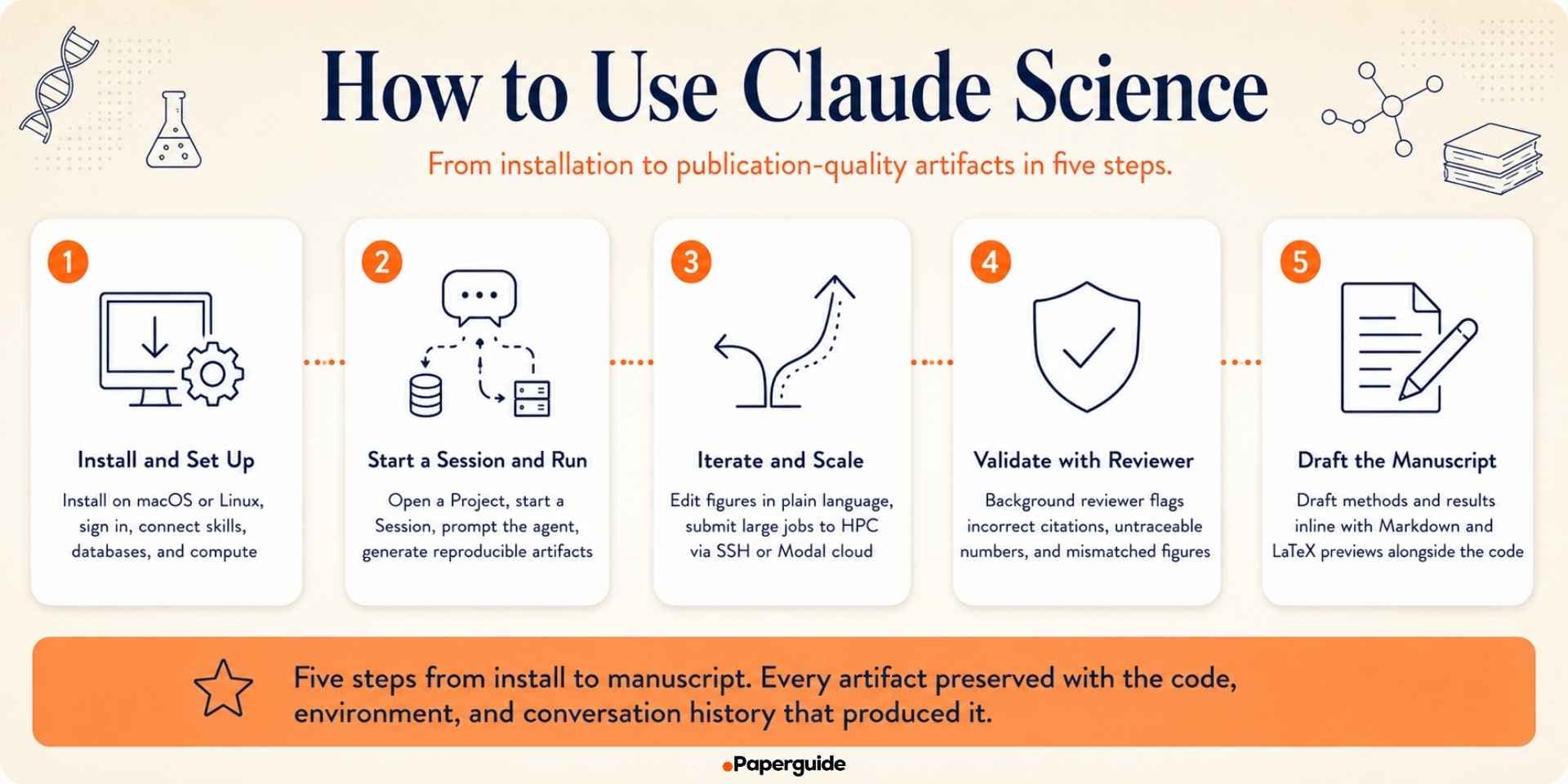
Below is the end-to-end walkthrough in five steps, from installing the app to drafting a manuscript alongside the analysis.
Step 1: Install and Set Up Claude Science
Download the app from claude.com/product/claude-science and choose the macOS or Linux installer. On macOS, open the .dmg and drag Claude Science into Applications. On Linux, run the shipped installer, or SSH into a remote Linux box or HPC login node and install it there so it sits with your data. Sign in with your Claude account credentials to unlock the features included in your plan.
Open Settings and toggle on the skills relevant to your research from the 60+ pre-configured options across genomics, proteomics, structural biology, cheminformatics, and clinical databases. Add compute environments (HPC via SSH, Modal cloud, or custom SSH-reachable servers) in the same panel. For internal systems, add a custom MCP connector so specialist agents can query your lab's own pipelines alongside the public databases. Claude Science asks before reaching new resources and lets you review or revoke any decision before writing and submitting a job.
Step 2: Start a Session and Run Your First Analysis
Claude Science organizes work into Projects (research topics) and Sessions (analyses inside a project). From the home screen, click New Project, then New Session, and type your first prompt. Every session has a chat panel in the center, an artifacts panel on the right where figures and tables render natively, and a sidebar for other sessions.
Example prompt (single-cell RNA-seq analysis of immunotherapy responders vs non-responders): "Analyze this scRNA-seq dataset from immune checkpoint melanoma responders vs non-responders (Sade-Feldman et al., Cell 2018). Cluster and annotate immune cell types, identify differential markers, and generate publication-quality UMAP visualizations."
Claude Science drafts a plan, executes each step in persistent Python kernels, and generates artifacts (UMAP plots, dot plots, QC metrics, differential expression tables, a summary report) that render natively in the artifacts panel. Every artifact ships with the code, execution environment, and conversation history that produced it. The agent adds caveats about study limitations so downstream users understand where results need validation. A typical session produces 15 to 20 artifacts plus the full conversation history, all preserved together.
Step 3: Iterate on Figures and Scale to HPC or Modal
Ask for figure changes in plain language and the agent edits the underlying code directly: "Remove the gridlines from this UMAP and switch axes to log scale" or "Split this plot into two panels: responders and non-responders." The agent re-runs its own code and updates the figure. Every version is preserved so you can fork or revert.
For large analyses (200-sample pipelines, protein folding, whole-genome workflows), ask Claude Science to submit to HPC or Modal. The agent drafts the Slurm sbatch script or Modal job definition, shows it to you for approval, submits over SSH, and monitors the job. When it completes, the batch script, job ID, logs, and outputs are all preserved in the artifact history. This replaces the manual "write sbatch → SSH into cluster → check queue → download results" loop.
Step 4: Validate with the Background Reviewer Agent
Claude Science runs a background reviewer alongside every analysis that flags incorrect citations, untraceable numbers, and figures that do not match their underlying code. This is not the same as a compliance-grade blind review workflow (which requires two independent human reviewers screening evidence for a systematic review), but it catches common scientific errors during code-driven analysis before they surface in the artifacts panel. For biologically important results, always independently validate before publication.
Step 5: Draft the Manuscript Alongside the Analysis
Because Claude Science holds the full analysis in memory, you can draft the manuscript inside the same session. Ask for a methods section describing the pipeline, a results section summarizing the figures, or figure captions tied to specific artifacts. Markdown and LaTeX previews render inline.
This works well for methods and results tied to your own computational analysis. For introduction, related work, and discussion sections that require broad literature synthesis across peer-reviewed sources, most teams pair Claude Science with a citation-grounded AI writer that pulls verified citations from a peer-reviewed reference library. Paperguide's AI Paper Writer is the tool most evidence-focused teams use for that step.
Core Workflows in Claude Science
Beyond the single-cell RNA-seq example above, Claude Science is pre-configured for the following core life sciences workflows:
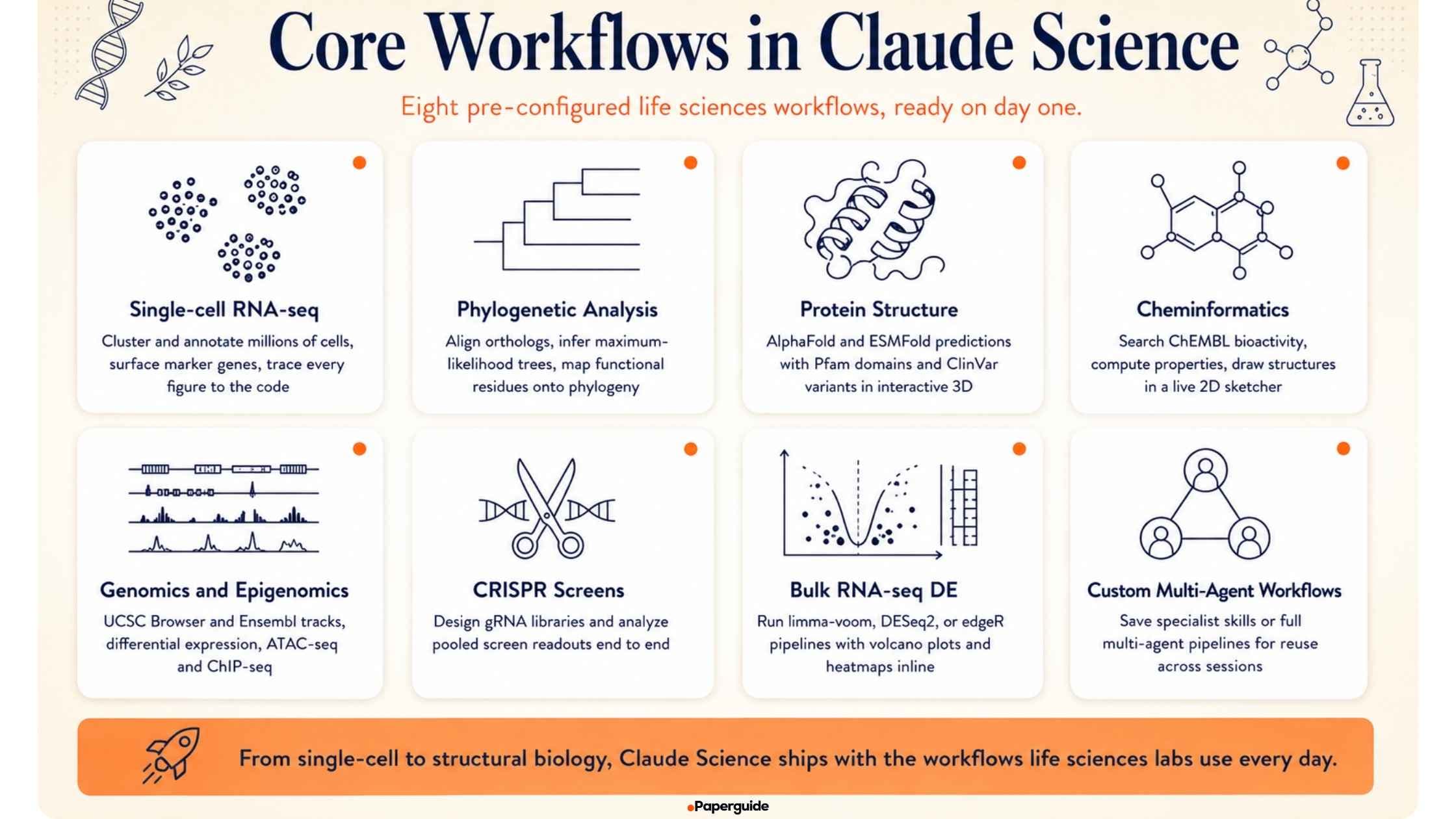
- Single-cell RNA-seq analysis: Cluster and annotate millions of cells across tissues, surface marker genes, and trace every figure back to the code.
- Phylogenetic and evolutionary analysis: Align orthologs, infer maximum-likelihood trees, and map functional residues onto the phylogeny.
- Protein structure prediction and analysis: Pull predicted structures from AlphaFold or ESMFold, layer on Pfam domains and clinical variants (ClinVar, UniProt), and explore interactively in 3D.
- Cheminformatics and molecular design: Search bioactivity data in ChEMBL, compute properties and similarities, and draw or refine structures in a live 2D sketcher.
- Genomics and epigenomics: Query the UCSC Genome Browser and Ensembl for tracks, run differential expression pipelines, or process ATAC-seq and ChIP-seq datasets.
- CRISPR screen design and analysis: Design gRNA libraries and analyze pooled screen readouts.
- Bulk RNA-seq differential expression: Run limma-voom, DESeq2, or edgeR pipelines with volcano plots, MA plots, and heatmaps generated inline.
- Custom multi-agent workflows: Create your own specialist skills or full multi-agent workflows and save them for reuse across sessions.
When Claude Science Is Not the Right Fit
Claude Science is an excellent scientific AI workbench for compute-heavy scientific analysis. It is not built for every scientific research workflow, and using it for the wrong job leads to friction. Claude Science is not the right fit when:
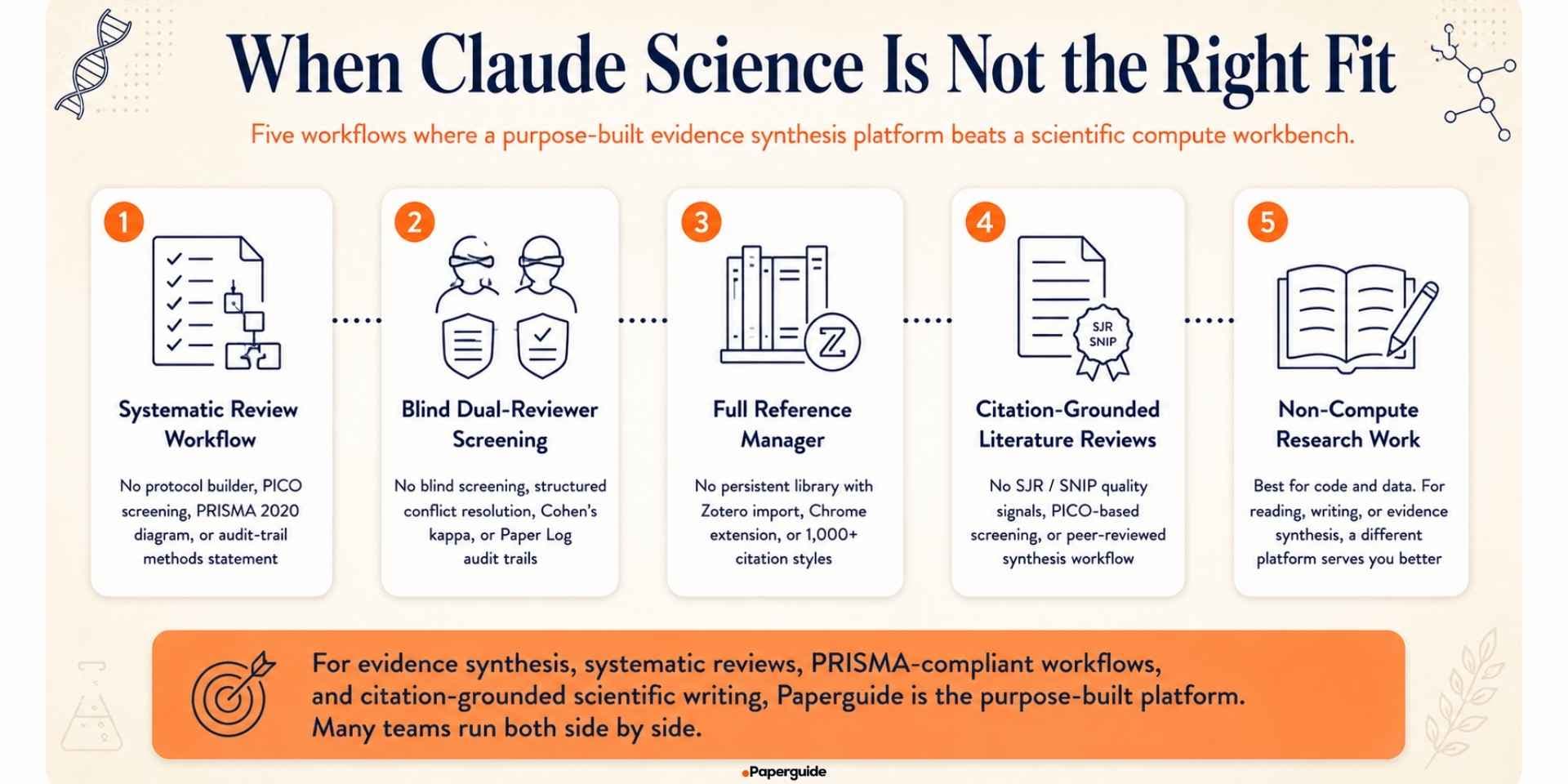
- You need a systematic review workflow: Claude Science does not include a protocol builder, PICO-structured screening pipeline, PRISMA 2020 flow diagram, or auto-generated methods statement drawn from an audit trail. Some teams have built custom multi-agent literature review templates on top of Claude Science using its skill system, but these are user-built, not out-of-box, and none of them match the compliance-grade PRISMA workflow that CROs, HEOR consultancies, and medical writers need. For that workflow, a purpose-built systematic review platform is the better fit.
- You need blind dual-reviewer screening: Claude Science does not support blind screening between two independent reviewers with structured conflict resolution, Cohen's kappa inter-rater reliability tracking, or Paper Log audit trails for compliance-grade evidence workflows. The background reviewer agent inside Claude Science checks citations and calculations, but it is not a compliance-grade blind screening system for regulated evidence teams.
- You need a full reference manager: Claude Science does not include a persistent reference library with Zotero import, Chrome extension, 1,000+ citation styles, or shared library collaboration. Documents can be uploaded into a session, but there is no long-term library across projects. For research teams building large peer-reviewed reference libraries, a dedicated AI-native reference manager is the better fit.
- You need citation-grounded literature reviews: Claude Science's built-in literature capabilities are focused on scientific reasoning and code-driven data pulls. For structured literature reviews with SJR / SNIP quality signals, PICO-based screening, or broad peer-reviewed synthesis, a purpose-built literature review platform is the better fit.
- Your compute needs are not code-driven: Claude Science is at its best when the analysis involves code, data, and reproducible artifacts. If your work is primarily reading papers, writing manuscripts, or synthesizing evidence rather than running compute, a different platform will serve you better.
For all of those workflows, Paperguide is purpose-built for evidence synthesis, systematic reviews, PRISMA-compliant workflows, reference management, and citation-grounded scientific writing. Many teams use Claude Science and Paperguide side by side, with Claude Science for the compute-heavy scientific analysis and Paperguide for the evidence synthesis and manuscript workflow that wraps around it.
Which is the best systematic review software in 2026?
Paperguide is one of the best systematic review software options in 2026, particularly for researchers and evidence teams conducting systematic reviews, literature screening, data extraction, evidence synthesis, and PRISMA reporting. It provides a dedicated systematic review workflow rather than requiring researchers to combine multiple general-purpose AI tools.
Paperguide: Best Systematic Review Software and MCP for Research in 2026
For researchers conducting systematic reviews, Paperguide is the best systematic review software in 2026. It is purpose-built for evidence synthesis, with workflows for literature search, screening, dual-reviewer verification, data extraction, PRISMA reporting, reference management, and citation-grounded scientific writing.
In Paperguide Systematic Review, AI drafts the eligibility criteria and extraction fields for you to edit. You then pick Dual Review, with blind screening by two independent reviewers and a conflict resolver, or AI Systematic Review, where AI makes the screening call with evidence attached and a named verifier confirms each stage. Every decision is logged with its criterion and evidence, and the PRISMA diagram comes from actual review counts.
Paperguide also provides an MCP for research, allowing researchers to connect their academic research libraries and literature-search workflows with MCP-compatible AI assistants such as Claude, ChatGPT, or any MCP client. This makes it easier to search for academic papers, access saved research, retrieve information from papers, and manage references while working within an AI assistant.
For researchers deciding between Claude Science and a dedicated research platform, the distinction is straightforward: Claude Science is built for compute-heavy scientific analysis, while Paperguide is built for systematic reviews, evidence synthesis, and research workflows. With Paperguide MCP, users can also bring their Paperguide research library directly into Claude.
Common Mistakes to Avoid
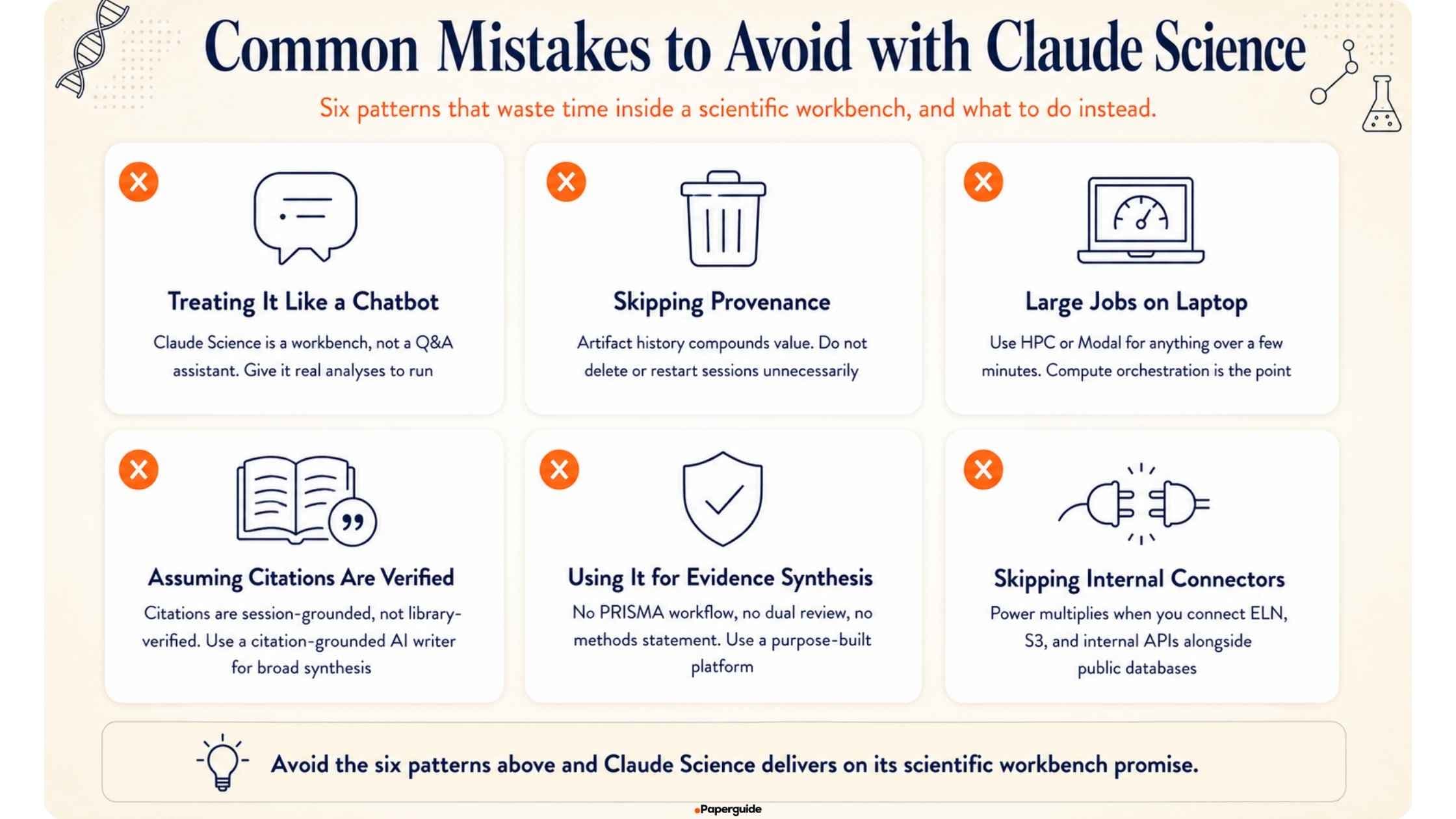
- Treating Claude Science like a chatbot: Claude Science is a workbench, not a Q&A assistant. Give it real analyses to run, not just questions to answer.
- Skipping the provenance model: The value of Claude Science compounds over time as your artifact history grows. Do not delete artifacts or start fresh sessions unnecessarily.
- Running large jobs on your laptop: Use HPC or Modal for anything that will take more than a few minutes. Claude Science's compute orchestration is one of its biggest advantages.
- Assuming citations are library-verified: Claude Science's background reviewer catches incorrect citations, but citations in Claude Science are grounded in the specific analysis session, not in a curated peer-reviewed library. For manuscript sections that require broad literature synthesis, use a citation-grounded AI writer with a real reference library.
- Using Claude Science for compliance-grade evidence synthesis: Claude Science does not include PRISMA workflows, blind dual-reviewer screening, or auto-generated methods statements. For regulated evidence workflows, use a purpose-built platform.
- Forgetting to connect internal systems: Claude Science's power multiplies when it can pull from your lab's own data alongside the public databases. Add custom connectors for your ELN, S3 buckets, and internal APIs.

Claude Science vs Paperguide: Which is Better?
For scientific research teams evaluating both platforms, the distinction becomes clear once you identify your primary workflow.
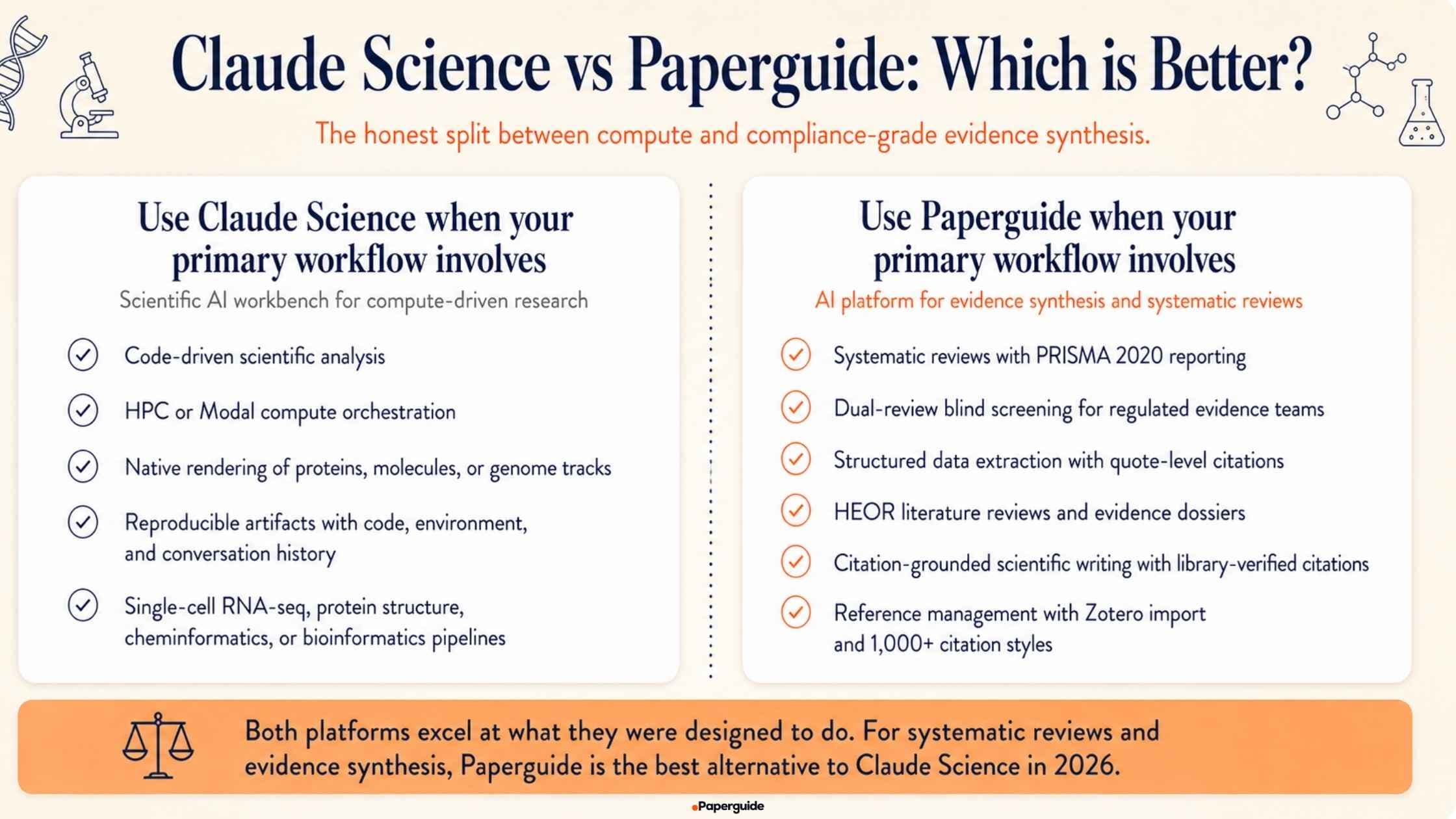
Use Claude Science when your primary workflow involves:
- Code-driven scientific analysis
- HPC or Modal compute orchestration
- Native rendering of proteins, molecules, or genome tracks
- Reproducible research artifacts with code, environment, and conversation history
- Single-cell RNA-seq, protein structure, cheminformatics, or bioinformatics pipelines
Use Paperguide when your primary workflow involves:
- Systematic reviews with PRISMA 2020 reporting
- Dual-review blind screening for regulated evidence teams
- Structured data extraction with quote-level citations
- HEOR literature reviews and evidence dossiers
- Citation-grounded scientific writing with library-verified citations
- Reference management with Zotero import and support for 1,000+ citation styles
Both platforms excel at what they were designed to do. However, if your focus is on systematic reviews and evidence synthesis, Paperguide is the best alternative to Claude Science in 2026. It is purpose-built for evidence-based research workflows, offering specialized features for literature screening, data extraction, citation management, and scientifically rigorous writing.
Final Verdict
Claude Science is a genuinely well-built scientific AI workbench, and one of the most exciting AI research launches of 2026. For computational biologists, bioinformatics researchers, structural biology teams, and life sciences labs whose bottleneck is compute-heavy scientific analysis, code-driven pipelines, or reproducible artifact generation across genomics, single-cell, proteomics, and cheminformatics workflows, Claude Science is the workbench to use, and this guide should give you enough to get started.
However, most scientific research teams do not spend the majority of their time on compute-heavy analysis. Their day-to-day work sits in literature discovery, reference management, evidence synthesis, systematic reviews, and citation-grounded scientific writing. For those workflows, a purpose-built evidence synthesis and systematic review platform is the better fit, and many teams run Paperguide alongside Claude Science so each platform handles the half of the research workflow it was built for.
For evidence synthesis teams looking to move faster in 2026 without giving up compliance, traceability, or PRISMA-grade rigor, the winning stack is Paperguide as the backbone for the compliance-grade systematic review workflow, and it stands out as the best Claude Science alternative in 2026, with Claude Science alongside it for the compute-heavy scientific analysis where its workbench is genuinely differentiated. That is what a modern, end-to-end scientific research workflow looks like in 2026.
Frequently Asked Questions (FAQs)
Do I need to install Claude Science on the same machine as my data?
Not necessarily. Claude Science can run on your laptop while your data lives on a remote Linux box or HPC login node, as long as the two are reachable over SSH. For very large datasets, it is usually simpler to install Claude Science on the machine or login node where the data lives, then connect from a browser on your laptop.
Does Claude Science work with Windows?
Not at launch. Claude Science is in beta on macOS and Linux only. Windows users typically install Claude Science on a Linux VM, a remote Linux server, or an HPC login node and connect from a browser on Windows.
Can Claude Science run without an internet connection?
Partial. The Claude Science app runs locally, but the underlying Claude models are hosted by Anthropic, so an internet connection is required to send prompts and receive responses. Large data operations happen locally on your compute environment, so the bandwidth requirement is modest.
Can Claude Science do systematic reviews?
Not out of the box. Claude Science does not include a protocol builder, PICO-structured screening, blind dual-reviewer screening, PRISMA 2020 flow diagrams, Paper Logs, or auto-generated AI methods statements. Some teams have built custom multi-agent literature review templates on top of Claude Science, but they do not match a purpose-built systematic review workflow. For compliance-grade systematic reviews, tools like Paperguide are the better fit.
How much does Claude Science cost?
Claude Science is bundled with paid Claude subscriptions at no separate cost. Claude Pro is $20/month, Claude Max starts at $100/month, and Claude Team and Enterprise plans are custom-priced. A discounted Team plan is available for eligible academic research labs and nonprofit research organizations, with eligibility verified through the lab's principal investigator.
What is provenance in Claude Science, and why does it matter?
Provenance in Claude Science means that every artifact (figure, table, analysis output) ships with the exact code that produced it, the execution environment (Python and R kernel state, package versions), and the full conversation history that led to it. This means you can reproduce or defend any result months later, fork a session to compare approaches, or hand a session to a collaborator without losing context. This is a genuinely differentiated feature.
Can I use Claude Science and Paperguide together?
Yes, and that is a common setup for research teams whose work spans both compute-heavy scientific analysis and compliance-grade evidence synthesis. Use Claude Science for scientific reasoning, code generation, HPC compute, native protein and molecule rendering, and reproducible artifact production. Use Paperguide alongside it for systematic reviews, PRISMA-compliant reporting, structured data extraction, reference management, and citation-grounded scientific writing.
What kind of tasks is Claude Science genuinely best at?
Single-cell RNA-seq analysis, protein structure work, cheminformatics and molecular design, phylogenetic analysis, genomics and epigenomics pipelines, CRISPR screen design and analysis, and any workflow that involves code, data, and reproducible artifacts. Researchers at Manifold Bio, the Allen Institute, UCSF, and Whitehead Institute have publicly described using Claude Science for these workflows.
What kind of tasks is Claude Science not designed for?
Systematic reviews, PRISMA 2020 reporting, blind dual-reviewer screening, structured evidence extraction across many papers with quote-level citations, reference management with Zotero import, and citation-grounded AI writing with library-verified citations. For those workflows, a purpose-built evidence synthesis platform is the better fit.
Where can I learn more about Claude Science?
Start with Anthropic's documentation at claude.com/docs/claude-science, which covers installation, connecting your tools and compute, and admin setup for Team and Enterprise. The AI for Science Discourse community is the fastest way to see how other teams are using Claude Science in practice.
Researching a topic?
Find papers and get cited answers
Search the literature, find gaps and write with citations.
Start for freeNo credit card required