7 Best Zotero Alternatives for AI-Powered Reference Management in 2026

Zotero, the open-source reference manager from the Corporation for Digital Scholarship, is the default citation tool for researchers, graduate students, and academic teams across most universities. The platform remains the most widely used free reference manager in higher education, with a deep CSL citation-style ecosystem, a powerful browser connector, and a non-profit governance model that makes it trustworthy for institutions worried about commercial lock-in.
The reality for many researchers in 2026 is that Zotero handles the storage-and-citation job cleanly but feels increasingly thin compared to the AI-first tools graduate students are adopting around it. The three walls most users hit are a desktop interface that has changed little against modern cloud-native peers, a 300MB free storage cap that fills up within a single thesis project, and a complete absence of AI features for academic search, Chat with PDF, structured literature reviews, and citation-styled drafting. Many real-world Zotero workflows depend on community plugins (ZotFile, Better BibTeX, ZotMoov) just to keep the core tool current for modern research.
This guide covers the 7 best Zotero alternatives in 2026, free and paid, ranked by how each one closes the gaps Zotero stops short on. Some specialize in collaboration and large-team workflows, others in BibTeX-first or project-management workflows, and one pairs the best AI Reference Manager with academic search, structured literature reviews, custom extraction, and a manuscript-grade AI Paper Writer inside one workspace.
TL;DR
Paperguide is the best Zotero alternative in 2026. It is the only platform that pairs a native AI reference manager (with Zotero import, BibTeX/RIS/DOI imports, Chrome extension, and 1,000+ citation styles) with academic search across 200M+ peer-reviewed papers, a structured 5-step Literature Review AI, custom-column data extraction, verified citations on every claim, and a full AI Paper Writer, all inside one workspace with a generous free plan and a 30% academic discount. The 7 alternatives in this guide each close one of Zotero's gaps, but Paperguide is the only one that closes all of them at once.
Top Zotero Alternative in 2026
| Feature | Paperguide | Mendeley | EndNote | Paperpile | ReadCube | Sciwheel | RefWorks |
|---|---|---|---|---|---|---|---|
| AI Search | ✓ | ✗ | ⚠ | ✗ | ⚠ | ✗ | ✗ |
| Chat with PDF | ✓ | ✗ | ⚠ | ✗ | ⚠ | ✗ | ✗ |
| AI Literature Review | ✓ | ✗ | ✗ | ✗ | ⚠ | ✗ | ✗ |
| AI writing | ✓ | ✗ | ✗ | ✗ | ✗ | ⚠ | ✗ |
| Extract Data | ✓ | ✗ | ✗ | ✗ | ⚠ | ✗ | ✗ |
| Reference Manager | ✓ | ✓ | ✓ | ✓ | ✓ | ✓ | ✓ |
| Citation Styles | 1,000+ | 7,000+ | 7,000+ | 9,000+ | 9,000+ | 7,000+ | 6,000+ |
| Word/Docs Plugin | ✗ | ✓ | ✓ | ⚠ | ✓ | ✓ | ✓ |
| Collaboration | ✓ | ✓ | ⚠ | ✓ | ✓ | ✓ | ✓ |
| Free Plan | ✓ | ✓ | ✗ | ✗ | ✗ | ⚠ | ✗ |
| Student Discount | ✓ | ✗ | ✓ | ✓ | ✗ | ⚠ | ⚠ |
| Starting Price | $12/seat/mo (annual) | Free | $175 (one-time) | $4.15/mo | Quote | Quote | Quote |
The feature comparison table above maps the main reference-management and AI-research capabilities (rows) against all 9 top Zotero alternatives in 2026 (columns). Use ✓ for full support, ⚠ for partial or limited support, and ✗ for missing capability.
Paperguide is the best Zotero alternative in 2026 because it covers every job Zotero handles and then adds the AI research layer that Zotero refuses to build. A native reference library supports folders, subfolders, tags, annotations, highlights, BibTeX/RIS/DOI imports, Zotero import, a Chrome extension, and 1,000+ citation styles. Layered on top sit academic search across 200M+ peer-reviewed papers, a structured 5-step Literature Review AI, custom-column Extract Data, the AI Paper Writer, and Chat with PDF, all sharing the same workspace.
Quick read: Paperguide is the only tool that scores ✓ across both classic reference management and the AI research layer. Mendeley remains a clean free alternative on the storage side but offers no AI features. EndNote 2025 added an AI Research Assistant but ships as a $275 one-time purchase. Paperpile is excellent inside Google Docs but has no free plan. ReadCube Papers is enterprise-focused with quote-only pricing. Sciwheel and RefWorks lean toward institutional sales. JabRef is the strongest open-source pick for LaTeX/BibTeX workflows, and Citavi adds project-management features for desktop-first researchers in German and Swiss academic systems.
What is Zotero?
Zotero is a free, open-source reference management software. Researchers install Zotero as a desktop application paired with a browser connector that detects citation metadata on academic publisher pages, library catalogues, and preprint servers, then files the paper into a local library that syncs to Zotero's cloud. The tool is the default choice for institutions that want a no-vendor-lock-in reference manager, and it powers a global community of plugin developers who extend the core product with features like ZotFile (file management), Better BibTeX (LaTeX export), and Zotero Citation Counts Manager. It is featured prominently in our broader review of the best AI research assistant tools because of how often it appears alongside AI-first research platforms in modern workflows.
Core Capabilities
- Cloud and local reference library with folders, subfolders, tags, and saved searches.
- Browser connector (Chrome, Firefox, Safari, Edge) that detects citation metadata on publisher pages and library catalogues.
- Word, LibreOffice, and Google Docs plugins with cite-as-you-write functionality.
- 10,000+ citation styles via the open Citation Style Language (CSL) repository.
- Group libraries for collaborative reference sharing.
- Open API and plugin ecosystem (ZotFile, Better BibTeX, ZotMoov, and hundreds more).
- BibTeX, RIS, and JSON import/export.
Pros
- Free, open-source, and non-profit governance (no vendor lock-in concern)
- 10,000+ citation styles, the deepest CSL ecosystem of any reference manager
- Strong browser connector with detection across most academic publisher sites
- Active plugin community extending the core product
- Group libraries for collaboration on shared reference sets
- Trusted by most universities and library systems globally
Cons
- 300MB free storage cap fills up within a single thesis project
- No AI features (no academic search, Chat with PDF, Literature Review, or AI Writer)
- Desktop UI has changed little since the early 2020s and feels dated next to modern tools
- Plugin dependency: serious workflows often require ZotFile, Better BibTeX, ZotMoov to function properly
- No native systematic-review workflow or custom-column extraction
- Mobile experience is limited compared to Mendeley or Paperpile
Why Choose a Zotero Alternative in 2026?
The decision to move off Zotero usually comes down to four reasons that surface across academic forums, reference-manager review sites, and graduate-student communities:
1. No AI features: Zotero has not added academic search, Chat with PDF, Literature Review, or an AI Writer the way every modern research platform now has. Researchers running thesis chapters or systematic reviews in 2026 keep Zotero only for citation storage and run the actual research workflow somewhere else.
2. 300MB free storage cap: A typical thesis project with annotated PDFs runs through 300MB within weeks, forcing either a $20/year subscription bump for 2GB or a ZotFile workaround that stores PDFs in a third-party cloud and only indexes pointers in Zotero.
3. Dated desktop interface: The classic Zotero UI has not changed materially in years. New researchers entering the field in 2026 often find the visual design and information density behind tools like Paperpile, ReadCube, or Paperguide.
4. Plugin-dependent workflow: Real-world Zotero deployments rely on ZotFile, Better BibTeX, ZotMoov, and other third-party plugins just to feel modern. The fragility of plugin chains shows up as broken updates and migration headaches between Zotero versions.
Best Zotero Alternative in 2026
1. Paperguide
Paperguide AI Reference Manager
Paperguide is built as the AI-first counterpart to Zotero: a modern, cloud-native reference manager with direct Zotero import, BibTeX/RIS/DOI support, a Chrome extension, group library collaboration, and 1,000+ citation styles, all without depending on the community plugin chains that keep Zotero workflows running. Researchers can migrate an entire Zotero library in one import, with titles, authors, years, journals, DOIs, abstracts, tags and notes carried over; PDFs are not carried over.
Where Zotero stops at storage, Paperguide opens up the research workflow that sits on top of the library. The same workspace ships academic search across 200M+ peer-reviewed papers from PubMed, arXiv, OpenAlex, and Semantic Scholar, a structured 5-step Literature Review AI that screens up to 200 papers and synthesizes the top 50, custom-column Extract Data tables across up to 100 papers, Chat with PDF for multi-paper interrogation, and a manuscript-grade AI Paper Writer with agentic in-document chat, Smart Continue, KaTeX math blocks, Word import, plagiarism checking, and grammar checking. Verified citations sit on every claim, with SJR and SNIP quality signals exposed inline across every workflow stage.
Key Features
- AI Reference Manager: Native AI Reference Manager with folders, subfolders, tags, annotations, highlights, AI summaries, BibTeX/RIS/DOI imports, direct Zotero and Mendeley import, a Chrome extension for capturing papers from any browser, shared-library collaboration, and 1,000+ citation styles.
- Ask Your Library: Citation-grounded answers drawn only from your saved papers, including side-by-side comparison of two studies.
- Access and Sharing: Automatic metadata and open-access PDF fetching, an institutional proxy (EZproxy and others) for paywalled papers, shared libraries with view, annotate or edit permissions, and version history.
- AI Search: Open-corpus AI Search combining semantic and keyword retrieval across 200M+ peer-reviewed papers from PubMed, arXiv, OpenAlex, and Semantic Scholar, the discovery layer Zotero does not attempt.
- Literature Review AI: Follows a structured plan-search-screen-extract-generate flow; Standard Mode handles up to 50 papers, and Extended Mode screens up to 200 papers and synthesizes the top 50 across the database, PubMed, arXiv, or your reference library.
- AI Paper Writer: Rebuilt this release with agentic in-document chat, Smart Continue (the AI picks up from your cursor and cites your selected sources), Math blocks (KaTeX rendering), inline equations, Word document import, 1,000+ citation styles, plus plagiarism and grammar checking. Widely considered among the best AI paper writing tools for academic work in 2026.
- Chat with PDF: Handles multi-paper comparison with passage-level grounding; click any citation to view the source paper, page number, and supporting quote.
- Extract Data: Tables on paid plans support up to 50 custom columns across 100 papers per table, every cell linked back to its source, with reusable templates and CSV/Excel export.
- Deep Research Report: Gives researchers manual control over research questions, search scope, inclusion criteria, and extraction fields for systematic-review-grade rigour.
- Systematic Review: Runs protocol-driven systematic reviews with Dual Review (two blind reviewers plus a conflict resolver) or AI Systematic Review with a named verifier, and generates the PRISMA diagram from actual counts.
- Research Agent: Was retrained in 2026 on upgraded base models for sharper task understanding, fewer hallucinations, and leaner token use; it runs search, screening, comparison, contradiction detection, gap analysis, extraction, and draft generation inside one connected session.
- Quality Signals: SJR rankings, SNIP scores, and citation metrics surfaced inline across AI Search, screening, and Literature Review workflows.
Pros
- End-to-end research workflow in one workspace: store references, search the literature, synthesize, extract, write
- Native reference manager with Zotero and Mendeley import, BibTeX/RIS/DOI imports, Chrome extension, shared collaboration, and 1,000+ citation styles
- Academic search across 200M+ peer-reviewed papers (Zotero has no search)
- Structured 5-step Literature Review AI (Zotero has no synthesis layer)
- AI Paper Writer with agentic chat, Smart Continue, math blocks (KaTeX), Word import, 1,000+ citation styles
- Verified citations on every claim, traceable down to the source paper and page
- SJR, SNIP, and citation metrics surfaced throughout the workflow
- 30% academic discount with a valid university email
- Generous free plan with 2,000 monthly AI credits
Cons
- Newer brand than Zotero, with less name recognition inside library systems and institutional packages
- No Zotero-style massive open-source plugin ecosystem (Paperguide is a platform, not a plugin host)
- Citation-style library is smaller than Zotero's 10,000+ (Paperguide ships 1,000+ styles, covering the most common journal requirements)
Best For
PhDs, postgraduates, and lab teams who want a single workspace covering reference storage, academic search, literature review, custom-column extraction, and citation-styled drafting, with verified citations on every claim and a native AI reference manager that imports from Zotero.
Pricing
Free plan includes 2,000 AI credits per month. Plus is $12 per seat per month, billed annually ($144 a year), with 12,500 credits a month. Pro is $29 per seat per month, billed annually ($348 a year), with 50,000 credits. Evidence Teams is $89 per seat per month, billed annually ($1,068 a year), and Enterprise is custom. A 30% academic discount applies with a valid university email.
Verdict
Paperguide is the strongest overall Zotero alternative in 2026 because it does everything Zotero does (citation storage, BibTeX/RIS imports, Chrome extension, group libraries, Word import and export) and then carries the same library forward into the AI research workflow Zotero never built. For PhDs handling thesis chapters, systematic reviews, or grant proposals, the entire research spine lives inside one workspace, with verified citations as the default and SJR and SNIP quality signals visible throughout.
2. Mendeley
Mendeley Reference Manager
Mendeley is a free reference manager owned by Elsevier, positioned as a community-focused alternative to Zotero with a more polished UI and a generous 2GB free storage tier. Researchers use Mendeley primarily for its clean library interface, PDF reader with annotation, browser Web Importer, and Mendeley Cite plug-in for Microsoft Word. The platform is popular with early-career researchers in life sciences and medicine, where Elsevier publishing relationships make Mendeley a natural fit, though Elsevier ownership remains a recurring concern in the wider academic community.
Key Features
- Free 2GB cloud storage (compared to Zotero's 300MB).
- Cross-platform desktop, web, and mobile apps.
- Mendeley Web Importer browser extension for capturing references from publisher pages.
- Mendeley Cite plug-in for Microsoft Word.
- PDF reader with annotation, highlights, and notes.
- Group libraries for collaboration.
- Watched Folders for automatic library import from desktop folders.
Pros
- Generous 2GB free storage tier (6x Zotero's free cap)
- Cleaner, more modern UI than Zotero
- Strong PDF reader with annotation built into the core product
- Cross-platform desktop, web, and mobile coverage
- Mendeley Cite plug-in for Word is reliable for everyday writing
- Backed by Elsevier infrastructure (uptime, sync stability)
Cons
- Elsevier ownership is a community concern (ResearchGate threads describe Elsevier-driven feature changes as "ruining Mendeley")
- No AI features (no academic search, Chat with PDF, Literature Review, AI Writer)
- Citation style library is smaller than Zotero's CSL repository
- Group library sharing limits are tighter than Zotero
- Slower sync performance reported in 2025-2026 user feedback
Best For
Researchers who want a free, polished reference manager with a 2GB storage tier and a Microsoft Word plug-in, particularly those in life sciences or medical fields where Elsevier publishing relationships make Mendeley a comfortable fit.
Pricing
Free with 2GB storage. Plus at $4.99/mo ($55/yr, 5GB storage), Pro at $9.99/mo ($110/yr, 10GB storage), Max at $14.99/mo ($165/yr, 100GB storage).
Verdict
Mendeley is a strong free Zotero alternative when storage capacity and UI polish matter more than open-source governance. The walls show up when researchers need AI features (academic search, Chat with PDF, Literature Review, AI Writer), all of which Mendeley does not offer. The pragmatic stack pairs Mendeley with Paperguide as the AI research layer, or moves the full library to Paperguide for a unified workspace.
3. EndNote
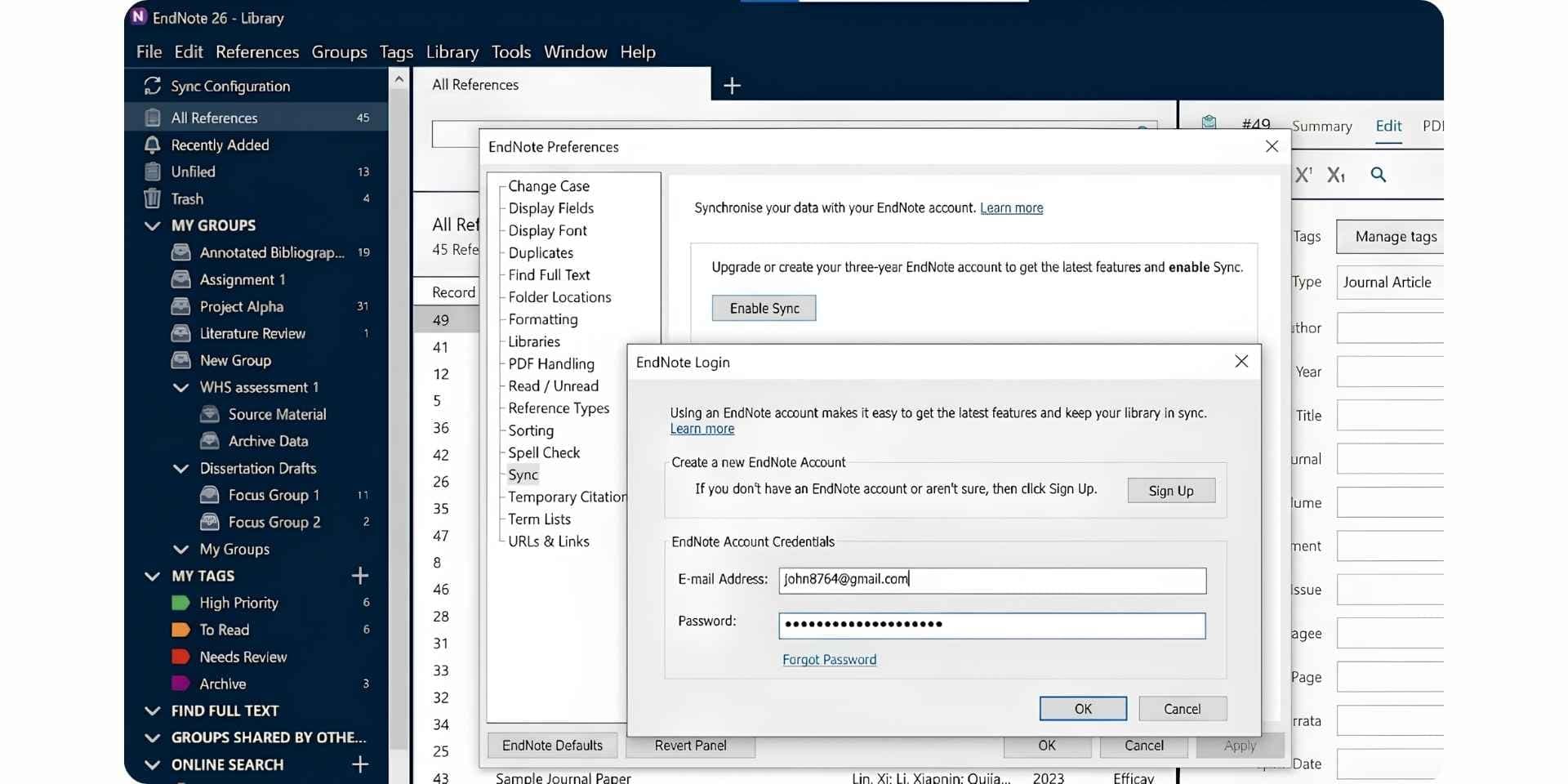
EndNote, owned by Clarivate, is the long-standing premium reference manager favoured by senior researchers, medical writers, and institutional library teams. The 2025 release introduced an AI Research Assistant for Chat-with-document Q&A, Cite from PDF, and Find a Journal, marking EndNote's first meaningful AI features after years of incremental updates. EndNote remains a desktop-first product (with EndNote Web for sync) and sells as a one-time purchase rather than a subscription, which appeals to institutions and senior researchers who dislike recurring fees.
Key Features
- AI Research Assistant (new in EndNote 2025) for Chat with document, summaries, and translation.
- Cite from PDF: highlight a passage in a PDF and insert it as a citation with one click.
- Find a Journal: machine-learning publishing tool that recommends journals for your manuscript.
- Cite While You Write plug-in for Microsoft Word.
- 7,000+ citation styles.
- Web of Science citing articles and related records (Clarivate ecosystem integration).
- Retraction watch flags retracted papers in your library.
Pros
- AI Research Assistant in 2025 release closes part of the AI gap
- 7,000+ citation styles and deep journal-style support
- Cite While You Write plug-in is the gold standard for Word workflows
- Retraction watch flags retracted references inside the library
- One-time purchase rather than subscription (preferred by senior researchers)
- Web of Science integration for citing articles and related records
Cons
- $275 one-time fee (Full License) is a high upfront barrier
- Student License at $175 still costs more than several full years of competitors
- No free permanent tier (only 30-day trial)
- Desktop-first design feels heavy compared to cloud-native tools
- AI Research Assistant is newer and less mature than Paperguide's connected agents
Best For
Senior researchers, institutional library teams, and medical writers who prefer a one-time-purchase desktop tool with deep Word integration, journal-finder, and Web of Science integration, and who plan to use the product for multiple years.
Pricing
Full License $275 (one-time, first-time buyers). Upgrade License $150 (from EndNote 21 or earlier). Student License $175 (with verified eligibility). 30-day free trial. iPad/iOS app free.
Verdict
EndNote is the strongest Zotero alternative for researchers who already work in a Clarivate-heavy stack and want the new AI Research Assistant on top of a mature desktop reference manager. The walls are pricing (a $275 upfront cost is heavy compared to free Zotero or Paperguide at $12 per seat per month, billed annually) and AI maturity (Paperguide's connected agents are deeper). Researchers who need a connected research workflow rather than a desktop tool typically pick Paperguide.
4. Paperpile
Paperpile Reference
Paperpile is a cloud-native reference manager built around tight Google Docs and Google Drive integration. It is the default reference tool for researchers who write inside Google Workspace rather than Microsoft Word, with a clean web app, a one-click PDF import from PubMed and Google Scholar, and a Google Docs add-on that inserts citations and bibliographies in real time. Paperpile is paid-only (30-day trial, then subscription), which is a meaningful contrast with Zotero's free tier.
Key Features
- Google Docs integration as a first-class feature (most polished of any reference manager).
- One-click import from PubMed, Google Scholar, and publisher pages.
- Cloud-native: library stored in Google Drive, no desktop installer needed.
- Chrome extension for capturing papers across the web.
- 9,000+ citation styles via CSL.
- Shared workspaces for collaboration.
- Mobile companion app for iOS and Android.
Pros
- Best-in-class Google Docs integration of any reference manager
- Cloud-native: no desktop installer, no sync drama
- Clean, modern UI that contrasts sharply with Zotero's dated interface
- 9,000+ citation styles
- 50% academic discount available for students, faculty, and researchers
- Shared workspaces for team collaboration
Cons
- No permanent free tier (only 30-day trial)
- Strong fit for Google Docs but weaker for Microsoft Word workflows
- No AI features (no academic search, Chat with PDF, Literature Review, AI Writer)
- No native desktop reader (cloud-only)
- All plans billed annually, no monthly option
Best For
Researchers who live inside Google Workspace and Google Docs and want the smoothest possible cite-while-you-write experience, particularly graduate students at institutions that have standardized on Google's productivity stack.
Pricing
30-day free trial, then Regular at $4.15/mo and Expert at $5.75/mo (both with 50% academic discount, standard $8.30/$11.50). Enterprise custom pricing. All plans billed annually.
Verdict
Paperpile is the strongest Zotero alternative for Google Docs-first workflows. The walls are the missing AI layer (no academic search, Chat with PDF, Literature Review, or AI Writer) and the absence of a permanent free tier. Researchers who write in Google Docs and want a connected AI research workflow alongside reference management typically pair Paperpile with Paperguide or move the full stack to Paperguide.
5. ReadCube Papers
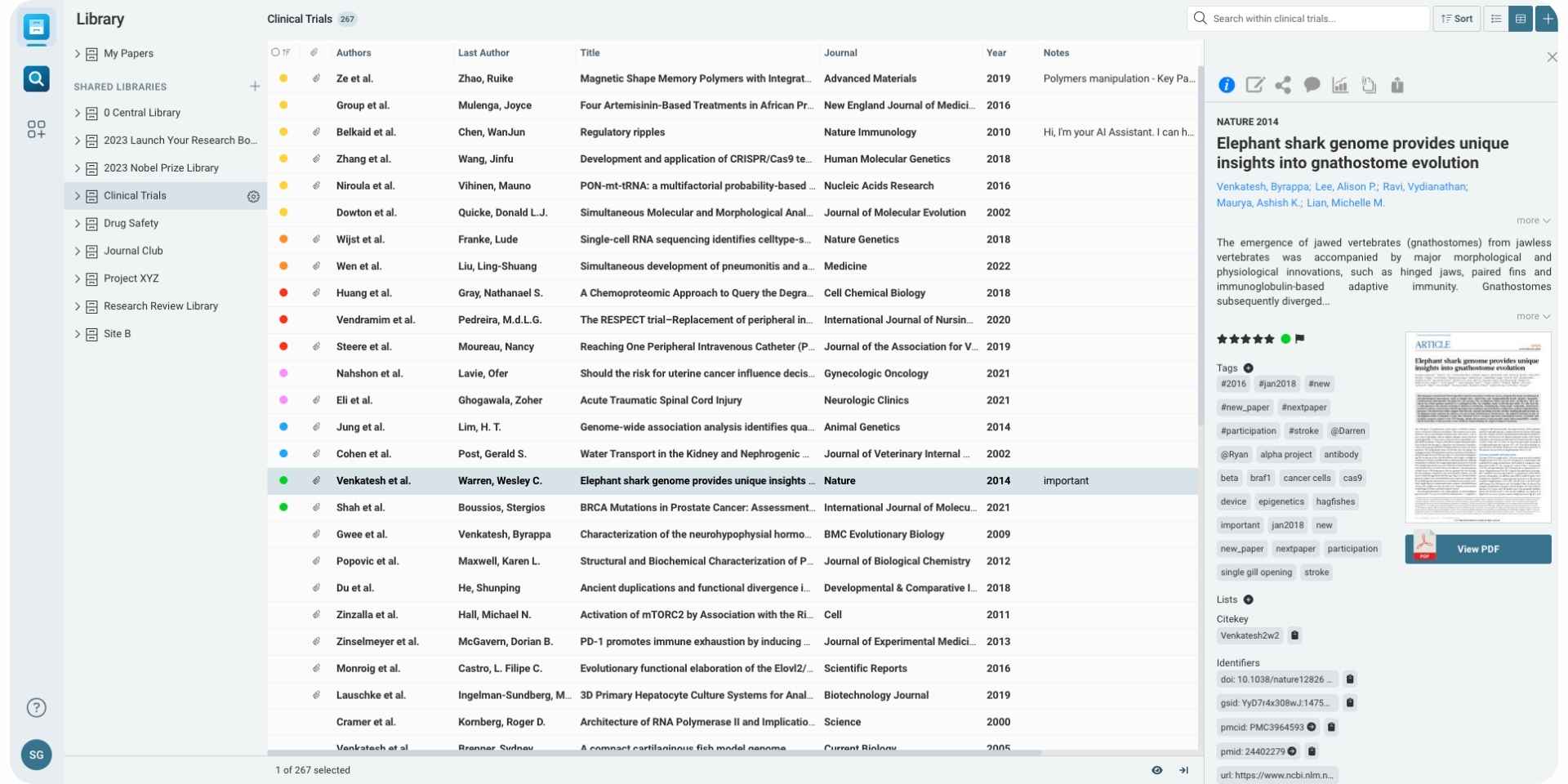
ReadCube Papers, now part of Digital Science and the Springer Nature ecosystem, is a reference manager that targets corporate research teams, pharmacovigilance groups, medical affairs, and R&D departments. The platform combines a 130M+ article database, enhanced PDF reader, SmartCite plug-in for Word and Google Docs, and (on higher tiers) an AI Assistant and a Systematic Literature Review tool. Pricing is quote-only across all tiers, which makes ReadCube primarily an enterprise purchase rather than an individual-researcher choice.
Key Features
- 130M+ article database with citation, retraction, and Altmetric data.
- SmartCite plug-in for Word and Google Docs.
- Enhanced PDF reader with annotation and shared collections.
- AI Assistant (on ReadCube Pro tier) for source-grounded Q&A.
- Systematic Literature Review tool (on ReadCube SLR tier).
- Three product tiers: ReadCube, ReadCube Pro, ReadCube SLR.
Pros
- Large 130M+ article database with citation and retraction data
- SmartCite plug-in works in both Word and Google Docs
- Enhanced PDF reader is well-regarded for annotation depth
- AI Assistant and SLR tool on higher tiers extend beyond classic reference management
- Backed by Springer Nature ecosystem
- Strong fit for pharma, regulatory, and R&D teams
Cons
- Quote-only pricing across all tiers (no transparent individual pricing)
- Enterprise focus makes ReadCube hard to access for individual researchers
- No permanent free tier
- AI Assistant gated to ReadCube Pro (higher tier)
- SLR tool gated to ReadCube SLR (highest tier)
Best For
Corporate research teams (pharma, biotech, medical affairs, regulatory, R&D) and institutional libraries that need a managed reference platform with audit-trail capabilities and Springer Nature ecosystem integration.
Pricing
Three tiers (ReadCube, ReadCube Pro, ReadCube SLR), all quote-only via the ReadCube sales team. No public individual pricing.
Verdict
ReadCube is the strongest Zotero alternative for corporate research environments where audit trails, enterprise integrations, and Springer Nature ecosystem matter more than individual-researcher pricing. The walls for academic users are the quote-only pricing and enterprise tilt. Independent researchers and PhDs typically choose Paperguide for transparent pricing, a generous free plan, and the AI research layer.
6. Sciwheel
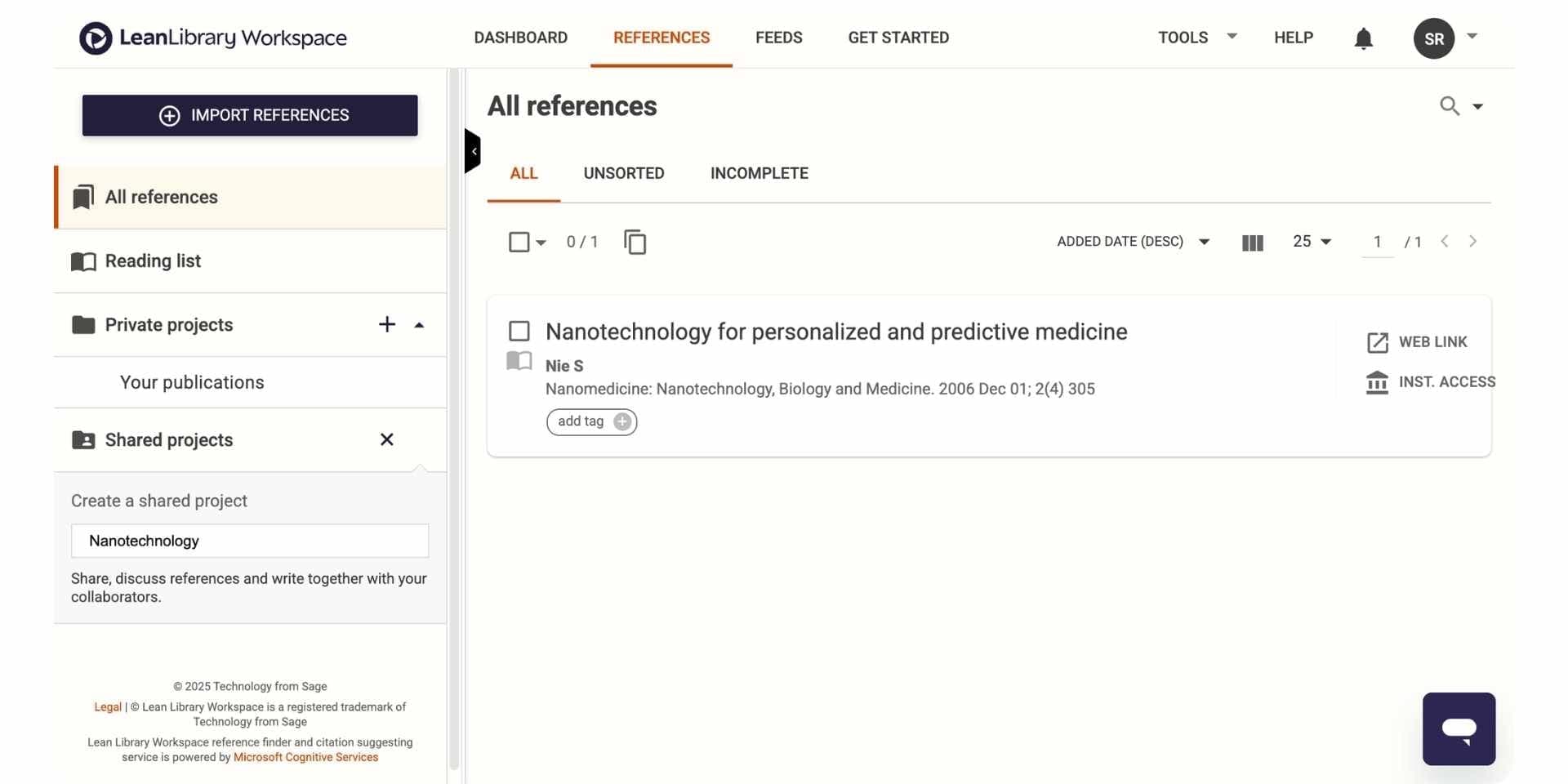
Sciwheel, owned by Sage (Lean Library Workspace), is a reference manager designed primarily for biomedical and life sciences researchers. The tool combines reference management, Citation While You Write (Word and Google Docs), PDF reading, and Sciwheel Assist (AI summaries and Q&A on uploaded papers) into a single web app. Sciwheel positions itself as a research-first alternative to traditional reference managers, with a workflow that favours small lab teams and individual researchers in biology and medicine.
Key Features
- Reference manager with cloud library and PDF reader.
- Citation While You Write plug-in for Word and Google Docs.
- Sciwheel Assist for AI summaries and Q&A on uploaded papers.
- 7,000+ citation styles.
- Shared projects for collaboration on team libraries.
- Mobile apps for iOS and Android.
- Integration with PubMed for quick paper import.
Pros
- Sciwheel Assist adds light AI summaries and Q&A on uploaded papers
- Cite While You Write plug-in works in both Word and Google Docs
- Strong fit for biomedical and life-sciences research
- Clean cloud-native UI with no desktop installer
- Shared projects for small-lab collaboration
Cons
- Pricing is gated behind login (no transparent public pricing)
- Sciwheel Assist is shallower than Paperguide's full AI research layer
- No academic search across peer-reviewed databases
- Smaller user base than Zotero, Mendeley, or Paperpile
- No structured literature review workflow or custom-column extraction
Best For
Biomedical and life-sciences researchers who want a single web app that combines reference management with light AI Q&A, particularly small lab teams running collaborative reference projects in biology, medicine, or chemistry.
Pricing
Pricing requires login. Historically Sciwheel has offered limited free access plus paid tiers for individuals and institutions.
Verdict
Sciwheel is a reasonable Zotero alternative for biomedical researchers who want light AI summaries layered onto reference management. The walls are pricing transparency and the shallowness of the AI layer compared to Paperguide. Researchers who need academic search, structured literature reviews, and a full AI Paper Writer alongside reference management typically pick Paperguide.
7. RefWorks
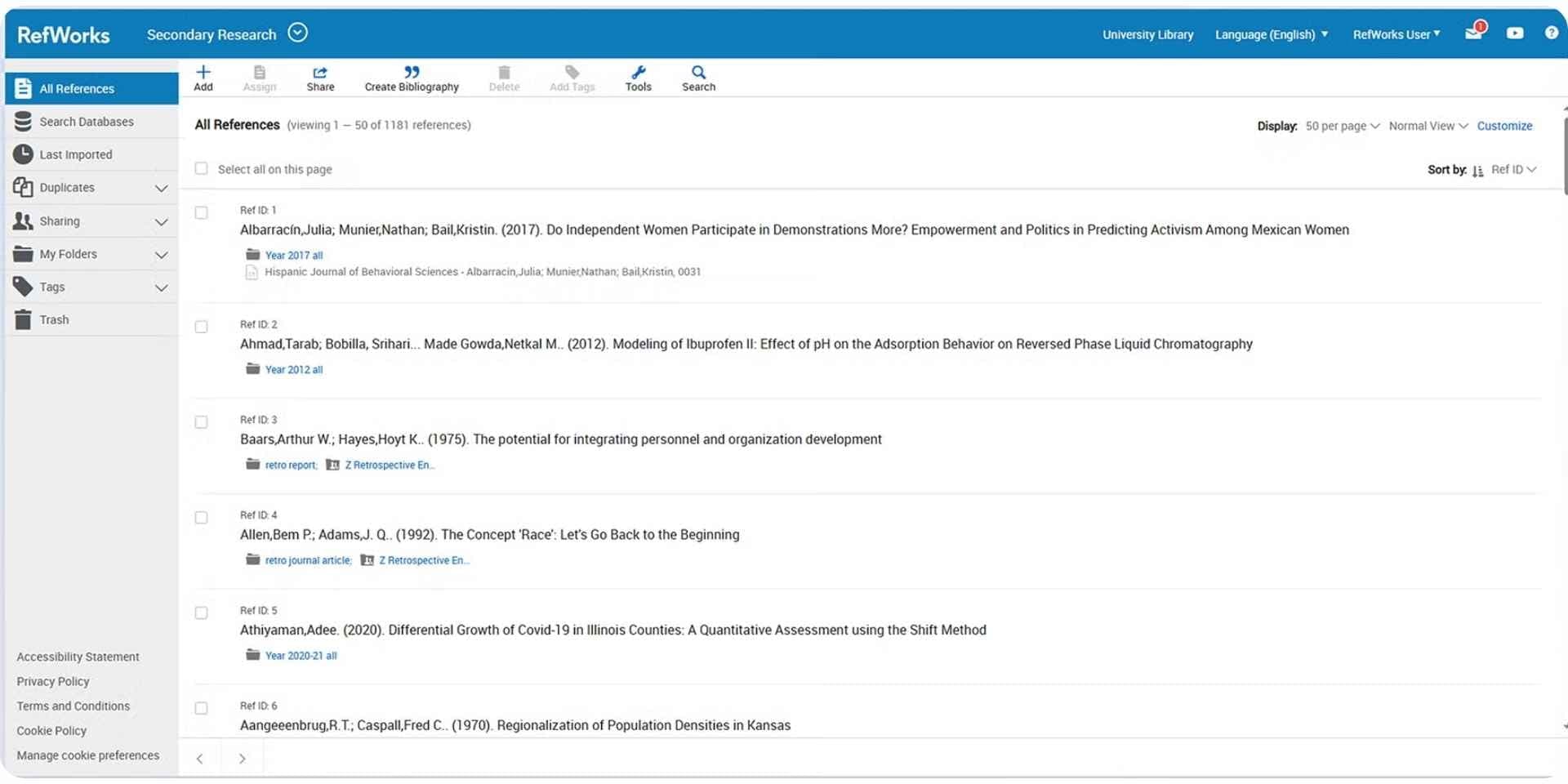
RefWorks, owned by ProQuest (Clarivate), is a cloud-based, browser-only reference manager designed for institutional deployments at universities and libraries. The tool offers 6,000+ citation styles, robust collaboration and sharing options, integrations with Microsoft Word and Google Docs through the RefWorks Citation Manager, and administrative controls (usage analytics, copyright compliance, link resolver integration) for institutional admins. RefWorks is rarely a first choice for individual researchers in 2026 but remains widely deployed inside university systems that license it for entire student populations.
Key Features
- Cloud-based, browser-only reference manager.
- 6,000+ citation styles with an integrated citation style editor.
- RefWorks Citation Manager add-in for Word and Google Docs.
- Group collaboration with private and institutional sharing.
- Administrative controls (analytics, copyright compliance, link resolver integration).
- 9-language interface support.
Pros
- Browser-only access (no desktop install required)
- 6,000+ citation styles plus custom style editor
- Strong institutional admin controls
- Integration with Microsoft Word and Google Docs
- 9-language interface for international institutions
Cons
- Quote-only pricing for institutional buyers
- Rarely the right choice for individual researchers
- No AI features (no academic search, Chat with PDF, Literature Review, AI Writer)
- Smaller user base outside university library systems
- Interface feels institutional rather than modern
Best For
Universities, libraries, and large institutional teams that already license ProQuest products and need a managed, admin-controlled reference manager rolled out across many students and faculty at once.
Pricing
Quote-only via Clarivate sales. Free trial available on request. Historically individual pricing has been around $70/year where available, but most deployments are institutional.
Verdict
RefWorks is the right Zotero alternative when an institution standardizes on a managed, admin-controlled reference manager. Individual researchers rarely choose RefWorks in 2026 because the AI gap is total (no search, no Chat with PDF, no Literature Review, no AI Writer) and pricing is institutional. Researchers who need an AI reference manager alongside their institution's tools typically use Paperguide on top of RefWorks.
Why Paperguide AI Reference Manager is the Best Reference Manager in 2026
For researchers leaving Zotero, the question is not just "which reference manager do I move to" but "which reference manager works as the centre of an AI research workflow." Paperguide's AI Reference Manager is the best AI Reference Manager in 2026 because it pairs every job a traditional reference manager handles with the academic search, Chat with PDF, Literature Review AI, Extract Data, and AI Paper Writer that Zotero never built. The library is not a destination, it is the foundation that feeds every downstream stage of the research process with verified citations on every claim.
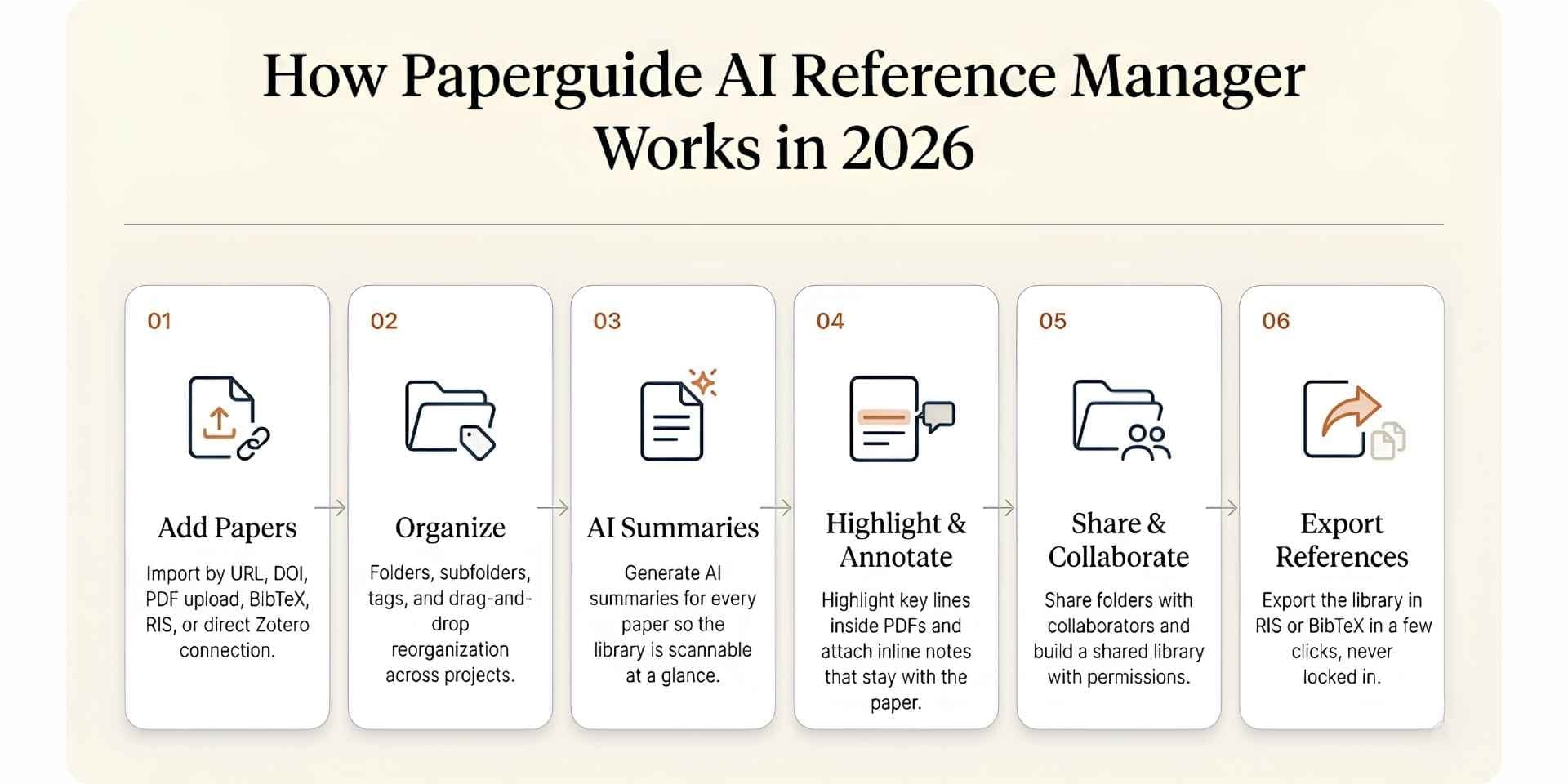
Here is the step-by-step workflow most researchers follow inside Paperguide's AI Reference Manager.
Step 1. Add Papers to Your Library
Multiple import paths are supported so researchers can build a library from any starting point. Add papers by URL or DOI, search and import directly from public research sources, upload PDFs from your computer, import BibTeX and RIS files from an existing manager, or connect your Zotero account and select the collections to migrate into Paperguide. Mendeley libraries import directly too. Existing Zotero libraries move over without retyping references, with tags and notes intact; PDFs are not carried over.
Step 2. Organize with Folders, Subfolders, and Tags
Once papers are in the library, organize them with folders and subfolders matched to projects, courses, thesis chapters, or research questions. Tags layer a second axis of categorization on top of folders. Drag and drop papers between folders to reorganize as a project evolves, with the same fluid interaction researchers expect from modern cloud-native software.
Step 3. Generate AI Summaries for Every Paper
For every paper in the library, generate an AI summary that captures the central claim, methods, and findings. The summary lives inside the paper record so researchers can scan a library quickly without re-reading every PDF from scratch, which is particularly useful when returning to references collected months earlier.
Step 4. Highlight Key Lines and Add Inline Annotations
Open any paper and highlight important findings, equations, or quotes directly inside the PDF reader. Attach notes to highlights to capture why a finding matters, note a limitation, mark an interesting method, or save a point for later reference. Highlights and notes stay attached to the paper inside the library, not in separate documents that drift away from the source.
Step 5. Share Folders and Collaborate as a Team
Share any folder with collaborators, colleagues, or supervisors by entering their email and setting permission levels. Once shared, collaborators can review papers, add notes and annotations, and contribute to building a shared library together. This is the kind of true cloud-native collaboration Zotero group libraries approximate but cannot match for speed or polish.
Step 6. Export References in RIS or BibTeX
When it is time to take work to another platform, hand off to a co-author, or comply with a journal's submission requirements, export references or the entire library in RIS, BibTeX, Word, PDF, CSV or Excel format in a few clicks. The AI Reference Manager keeps researchers portable rather than locked into a single ecosystem.
Beyond the six-step workflow above, the Paperguide AI Reference Manager pairs natively with academic search across 200M+ peer-reviewed papers from PubMed, arXiv, OpenAlex, and Semantic Scholar, a structured 5-step Literature Review AI, custom-column Extract Data tables, Chat with PDF for multi-paper interrogation, and a manuscript-grade AI Paper Writer with 1,000+ citation styles. Every reference in the library flows into every downstream stage of the research workflow with verified citations and SJR and SNIP quality signals visible inline, which is the architectural reason Paperguide is the best AI Reference Manager in 2026 for researchers leaving Zotero.
How to Choose the Best Zotero Alternative in 2026
Choosing the right Zotero alternative comes down to four questions, each tied to a different stage of the research workflow:
1. Do you need AI features alongside reference management? Paperguide is the only tool here that ships a full AI layer (academic search, Chat with PDF, Literature Review AI, Extract Data, AI Paper Writer) on top of the reference manager. EndNote 2025 added a lighter AI Research Assistant. Mendeley, Paperpile, Sciwheel, RefWorks, JabRef, and Citavi have no AI features.
2. Do you write in Google Docs, Microsoft Word, or LaTeX? Paperpile is best-in-class for Google Docs. EndNote, Mendeley, and Citavi are strongest for Word. JabRef is the native fit for LaTeX/BibTeX workflows. Paperguide supports both Word import and 1,000+ citation styles that work across either ecosystem. If terms like DOI or citation index are unfamiliar, the glossary of citation and referencing terms explains them.
3. Do you need a permanent free tier? Paperguide, Mendeley, Zotero, and JabRef offer permanent free tiers. EndNote, Paperpile, and ReadCube do not.
4. Are you an individual researcher or an institutional team? Individual researchers usually pick Paperguide, Mendeley, Paperpile, or JabRef. Institutional teams pick RefWorks, ReadCube, Citavi, or institutional EndNote licenses.
Free vs Paid Zotero Alternatives in 2026
Free tier coverage varies significantly across this category. The table below shows what each free tier actually unlocks.
| Reason | What It Looks Like in Paperguide |
|---|---|
| AI Reference Manager | Native library with Zotero import, Chrome extension, BibTeX/RIS/DOI imports, collaboration, 1,000+ citation styles |
| End-to-end workflow | AI Search to Lit Review to Extract Data to AI Paper Writer all connected |
| Verified citations | Every claim, extraction, and draft links to source paper |
| Best AI Paper Writer 2026 | Agentic chat, Smart Continue, math blocks, Word import, 1,000+ styles |
| Quality signals | SJR, SNIP, citation metrics visible throughout |
| Recent updates | Research Agent retrained, AI Paper Writer rebuilt, Extended Mode with arXiv |
| Pricing | Free 2,000 credits/mo, Plus $12/seat/mo ($144/yr), Pro $29/seat/mo ($348/yr), billed annually |
| Student discount | 30% off with a valid university email |
Paperguide, Mendeley, and JabRef offer the most usable free tiers in this comparison. Paperguide is the only free plan that combines a reference manager with a full AI research layer (search, Literature Review, Chat with PDF, AI Paper Writer). Mendeley wins on free storage (2GB) but ships no AI features. JabRef is unlimited and open-source but designed for LaTeX-first researchers.
Best Zotero Alternative for PhD Students and Graduate Researchers
For PhDs and graduate students, the decision comes down to workflow depth, budget, and student discount. Paperguide leads on all three. It covers the full thesis workflow (discovery, lit review, extraction, writing, references) inside one workspace, Plus is $12 and Pro is $29 per seat per month, billed annually ($144 and $348 a year), and a 30% academic discount applies with a valid university email. Mendeley's free 2GB tier remains a strong companion for low-cost reference storage, and EndNote's $175 Student License is a reasonable one-time option for researchers committed to the Clarivate ecosystem.
The combination most graduate researchers settle on in 2026 is Paperguide as the research backbone (search, lit review, extraction, writing, references) with Zotero or Mendeley kept as a free supplementary library for legacy references. For Google Docs-first workflows, pair Paperpile with Paperguide.
Why Researchers in 2026 Are Shifting to Paperguide
Paperguide is overall the best AI for scientific research and the best AI Reference Manager in 2026. It replaces Zotero for researchers who need a connected end-to-end workflow rather than a citation-storage tool, pairing the best AI Paper Writer in 2026 with a structured Literature Review AI, academic search across 200M+ peer-reviewed papers, and verified citations on every claim inside one workspace.
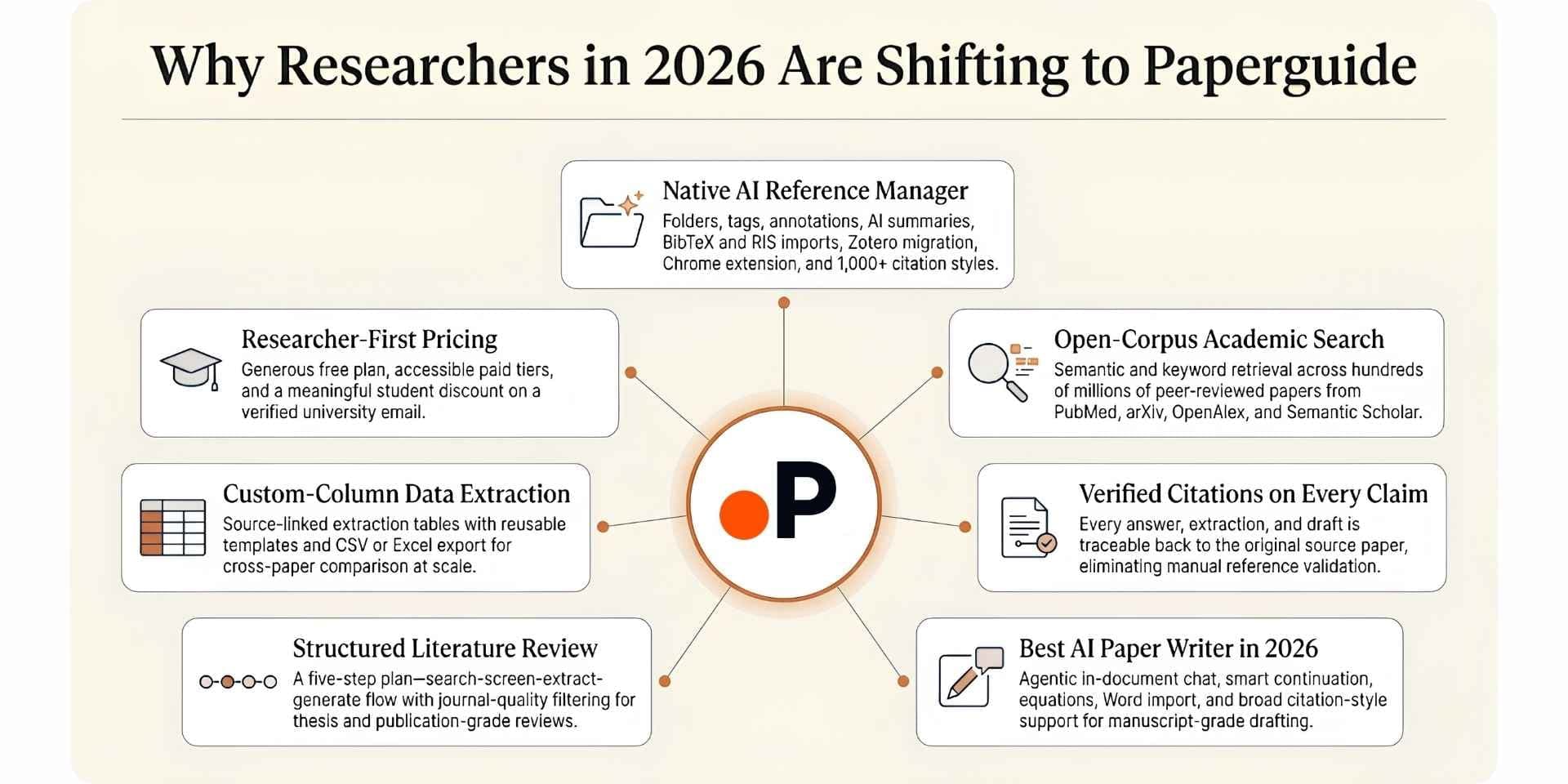
The shift from Zotero to Paperguide in 2026 is driven by seven reasons:
1. Native AI Reference Manager. Folders, subfolders, tags, annotations, AI summaries, BibTeX/RIS/DOI imports, direct Zotero import, Chrome extension, shared library collaboration, and 1,000+ citation styles, all inside the same workspace as the AI research layer.
2. Academic search across 200M+ peer-reviewed papers. Hybrid semantic and keyword retrieval across PubMed, arXiv, OpenAlex, and Semantic Scholar. Zotero has no native search.
3. Verified citations on every claim. Every answer, extraction, and draft is traceable back to the source paper, eliminating the manual reference validation Zotero users perform when working with AI tools that hallucinate.
4. The best AI Paper Writer in 2026. Rebuilt this release with agentic in-document chat, Smart Continue, Math blocks (KaTeX), inline equations, Word import, 1,000+ citation styles, plagiarism and grammar checking.
5. Structured Literature Review with quality screening. Extended Mode screens 200 papers and synthesizes the top 50 with SJR, SNIP, and citation metric filtering. Zotero offers no synthesis layer.
6. Custom-column Extract Data across up to 100 papers. Source-linked, exportable to CSV and Excel, with reusable templates. Zotero offers no extraction tables.
7. Pricing and student discount. Free plan with 2,000 AI credits per month, Plus at $12 and Pro at $29 per seat per month, billed annually ($144 and $348 a year). A 30% academic discount applies with a valid university email.
| Reason | What It Looks Like in Paperguide |
|---|---|
| AI Reference Manager | Native library with Zotero import, Chrome extension, BibTeX/RIS/DOI imports, collaboration, 1,000+ citation styles |
| End-to-end workflow | AI Search to Lit Review to Extract Data to AI Paper Writer all connected |
| Verified citations | Every claim, extraction, and draft links to source paper |
| Best AI Paper Writer 2026 | Agentic chat, Smart Continue, math blocks, Word import, 1,000+ styles |
| Quality signals | SJR, SNIP, citation metrics visible throughout |
| Recent updates | Research Agent retrained, AI Paper Writer rebuilt, Extended Mode with arXiv |
| Pricing | Free 2,000 credits/mo, Plus $12/seat/mo ($144/yr), Pro $29/seat/mo ($348/yr), billed annually |
| Student discount | 30% off with a valid university email |
Final Verdict
Zotero works well at the job it was built for. For free, open-source reference storage with the deepest CSL citation-style ecosystem and a non-profit governance model, no other tool in this guide matches Zotero on principle or breadth of citation-style coverage. It remains the default choice at most universities, the safest pick for researchers worried about commercial lock-in, and the foundation of a global plugin community that extends the product in directions a commercial tool would never go.
Researchers who stay on Zotero long enough for thesis work or publication-targeted writing usually hit the same three walls. The first is the 300MB free storage cap, which forces either a $20/year storage subscription or a ZotFile workaround within weeks. The second is the dated desktop interface, which feels heavy next to cloud-native tools like Paperpile or Paperguide. The third is the complete absence of AI features (no academic search, Chat with PDF, Literature Review, AI Writer), which means Zotero handles only citation storage and the actual research workflow has to live in another tool. These walls show up most clearly during thesis chapters, literature reviews, and publication-targeted writing in 2026.
Paperguide is the only alternative here that fixes all three walls inside a single workspace. It pairs the best AI Reference Manager in 2026 with academic search across 200M+ peer-reviewed papers from PubMed, arXiv, OpenAlex, and Semantic Scholar, a Literature Review AI that screens up to 200 papers and synthesizes the top 50, custom-column Extract Data, a manuscript-grade AI Paper Writer with 1,000+ citation styles, and Chat with PDF, all with verified citations on every claim and SJR and SNIP quality signals throughout the workflow. For researchers handling thesis chapters, systematic reviews, or grant proposals, the workflow continuity matters as much as any individual feature, and Paperguide is the only platform in this guide that treats reference storage as the foundation of a connected AI research workspace rather than as the entire product.
Frequently Asked Questions
Is there a free Zotero alternative?
Yes. Paperguide, Mendeley, and JabRef all offer permanent free plans. Paperguide's free plan is the most complete, covering academic search, Literature Review AI, Chat with PDF, AI Paper Writer, and the AI Reference Manager with 2,000 monthly AI credits. Mendeley offers 2GB of free storage, and JabRef is fully open-source.
What is the best Zotero alternative for PhD students?
Paperguide. Thesis and dissertation work covers discovery, synthesis, extraction, and writing in the same week, and Paperguide is the only tool here that covers all four with verified citations alongside the AI Reference Manager and a 30% academic discount.
What is the best Zotero alternative for AI-powered reference management?
Paperguide. It is the only reference manager in 2026 that ships a full AI layer (academic search, Chat with PDF, Literature Review AI, Extract Data, AI Paper Writer) on top of the reference library, with verified citations on every claim.
How is Paperguide different from Zotero?
Zotero is a free, open-source reference manager that stores citations and stops there. Paperguide pairs a native AI Reference Manager (with Zotero import) with academic search across 200M+ peer-reviewed papers, a 5-step Literature Review AI, custom-column Extract Data, the AI Paper Writer with 1,000+ styles, and Chat with PDF, all inside one workspace.
Can I import my Zotero library into Paperguide?
Yes. Paperguide supports direct Zotero and Mendeley import alongside BibTeX, RIS, and DOI imports, so an existing Zotero library moves over without retyping references. The Chrome extension also lets you capture new papers from any browser into your Paperguide library.
Which Zotero alternative has the strongest collaboration features?
Paperguide, Mendeley, and Zotero itself all offer group libraries for shared collaboration. Paperguide adds shared collaboration with native AI Paper Writer, Literature Review AI, and Chat with PDF inside the shared workspace, which Zotero does not offer.
Is EndNote worth the $275 one-time cost compared to Zotero?
For researchers committed to the Clarivate ecosystem and Microsoft Word, EndNote 2025's new AI Research Assistant, Cite from PDF, and Find a Journal features make the upfront cost reasonable. For researchers who want a connected AI research workflow across discovery, synthesis, extraction, and writing, Paperguide at $12 to $29 per seat per month, billed annually (with a 30% academic discount), is the more complete option.
Related Reading
If Zotero is part of your research stack, a few of our other guides build directly on this comparison.
For the wider category landscape, our roundup of the best AI Reference Manager tools maps every major reference manager researchers are using in 2026, and our review of the best reference management software covers the longer history of the category. Our analysis of the best AI research assistants for scientific research explains how AI-first platforms now sit alongside traditional reference managers.
For head-to-head detail, the Paperguide vs Zotero deep dive walks through every workflow side by side. Focused comparisons cover Zotero vs Mendeley and Zotero vs Paperpile for capability-by-capability differences.
For researchers running full literature reviews and dissertation chapters, our walkthrough on how to write a literature review and our roundup of AI tools for literature review explain the broader workflow that pairs naturally with an AI-first reference manager.
Managing references?
Keep every reference in one library
Import papers, annotate PDFs and cite from one library.
Try it freeNo credit card required