Paperguide vs Paperpal: Best Paperpal Alternative for Academic Writing and Research in 2026


Paperpal has built a strong reputation as an AI-powered manuscript editing platform focused on grammar correction, plagiarism detection, AI detection, and submission-readiness workflows through integrations like MS Word and Google Docs. Paperguide approaches research differently by connecting AI Search, Literature Review, Extract Data, AI Paper Writer, Deep Research Report, and Reference Management into one continuous scientific research workflow with research-quality signals like SJR and SNIP visible throughout the process.
Both platforms support academic and scientific researchers in 2026, but they are optimized for very different stages of the research workflow.
So which one actually performs better when you sit down to do real academic research? I tested both platforms side by side, recorded every workflow, and documented exactly what each tool produced, where it performed well, and where it fell short. Below is a detailed comparison across AI Search, Literature Review, Chat with PDF, Data Extraction, AI Paper Writer, Reference Management, grammar and editing workflows, and pricing to help you decide which platform fits your research workflow best.
TL;DR
Paperguide is stronger for connected research workflows that span paper discovery, literature reviews with SJR and SNIP screening, structured data extraction, multi-paper Chat with PDF, full-featured reference management with Zotero import, and citation-grounded AI writing with plagiarism checking. Paperpal is stronger for manuscript polishing and submission readiness, with an advanced grammar engine, AI detection, plagiarism scanning against 90 billion webpages, AI disclosure templates for major publishers, and MS Word and Google Docs add-ins.
Overall, Paperguide offers the better connected AI scientific research workflow in 2026 for researchers who need to go from a research question through screening, extraction, and synthesis to a finished draft. Paperpal is more useful for researchers who already have a manuscript and need to refine language, check originality, and prepare for journal submission.
| If you need... | Better choice |
|---|---|
| Literature review workflows | Paperguide |
| AI writing | Paperguide |
| Research quality filtering (SJR, SNIP) | Paperguide |
| AI Search across 200M+ papers | Paperguide |
| Structured data extraction | Paperguide |
| Multi-paper Chat with PDF | Paperguide |
| Reference management | Paperguide |
| Advanced grammar and language editing | Paperpal |
| AI detection and plagiarism checking | Paperpal |
| AI disclosure templates for publishers | Paperpal |
| MS Word and Google Docs add-ins | Paperpal |
| Student discount | Paperguide (30% academic discount) |
| Best overall connected workflow | Paperguide |
Paperguide Vs Paperpal: Quick Comparison
| Feature | Paperguide | Paperpal |
|---|---|---|
| AI Search | Hybrid semantic + keyword, agentic multi-query, 200M+ papers | Research Q&A with top paper suggestions |
| Research Agent | Yes (search, compare, extract, draft) | No dedicated agent |
| Paper Database | 200M+ (PubMed, arXiv, OpenAlex, Semantic Scholar) | Built-in database (size not specified) |
| Research Quality Signals | SJR, SNIP, citation metrics, journal quartiles | Not available |
| Literature Review | 5-step structured (Standard + Extended modes) | Not available |
| Chat with PDF | Multi-paper comparison, passage-level verification | Single PDF chat (5 uploads/month free) |
| Data Extraction | Custom columns (up to 50), source verification, CSV/Excel export | Not available |
| AI writing | Connected workflow + full document generation + citation-grounded writing + plagiarism/grammar checker | AI-assisted drafting with research Q&A, outline generation, paragraph expansion |
| Grammar & Editing | Built-in grammar checker in AI Paper Writer | Advanced grammar engine with categorized suggestions, bulk accept/reject |
| Plagiarism Check | Built into the AI Paper Writer | Yes (scans 90B webpages + 200M papers) |
| AI Detection | No | Yes (AI-written %, human-AI blend breakdown) |
| AI Disclosure | No | Yes (student + journal submission templates) |
| Reference Manager | Full-featured (Zotero, Chrome ext, 1000+ styles with collaboration) | Basic add-to-library, reference generation (paywalled) |
| MS Word / Google Docs Add-in | No | Yes |
| Student Discount | 30% academic discount | Not visible |
Workflow Comparison
AI Writer
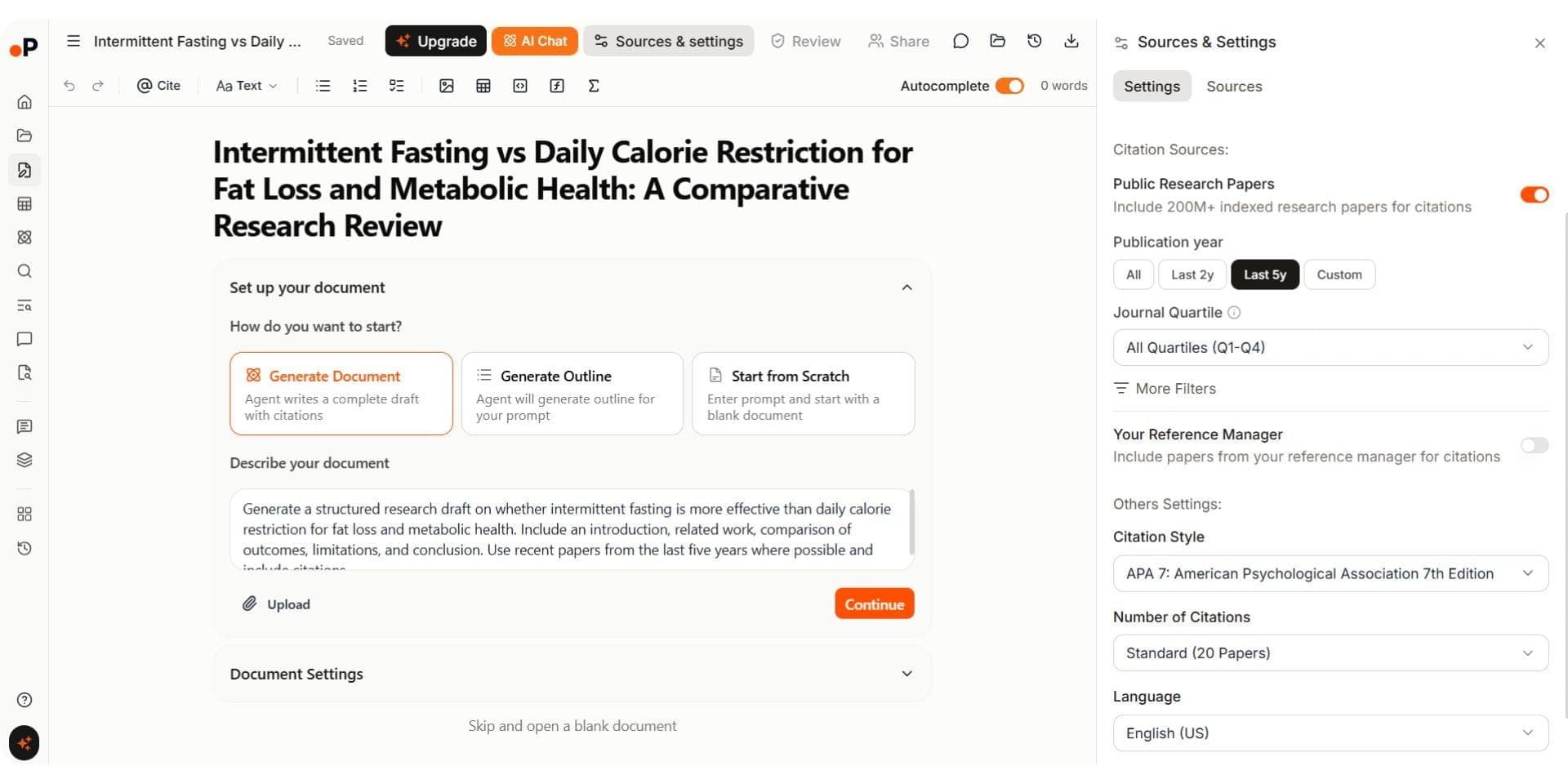
Paperguide's AI Paper Writer now supports full document generation workflows built specifically for academic and scientific research. Instead of starting from a blank editor, researchers can generate a complete draft, generate only an outline, or start from scratch. Before generation, I could define custom writing instructions, choose citation sources from both the 200M+ public research database and my own Reference Manager, filter papers by publication year and journal quartile, select citation styles, and control the number of references used in the draft.
The workflow starts by generating a structured outline and then expands it into a citation-grounded draft with linked references. During testing, I could rewrite, refine, expand, and tighten sections while keeping citations connected to the underlying source papers. Citation insertion also works through "@" commands that pull references directly from the library. Before drafting, it runs a structured research process (find papers, screen against inclusion and exclusion criteria, extract, synthesize) and emails you when the document is ready. Inside the editor, AI Chat finds papers and verifies references, and Smart Continue picks up from the cursor with your selected sources cited. Word documents can be imported and edited with every feature available, and drafts export to Word and PDF. The AI Paper Writer additionally includes plagiarism checking, grammar checking, support for 1,000+ citation styles, and multiple academic document formats including literature reviews, research articles, and reports.
For editing, AI Edit works on any selected text (improve, change tone, simplify, translate) and keeps citation markers in place. Equations go in as KaTeX math blocks, or you describe one in plain English and the AI writes it. Every citation links to a real paper, so references cannot be fabricated.
Prompt used: "Generate a structured research draft on whether intermittent fasting is more effective than daily calorie restriction for fat loss and metabolic health. Include an introduction, related work, comparison of outcomes, limitations, and conclusion. Use recent papers from the last five years where possible and include citations."
Paperguide AI Paper Writer
Paperpal's writing environment is its strongest capability. It combines AI-assisted drafting with a powerful grammar engine. Quick actions include outline generation, brainstorming, and research Q&A. The grammar checker highlighted 70+ suggestions across categories like noun number, punctuation, and word choice, with bulk accept/reject controls. A contextual popup menu lets you search for papers, cite from library, or adjust tone at the sentence level. Paperpal also includes AI disclosure templates (Oxford University Press, PLOS, SAGE), plagiarism checking against 90 billion webpages and 200 million papers, and an AI detector estimating what percentage of text is AI-written.
Prompt used: "Write a structured academic essay on the impact of social media algorithms on user behaviour and mental health. Include key arguments, supporting evidence, and a critical discussion."
Paperpal AI Writer
Verdict: This is the closest comparison in the article. Paperpal has genuinely strong editing with advanced grammar correction, AI detection, plagiarism scanning, and submission-readiness workflows, but Paperguide’s AI Paper Writer is more deeply connected to the broader research workflow with full document generation, citation-grounded drafting, plagiarism checking, and integrated research context from AI Search, Literature Review, and Extract Data. This makes Paperguide one of the best AI paper writing tools for research in 2026 for researchers who need both research and writing inside one platform. Paperpal performs better as a manuscript polishing and editing tool, while Paperguide is stronger for end-to-end research writing workflows.
AI Search
Paperguide's AI Search uses a hybrid semantic and keyword search across 200M+ papers from PubMed, arXiv, OpenAlex, and Semantic Scholar. It breaks questions into multiple sub-queries using an agentic approach, running them in parallel. Results display SJR rankings, SNIP scores, and citation metrics inline, with filters for study type, year, and journal quality. The final answer synthesizes the top 20 papers with source-linked citations, exportable as BibTeX or CSV.
Paperpal does not have a dedicated AI search tool. Research discovery happens through the Ask a Question panel inside the document editor. When I entered a question, the system searched its built-in database and generated an answer with numbered citations alongside a list of top papers showing title, authors, year, and tags. I could cite papers, upload PDFs, or add them to a library. This works for quick research support while writing, but there are no filters for study type, journal quality, or publication metrics.
Verdict: Paperguide is the stronger choice for research discovery with quality signals, multi-query expansion, and filtering. Paperpal's research Q&A is useful for quick answers while writing but lacks the depth needed for thorough paper discovery.
Research Agent
Paperguide's Research Agent handles literature search, gap analysis, study comparison, contradiction detection, structured extraction, and draft generation within one session. During testing, it retrieved and ranked papers, generated comparison tables with source-linked citations, and identified follow-up directions. Outputs could be saved into notebooks or writing workflows.
Paperpal does not have a dedicated research agent. The Ask a Question panel retrieves papers and generates source-backed answers, and can expand paragraphs with additional arguments. But it does not support multi-step tasks like gap analysis, contradiction detection, or structured extraction.
Verdict: Paperguide wins. Its Research Agent handles multi-step tasks including comparison, gap analysis, and draft generation in one session. Paperpal's research assistance supports writing but does not function as an independent research workflow.
Literature Review
Paperguide's Literature Review AI follows a five-step process: planning, search, screening (with SJR, SNIP, and citation metrics), extraction and synthesis, and review generation. Standard Mode handles up to 50 papers. Extended Mode screens up to 200. Outputs include a screening table, extracted data table, structured review with citations, and interactive follow-up. Papers flow into the reference manager and AI Paper Writer.
Paperpal does not have a dedicated literature review workflow. It can help draft review text through its writing assistant, but there is no structured screening, no inclusion/exclusion criteria, and no systematic pipeline from search to synthesis.
Verdict: Paperguide is the clear choice for literature reviews. It provides an end-to-end structured workflow with SJR/SNIP screening and connected reference management. Paperpal can help write review text but lacks the structured process needed for rigorous literature reviews.
Chat with PDF
Paperguide's Chat with PDF supports single-paper and multi-paper interaction. I uploaded a PDF, asked about methodology, then added more papers to compare findings across documents. Responses include inline citations linking to the source paper, page number, and exact passage. Insights feed into literature reviews and writing.
Paperpal offers Chat PDF from the home dashboard (5 uploads/month free, 250 on Prime). Users can ask questions about uploaded content, but the workflow focuses on single-paper interaction rather than multi-paper comparison.
Verdict: Paperguide has the clear advantage. It supports multi-paper comparison with passage-level source verification, and insights connect directly to other research workflows. Paperpal's PDF chat is functional for understanding individual papers but limited for cross-document analysis needed when writing research introductions.
Data Extraction
Paperguide's Extract Data creates structured tables with custom columns (up to 50) and supports up to 100 papers per table on paid plans. Every extracted item links back to the source text for verification. Templates are reusable, and tables export as CSV or Excel.
Paperpal does not offer structured data extraction. The platform focuses on writing and editing, not extracting study details across papers.
Verdict: Paperguide wins. Structured extraction with source verification, custom columns, and export options is essential for writing discussion sections grounded in evidence. Paperpal does not compete in this category.
Reference Manager
Paperguide includes a built-in AI Reference Manager with folders, tags, annotations, highlights, and AI-generated summaries. Import via DOI, URL, BibTeX, RIS, PDF upload, or directly from Zotero or Mendeley. A Chrome extension saves papers from the browser. It supports 1,000+ citation styles, collaboration via shared folders, and a Reference Manager that is limited on Free and unlimited on paid plans.
Paperpal does not have a dedicated reference manager. Users can add papers to a basic library from Q&A results, and the platform generates APA 7th edition references within documents, but this is locked behind the paid plan. There is no import/export for citations, no folder organization, and no Chrome extension.
Verdict: Paperguide is the clear winner with a full research library, multiple import methods, collaboration, and workflow integration. Paperpal's basic library and paywalled references do not compare.
Deep Research Report
Paperguide's Deep Research Report gives researchers manual control at every stage: research questions, search scope, included/excluded papers, screening criteria, extraction fields, and review progression. Every stage includes a confirmation step, making it useful for systematic review workflows where researcher oversight is essential.
Paperpal does not offer deep research or report generation capabilities. Its focus remains on writing assistance, grammar correction, and submission readiness rather than structured research synthesis.
Verdict: Paperguide is the only option for researcher-controlled deep research workflows.
Pricing Comparison
| Plan | Paperguide | Paperpal |
|---|---|---|
| Free plan | $0 (2,000 AI credits/mo) | $0 (200 language suggestions/mo, daily limits on most features) |
| Paid plan | Plus $12 per seat/mo, billed annually ($144/yr) | Prime ~$8.10/mo (annual, ~$97.30/year) |
| Higher tier | Pro $29 per seat/mo, billed annually ($348/yr) | 2-Year Plan ~$9.54/mo ($229 one-time) |
| Long-term option | Evidence Teams $89 per seat/mo, billed annually ($1,068/yr); Enterprise custom | 3-Year Plan ~$8.02/mo ($289 one-time) |
| Student discount | 30% off (valid university email) | Not visible on pricing page |
Paperpal's pricing is straightforward. The Prime plan costs approximately $8.10/month billed annually ($97.30/year), with multi-year options: $229 for two years or $289 for three years. One paid tier unlocks everything.
Paperguide offers Plus at $12 per seat per month and Pro at $29 per seat per month, both billed annually ($144 and $348 a year). Plus includes 12,500 AI credits a month and a plagiarism checker for 20,000 words a month. Pro adds 50,000 credits, systematic reviews up to 5,000 papers, and a plagiarism checker for 100,000 words a month. Paperguide offers a 30% academic discount with a valid university email.
The free plans differ significantly. Paperguide includes 2,000 AI credits a month, a Literature Review Report, Deep Research Report, Extract Data (5 columns, 10 papers), Chat with PDF, a limited Reference Manager, a plagiarism checker for 4,000 words a month. Paperpal's free plan has tighter daily limits: 200 language suggestions/month, 5 uses/day for writing and research Q&A, 5 AI detection scans/day (1,200 words each), 5 PDF uploads/month, and 7,000 words/month for plagiarism. Paperguide gives more before you need to upgrade.
Paperguide vs Paperpal: Final Comparison
| Category | Paperguide | Paperpal |
|---|---|---|
| Best for | End-to-end scientific research | Manuscript editing and submission readiness |
| Paper database | 200M+ (PubMed, arXiv, OpenAlex, Semantic Scholar) | Built-in database (size not specified) |
| Research quality signals | SJR, SNIP, citation metrics | Not available |
| Literature Review | 5-step structured (Standard + Extended) | Not available |
| Chat with PDF | Multi-paper + source verification | Single paper (limited uploads) |
| Data Extraction | Custom columns + source verification | Not available |
| AI writing | Connected + full document generation + plagiarism/grammar checker | AI drafting + grammar + plagiarism + AI detection |
| Grammar & Editing | Built-in checker | Advanced categorized engine with bulk controls |
| Plagiarism Check | Built into the AI Paper Writer | Yes (90B webpages + 200M papers) |
| AI Detection | No | Yes |
| AI Disclosure | No | Yes (student + publisher templates) |
| Reference Manager | Full-featured + Zotero + Chrome extension | Basic library, paywalled references |
| Platform Add-ins | No Word or Google Docs add-in | MS Word, Google Docs, Chrome extension |
| Student discount | 30% academic discount | Not visible |
| Paid pricing | $12 to $29 per seat/mo, billed annually | ~$8.10/mo (annual) |
Final Verdict
Paperguide is the stronger choice for academic and scientific researchers who need a complete workflow from paper discovery to a finished, citation-grounded draft. AI Search, Literature Review, Extract Data, Reference Management, Deep Research Report, and AI Paper Writer all stay connected inside one platform, making Paperguide especially useful for PhD students, graduate researchers, and academic teams handling evidence-heavy research workflows. For evidence synthesis, Paperguide Systematic Review runs protocol-driven reviews with Dual Review (two blind reviewers plus a conflict resolver) or AI Systematic Review with a named verifier, and generates the PRISMA diagram from actual counts.
Paperpal is a genuinely strong manuscript editing and submission-readiness tool. Its grammar engine, plagiarism checker, AI detection, AI disclosure templates, and MS Word/Google Docs integrations make it particularly useful for refining drafts and preparing papers for journal submission. Researchers who already have their research completed and mainly need language polishing and compliance workflows will find Paperpal very useful.
The main difference is scope. Paperpal focuses on editing and manuscript preparation, while Paperguide supports the full research lifecycle from discovery to writing. If you need both research and writing in one platform, Paperguide is the stronger overall choice in 2026 and also stands out among the best AI tools for academic writing in 2026 for connected research workflows.
Frequently Asked Questions
Is Paperguide better than Paperpal?
Paperguide is the better choice for researchers who need an end-to-end research workflow covering search, literature review, data extraction, and connected writing with quality signals at every step. Paperpal is the better choice for manuscript editing, grammar correction, plagiarism checking, and submission readiness. The right tool depends on whether your primary need is research discovery and synthesis or writing refinement and compliance.
Which tool has better grammar and editing features?
Paperpal has a more advanced grammar engine with categorized suggestions (noun number, punctuation, conventions, article usage, word choice) and bulk accept/reject controls. Paperguide includes grammar and plagiarism checking within its AI Paper Writer but does not match Paperpal's depth of language editing categories.
Does Paperpal support literature reviews?
Paperpal does not have a dedicated literature review workflow. It can help draft literature review text through its AI writing assistant by generating content and inserting citations, but there is no structured screening process, inclusion/exclusion criteria, quality-based filtering, or systematic pipeline. Paperguide offers a five-step Literature Review AI with Standard and Extended modes. For a closer look at how Jenni AI and Paperpal compare as writing-first tools, see the Jenni vs Paperpal breakdown.
Which tool is better for plagiarism detection?
Paperpal's plagiarism checker scans against 90 billion webpages and 200 million open-access research papers, offering standard reports on the free plan (7,000 words/month) and detailed reports on Prime (10,000 words/month). Paperguide includes plagiarism checking within its AI Paper Writer on every plan (4,000 words a month on Free, 20,000 on Plus, and 100,000 on Pro and above). Paperpal's dedicated plagiarism workflow is more mature, with larger scan databases and detailed reporting.
Can Paperpal detect AI-generated content?
Yes, Paperpal includes a built-in AI detector that estimates the percentage of text that is AI-written, human-AI blended, or human-written. The free plan allows 5 scans per day with a 1,200-word limit per scan. The Prime plan offers unlimited scans with up to 10,000 words per scan. Paperguide does not currently offer AI detection.
Which tool is more affordable?
Paperpal's Prime plan starts at approximately $8.10 per month on annual billing ($97.30/year), with multi-year options bringing the cost down to $8.02/month. Paperguide Plus costs $12 per seat per month, billed annually ($144 a year), and offers a 30% academic discount with a valid university email, which brings it close to Paperpal's price for students. For non-students who only need writing and editing features, Paperpal offers a lower entry price.
Does Paperpal have a reference manager?
Paperpal does not have a dedicated reference manager. Users can add papers to a basic library, and the platform generates APA 7th edition references within documents, but this is paywalled. There is no import/export for citations. Paperguide offers a full-featured reference manager with multiple import methods, 1,000+ citation styles, and a Chrome extension.
Can I use Paperpal with Microsoft Word?
Yes, Paperpal offers add-ins for Microsoft Word and Google Docs, plus a Chrome extension. These let you use grammar correction, rewriting, and AI tools within your existing writing environment. Paperguide provides a Chrome extension for saving papers but does not offer MS Word or Google Docs add-ins.
Writing a paper?
Write your paper with real citations
Drafts grounded in real papers, with citations in APA, MLA and Chicago.
Start writingNo credit card required