Paperguide vs Thesis AI: Best ThesisAI Alternative for Thesis Writing in 2026


ThesisAI stands out for its ability to generate complete long-form academic documents of up to 80 pages from a single prompt, with built-in Overleaf, Zotero, and Mendeley integration for researchers working in thesis and dissertation workflows. Paperguide approaches research differently by connecting AI Search, Literature Review, Extract Data, AI Paper Writer, Deep Research Report, and Reference Management into one continuous scientific research workflow with research-quality signals like SJR and SNIP visible throughout the process.
The contrast is sharpest when you look at how each tool handles the writing process itself. One platform treats writing as the final stage of an iterative research pipeline where every claim traces back to a verified source. The other treats writing as the primary output, generating a full document upfront and leaving refinement to the researcher afterward. The biggest difference is not iterative drafting versus one-shot generation. It is whether the platform that writes your paper is also the platform that helped you understand the research behind it.
To compare them properly, I tested both platforms hands-on across AI writing, AI search, literature review, Chat with PDF, data extraction, reference management, research quality filtering, and pricing. Below is a detailed breakdown of how each tool performed.
TL;DR
Paperguide is stronger for connected scientific research workflows covering AI-powered search, structured literature reviews with SJR and SNIP screening, custom data extraction, iterative citation-grounded writing with plagiarism and grammar checking, and full reference management. ThesisAI is stronger for generating complete long-form first drafts of up to 80 pages from a single prompt with Overleaf and LaTeX export built in.
Overall, Paperguide offers the better connected AI scientific research workflow in 2026 for researchers who need quality transparency and iterative control from paper discovery through polished writing. ThesisAI is more useful when you have references ready and need a structured thesis or dissertation draft fast, with plans to refine it externally.
| If you need... | Better choice |
|---|---|
| Literature review workflows | Paperguide |
| AI writing | Paperguide |
| Research quality filtering (SJR, SNIP) | Paperguide |
| Multi-paper Chat with PDF | Paperguide |
| Structured data extraction | Paperguide |
| Long-form first draft (up to 80 pages) | ThesisAI |
| Overleaf/LaTeX export | ThesisAI |
| Iterative in-platform editing | Paperguide |
| Reference management | Paperguide |
| Student discount (30% vs 20%) | Paperguide |
| Best overall connected workflow | Paperguide |
paperguide Vs Thesis AI: Quick Comparison
| Feature | Paperguide | ThesisAI |
|---|---|---|
| AI writing | Agentic AI writer with full research draft generation, citation-grounded writing, contextual editing, rewriting, refinement tools, and support for literature reviews, reports, and research papers, plus Smart Continue, KaTeX math blocks and Word import. | One-shot long-form document generation (8 to 80 pages) with limited interactive editing and citation control. |
| Literature Review | 5-step structured workflow with Standard + Extended modes. | Not available as a standalone workflow. |
| AI Search | Hybrid semantic + keyword search with agentic multi-query research across 200M+ papers. | Not available (relies primarily on uploaded references). |
| Research Quality Signals | SJR, SNIP, citation metrics, journal quartiles, and source credibility indicators. | Not visible. |
| Chat with PDF | Multi-paper comparison with passage-level verification and grounded answers. | Not available. |
| Data Extraction | Custom extraction columns, source verification, CSV/Excel export. | Not available. |
| Reference Manager | Integrated reference manager with Zotero and Mendeley import, Chrome extension, collaboration, and 1,000+ citation styles. | Imports from Zotero, Mendeley, and Semantic Scholar mainly for generation workflows. |
| Export Formats | PDF, Word, BibTeX, RIS. | PDF, Word (Pro only), LaTeX, BibTeX, Overleaf. |
| Interactive Editing | Full in-editor AI assistance for rewriting, expanding, refining, summarizing, and improving academic tone using research context. | Primarily chat-based edits with limited in-document controls. |
| Generation Time | Real-time drafting and iterative editing. | Typically 15 to 60 minutes per document. |
| Student Discount | 30% off (university email). | 20% off. |
Workflow Comparison
AI Writer
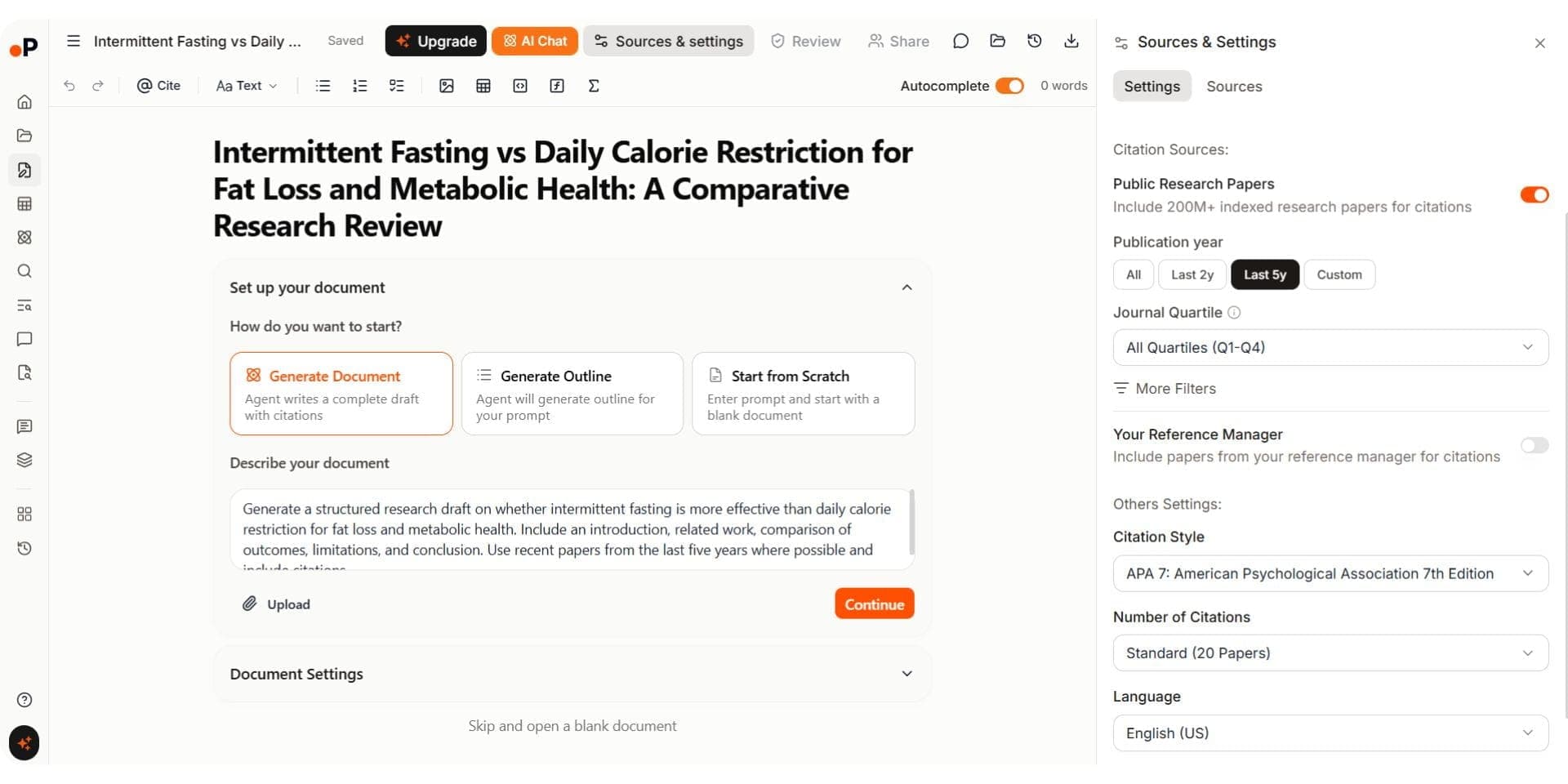
Paperguide's AI Paper Writer now supports full document generation workflows built specifically for academic and scientific research. Instead of starting from a blank editor, researchers can generate a complete draft, generate only an outline, or start from scratch. Before generation, I could define custom writing instructions, choose citation sources from both the 200M+ public research database and my own Reference Manager, filter papers by publication year and journal quartile, select citation styles, and control the number of references used in the draft.
The workflow starts by generating a structured outline and then expands it into a citation-grounded draft with linked references. During testing, I could rewrite, refine, expand, and tighten sections while keeping citations connected to the underlying source papers. Citation insertion also works through "@" commands that pull references directly from the library. The AI Paper Writer additionally includes plagiarism checking, grammar checking, support for 1,000+ citation styles, and multiple academic document formats including literature reviews, research articles, reports, and abstracts.
Like ThesisAI, it can take a target word count, document language and maximum number of references. Before drafting it finds papers, screens them against inclusion and exclusion criteria, extracts and synthesizes, then emails you when the document is ready. After that the draft stays editable: AI Chat verifies references, Smart Continue extends text from the cursor with citations, equations go in as KaTeX, Word files import, and drafts export to Word and PDF.
Paperguide AI Paper Writer
ThesisAI takes a fundamentally different approach. Instead of interactive drafting, it generates an entire document from a single prompt. I configured the number of pages (slider from 8 to 80), selected a citation style, set citation level and coverage, chose the document language, and uploaded reference papers. The process took roughly 20 minutes for a 35-page document. During generation, a progress bar showed percentage completion, but I could not see the evolving content or make adjustments. The output included a table of contents, structured sections (introduction, literature review, methodology, results discussion, conclusion), and inline citations from the uploaded papers. Export options included PDF, LaTeX, Overleaf, Word (Pro only), and BibTeX with a citation report.
ThesisAI can produce a 35-page manuscript with citations in under an hour, which is genuinely useful for thesis and dissertation first drafts. However, there are no in-platform editing tools, no grammar correction, and no paraphrasing. Editing happens through chat prompts or after exporting to Word or Overleaf.
Thesis AI Writer
Verdict: ThesisAI is impressive for generating long-form first drafts quickly, especially for thesis and dissertation workflows where researchers want a structured document fast. Paperguide’s AI Paper Writer is more deeply connected to the broader research workflow with full document generation, iterative editing, citation-grounded drafting, plagiarism checking, and integrated research context from AI Search, Literature Review, and Extract Data. This makes Paperguide one of the best AI paper writing tools for research in 2026 for researchers who need both research and writing inside one platform. ThesisAI works better as a long-form draft generator, while Paperguide is stronger for iterative, research-connected academic writing workflows.
Literature Review
Paperguide's Literature Review AI follows a five-step structured process: planning, search (across PubMed, arXiv, OpenAlex, Semantic Scholar), screening (using SJR, SNIP, and citation metrics), extraction and synthesis, and review generation. It offers Standard Mode (up to 50 papers) and Extended Mode (screens up to 200 papers). The output includes a screening table, extracted data table, structured literature review with citations, and interactive follow-up. Papers flow directly into the reference manager and AI Paper Writer.
ThesisAI does not offer a standalone literature review workflow. It generates a literature review section as part of full document generation. Users upload reference papers (up to 500), enter a prompt, and the output includes a literature review section with citations. However, there is no screening step, no quality filtering, no inclusion/exclusion criteria, and no SJR or SNIP signals. The quality depends entirely on the papers you provide.
Verdict: Paperguide provides a structured, multi-step literature review workflow with quality screening and connected reference management. ThesisAI generates a literature review section within a larger document but without independent screening or quality filtering. For researchers looking at AI thesis statement generators and rigorous source screening, Paperguide is the stronger choice.
AI Search
Paperguide's AI Search uses a hybrid semantic and keyword search across 200M+ papers from PubMed, arXiv, OpenAlex, and Semantic Scholar. The search engine breaks questions into multiple sub-queries using an agentic approach, running them in parallel. Results display SJR rankings, SNIP scores, and citation metrics inline, with filters for study type, publication year, and journal quality. The final answer is synthesized from around the top 20 papers with source-linked citations, exportable as BibTeX or CSV.
ThesisAI does not have an independent AI search feature. It offers Semantic Scholar integration as part of its reference import workflow, which is useful for building a reference collection but is not a research discovery tool. There is no agentic search, no quality-based ranking, and no synthesized answers.
Verdict: Paperguide is the clear choice for research discovery. ThesisAI's Semantic Scholar integration is useful for importing references but does not function as a standalone search tool.
Chat with PDF
Paperguide's Chat with PDF supports single-paper and multi-paper interaction. I uploaded a PDF, asked questions about methodology, then added more papers to compare findings across documents. Responses include inline citations with clickable links to the source paper, page number, and exact passage. Insights feed into literature reviews and writing within the same platform.
ThesisAI does not offer a Chat with PDF feature. Users upload papers as reference sources for document generation, but there is no interactive way to ask questions about individual papers or compare findings across documents.
Verdict: Paperguide has a clear advantage. Its multi-paper Chat with PDF supports passage-level verification and feeds insights into the broader research workflow. ThesisAI does not provide this capability. For researchers who need to interrogate papers before writing, Paperguide is the only option between the two.
Data Extraction
Paperguide's Extract Data creates structured extraction tables with custom columns (up to 50 columns, 100 papers per table on paid plans). Every extracted item links back to the original source text for verification. Templates are reusable, and tables export as CSV or Excel. Extracted data stays connected to the reference manager.
ThesisAI does not offer structured data extraction. The platform reads uploaded papers during generation but provides no way to extract specific data points, create comparison tables, or build structured datasets.
Verdict: Paperguide is the only option for structured data extraction between the two. For building evidence tables with source verification, Paperguide provides a complete workflow that ThesisAI does not attempt.
Reference Manager
Paperguide's AI Reference Manager includes folders, tags, annotations, highlights, notes, and AI-generated summaries. Import via DOI, URL, BibTeX, RIS, PDF upload, or Zotero and Mendeley collections. A Chrome extension saves papers from the browser, and the system automatically fetches metadata. It supports 1,000+ citation styles, collaboration via shared libraries, and the Reference Manager is limited on Free and unlimited on paid plans.
ThesisAI supports importing references from Zotero, Mendeley, Semantic Scholar, and PDF upload (up to 500 papers). However, this is not a reference manager. Imported papers serve exclusively as input for document generation. There are no folders, tags, annotations, or organizational features. After generation, a citation report lists all references used with BibTeX export.
Verdict: Paperguide provides a full-featured reference manager integrated with the research workflow. ThesisAI offers reference import for generation purposes only. For researchers managing a growing library of papers, Paperguide is the clear choice.
Research Agent
Paperguide's Research Agent runs multi-step research workflows including search, comparison, extraction, and draft generation from a single research question. It identifies research gaps and produces structured outputs with citations.
Paperguide Research Agent
ThesisAI does not offer a research agent. Its workflow centers on one-shot document generation from uploaded references rather than interactive, multi-step research tasks.
Verdict: Paperguide's Research Agent handles multi-step research workflows that ThesisAI does not support.
Deep Research Report
Paperguide's Deep Research Report gives researchers manual control at every stage: research questions, search scope, included/excluded papers, screening criteria, extraction fields, and review progression. Every stage includes a confirmation step, making it useful for systematic review workflows where researcher oversight is essential.
Paperguide Deep Research Report
ThesisAI does not offer deep research or systematic review workflows. Document generation happens in a single pass without staged researcher control.
Verdict: Paperguide is the only option for researcher-controlled deep research workflows.
Pricing Comparison
| Plan | Paperguide | ThesisAI |
|---|---|---|
| Free plan | $0 (2,000 credits/mo) | $0 (limited features, no citation report) |
| Entry paid | Plus $12/seat/mo, billed annually ($144/yr) | Basic $11/mo (annual, billed at $132/yr) |
| Mid tier | Pro $29/seat/mo, billed annually ($348/yr) | Pro $14/mo (annual, billed at $168/yr) |
| High tier | Evidence Teams $89/seat/mo, billed annually ($1,068/yr); Enterprise custom | N/A |
| Student discount | 30% academic discount (valid university email) | 20% off |
| Documents per month | Plus: 5, Pro: 20 | 4 (both plans) |
ThesisAI's pricing is straightforward. The Basic plan at $11/month (annual) provides up to 50 pages per document, PDF and LaTeX export, and 4 documents per month. The Pro plan at $14/month (annual) unlocks 80-page documents, Word export, citation reports, and low AI-detectability optimization.
Paperguide's pricing covers a broader set of tools. The Plus plan at $12 per seat per month, billed annually ($144 a year), includes 12,500 AI credits a month, AI Search, Literature Review, Chat with PDF, Extract Data, AI Paper Writer with 5 document generations, a plagiarism checker for 20,000 words a month, and an unlimited Reference Manager. The Pro plan at $29 per seat per month, billed annually ($348 a year), includes 50,000 credits, 20 AI Paper Writer documents, and a plagiarism checker for 100,000 words a month.
The key difference is what your money buys. ThesisAI charges for document generation, and you receive a finished manuscript. Paperguide charges for access to an entire research workflow. ThesisAI may cost less per month, but the 4-document monthly limit means each revision consumes your allowance. Paperguide's iterative model lets you refine the same document without consuming additional generations.
Paperguide offers a 30% academic discount with a valid university email. ThesisAI offers a 20% student discount. Paperguide's free plan includes 2,000 credits a month with access to most features, while ThesisAI's free plan is more limited.
Paperguide vs ThesisAI: Final Comparison
| Category | Paperguide | ThesisAI |
|---|---|---|
| Best for | End-to-end scientific research | Long-form first-draft generation |
| Paper database | 200M+ (PubMed, arXiv, OpenAlex, Semantic Scholar) | Semantic Scholar (import only) |
| Research quality signals | SJR, SNIP, citation metrics, journal quartiles | Not visible |
| AI writing | Connected + full document generation + plagiarism/grammar checker | One-shot generation (8 to 80 pages) |
| Literature Review | 5-step structured (Standard + Extended) | Generated as part of full document |
| Chat with PDF | Multi-paper + source verification | Not available |
| Data Extraction | Custom columns + source verification | Not available |
| Reference Manager | Full-featured + Zotero + Chrome extension | Import for generation only |
| Interactive Editing | In-platform rewriting, expanding, tightening | Chat prompts or post-export editing |
| Export Formats | PDF, Word, BibTeX, RIS | PDF, LaTeX, Word (Pro), BibTeX, Overleaf |
| Deep Research Report | Yes (manual control at every stage) | Not available |
| Generation Time | Real-time | 15 to 60 minutes |
| Max Document Length | No fixed page limit | 80 pages (Pro) |
| Reference Import | DOI, URL, BibTeX, RIS, PDF, Zotero, Mendeley, Chrome ext | PDF, Zotero, Mendeley, Semantic Scholar |
| Citation Styles | 1,000+ | APA, IEEE, Harvard, Chicago, and others |
| Student Discount | 30% off (university email) | 20% off |
| Pricing (entry) | $12/seat/mo (annual) | $11/mo (annual) |
Final Verdict
Paperguide is the stronger choice for academic and scientific researchers who need a complete workflow from paper discovery to a finished, citation-grounded draft. AI Search, Literature Review, Extract Data, Reference Management, Deep Research Report, and AI Paper Writer all stay connected inside one platform, allowing researchers to move from discovery to writing with stronger quality control and workflow continuity. For evidence synthesis, Paperguide Systematic Review runs protocol-driven reviews with Dual Review (two blind reviewers plus a conflict resolver) or AI Systematic Review with a named verifier, and generates the PRISMA diagram from actual counts. This makes Paperguide especially useful for PhD students, graduate researchers, and academic teams working on evidence-heavy research projects.
ThesisAI fills a different role. Its ability to generate long-form thesis and dissertation drafts of up to 80 pages from a single prompt is genuinely useful for researchers who already have references prepared and want a structured first draft quickly. The Overleaf and LaTeX export options are also valuable for researchers working in LaTeX-based academic environments.
The main difference is workflow depth. ThesisAI focuses on one-shot long-form generation, while Paperguide supports the full research lifecycle from discovery and screening to extraction, writing, and citation management. If you need both research and writing in one platform, Paperguide is the stronger overall choice in 2026 and also stands out among the best AI tools for academic writing and for connected academic and scientific research workflows.
Frequently Asked Questions
Is Paperguide better than ThesisAI?
Paperguide is the better choice for researchers who need a connected end-to-end research workflow with quality signals, iterative writing, and integrated reference management. ThesisAI is stronger for generating long first drafts (up to 80 pages) from a single prompt when you have reference papers ready. The right choice depends on whether you need a research platform or a draft generator.
Can ThesisAI generate an entire thesis?
ThesisAI can generate documents between 8 and 80 pages with structured sections, a table of contents, and inline citations. It produces a first draft, not a submission-ready thesis. Researchers still need to craft a strong thesis statement and refine arguments manually. The output requires citation verification, factual validation, and manual editing before it can be used academically. Generation takes 15 to 60 minutes depending on document length and number of uploaded papers.
Which tool is better for literature reviews?
Paperguide offers a five-step structured literature review workflow with inclusion/exclusion criteria, SJR/SNIP screening, and two modes (Standard handles up to 50 papers, Extended screens up to 200). ThesisAI generates a literature review section within a full document but without independent screening, quality filtering, or connected reference management. For rigorous academic literature reviews, Paperguide is the better choice.
Does ThesisAI support interactive editing?
ThesisAI does not offer in-platform editing tools like sentence-level rewriting, paraphrasing, or grammar correction. After document generation, users can make changes through follow-up chat prompts. For full editing, users must export to Word or Overleaf. Paperguide provides in-platform rewriting, expanding, tightening, and AI-assisted refinement.
Which tool is more affordable for students?
Paperguide offers a 30% academic discount with a valid university email. ThesisAI offers a 20% student discount. Paperguide's free plan also includes 2,000 credits a month with access to most features, while ThesisAI's free plan is more limited.
Can I import my Zotero library into these tools?
Both tools support Zotero import. Paperguide also supports Mendeley, DOI, URL, BibTeX, RIS, PDF upload, and has a Chrome extension for saving papers from the browser. ThesisAI supports Zotero, Mendeley, Semantic Scholar, and PDF upload, but imported papers are used exclusively for document generation rather than reference management.
How long does ThesisAI take to generate a document?
ThesisAI takes between 15 and 60 minutes depending on page count and number of uploaded papers. Users cannot preview the document during generation. Paperguide's AI Paper Writer generates drafts in real time.
Which tool has better export options?
ThesisAI offers PDF, LaTeX, Overleaf, Word (Pro only), and BibTeX, making it strong for LaTeX workflows. Paperguide offers PDF, Word, BibTeX, and RIS with 1,000+ citation styles via its reference manager. The better option depends on whether you work primarily in LaTeX (ThesisAI) or need broader citation management (Paperguide).
Writing a paper?
Write your paper with real citations
Drafts grounded in real papers, with citations in APA, MLA and Chicago.
Start writingNo credit card required