5 Best Citation Network Visualization Tools (Free + Paid)


The best citation network visualization tool in 2026 is Paperguide's free Citation Graph. It plots a seed paper's network on a timeline, sizes each paper by citations and labels why it appears. In our blind test its papers scored 1.75 of 2 for relevance, level with Connected Papers at 1.77.
Citation network visualization turns the links between papers into a picture you can read. Some tools draw one paper's neighborhood: what it cites, what cites it and what sits close to it. Others, such as bibliometric software, map a whole field from a database export. In each case, the picture depends on what a line means, what position, size and color encode, and how many papers fit on screen.
We tested four of the five tools hands-on. Each ran on a free plan with the same three seed papers: a meta-analysis of cognitive behavioral therapy for insomnia [1], Hattie and Timperley's review of feedback in education [2] and "Attention Is All You Need" [3]. For every map we read the legend, counted the papers on screen and timed the first picture. We then pooled each tool's top 20 papers per seed, shuffled them and had judges score each one 0 to 2 without seeing which tool suggested it. VOSviewer maps database exports rather than a seed paper, so we did not test it hands-on and it has no score.
TL;DR
Paperguide Citation Graph is the best citation network visualization tool in 2026. Its timeline shows year across, citations up and arrows for who cites whom, and every paper carries a "Why it's here" reason. It scored 1.75 of 2 for blind relevance, with no paper off-topic. Connected Papers ties on relevance (1.77) with the clearest similarity cluster. In contrast, Inciteful exposes a field's foundations, Local Citation Network stacks a reference list by year, and VOSviewer maps whole fields.
Key Takeaways
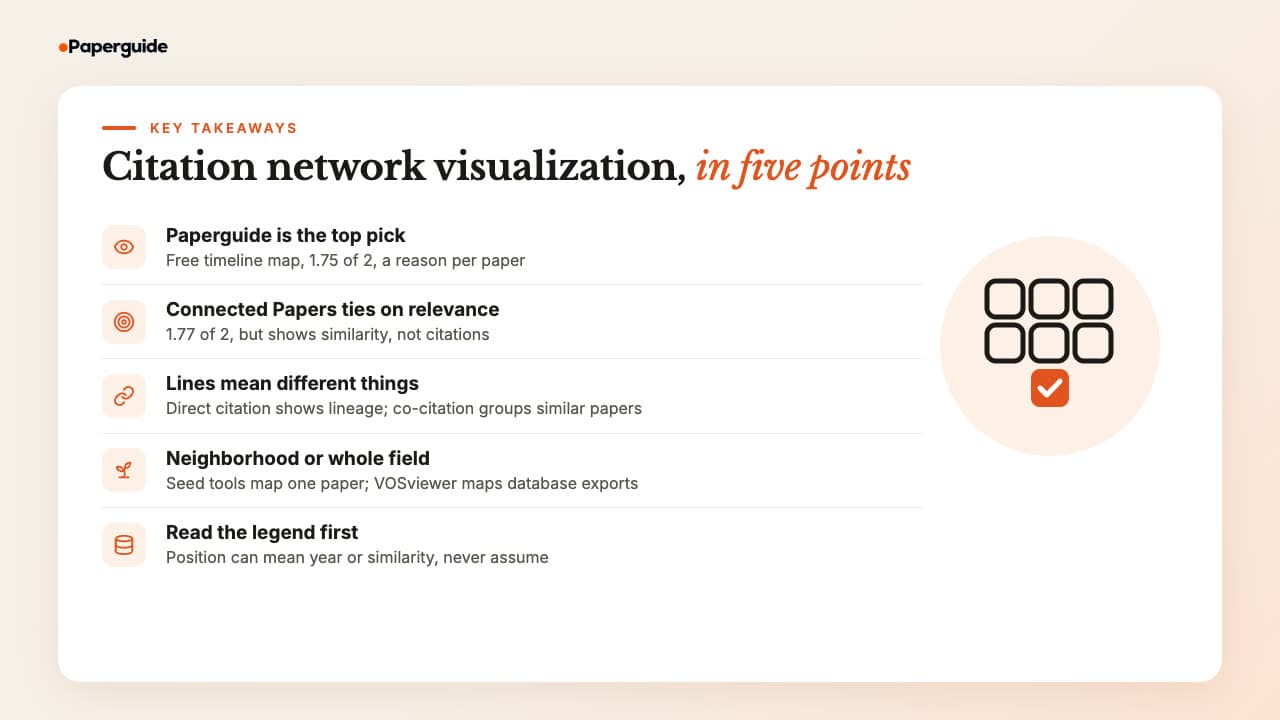
- Paperguide's Citation Graph is the best citation network visualization tool in 2026: a readable timeline, a reason on every paper and 1.75 of 2 for relevance, free.
- Connected Papers tied on relevance at 1.77 of 2, but its graph shows similarity rather than citations, and free accounts get five graphs a month.
- What a line means decides what the picture shows: direct citation traces a paper's lineage, while co-citation and shared references group similar papers.
- Seed tools draw one paper's neighborhood; bibliometric software such as VOSviewer maps a whole database export.
- Read the legend first: position meant year in Paperguide and Local Citation Network, but similarity in Connected Papers and Inciteful.
What Are the Best Citation Network Visualization Tools?
The best citation network visualization tools in 2026 are Paperguide Citation Graph, Inciteful, Local Citation Network, VOSviewer and Connected Papers. Paperguide is the best overall: an explained timeline of citations from up to five seeds, free. Inciteful and Local Citation Network are free with no account, VOSviewer maps whole fields from database exports, and Connected Papers ties Paperguide on relevance.
How to Choose a Citation Network Visualization Tool
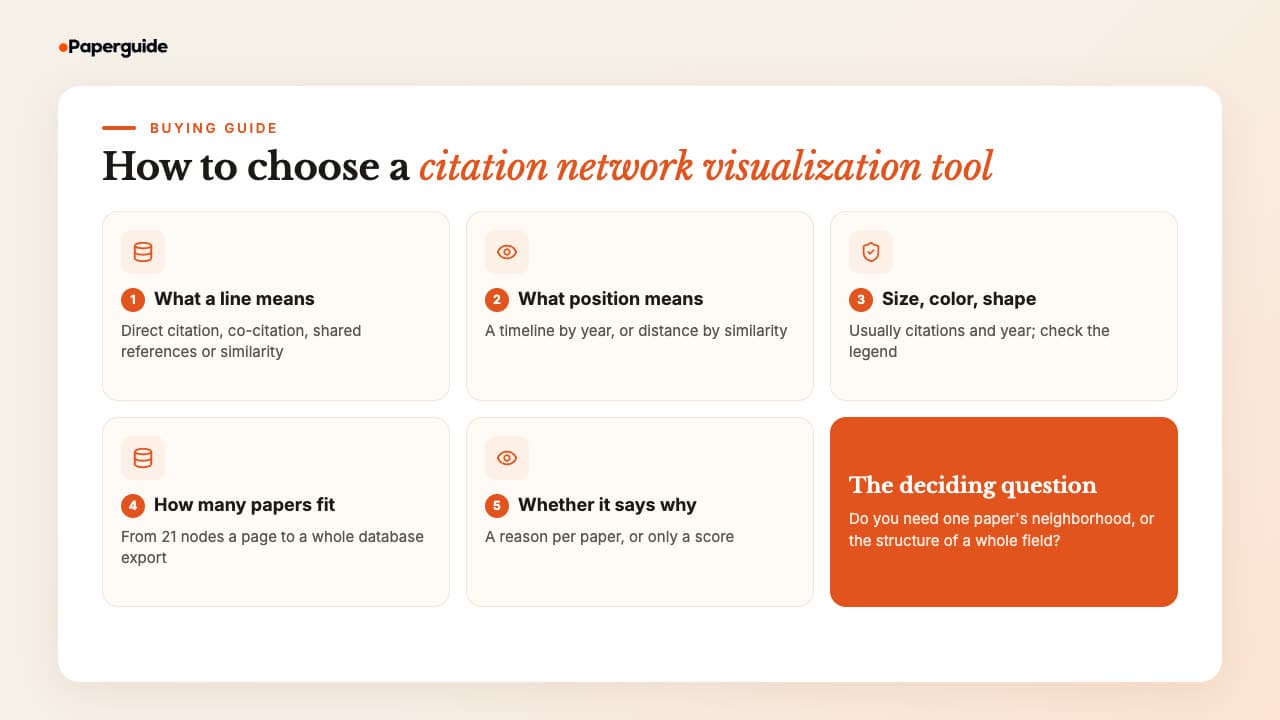
Choose a citation network visualization tool by what you need to see. Decide first whether you want one paper's neighborhood or a whole field's structure. Then check what a line means, what position, size and color encode, how many papers the picture holds, and whether the tool tells you why each paper is there.
A citation map shows how papers connect through references and citations. A visualization tool decides how that map is drawn, and the same seed can produce very different pictures. Weigh these five things.
1. What a line means. For example, a direct citation line points from a citing paper to the paper it cites. Co-citation links two papers that later work cites together [4], and bibliographic coupling links two papers that share references [5]. Similarity graphs, however, merge these into one score, so a line says "close" but not "cites".
2. What position means. Paperguide puts year on the horizontal axis and citations on the vertical one. Local Citation Network stacks years from newer at the top to older at the bottom. In contrast, Connected Papers and Inciteful use force layouts, where distance means similarity and left or right says nothing about time.
3. What size, color and shape encode. Size usually means citations and color often means year. Local Citation Network also gives each paper's role its own shape.
4. How many papers fit. Connected Papers draws 41 nodes, Paperguide 20 per page from a ranked list of 1,190 to 1,447, and Local Citation Network over 100 for a long reference list. In other words, bigger pictures show structure and smaller ones keep labels readable.
5. Whether it says why. Only Paperguide labels whether two papers are close because of co-citation, shared references, direct citation or topic.
If you do not yet have a paper to start from, the AI tools for finding research papers are a better first step, and the picture comes after.
One Paper's Neighborhood or a Whole Field?
Seed-based tools start from papers you already trust and draw what surrounds them. They answer "what should I read next around this paper?", which suits a thesis chapter or a review's citation searching. All four tools we tested work this way, and the citation map generators that start from a seed paper compare more of them on speed and limits.
Bibliometric software, by contrast, maps the records you export from a database search. The picture covers whatever your search retrieved, so it shows a field's structure rather than one paper's neighbors. Field maps can be very large: Boyack and Klavans clustered 2,153,769 biomedical articles by direct citation, co-citation and bibliographic coupling, and each approach placed over 92% of the corpus in clusters [6]. VOSviewer is the field-mapping tool on this list. Topic maps that start from a keyword are covered among the tools for mapping a whole research topic.
How to Read a Citation Network Visualization
Each tool encodes the same network differently, so read the legend before the picture. This table sets out what position, size, color and lines meant in the four tools we tested; VOSviewer is left out because we did not test it.
| Tool | Position means | Node size | Color | Lines | What links two papers |
|---|---|---|---|---|---|
| Paperguide Citation Graph | Year from "Oldest" to "Recent"; "Higher = more cited" | Citations | Orange seed, white related papers | Arrows for "Cites" | Direct citation, co-citation, shared references or topic, named on each paper |
| Inciteful | Force layout | No legend | Publication year scale | Unlabeled links | A two-step citation network, ranked by similarity |
| Local Citation Network | Year rows, newer at top | Citations to and from the seeds | One color per year (or per journal) | Citation links | Direct citation only |
| Connected Papers | Force layout by similarity | Citations | Publication year | Stronger lines for more similar papers | Co-citation and bibliographic coupling, "not a citation tree" |
Quick Comparison: Best Citation Network Visualization Tools in 2026
The quickest way to compare citation network visualization tools is by the picture each one draws and what it is good for. Paperguide and Connected Papers lead on relevance, Inciteful is best for spotting foundations, Local Citation Network shows a reference list's structure, and VOSviewer maps a whole field from your own database export.
| Tool | Best picture for | What a link means | Layout | Papers on screen | Blind relevance (of 2) | Free plan | Paid from (US) |
|---|---|---|---|---|---|---|---|
| Paperguide Citation Graph | A seed's neighborhood, with reasons | Direct citation, co-citation, shared references, topic | Timeline, higher = more cited | 20 per page, from 1,190 to 1,447 ranked | 1.75 | Free, no signup, no graph limit stated | Platform plans from $12 a month, billed annually |
| Inciteful | Spotting foundational papers | Two-step citation network, link prediction, PageRank | Force graph colored by year | Top similar papers, from a network of 44,606 to 138,520 | 1.42 | Free, no account | Free |
| Local Citation Network | A reference list's internal structure | Direct citation only | Year rows, shapes by role | Over 100 for a long reference list | 1.15 | Free, no account | Free |
| VOSviewer | A whole field from a database export | Not tested | Not tested | Your exported records | Not tested | Free desktop software | Free |
| Connected Papers | One paper's similarity cluster | Co-citation and bibliographic coupling | Force graph colored by year | 41 nodes | 1.77 | 5 graphs a month | $6 a month, billed annually |
Prices are US list prices at the time of writing.
Best Citation Network Visualization Tools in 2026
The five best citation network visualization tools in 2026 are Paperguide Citation Graph, Inciteful, Local Citation Network, VOSviewer and Connected Papers. Each section explains what you see on screen, how to read it and what the picture is good for, followed by its blind relevance score, features, limits and pricing.
1. Paperguide Citation Graph
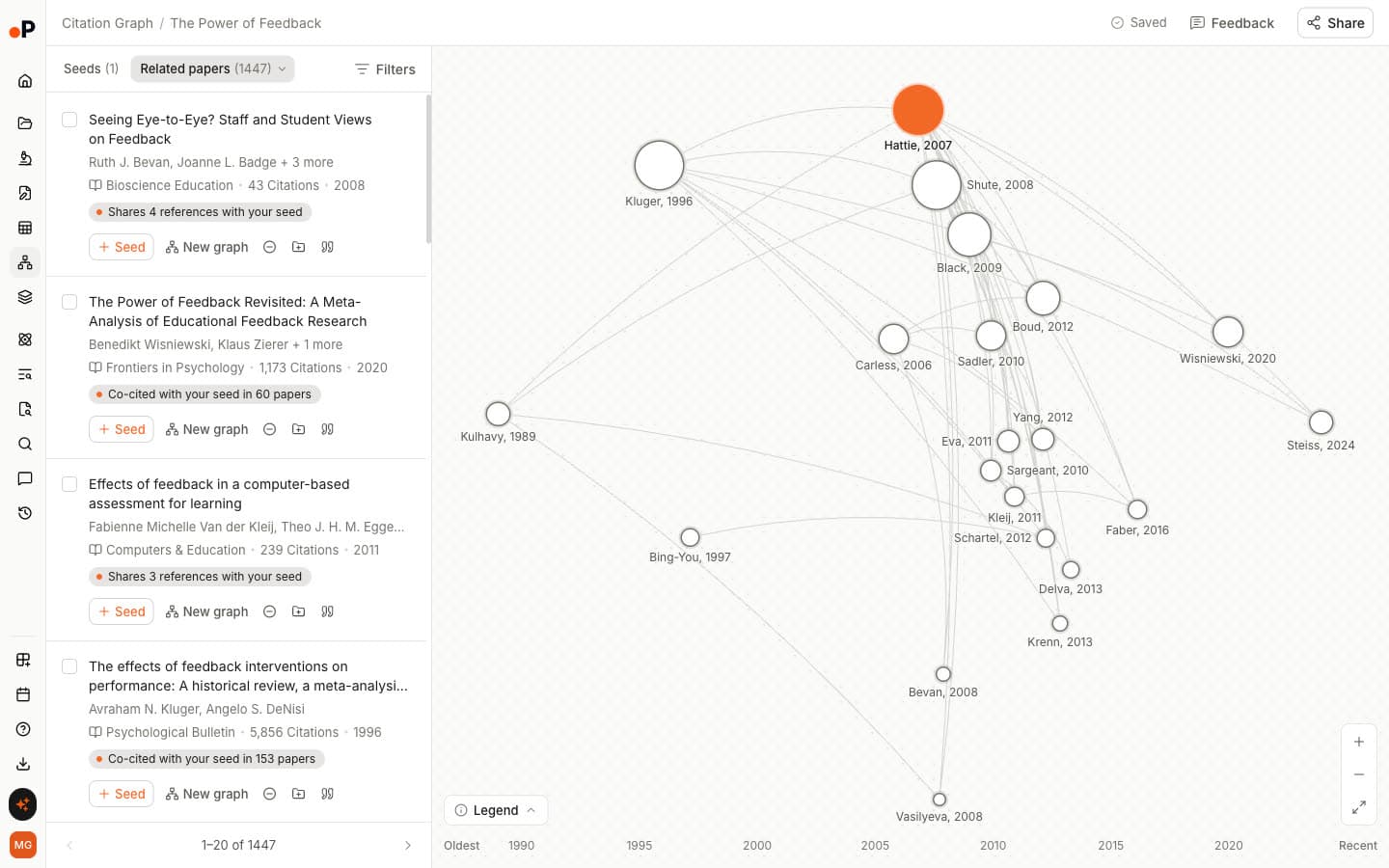
Paperguide's Citation Graph is a free citation network visualization tool inside Paperguide, the AI-native platform for scientific research workflows and systematic reviews. It draws one to five seed papers and the work around them on a timeline, and labels why each paper is shown. You can build and browse a graph without signing up.
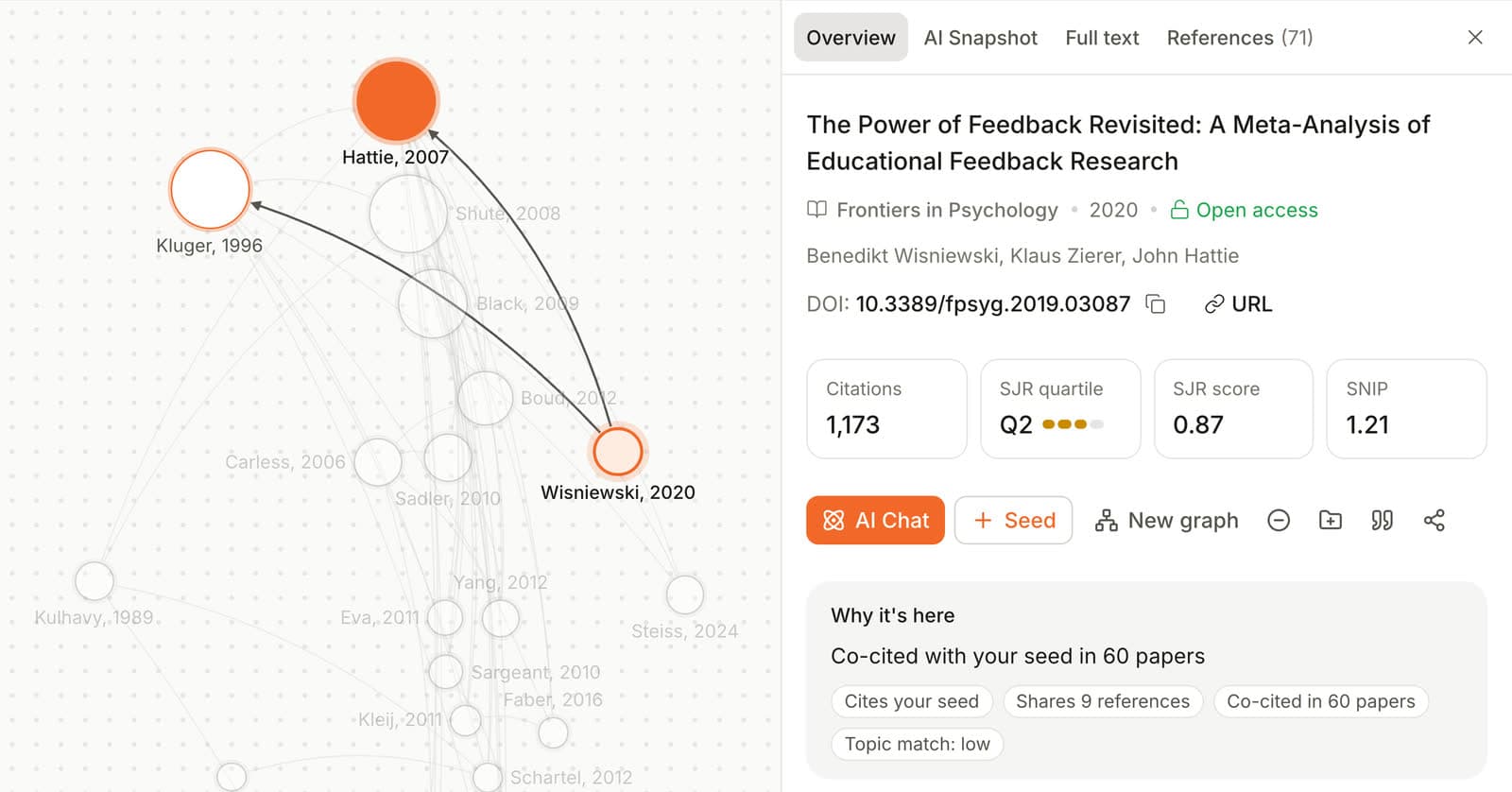
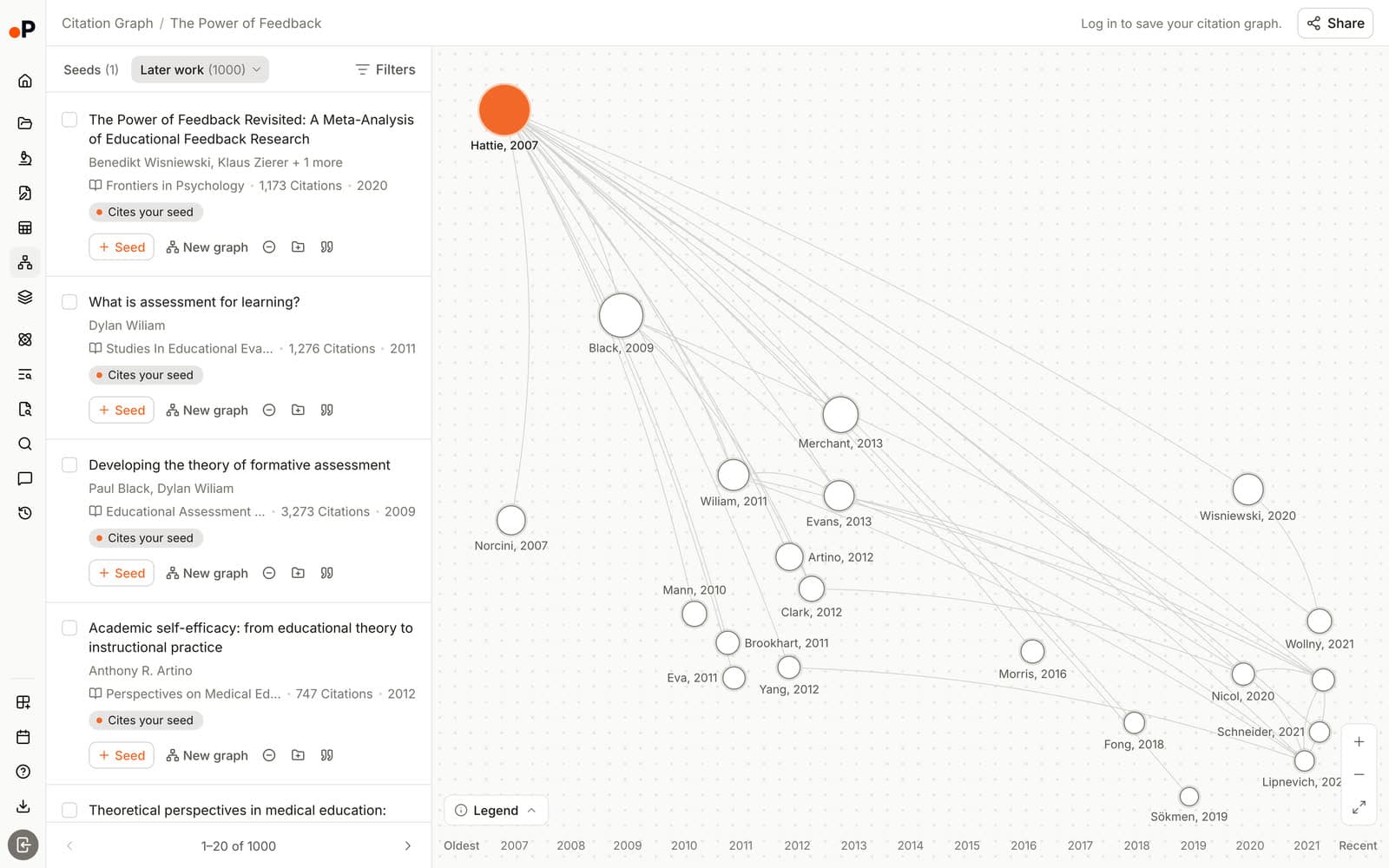
What you see. Papers sit on a horizontal timeline from "Oldest" to "Recent". The legend reads "Size = citations" and "Higher = more cited", the seed is orange, and arrows mark "Cites". The map draws the 20 papers on the current page around the seed, so labels stay readable, while the list beside it ranked 1,190 to 1,447 papers per seed. Earlier work and Later work redraw the map with what the seed builds on and what built on it.
How to read it. Large nodes high on the left are older, heavily cited papers, usually the foundations. Small nodes low on the right are recent work that has not yet gathered citations. Click any node and its "Why it's here" panel names the link, such as "Co-cited with your seed in 60 papers". Chips such as "Cites your seed" and "Shares 9 references" break it down.
What it is good for. Getting oriented around a paper you trust and telling foundations from new work at a glance. Specifically, with two insomnia seeds, all 20 top papers carried a label tying them to both seeds, such as "Co-cited with 2 of your seeds", which shows exactly where two lines of work overlap.
In our test: Paperguide scored 1.75 of 2, with 75% of papers rated core and none rated off-topic. On the same seeds it tied with Connected Papers on relevance (1.77), so it does not find more relevant papers than Connected Papers; what it adds is a picture that explains itself. The first map took 26 to 32 seconds and used no AI credits.
Key Features
- Citation Graph: Related papers, Earlier work and Later work from 1 to 5 seeds, with a "Why it's here" label on every paper and no graph limit stated.
- Paper panel: Citations, SJR quartile, SJR score and SNIP beside the reason chips.
- Grow the map: "Seed" adds any paper to the graph and "New graph" starts a fresh one from it. Signed in, you can seed from your Reference Manager.
- Saved and shared graphs: Graphs save automatically, named after the first seed, and share by link with "Can edit", "Can view" or "No access".
- Exclude and Cite: Remove off-topic papers or copy a citation.
- AI Search: Cited answers across 200M+ papers, with a "Graph" button on every reference to start a map from it.
Pros
- The only picture here that says why each paper appears, including how many seeds it links to.
- Relevance tied for first in our blind test, with no off-topic papers.
- Free with no signup, no graph limit stated and no AI credits used.
Cons
- 26 to 32 seconds to the first map, slower than Inciteful.
- One fixed timeline layout, with no clustered view.
- No export of the picture itself; papers export through the Reference Manager.
- The arXiv DOI for the transformer paper failed, and title search matched a duplicate record dated 2025.
Pricing
| Plan | Price | What it covers |
|---|---|---|
| Citation Graph | Free | No signup to build or browse; signed-in graphs save to your account |
| Free | $0 | 1,500 AI credits a month for the wider platform |
| Plus | $12 per seat per month, billed annually ($144 a year) | 12,500 AI credits a month |
| Pro | $29 per seat per month, billed annually ($348 a year) | 50,000 AI credits a month |
| Evidence Teams | $89 per seat per month, billed annually ($1,068 a year) | 150,000 AI credits a month, dual reviewer screening |
Best For: PhD students, systematic review teams and HEOR groups who want a readable picture of a paper's network, a reason for every paper, and a direct path into reading and writing.
Verdict: Paperguide's Citation Graph is the best citation network visualization tool in 2026: a timeline anyone can read, a reason on every paper and 1.75 of 2 for relevance, free. It is not the fastest, and it does not export the picture.
2. Inciteful
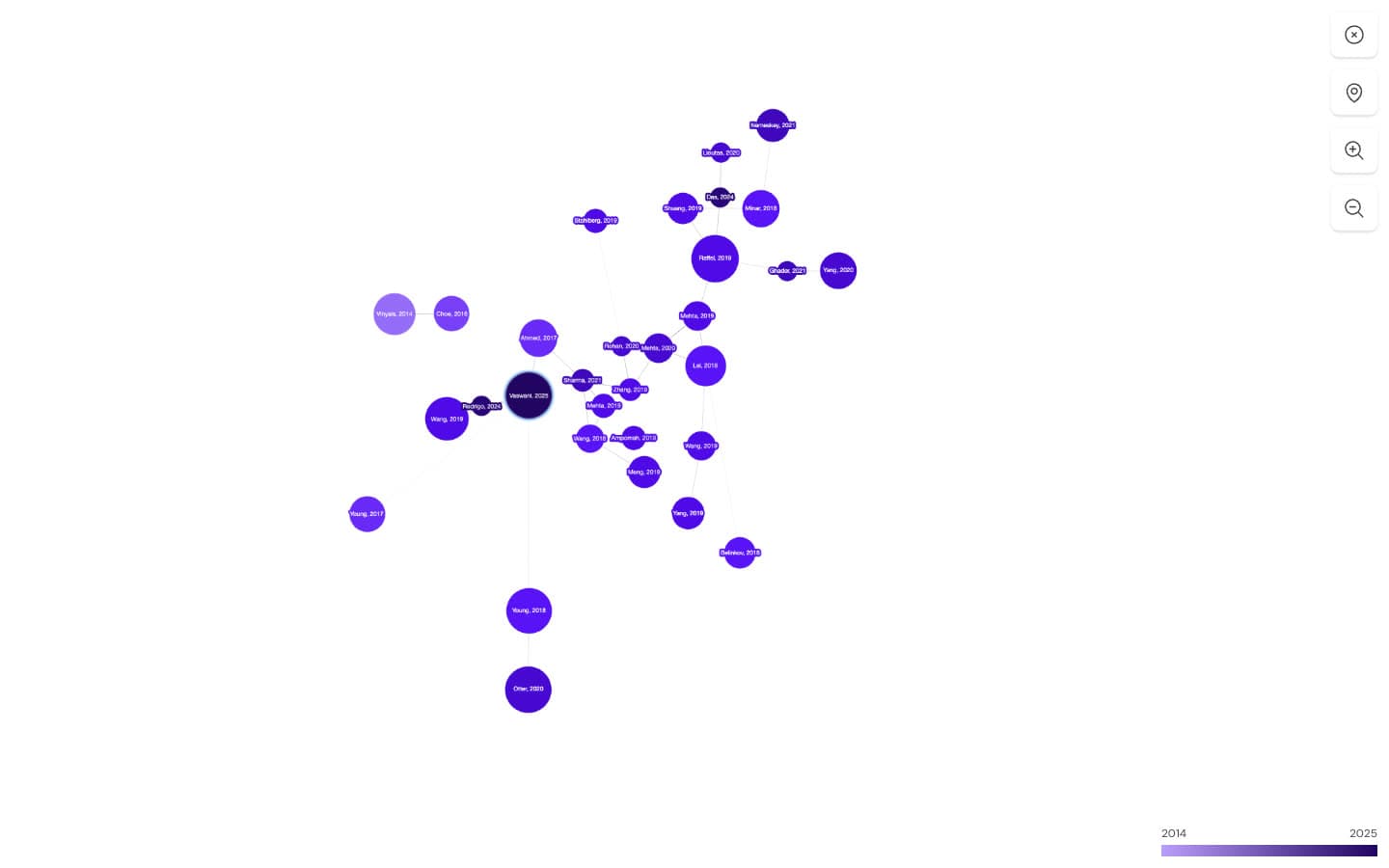
Inciteful is a free, open-source citation network tool that builds a network two steps out from your seed papers using OpenAlex data, then ranks it with network algorithms. It needs no account and describes itself as "100% Free to use".
What you see. A small force-directed graph of the top similar papers, each node labelled "Author, Year" and shaded on a publication-year scale, with zoom and full-screen controls. There is no written legend beyond that scale. However, a far larger network sits behind it: 44,606 papers for the insomnia seed, 83,783 for the feedback review and 138,520 for the transformer paper.
How to read it. Closeness shows how tightly papers are linked, not when they appeared, so use the color scale for age. Notably, the ranked tables carry most of the meaning. "Similar Papers" "tend to bias towards newer papers in the field", while "Most Important Papers", ranked by PageRank, "tend to be the older papers in the field".
What it is good for. Spotting foundational papers. For the insomnia meta-analysis, PageRank surfaced the instruments the field is built on, such as the Pittsburgh Sleep Quality Index (1989) and Beck's inventory for measuring depression (1961). For the transformer paper it surfaced Long Short-Term Memory (1997) and BLEU.
In our test: Inciteful scored 1.42 of 2, with 3% off-topic, and built each page in about 5 to 10 seconds (6.1 seconds for the feedback review). However, the transformer seed resolved to a record dated 2025 with the wrong DOI. Its similar list then opened with off-topic papers, such as a Spanish thesis on art and machine learning. With two seeds, all 20 top similarity scores were identical, so their order was a tie-break.
Key Features
- Paper Discovery tables: Similar Papers, Most Important Papers, Review Papers, The Most Important Recent Papers, Top Authors and Top Journals.
- View SQL and filters: The exact query behind each table, plus keyword, year and distance filters.
- Literature Connector: The shortest citation path between two papers, up to six hops.
- Multi-seed: Add papers with the purple plus; it recommends "at least five papers".
- Export: "BibTex", "RIS", "Mendeley" and "Zotero" from every table, plus a Zotero plugin.
Pros
- Free with no account, and open about how it ranks papers.
- PageRank makes a field's foundations easy to find.
- Fast for a network of tens of thousands of papers.
Cons
- The graph is small, with no legend beyond the year scale.
- No saved maps or share links beyond the page URL.
- No per-paper reason, only a numeric similarity score.
- The transformer seed matched the wrong record.
Pricing: Free. "Our core tools are free to use and always will be."
Best For: Researchers who want a free picture of a citation network plus ranked lists of its foundational and recent papers.
Verdict: Inciteful is the best free tool for finding a field's foundational papers, with 1.42 of 2 for relevance. Its picture is small, though, and nothing is saved between visits.
3. Local Citation Network
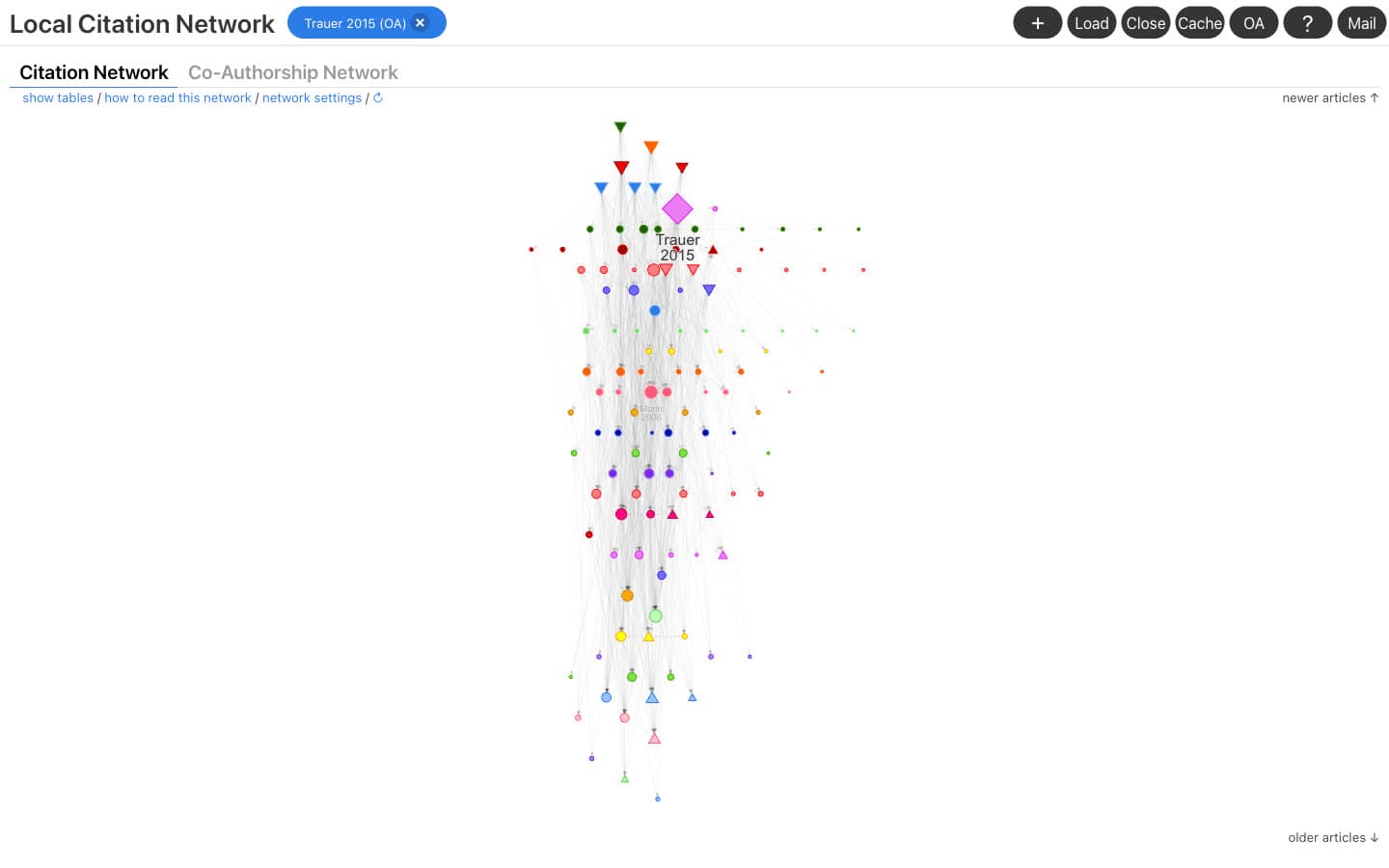
Local Citation Network is a free, open-source web app that turns a paper's reference list, or any list of DOIs, into a citation network. It runs in the browser with no account and no cookies.
What you see. The "Citation Network" view orders papers by year "from top (newer) to bottom (older), with each year colored differently". Node size is the sum of citations to and from the seed articles. Seeds are circles, the source paper is a diamond, and "Top Cited" and "Top Citing" papers are up and down triangles. The insomnia meta-analysis produced 101 seed articles plus 20 suggestions. A second view, "Co-Authorship Network", maps the authors instead.
How to read it. Up triangles near the bottom are older papers that many of your seeds cite: the foundations of the reference list. Down triangles near the top are newer papers that cite many of your seeds. "Network settings" can also color nodes by journal instead of year.
What it is good for. Seeing the internal structure of one reference list, with every line a literal citation. For example, the most cited missing reference for the insomnia meta-analysis was Ford's 1989 study of sleep disturbances, cited by 29 of the seeds. For the feedback review, it was the Handbook of Research on Teaching (1986), cited by 8.
In our test: Local Citation Network scored 1.15 of 2, with 20% off-topic. It was also the slowest tool. The transformer paper took about 55 seconds, the insomnia meta-analysis about 165 seconds and the feedback review over three minutes, with an "estimated completeness" of 85% and 67% on the two larger ones.
Key Features
- Top Cited and Top Citing: Ten backward and ten forward suggestions.
- Flexible input: A source DOI, a custom ID list, a RIS or BibTeX file, or a bookmarklet on journal pages.
- Systematic review support: "All Cited" and "All Citing" lists for direct citation searching.
- Export: Articles as CSV or RIS, and the full network as JSON to reload later.
Pros
- The clearest legend of any tool here, with shapes for each paper's role.
- Direct citation only, so every line means "cites".
- Free, open source and private, with no account.
Cons
- Slow on long reference lists, with incomplete data on large ones.
- A long reference list becomes a dense column that is hard to label.
- No share links; networks live in browser storage.
Pricing: Free and open source.
Best For: Systematic reviewers and students who want to see how a reference list cites itself and which papers it is missing.
Verdict: Local Citation Network draws the most literal picture here, a reference list stacked by year with a precise legend, if you can wait a few minutes per network.
4. VOSviewer
VOSviewer is free desktop software for building bibliometric maps from records you export from bibliographic databases. It is the one tool here that visualizes a field rather than one paper's neighborhood. We did not test it hands-on, so it has no relevance score or screenshot, and this section draws only on its own site.
What you see. A map of the records your database search exported. Your search, not a seed paper, decides what goes into the picture, so the map reflects how well you searched.
What it is good for. Seeing a field's structure across a whole result set once you already have a database search, rather than finding the next paper to read.
Key Features
- Database exports as input: The map covers the records you export.
- Desktop software: It runs on your own computer; the current release is version 1.6.21.
- Free licence: In its own words, "The software can be used freely for any purpose."
Pros
- Free, with no account.
- Maps a whole result set, not only the papers linked to one study.
Cons
- Not a paper recommender: it does not start from a seed paper.
- Needs a database export first, which adds a step before any map appears.
- A desktop install rather than a web app.
Pricing: Free software.
Best For: Researchers who already have a database search and want a bibliometric map of that whole set of records.
In our test: Not tested hands-on and not scored, because it maps database exports rather than drawing the network around a seed paper.
Verdict: VOSviewer is the tool for a field-level picture built from a database export, a different job from the four seed-based tools here.
5. Connected Papers
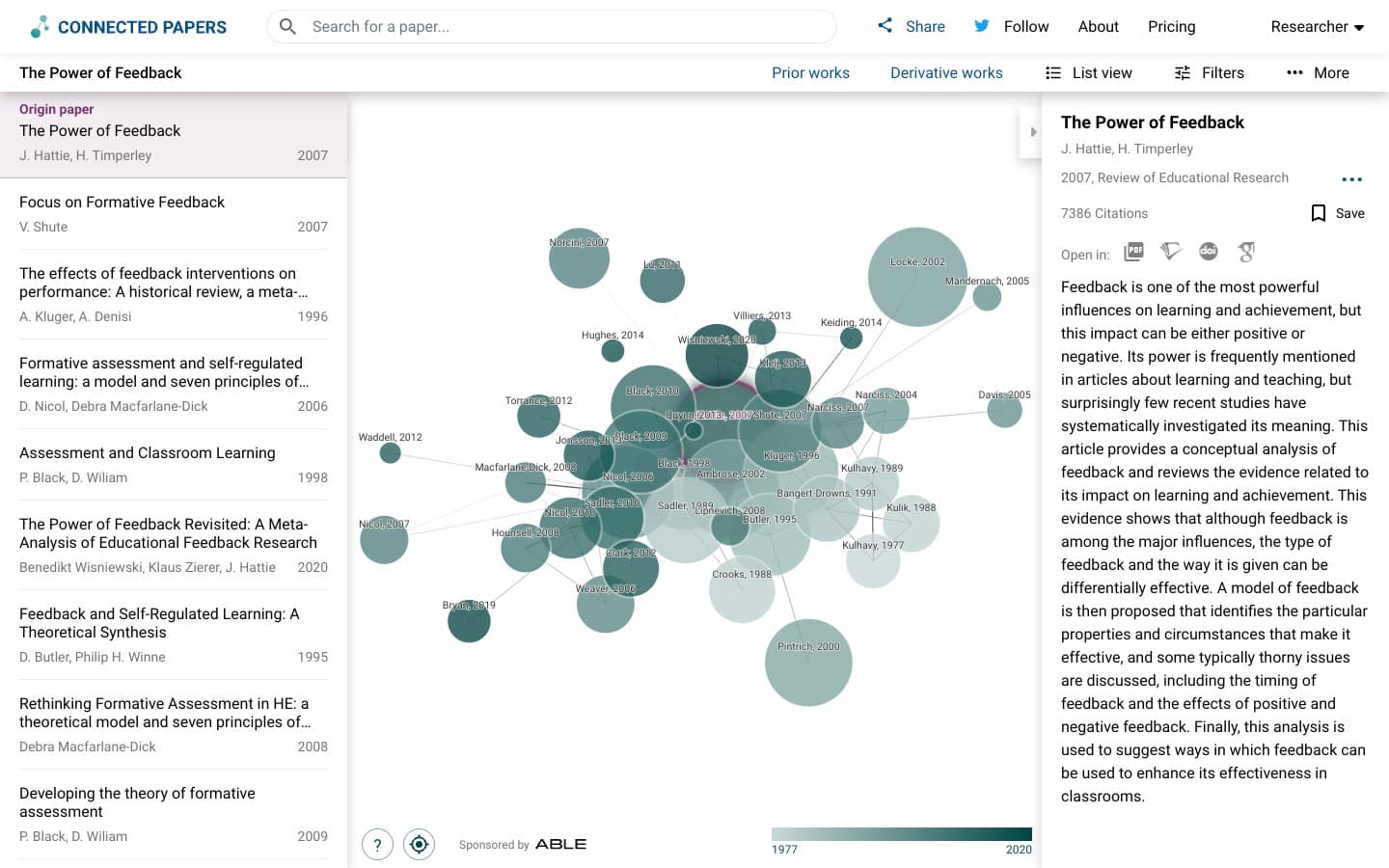
Connected Papers is a visual tool that builds a similarity graph of 40 papers around an origin paper from Semantic Scholar data.
What you see. A force-directed graph of 41 nodes, with a paper list on the left. The help panel says papers "are arranged according to their similarity (this is not a citation tree)". It adds that "Node size is the number of citations", "Node color is the publishing year" and "Similar papers have strong connecting lines and cluster together".
How to read it. Clusters are groups of papers that share references or are cited together, and distance means similarity, not age. Two side views do add direction. "Prior works" lists the 10 papers "most commonly cited by the papers in the graph", usually "important seminal works", and "Derivative works" lists 10 that "cited many of the papers in the graph". Selecting a prior work highlights every graph paper that references it.
What it is good for. Seeing which cluster a paper belongs to and which papers sit closest to it, in one tidy picture.
In our test: Connected Papers scored 1.77 of 2, the highest of any tool and level with Paperguide, with 78% core and 2% off-topic. Graphs it had built before loaded in 1 to 3 seconds, while a fresh build took about 31 to 37 seconds. That said, no paper from 2024 or later appeared in any top 20. For the transformer paper, very highly cited nodes also rendered as huge overlapping circles that hid most labels. If five graphs a month is too few, the free Connected Papers alternatives tested on the same seeds cover the options.
Key Features
- Similarity graph: 40 papers plus the origin, with "Similarity to origin" in List view.
- Prior and Derivative works: Ten older foundations and ten newer citing papers, highlighted on the graph.
- Multi-origin graphs: Combine seeds with "Add origin".
- Export and share: A BibTeX file of every graph paper, and "Share graph" by link.
Pros
- Top relevance in our blind test.
- The clearest picture of one paper's similarity cluster.
Cons
- Five graphs a month on a free account, two as a guest.
- No per-paper reason, and no RIS, CSV or image export.
- Lines show similarity, not citations, and recent work appears only in Derivative works.
- The DOI search failed for the arXiv transformer paper.
Pricing
| Plan | Price |
|---|---|
| Free | 5 graphs a month, all features |
| Academic | $6 a month billed annually ($72 a year), or $30 a quarter |
| Business | $20 a month billed annually ($240 a year), or $90 a quarter |
Best For: Researchers who want the tightest cluster of similar papers around one trusted paper and need only a few graphs a month.
Verdict: Connected Papers ties Paperguide on relevance at 1.77 of 2 and draws the clearest similarity picture, but it allows five free graphs a month and explains no paper.
How the Paperguide Citation Network Visualization Workflow Works
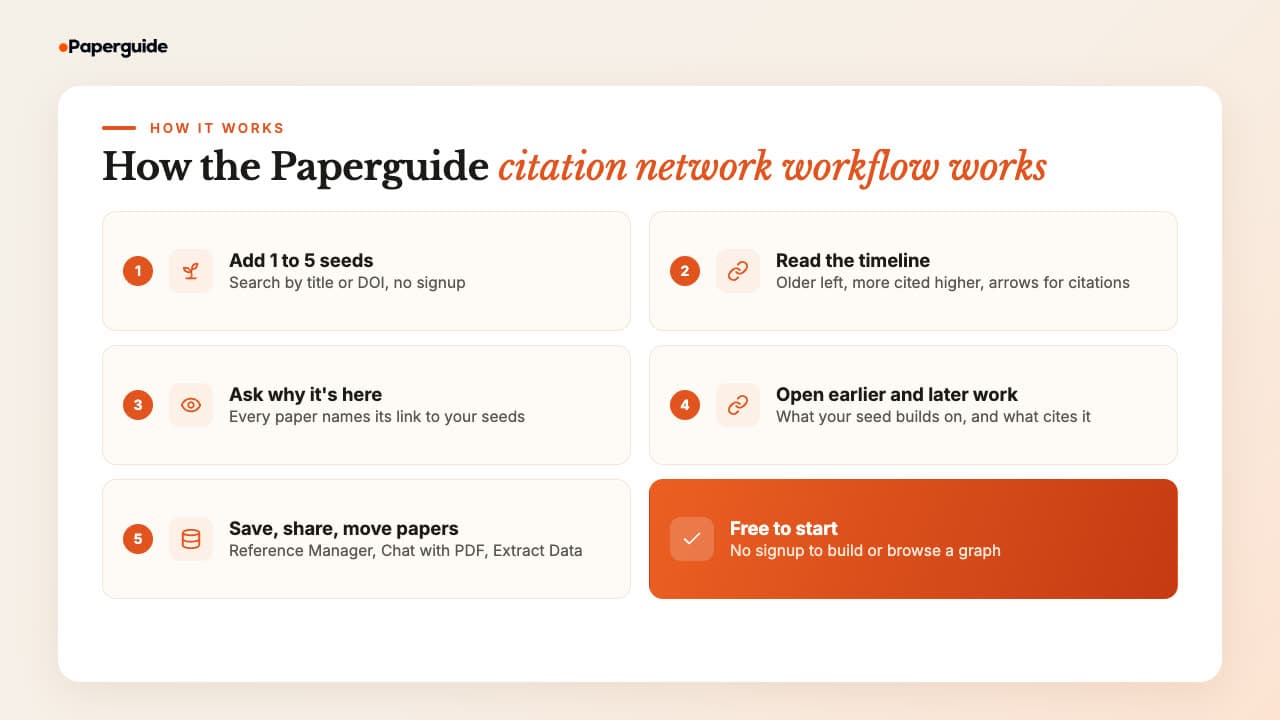
The Paperguide citation network visualization workflow runs from a seed paper to a readable, explained picture in five steps, then hands the papers you choose to the rest of Paperguide. Building and browsing a graph is free with no signup, while saving, sharing and the Reference Manager need you to sign in.
Step 1: Add 1 to 5 seeds. Open the free Citation Graph and search by title or DOI. A DOI is the safest match. Add more seeds later with "Seed" on any related paper; adding or removing a seed rebuilds the graph.
Step 2: Read the timeline. Older papers sit to the left, more cited papers sit higher and larger, and arrows show citations. As a result, the large nodes in the upper left are the first papers to read for context.
Step 3: Ask why a paper is there. Click a node to open its panel. "Why it's here" names the link, so you can tell a paper that cites your seed from one that only shares a topic.
Step 4: Switch to Earlier work and Later work. Earlier work redraws the map with what your seed builds on, and Later work with what cites it: 104 and 847 papers for the insomnia meta-analysis. These are the backward and forward steps of citation searching for a systematic review, and Later work is where recent papers sit.
Step 5: Save, share and move papers on. Signed in, each graph saves to "Your graphs" and shares by link, so a supervisor sees the same picture. "Add to Reference Manager" saves a paper to a folder. From there, Chat with PDF answers questions from the paper, Extract Data builds a comparison table, and Literature Review AI, the AI Paper Writer or Systematic Review take the set further.
Choosing good seeds matters more than any setting, and the steps for picking them are set out in how to create a citation map.
Best Citation Network Visualization Tool by Use Case
The best citation network visualization tool depends on what you need to see. Paperguide's Citation Graph is the best overall and the best free pick for an explained picture. Inciteful suits foundational papers, Local Citation Network a reference list, VOSviewer a whole field and Connected Papers one paper's similarity cluster.
| Use case | Recommended tool | Why |
|---|---|---|
| Best citation network visualization tool overall | Paperguide Citation Graph | Timeline picture, a reason on every paper, top-tier relevance |
| Best free tool | Paperguide Citation Graph | No signup, up to five seeds, no graph limit stated |
| Best for systematic review and HEOR teams | Paperguide Citation Graph | Earlier and later work feed citation searching, then screening and extraction |
| Best for spotting foundational papers | Inciteful | PageRank ranks the most important papers in the network |
| Best for a reference list's structure | Local Citation Network | Direct citations stacked by year, with roles shown by shape |
| Best for a whole field | VOSviewer | Maps a database export rather than one paper |
| Best for one paper's similarity cluster | Connected Papers | Highest relevance score, 41-node similarity graph |
Best Citation Network Visualization Tools: Final Comparison
The final comparison comes down to what each picture is good for. Paperguide and Connected Papers are best for getting oriented, Inciteful and Connected Papers point most directly to foundational papers, VOSviewer covers a whole field, and only Paperguide explains why each paper is on the screen.
| Tool | Getting oriented | Foundational papers | Recent work | Scale of the picture | Explains each paper |
|---|---|---|---|---|---|
| Paperguide Citation Graph | Yes, timeline | Upper-left nodes and Earlier work | Later work (847 citing papers for the insomnia seed) | One neighborhood, up to 5 seeds | Yes, "Why it's here" |
| Inciteful | Yes | Most Important Papers (PageRank) | The Most Important Recent Papers table | Tables over a network of up to 138,520 papers | No, a score |
| Local Citation Network | Needs a reference list | Top Cited | Top Citing | One reference list | No, counts |
| VOSviewer | Not tested | Not tested | Not tested | A whole database export | Not tested |
| Connected Papers | Yes, clusters | Prior works | Derivative works only | One cluster of 41 nodes | No, a score |
Common Mistakes When Reading a Citation Network Visualization
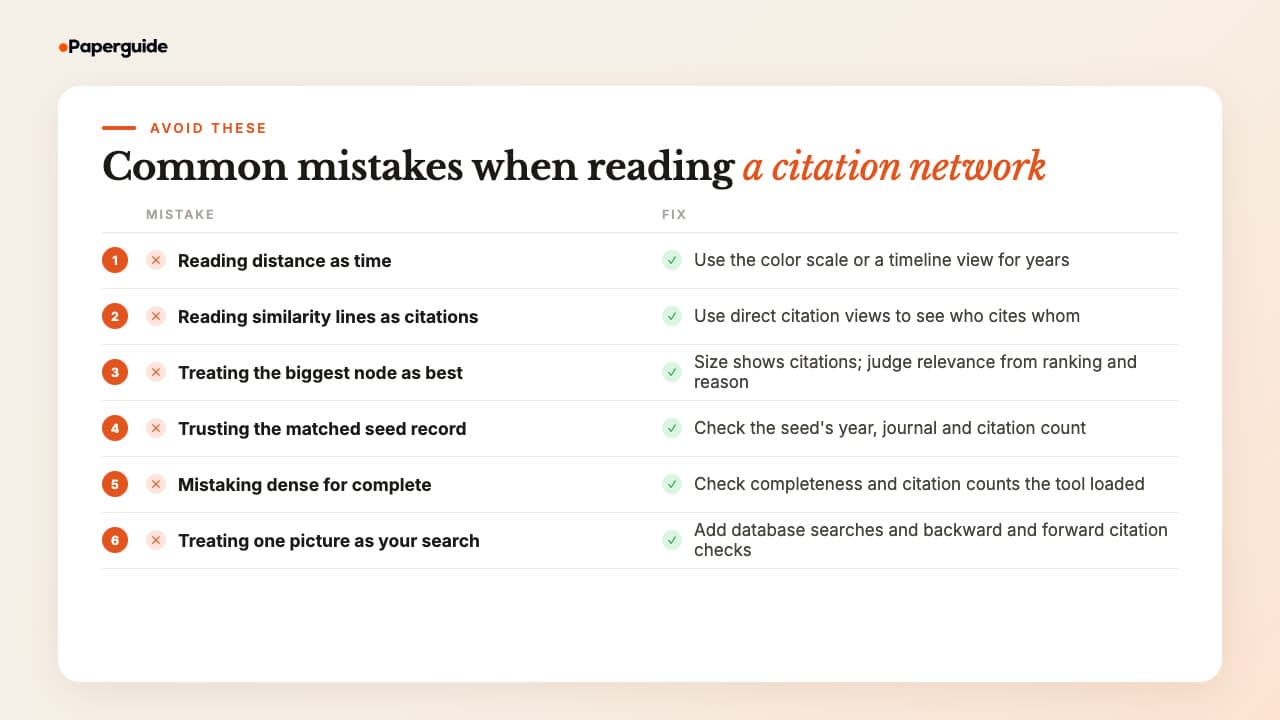
The most common mistakes come from reading the picture before the legend: treating distance as time, a similarity line as a citation, or a big node as a relevant one. Check the encoding, the seed record and the data's completeness, and the picture will hold up in a thesis.
Reading distance as time. In Connected Papers and Inciteful, closeness means similarity, not age. Use the color scale for years instead.
Reading a similarity line as a citation. Connected Papers says plainly that its graph is "not a citation tree". To see who cites whom, use a direct citation view instead.
Treating the biggest node as the most relevant. In Paperguide and Connected Papers node size shows citations, and in Local Citation Network citations to and from the seeds, so old classics look biggest. Relevance comes from the ranking, not the circle.
Trusting the matched seed record. Inciteful, Local Citation Network and Paperguide all matched the transformer paper to a record dated 2025, and Connected Papers could not resolve its DOI. Check the seed's year and journal first.
Mistaking a dense picture for a complete one. Local Citation Network reported 67% completeness for the feedback review, and Inciteful's header showed 98 citing papers for a seed that OpenAlex credits with 1,053. In other words, a picture shows the data the tool loaded.
Treating one picture as the whole search. Following citations finds studies that database searches miss: in one audit of a complex systematic review, 51% of sources were found by snowballing [7]. Use the picture alongside a database search and the AI tools for literature review that turn the papers into synthesis.
Final Verdict
Paperguide's Citation Graph is the best citation network visualization tool in 2026. Its timeline is the easiest picture to read: year across, citations up, arrows for who cites whom. It is the only tool that says why each paper is on screen, and it is free with no graph limit stated. In our blind test it tied Connected Papers for relevance and rated no paper off-topic.
The other four draw different pictures for different jobs. Connected Papers matches Paperguide's relevance with the clearest similarity cluster, for five free graphs a month. Inciteful is the quickest route to foundational papers, and Local Citation Network draws the most literal picture of a reference list. VOSviewer, meanwhile, suits a whole field from a database export. For a picture you can read, explain and share, start with Paperguide.
Frequently Asked Questions (FAQs)
What is the best citation network visualization tool in 2026?
Paperguide's Citation Graph is the best citation network visualization tool in 2026. It draws one to five seed papers on a timeline, sizes papers by citations, shows arrows for citations and labels why every paper appears. In our blind test its papers scored 1.75 of 2 for relevance with none off-topic, level with Connected Papers at 1.77.
What is citation network visualization?
Citation network visualization draws papers as nodes and their citation relationships as lines, so you can see how a body of work connects. A tool may link papers by direct citation, co-citation (papers cited together) or bibliographic coupling (papers sharing references) [4][5]. It then encodes extra information, such as year or citation count, in position, size and color.
Is there a free citation network visualization tool?
Yes. Paperguide's Citation Graph is free with no signup and no graph limit stated. Inciteful and Local Citation Network are free and open source with no account, and VOSviewer is free desktop software that "can be used freely for any purpose". Connected Papers gives five free graphs a month on a free account, or two as a guest.
How do I read a citation network graph?
Open the legend first. Check whether position means time or similarity, what node size and color encode, and whether lines are citations or similarity links. Then look for large, older nodes, usually foundational papers, and small recent nodes, usually new work. Finally, check why each paper is shown before you add it to your reading list.
What is the difference between a citation network and a similarity graph?
In a citation network, a line means one paper cites another, so the picture shows lineage: what a paper builds on and what built on it. A similarity graph, such as Connected Papers, links papers that are cited together or share references, so close papers are related in topic even if neither cites the other.
Can I visualize citations for a whole research field?
Yes, with bibliometric software. Tools such as VOSviewer map records you export from a bibliographic database, so the picture covers your whole search rather than one paper's neighbors. Seed-based tools such as Paperguide, Inciteful, Local Citation Network and Connected Papers are better for exploring around papers you already trust.
How can I find foundational papers in a citation network?
Look for older papers that many papers in the network cite. Inciteful ranks them under "Most Important Papers" using PageRank, and Connected Papers lists them under "Prior works". Local Citation Network shows them as "Top Cited", while Paperguide places them high and to the left of its timeline and lists them under Earlier work.
Are citation network visualization tools AI?
Mostly not. Paperguide's Citation Graph, Inciteful, Local Citation Network and Connected Papers draw their maps from citation links and bibliometric signals such as co-citation, shared references and PageRank. Paperguide adds optional AI features, such as AI Chat on a paper, alongside the graph, but the graph itself uses no AI credits.
References
- Trauer, J. M., Qian, M. Y., Doyle, J. S., Rajaratnam, S. M. W., & Cunnington, D. (2015). Cognitive behavioral therapy for chronic insomnia: A systematic review and meta-analysis. Annals of Internal Medicine, 163(3), 191-204. https://doi.org/10.7326/M14-2841
- Hattie, J., & Timperley, H. (2007). The power of feedback. Review of Educational Research, 77(1), 81-112. https://doi.org/10.3102/003465430298487
- Vaswani, A., Shazeer, N., Parmar, N., Uszkoreit, J., Jones, L., Gomez, A. N., Kaiser, Ł., & Polosukhin, I. (2017). Attention is all you need. Advances in Neural Information Processing Systems, 30. https://doi.org/10.48550/arXiv.1706.03762
- Small, H. (1973). Co-citation in the scientific literature: A new measure of the relationship between two documents. Journal of the American Society for Information Science, 24(4), 265-269. https://doi.org/10.1002/asi.4630240406
- Kessler, M. M. (1963). Bibliographic coupling between scientific papers. American Documentation, 14(1), 10-25. https://doi.org/10.1002/asi.5090140103
- Boyack, K. W., & Klavans, R. (2010). Co-citation analysis, bibliographic coupling, and direct citation: Which citation approach represents the research front most accurately? Journal of the American Society for Information Science and Technology, 61(12), 2389-2404. https://doi.org/10.1002/asi.21419
- Greenhalgh, T., & Peacock, R. (2005). Effectiveness and efficiency of search methods in systematic reviews of complex evidence: Audit of primary sources. BMJ, 331(7524), 1064-1065. https://doi.org/10.1136/bmj.38636.593461.68
Mapping citations?
See how any paper connects
Start from up to five papers and explore earlier, later and related work in one free citation graph. No signup.
Try Citation GraphNo credit card required