How to Do Citation Searching for a Systematic Review

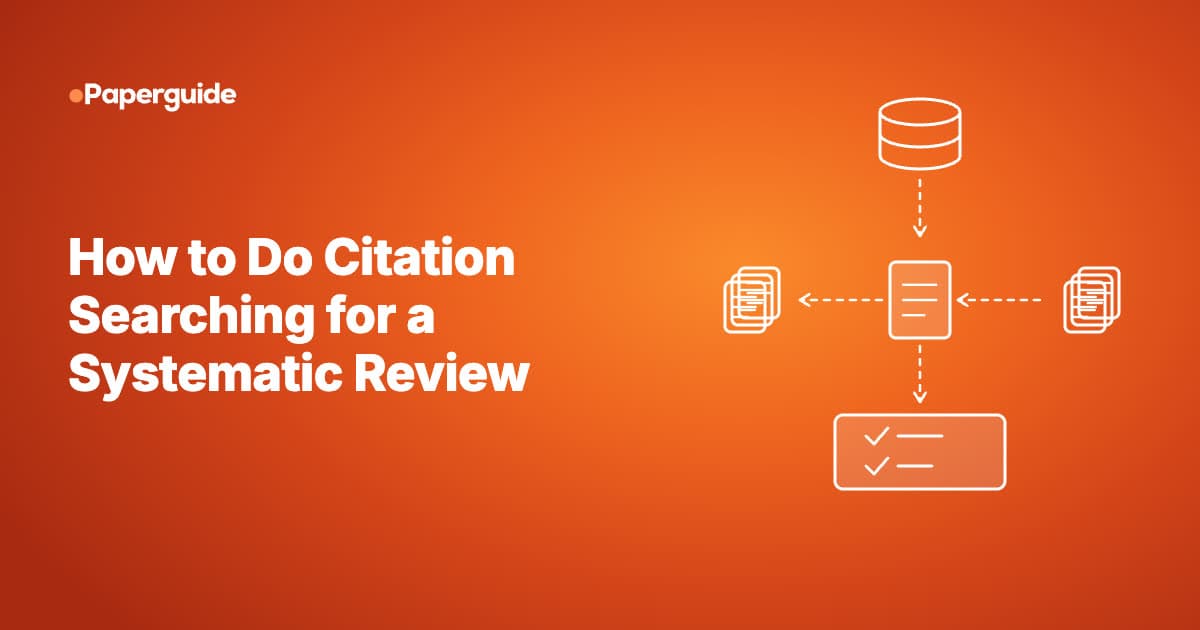
Citation searching for a systematic review finds extra studies by checking the reference lists of your included studies (backward citation searching) and the newer papers that cite them (forward citation searching). It supplements your database searches rather than replacing them, and it catches studies your search terms missed.
Checking reference lists is the familiar part. Running forward searches, deduplicating the results, deciding when to stop and reporting the method in enough detail for a reader to repeat it take more care, and those are the steps a peer reviewer checks.
This guide covers what citation searching is, how backward and forward searching differ, what the evidence says about its yield, when Cochrane and the TARCiS statement recommend it, an eight-step method, how a citation graph fits in, and how to report the work in your PRISMA flow diagram. It is written for individual reviewers and PhD students as well as information specialists and evidence synthesis or HEOR teams. If you are new to the method, start with what a systematic review involves.
Key Takeaways
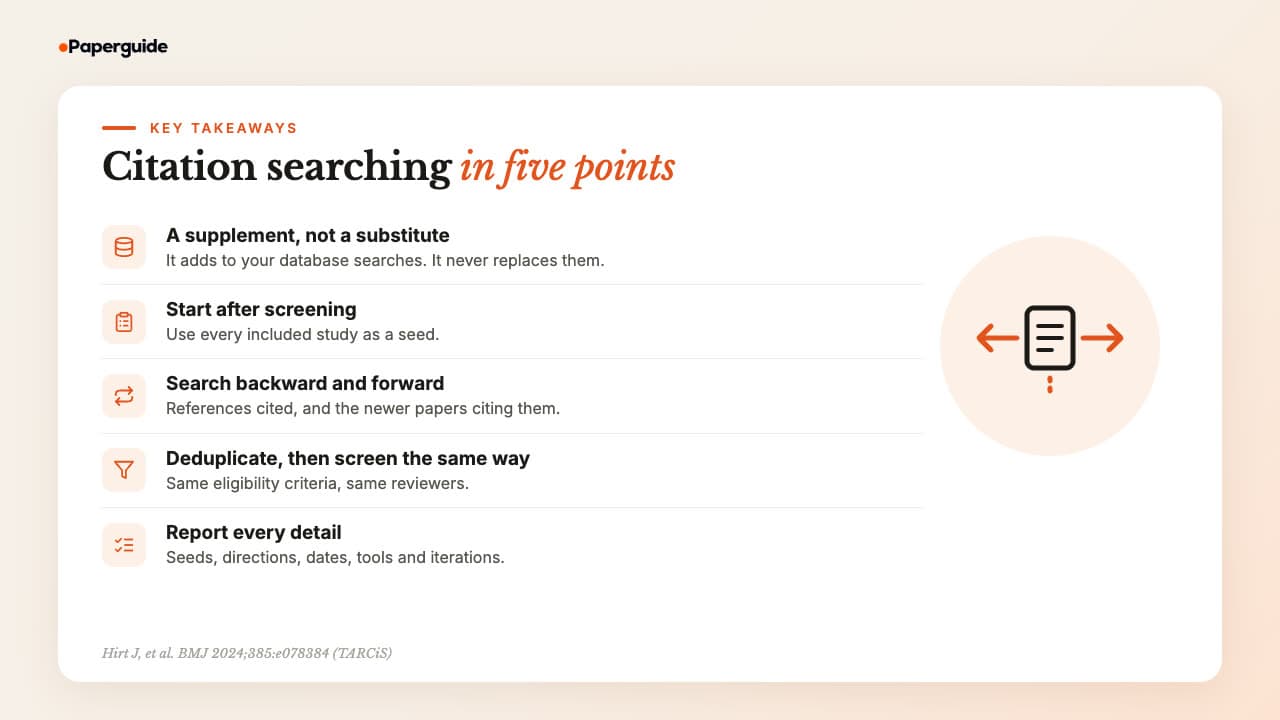
Citation searching is a supplementary search: you take the studies your review has included and screen the references they cite and the newer papers that cite them. Done after screening, in both directions, with deduplication, the same eligibility criteria and a full log, it finds studies keyword searches miss.
- Citation searching is a supplementary search method. Backward searching screens the references your included studies cite, and forward searching screens the papers that cite them.
- Run it after your database results have been screened, using all included records as seed references, as the Cochrane Handbook and the TARCiS statement describe.
- It adds most value on topics that are hard to search with keywords: complex interventions, inconsistent terminology, social science and methods questions.
- Citation indexes differ in coverage, so use more than one where you can, deduplicate against your database results, and screen new records with the same eligibility criteria.
- Report the seeds, directions, dates, citation indexes and tools, iterations and counts, and place the numbers in the "other methods" column of your PRISMA 2020 flow diagram.
What Is Citation Searching?
Citation searching is the set of methods that find studies through citation links instead of keywords. You start from papers already known to be relevant, called seed references, and screen the papers they cite (backward) and the papers that cite them (forward). In a systematic review, it supplements the database search.
The TARCiS statement, published in the BMJ in 2024, set out shared terms for the method. It defines backward citation searching as "retrieving and screening cited references", forward citation searching as "retrieving and screening citing references", and seed references as "relevant articles which are known beforehand and used as a starting point for any citation search" [1].
Before TARCiS, the same methods went by many names. A scoping review of 47 methods studies by Hirt and colleagues found that citation tracking terminology "was heterogeneous and frequently ambiguous" [3]. You will meet all of these terms in protocols and papers:
- Reference list checking: the traditional form of backward citation searching: reading the reference list of each included study.
- Citation chasing: a general term for following citations in either direction.
- Citation chaining: the same idea, common in library guides. Backward chaining follows references, forward chaining follows citing papers.
- Snowballing: common in software engineering. Wohlin's guidelines define backward snowballing as "using the reference list to identify new papers to include" and forward snowballing as "identifying new papers based on those papers citing the paper being examined" [2].
- Citation tracking: the umbrella term used in the Hirt scoping review for any of these methods.
TARCiS also names two less common directions, co-cited and co-citing, in its reporting recommendation [1]. Co-cited papers are cited together with a seed by later papers, and co-citing papers share references with a seed. Both signals also shape how a citation map links related papers. Backward and forward are the directions most guidance covers, so the rest of this guide focuses on those two.
Backward vs Forward Citation Searching
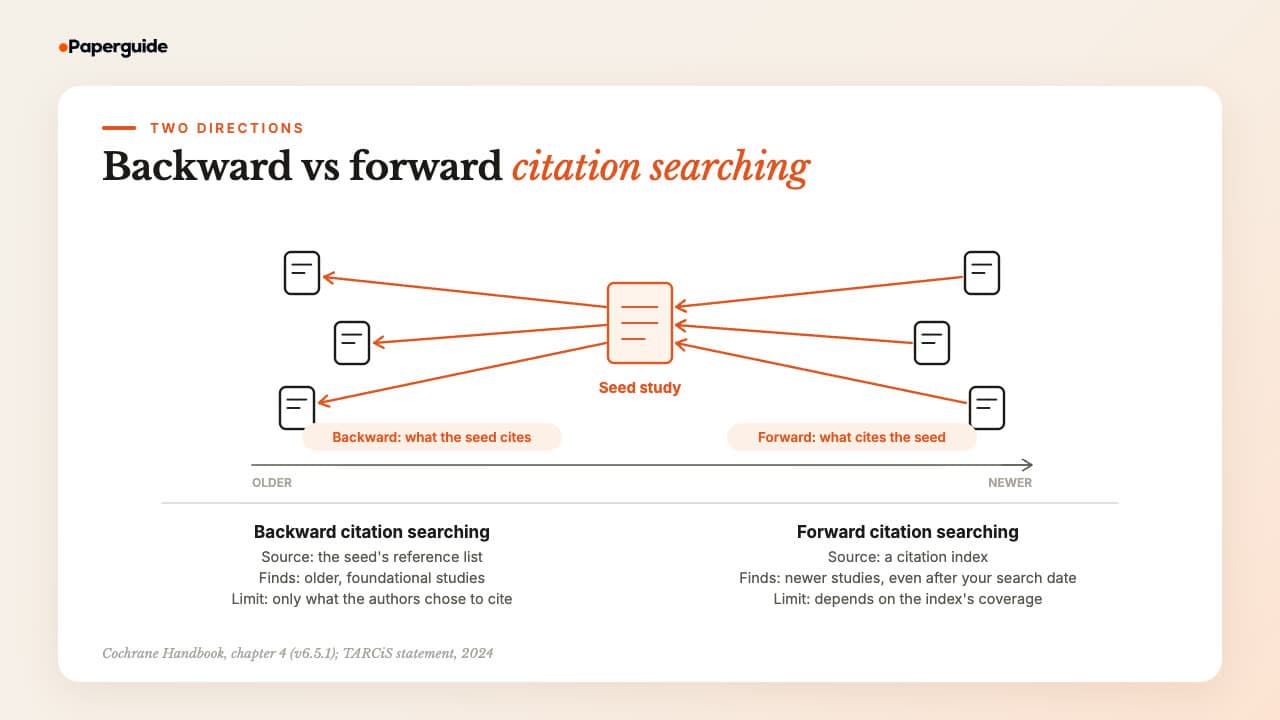
Backward citation searching looks back in time at the references a seed study cites, so it finds older work. Forward citation searching looks ahead at the papers that cite the seed, so it finds newer work, including studies published after your database search. The two directions find different studies, which is why TARCiS recommends considering both [1].
Backward searching needs nothing more than the full text of each included study. Forward searching needs a citation index, a database that records which papers cite which. The idea goes back to Eugene Garfield, who proposed a citation index for science in 1955 and described it as "an association-of-ideas index" [4].
Backward vs Forward Citation Searching at a Glance
| Feature | Backward citation searching | Forward citation searching |
|---|---|---|
| Direction in time | Older papers, published before the seed | Newer papers, published after the seed |
| Source | The seed study's reference list | A citation index or citation tool |
| Typical tools | The full text, or the cited references in a citation index | Scopus, Web of Science, Google Scholar, or a free tool such as citationchaser |
| What it finds | Foundational trials, earlier reports of the same study, studies described in different words | Recent trials, follow-up reports, studies published after your search date |
| Main limit | Only finds what the authors chose to cite | Coverage differs between indexes, and very recent papers have few citations yet |
Why Citation Searching Matters in Systematic Reviews
Citation searching matters because keyword searches miss studies that describe the same thing in different words, sit in poorly indexed journals or use terms your strategy did not anticipate. Methods studies report that it adds studies in many reviews [3], although the size of that gain varies widely by topic and much of the evidence comes from weak study designs.
One well-known example is Greenhalgh and Peacock's audit of the search methods behind a systematic review of complex evidence. Of 495 primary sources, "only 30% of sources were obtained from the protocol defined at the outset of the study (that is, from the database and hand searches). Fifty one per cent were identified by 'snowballing' (such as pursuing references of references), and 24% by personal knowledge or personal contacts" [5]. The percentages add to more than 100% as published. The authors concluded that reviews of this kind "cannot rely solely on protocol-driven search strategies".
Other studies point the same way, with caveats:
- Reference list checking. A Cochrane methodology review by Horsley and colleagues included 12 studies. The additional yield from checking reference lists "ranged from 2.5% to 42.7%", but the authors noted the evidence "is derived from weak study designs" [6].
- Iterated searching in both directions. In a case study on the NICE cost-effectiveness threshold, Hinde and Spackman ran forward and backward citation searching until no new papers appeared. It found 76 relevant papers, including all 15 found by keyword searching [7]. It is a single case study on one topic.
- Methods studies overall. Most of the 47 studies in the Hirt scoping review assessed the benefit of citation tracking, and 96% of those found added value for evidence retrieval. The authors added that the benefit "likely depends on multiple factors that could not be assessed with certainty" [3].
Not every study agrees. Wright, Golder and Rodriguez-Lopez ran forward citation searches on the 40 included studies of a review of multiple risk behaviour interventions. The searches returned 1,680 records from Google Scholar, 1,173 from Scopus, 1,095 from Web of Science and 213 from OvidSP, and all four were needed to retrieve every record. Only 9 eligible studies came back, and 8 of them had already been found. The authors concluded citation searching "may not be the best use of valuable time and resources" for a topic like theirs [8].
Read together, these studies suggest a practical rule. Citation searching tends to add the most when the topic is hard to search for: complex interventions, social science and policy questions, methods research and fields with inconsistent terminology. It tends to add less to a well-indexed clinical question with a sensitive search strategy, where it mainly confirms that the database search worked.
When Is Citation Searching Recommended?
The Cochrane Handbook recommends checking the reference lists of included studies and relevant reviews, and Cochrane's own standards require it for Cochrane reviews. The TARCiS statement recommends serious consideration of both backward and forward searching for difficult-to-search-for topics. No reporting guideline mandates it; only a journal, funder or institution can make it a requirement.
Chapter 4 of the Cochrane Handbook says review authors "should examine previous reviews on the same topic and check reference lists of included studies and relevant systematic reviews" [9]. The MECIR standard C30, "Searching reference lists", is labelled mandatory for Cochrane reviews: "Check reference lists in included studies and any relevant systematic reviews identified."
The same chapter supports forward searching. It notes that "citation indexes can be used to identify studies that are similar to a study report of interest, as it is probable that other reports citing or cited by a study will contain similar or related content", and for complex questions it suggests you "use citation searching on key articles in addition to a database search" [9].
TARCiS gives ten recommendations. The ones that decide whether and how to search are these [1]:
- R2: "For 'difficult-to-search-for' systematic search topics, backward and forward citation searching should be seriously considered as supplementary search techniques."
- R3: For "easier-to-search-for" topics with a highly sensitive search, citation searching is "not explicitly recommended", though "reference list checking of included records can be used to confirm the sensitivity of the search strategy."
- R4: Citation searching "should be based on all included records of the primary search".
- R9: "Stand-alone citation searching should not be used for literature searches that aim at completeness of recall."
Whether you should do citation searching depends on the review. For a Cochrane review, reference list checking is expected. For a complex or poorly indexed topic, forward and backward searching are worth the time. For a narrow drug trial question with a sensitive search in several databases, reference list checking alone may be enough to confirm you missed nothing.
How to Do Citation Searching for a Systematic Review: Step by Step
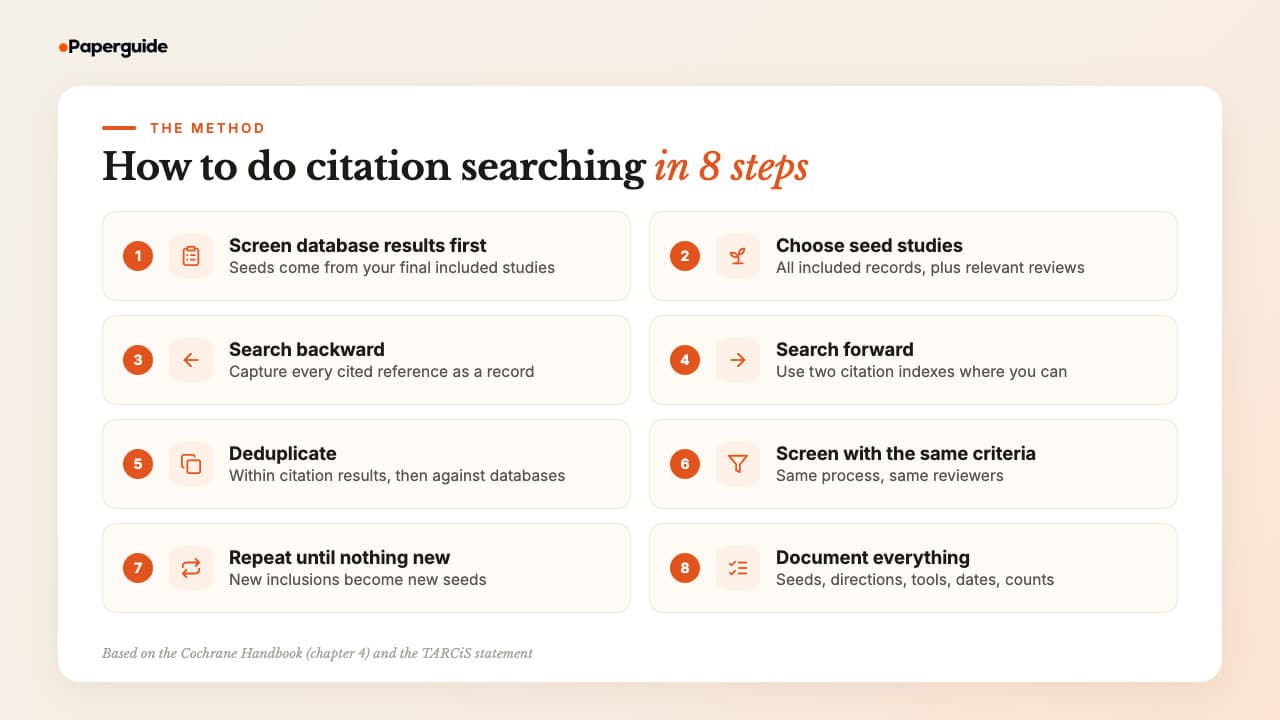
The method below follows the Cochrane Handbook and the TARCiS recommendations. Screen your database results, take every included study as a seed, search backward and forward, deduplicate, screen the new records with your existing criteria, repeat with any new inclusions and record each step as you go.
Step 1: Finish and Screen Your Database Search First
Citation searching starts from included studies, so it belongs after full-text screening of your database results. The Cochrane Handbook notes that "reference list searching, and forward citation searching … will occur later on in the review process after the database results have been screened" [9].
Starting earlier means chasing citations from papers you later exclude. Write the citation searching plan into your protocol before you start, including the directions, the indexes and the stopping rule, so the method is fixed before you see results.
Step 2: Choose Your Seed Studies
TARCiS recommends basing citation searching on all included records of the primary search [1]. Picking only the "most important" studies introduces a judgement call that a reader cannot check.
Add relevant systematic reviews as seeds if your protocol says so. The Cochrane Handbook asks authors to check the reference lists of relevant systematic reviews as well as included studies [9], and a recent review on your topic is often the richest single reference list you will find. If a study has several reports, such as a protocol, a main paper and a follow-up, use every report as a seed, since each cites and is cited by different papers. If your seeds differ from the included set, for example by adding reviews, TARCiS asks you to justify that choice when you report [1].
Step 3: Run Backward Citation Searching
For each seed, collect the reference list. TARCiS suggests that backward searching ideally uses a citation index, so you can screen titles and abstracts of the cited references; screening titles straight from the reference lists is still an accepted option [1]. An index is faster but depends on how well it parsed each reference list.
Whichever route you use, turn the cited references into records where you can, so they can be deduplicated, counted and screened like any other record. Paperguide's Reference Manager adds papers by DOI or from BibTeX and RIS files, which suits a batch of cited references. Ticking likely titles off a PDF is hard to count or reproduce.
Step 4: Run Forward Citation Searching
Forward searching needs a citation index. The main options are Scopus and Web of Science, which are subscription databases with curated coverage, and Google Scholar, which is free and broad. Google Scholar is harder to export from and to reproduce exactly. Citationchaser, a free and open source R package and Shiny app described by Haddaway and colleagues, runs both forward and backward chasing in bulk using the Lens.org scholarly database [10].
Coverage is the main problem, and it differs across academic search engines and citation databases. In the Wright case study, no single index returned every citing record [8], and TARCiS R6 recommends considering "the combined coverage of two citation indexes" [1]. Use at least two sources where you have access, and record which one each record came from.
Forward searching can also find studies published after your database search date. That makes it a partial check for new studies; a formal search update is still the way to bring the whole review up to date.
Step 5: Deduplicate Against Your Database Results
TARCiS R7 recommends that "before screening, the results of supplementary backward and forward citation searching should be deduplicated" [1]. Deduplicate in two passes: first within the citation results, since the same paper will be cited by many seeds and returned by several indexes, then against every record you already screened from the databases.
Expect many duplicates. In the Wright case study, 8 of the 9 eligible studies found by forward searching had already been found [8]. A high duplicate rate is a sign, though not proof, that your database search was sensitive. Record the counts before and after each pass, because you will need them for the flow diagram. A reference manager with reliable duplicate detection saves hours here, but check matches by DOI and title rather than trusting automatic merges blindly.
Step 6: Screen the New Records With the Same Criteria
Screen the remaining records with the same inclusion criteria, the same two-stage process (titles and abstracts, then full texts) and the same reviewer arrangement as your database results. If you used two independent reviewers for the database search, use two for citation results. If your team uses one of the AI tools for systematic review screening, route citation records through the same project rather than a side spreadsheet.
Citation results feel more relevant because they arrived through a known study. They are not: a record found through a reference list is eligible for exactly the same reasons as one found in MEDLINE.
Studies that pass full-text screening join your included set for data extraction. Paperguide's Extract Data fills the columns you define, such as sample size or outcome, across those papers and cites each value to the sentence it came from. A literature review map of your included studies can then group them by theme before you write the synthesis.
Step 7: Repeat Until No New Studies Appear
TARCiS R8 says: "If citation searching finds additional eligible records, another iteration of citation searching should be considered using these records as new seed references" [1]. Each newly included study becomes a seed for a second round, and you stop when a round finds no new eligible studies.
Each round starts from fewer seeds than the one before, so later rounds tend to be smaller. Set the stopping rule in your protocol, for example "iterate until a round yields no new included studies, to a maximum of three rounds," and report the number of iterations you ran.
Step 8: Document Everything for Reporting
Keep a log as you go, not at the end. For each round, record the seeds, the direction, the citation index or tool, the date, the number of records retrieved, the number after deduplication, the number screened and the number included. Exports from citation indexes change over time, so save the raw result files with the date in the file name.
This log is what lets a peer reviewer or a future update team repeat your work. It also holds every number the flow diagram needs, and if you build the diagram by hand, Paperguide's free PRISMA Flow Diagram Generator draws it from those counts.
How to Do Citation Searching With a Citation Graph
A citation graph tool shows the references, citing papers and related papers around one or more seed studies in a single interactive view. It helps with fast exploration and with spotting candidates before or alongside a formal citation index search, and it works best as a supplementary discovery aid next to a documented, reproducible search.
Paperguide's Citation Graph is free to explore and needs no signup. You start from 1 to 5 seed papers, found by title or DOI or picked from your Reference Manager library. It searches a database of 200M+ papers and ranks related papers by how close they are to your seeds. Arrows show which paper cites which, and node size and position show citation counts and the timeline.
The three views match the directions TARCiS describes:
- Earlier work shows papers your seeds build on, the backward direction.
- Later work shows papers that build on your seeds, the forward direction.
- Related papers draws on co-citation, shared references and topic similarity, and explains which relationship links each recommendation to your seeds.
In our runs, the newest papers appeared mainly in Later work rather than near the top of Related papers, so check Later work when you want recent studies.
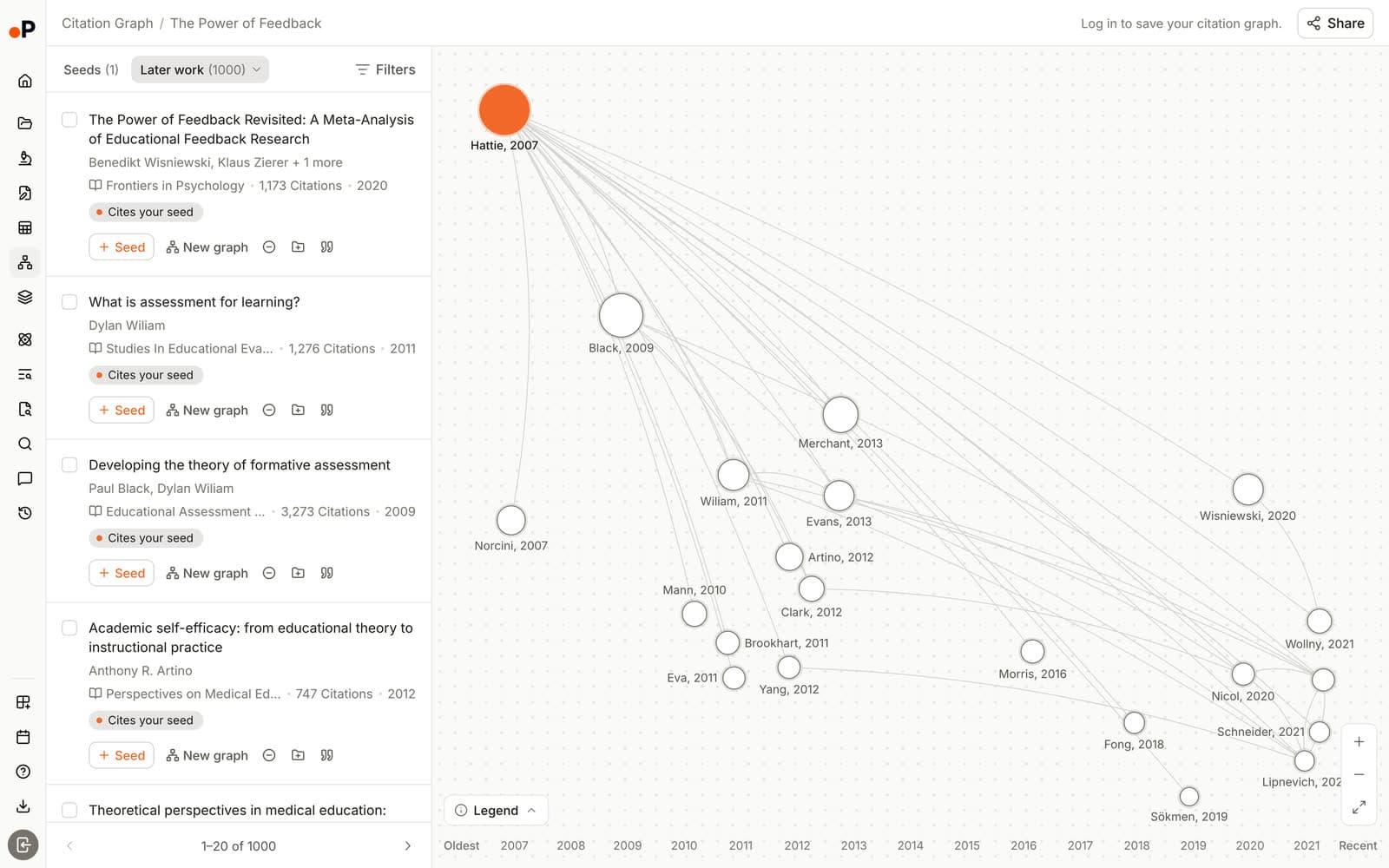
For a systematic review, a sensible workflow is to add up to five included studies as seeds per graph, open Earlier work and Later work, exclude papers that are clearly off topic and save plausible candidates to Reference Manager, which needs a free account. From there they join your other records for deduplication and screening. Any included study you find can be added as a new seed, which mirrors the TARCiS iteration step. Graphs save automatically, and you can share one with a co-reviewer by link with view or edit access.
Paperguide's own October 2026 evaluation, seeded with papers from published systematic reviews, found 16 included-study matches within the top 20 recommendations per seed. That was an internal test and results varied by field. It shows the tool surfaces relevant studies; it does not show that it finds every one.
When we ran Citation Graph for this guide in October 2026 on one seed, the CBT-I meta-analysis by Trauer and colleagues (2015), Earlier work listed 104 papers: 88 the seed cites directly and 16 cited by its references. Later work listed 847 papers, while the same record showed 1,050 citations. Adding a second seed, a related 2018 meta-analysis by van Straten and colleagues, raised Earlier work to 214 and Later work to 1,368. Those numbers make the point below: the views are a ranked, useful sample of the citation network, not a complete list of every citing record.
Two limits matter for reporting. The graph ranks papers by closeness to your seeds rather than listing every citing or cited record, and it is built for exploring and saving individual papers, not for producing a complete, countable result set. Use it to find candidates and check coverage, report it as a supplementary method with its date, and run your formal forward search in a citation index whose complete results you can export and count. The same views are what you read when you make a citation map around your seed studies, so the skills carry over. A citation map is narrower than a thematic or citation-based literature map of a whole topic, which is a different tool for a different job.
How to Report Citation Searching
Report citation searching in three places: the methods section, the PRISMA-S search details and the PRISMA 2020 flow diagram. Say which directions you searched, from which seeds, in which citation indexes or tools, on what dates, how many iterations you ran and how many records each step produced, so a reader could repeat the search.
PRISMA 2020 item 6, information sources, asks authors to "specify all databases, registers, websites, organisations, reference lists and other sources searched or consulted to identify studies" and to "specify the date when each source was last searched or consulted" [11]. Version 2 of the PRISMA flow diagram template has a version for reviews that searched databases, registers and other sources. Its right-hand column is headed "Identification of studies via other methods". Its first box lists "Citation searching (n = )" alongside websites and organisations. Like the rest of what PRISMA asks reviewers to report, these are recommendations, not mandates.
PRISMA-S, the 16-item extension for reporting literature searches, has an item for this method. Item 5, citation searching, recommends that authors "indicate whether cited references or citing references were examined, and describe any methods used for locating cited/citing references (e.g., browsing reference lists, using a citation index, setting up email alerts for references citing included studies)" [12].
TARCiS R10 adds the details that are easiest to leave out. It recommends reporting the seed references, "the directionality of searching (backward, forward, co-cited, co-citing)", the dates, the number of iterations, the citation indexes and tools, deduplication, the screening method and the number of results "in the right column box of the PRISMA 2020 flow diagram" [1].
What to Report for Citation Searching
| Item | What to record | Example |
|---|---|---|
| Seed references | Which records were used as seeds | All 24 included studies from the database search, plus 2 relevant systematic reviews |
| Direction | Backward, forward, or both | Backward and forward |
| Citation indexes and tools | Each source, with access route | Reference lists from full texts; forward citations from Scopus and Web of Science |
| Dates | When each search was run | Forward searches run 14 March (dates do not apply to reference list checking) |
| Iterations | Number of rounds and the stopping rule | Two rounds; stopped when a round found no new included studies |
| Deduplication | Method and counts | 1,020 records retrieved, 610 after removing duplicates within citation results and against database records |
| Screening | Process used for citation records | Same criteria and two independent reviewers as the database search |
| Flow diagram | Counts in the "other methods" column | Citation searching (n = 610), reports sought for retrieval (n = 20), reports assessed (n = 18); the 3 included studies join the combined "Studies included in review" box |
The numbers in the example column are illustrative, not from a real review. Replace them with your own counts.
Records from your database and citation searches should end up in one screening queue. In Paperguide's Systematic Review, search results are pooled with your library and deduplicated before screening, papers added mid-review follow the same screening path as the rest, and dual reviewer screening is available on the Evidence Teams and Enterprise plans.

Citation Searching in Scoping Reviews and Rapid Reviews
Citation searching works the same way in scoping and rapid reviews, but the trade-off shifts. Scoping reviews can cover broad, poorly indexed topics where citation links find a lot, while rapid reviews cut steps to save time and may limit citation searching to reference lists of included studies or key reviews.
In a scoping review that maps a field, the topic is often exactly the "difficult-to-search-for" kind that TARCiS R2 describes: broad concepts, mixed study designs and inconsistent vocabulary. Backward and forward searching from included sources, and from key reviews, is usually worth it. Report it with the same detail you would give in a systematic review: seeds, directions, sources, dates and counts.
In a rapid review, state plainly what you left out. One compromise is backward searching of included studies only, one round, with no forward search. That is a legitimate choice if you name it as a limitation, and a weak one if you leave readers to assume you did more.
Common Mistakes in Citation Searching
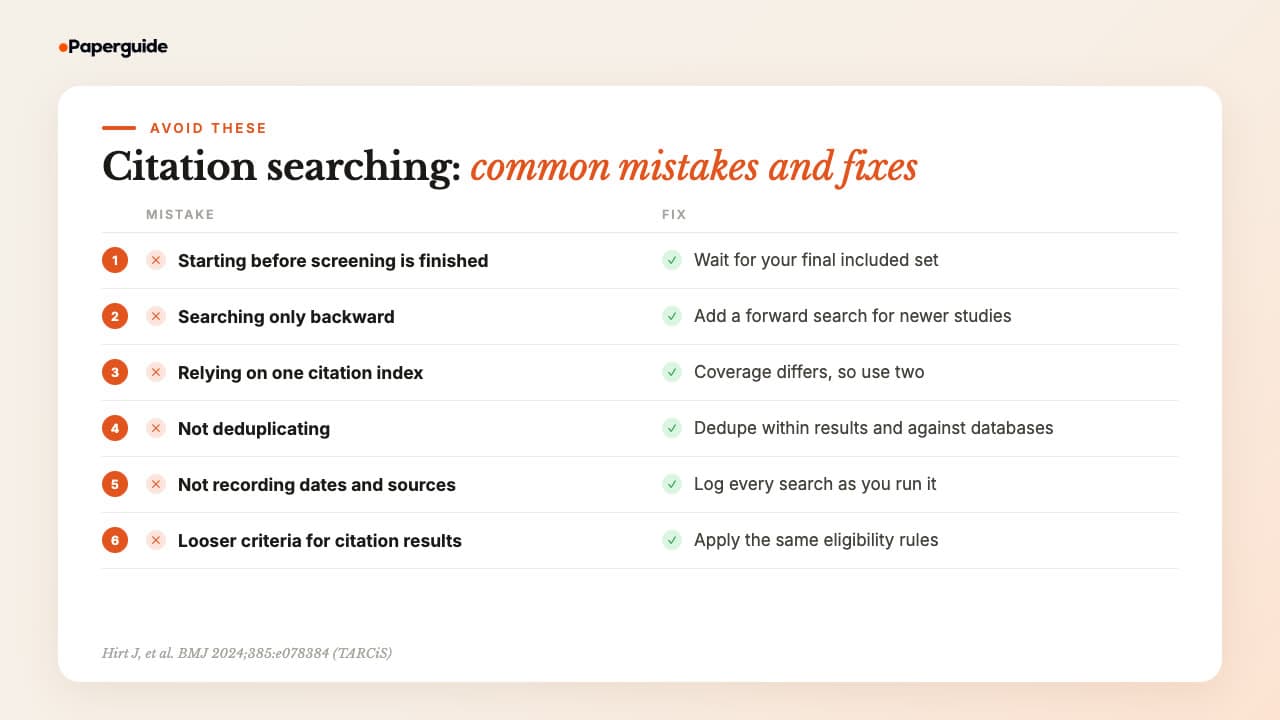
Most citation searching mistakes come from timing, coverage and record keeping: starting before screening ends, searching one direction or one index, skipping deduplication, not logging dates and sources, and screening citation records more leniently than database records. Each one weakens the reproducibility a peer reviewer will check.
Starting before database screening is finished. You end up chasing citations from studies you later exclude. Wait until full-text screening is complete, then use the final included set as seeds.
Searching only backward. Reference lists cannot contain anything published after the seed. Without a forward search, you miss newer studies, including ones that appeared after your database search date.
Relying on one citation index. Coverage differs between Scopus, Web of Science, Google Scholar and open citation sources, and the Wright case study needed all four of its sources to retrieve every record [8]. Use two where you can.
Not deduplicating. Screening the same paper several times wastes reviewer hours and inflates the counts you report. Deduplicate within the citation results and against your database records before screening.
Not recording dates and sources. A forward search run in March returns a different set from one run in June. Without dates, sources and counts, nobody can repeat or update your search, and your flow diagram cannot be checked.
Screening citation results with looser criteria. Records from reference lists are not more eligible because a trusted study cited them. Apply the same criteria and the same reviewer process.
Citation Searching Checklist
A citation search is ready to report when the seeds are fixed, both directions are searched in at least one citation index, results are deduplicated and screened like database records, iterations follow a stated stopping rule, and every date, source and count is logged. Run through these eight checks before you write up the methods.
- [ ] Database screening is complete and the final included set is fixed before citation searching starts
- [ ] All included records are seeds, plus relevant systematic reviews if the protocol names them
- [ ] Backward searching is done with every cited reference captured as a record, not ticked off a PDF
- [ ] Forward searching uses at least one citation index, and two where access allows
- [ ] Results are deduplicated within the citation results and against database records, with counts kept
- [ ] New records are screened with the same criteria and reviewer process as the database results
- [ ] Iterations follow a stated stopping rule, and the number of rounds is recorded
- [ ] Seeds, directions, tools, dates and counts are logged and ready for PRISMA-S item 5 and the flow diagram
Try It Yourself (2 Minutes)
The quickest way to see what citation searching adds on your topic is to run one seed through a citation graph in both directions and log the result. It takes about two minutes, needs no signup and produces the same seed, date and count entry a full search log uses.
- Take one included study from a review you are working on, or one key paper on your topic, and copy its DOI.
- Paste the DOI into Paperguide's free Citation Graph, then open the Earlier work and Later work views in turn.
- Count the candidates in each view that you would send to title and abstract screening, and write that count down with today's date and the seed's DOI.
By the end you will have a first log entry in the format a citation search report needs, and a sense of how many records each direction adds for your topic.
Conclusion
Citation searching for a systematic review takes a few clear steps. Wait until database screening is finished, use every included study as a seed, search both backward and forward in more than one source, deduplicate, screen with your usual criteria and repeat until a round finds nothing new.
Keep a record of seeds, directions, tools, dates, iterations and numbers as you go, ready for the other methods column of your flow diagram. With that log in hand, the next step is writing up the whole search using the PRISMA 2020 reporting guidelines.
Frequently Asked Questions
What is citation searching in a systematic review?
Citation searching is a supplementary search method that finds studies through citation links. You take the studies you have already included, screen the references they cite (backward searching) and the newer papers that cite them (forward searching), and screen any new records with your usual criteria. It catches studies that keyword searches miss [1].
What is the difference between forward and backward citation searching?
Backward citation searching examines the reference list of a seed study, so it finds older work the authors cited. Forward citation searching uses a citation index to find later papers that cite the seed, so it finds newer work, including studies published after your database search. Most guidance treats the two as complementary [1].
Is citation searching required for a systematic review?
It is recommended rather than required by reporting guidelines. The Cochrane Handbook recommends checking reference lists of included studies and relevant reviews, and Cochrane's own standards require it for Cochrane reviews [9]. TARCiS recommends serious consideration of both directions for difficult-to-search-for topics [1]. It becomes a requirement only if a journal, funder or institution mandates it.
How do you report citation searching in a PRISMA flow diagram?
Use version 2 of the PRISMA 2020 flow diagram, which has a right-hand column headed "Identification of studies via other methods". Enter the records on the "Citation searching (n = )" line, then report the reports sought, not retrieved, assessed and excluded in that column. Studies from every route are counted together in the "Studies included in review" box [11]. Describe the method as PRISMA-S item 5 recommends [12].
Which databases support forward citation searching?
Forward searching needs a citation index. Scopus and Web of Science are the main subscription options, Google Scholar is free but hard to export from and reproduce, and the free tool citationchaser uses the Lens.org database [10]. Coverage differs, and one case study needed four sources to retrieve every citing record, so use at least two where possible [8].
How many rounds of citation searching should you do?
There is no fixed number. TARCiS recommends considering another round whenever a round finds new eligible studies, using those studies as new seeds [1]. Each round starts from fewer seeds, so later rounds tend to be smaller. State a stopping rule in your protocol, such as a maximum number of rounds, and report how many you ran.
How do I find papers that cite a paper?
Use a citation index or a citation graph tool. In Scopus, Web of Science or Google Scholar, open the paper's record and follow its cited-by list. In Paperguide's free Citation Graph, add the paper as a seed and open Later work, which lists newer papers that build on it. For a systematic review, record the source, the date and the number of records.
What is citation chaining?
Citation chaining is another name for citation searching, common in library guides. Backward chaining follows the references a paper cites to older work, and forward chaining follows the later papers that cite it. Snowballing, citation chasing and citation tracking describe the same family of methods, which is why TARCiS proposed standard terms for them [1].
Can a citation graph tool replace citation searching in a database?
No. A citation graph tool is useful for exploring references, citing papers and related work around your seeds, and for finding candidates quickly. Tools of this kind often rank papers by relevance rather than listing every citing or cited record, so they do not give a complete, exportable and reproducible result set. Use one alongside a documented citation index search, and report it as a supplementary method.
References
- Hirt, J., Nordhausen, T., Fuerst, T., Ewald, H., & Appenzeller-Herzog, C. (2024). Guidance on terminology, application, and reporting of citation searching: The TARCiS statement. BMJ, 385, e078384. https://doi.org/10.1136/bmj-2023-078384
- Wohlin, C. (2014). Guidelines for snowballing in systematic literature studies and a replication in software engineering. In Proceedings of the 18th International Conference on Evaluation and Assessment in Software Engineering (EASE '14) (Article 38, pp. 1-10). ACM. https://doi.org/10.1145/2601248.2601268
- Hirt, J., Nordhausen, T., Appenzeller-Herzog, C., & Ewald, H. (2023). Citation tracking for systematic literature searching: A scoping review. Research Synthesis Methods, 14(3), 563-579. https://doi.org/10.1002/jrsm.1635
- Garfield, E. (1955). Citation indexes for science: A new dimension in documentation through association of ideas. Science, 122(3159), 108-111. https://doi.org/10.1126/science.122.3159.108
- Greenhalgh, T., & Peacock, R. (2005). Effectiveness and efficiency of search methods in systematic reviews of complex evidence: Audit of primary sources. BMJ, 331(7524), 1064-1065. https://doi.org/10.1136/bmj.38636.593461.68
- Horsley, T., Dingwall, O., & Sampson, M. (2011). Checking reference lists to find additional studies for systematic reviews. Cochrane Database of Systematic Reviews, (8), MR000026. https://doi.org/10.1002/14651858.MR000026.pub2
- Hinde, S., & Spackman, E. (2015). Bidirectional citation searching to completion: An exploration of literature searching methods. PharmacoEconomics, 33(1), 5-11. https://doi.org/10.1007/s40273-014-0205-3
- Wright, K., Golder, S., & Rodriguez-Lopez, R. (2014). Citation searching: A systematic review case study of multiple risk behaviour interventions. BMC Medical Research Methodology, 14, 73. https://doi.org/10.1186/1471-2288-14-73
- Lefebvre, C., Glanville, J., Briscoe, S., Featherstone, R., Littlewood, A., Metzendorf, M.-I., Noel-Storr, A., Paynter, R., Rader, T., Thomas, J., & Wieland, L. S. (2025). Chapter 4: Searching for and selecting studies. In J. P. T. Higgins, J. Thomas, J. Chandler, M. Cumpston, T. Li, M. J. Page, & V. A. Welch (Eds.), Cochrane handbook for systematic reviews of interventions (Version 6.5.1). Cochrane. https://www.cochrane.org/authors/handbooks-and-manuals/handbook/current/chapter-04 (accessed 28 October 2026)
- Haddaway, N. R., Grainger, M. J., & Gray, C. T. (2022). Citationchaser: A tool for transparent and efficient forward and backward citation chasing in systematic searching. Research Synthesis Methods, 13(4), 533-545. https://doi.org/10.1002/jrsm.1563
- Page, M. J., McKenzie, J. E., Bossuyt, P. M., Boutron, I., Hoffmann, T. C., Mulrow, C. D., … Moher, D. (2021). The PRISMA 2020 statement: An updated guideline for reporting systematic reviews. BMJ, 372, n71. https://doi.org/10.1136/bmj.n71
- Rethlefsen, M. L., Kirtley, S., Waffenschmidt, S., Ayala, A. P., Moher, D., Page, M. J., Koffel, J. B., & PRISMA-S Group. (2021). PRISMA-S: An extension to the PRISMA statement for reporting literature searches in systematic reviews. Systematic Reviews, 10, 39. https://doi.org/10.1186/s13643-020-01542-z
Chasing citations?
Check references and citing papers faster
Add included studies as seeds and open their earlier and later work in one free citation graph. No signup.
Try Citation GraphNo credit card required