Paperguide vs Connected Papers: Best Alternative in 2026


In our Paperguide vs Connected Papers blind test, both tools found equally relevant papers: 1.75 and 1.77 out of 2. Connected Papers draws a bigger map per seed and exports BibTeX. Paperguide explains why every paper is linked, goes deeper into earlier and later work, and states no graph limit.
We built maps from the same three seed papers in both tools on free plans. Then we scored the top 20 recommendations from each without knowing which tool suggested them. Here is where each tool wins, who each one suits, and when Paperguide is the better Connected Papers alternative.
TL;DR
Relevance is a tie, so choose on workflow. Connected Papers suits a fast, dense similarity map of about 40 papers per seed and a BibTeX file of it. Paperguide suits seeing why each paper is on the map, following a seed's references and citations in depth, and moving papers straight into a library.
Which tool fits which need
| If you need... | Better choice |
|---|---|
| The most relevant related papers | Tie (1.75 vs 1.77 of 2) |
| A dense one-screen map and a BibTeX file of it | Connected Papers |
| A reason shown for every paper | Paperguide |
| Deeper lists of the seed's earlier and later work | Paperguide |
| Clear labels when you use several seeds | Paperguide |
| Free graphs with no stated limit | Paperguide |
| Papers saved into a library you read and write from | Paperguide |
Paperguide vs Connected Papers: Quick Comparison
Both tools turn a seed paper into a map of related research, and both found strong papers in our test. However, they differ in four ways: how the map is built, how much each paper is explained, how far the earlier and later lists go, and what you can do with the papers afterwards.
Connected Papers is a free-to-try web tool that builds a similarity graph of about 40 papers around one origin paper. Paperguide's Citation Graph is a free tool that maps a seed's citation links on a timeline and labels why each paper is shown.
Feature comparison
| Feature | Paperguide | Connected Papers |
|---|---|---|
| Map type | Citation links on a timeline | Similarity graph ("this is not a citation tree") |
| Papers on screen per seed | 20 per page plus the seed, long ranked list behind it | 40 plus the origin |
| Blind relevance score | 1.75 of 2, no paper scored 0 | 1.77 of 2, 2% scored 0 |
| Why a paper is shown | "Why it's here" label on every paper | "Similarity to origin" number |
| Earlier and later work (insomnia seed) | 104 and 847 papers | 10 Prior works, 10 Derivative works |
| Several seeds | 1 to 5, with multi-seed labels | Multi-origin graphs, no multi-seed labels |
| Export of the map | None | BibTeX (.bib) |
| Saving papers | Add to Reference Manager on every card | One "Saved papers" list |
| Sharing | Link with "Can edit", "Can view" or "No access" | Social buttons, email, copy link |
| Free plan | Free, no signup to build, no graph limit stated | 5 graphs a month (2 as a guest) |
| Time to a new map | 26 to 32 seconds | 1 to 3 seconds cached, about 30 to 40 seconds fresh |
Who Is Paperguide Best For?
Paperguide suits researchers who use a citation map as the first step of a literature or systematic review. It explains every link, opens long lists of the seed's references and citing papers, and sends chosen papers into the same library you read, extract and write from, with no graph limit stated.
- PhD students who want to know why a paper matters before reading it.
- Systematic review and HEOR teams doing backward and forward citation searching in reviews.
- Anyone mapping many seeds who would hit a five-graph monthly limit.
Who Is Connected Papers Best For?
Connected Papers suits researchers who want a quick, dense picture of a field around one paper and a BibTeX file of it. Above all, its similarity graph clusters closely related work on one screen, cached graphs open in seconds, and the free plan includes every feature, limited only by graphs per month.
- Students exploring a new topic a few times a month.
- Researchers who work in BibTeX and want the map as one .bib file.
- Visual thinkers who prefer clusters to ranked lists.
How We Tested Paperguide and Connected Papers
We used three seeds from different fields on free accounts: a meta-analysis of cognitive behavioural therapy for chronic insomnia [1], Hattie and Timperley's review of feedback [2], and "Attention Is All You Need" [3]. We recorded matching, the map, the top 20, earlier and later work, a second seed, and saving, sharing and export.
Then came our blind relevance test. For each seed, we pooled the top 20 papers from Paperguide's Related papers view and from Connected Papers' list sorted by similarity, plus three other mapping tools. Next, we shuffled the pool. One judge then scored each paper without seeing its source: 2 for the seed's core topic, 1 for related but peripheral, and 0 for off-topic, not a research paper, or a duplicate of the seed.
Caveats: three seeds, one judge, scored by title with abstracts checked for nine unclear papers. As a result, treat small gaps as noise; results also vary by field.
How Does Finding Your Seed Paper Compare?
Both tools found the insomnia and feedback papers instantly by DOI, and both failed on the arXiv DOI of the transformer paper. Title search then split them. Connected Papers found the original 2017 record, while Paperguide matched a later duplicate record of the same paper, which shrank its earlier and later lists for that seed.
That said, Connected Papers had its own trouble. Searching the insomnia paper by exact title, or by title and author, put a yearbook commentary with the same title first, and the correct paper was not in the top 10. Only the DOI worked.
Paperguide's duplicate transformer record (dated 2025, 28 references) still produced a good Related list. However, we use the other two seeds for earlier and later counts.
Verdict: A near tie. Use DOIs in both tools and check the year and citation count of the record you pick.
How Does the Map Itself Compare?
Connected Papers draws a similarity graph of 40 papers around the origin, with node size for citations and colour for year. Paperguide, on the other hand, places papers on a timeline from oldest to most recent, sized by citations, with lines for citation links, and shows 20 related papers per page beside a ranked list.
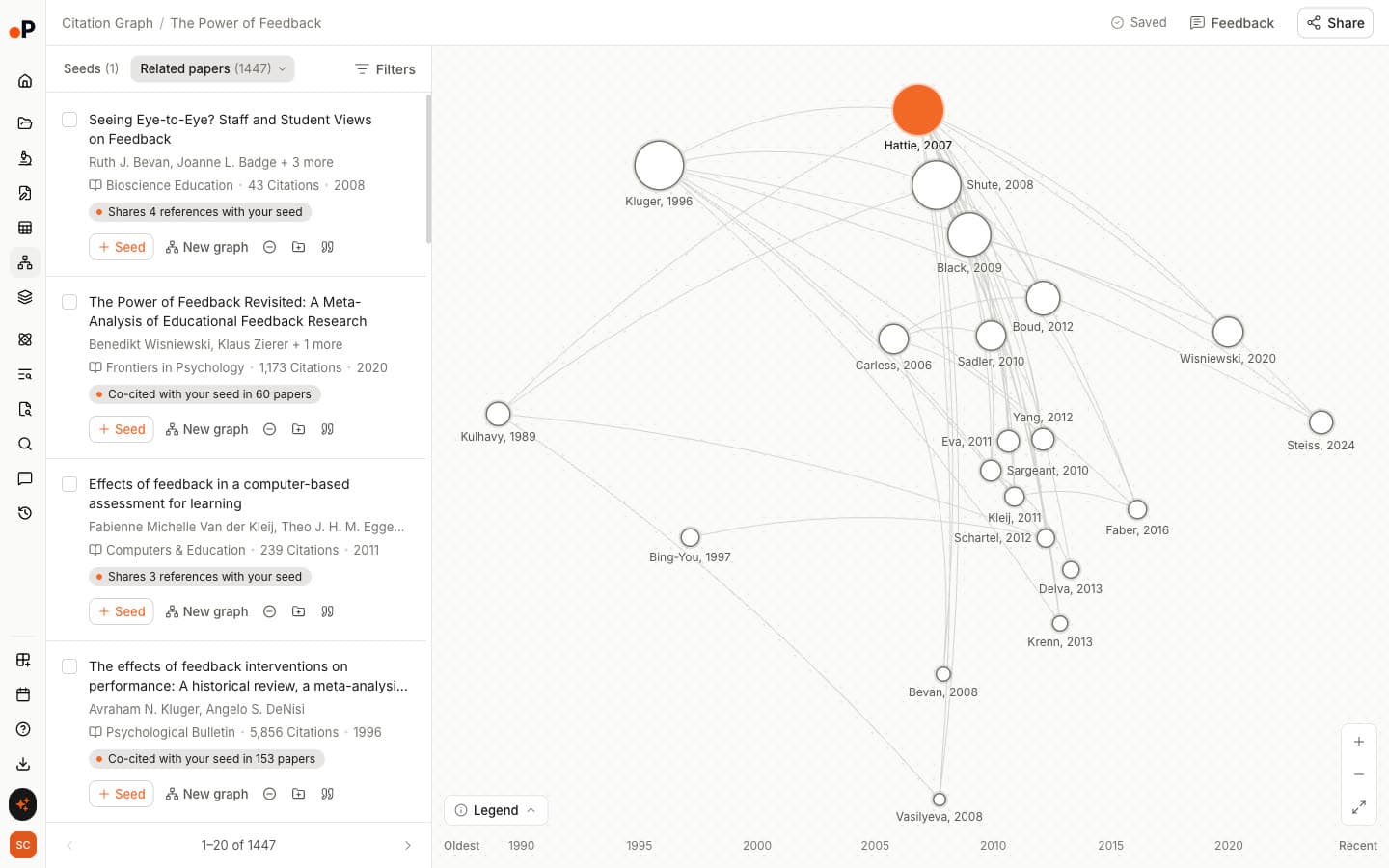
Connected Papers' help text is clear: "Papers are arranged according to their similarity (this is not a citation tree)". In other words, it is good for seeing which papers sit close together and less good for seeing who cited whom.
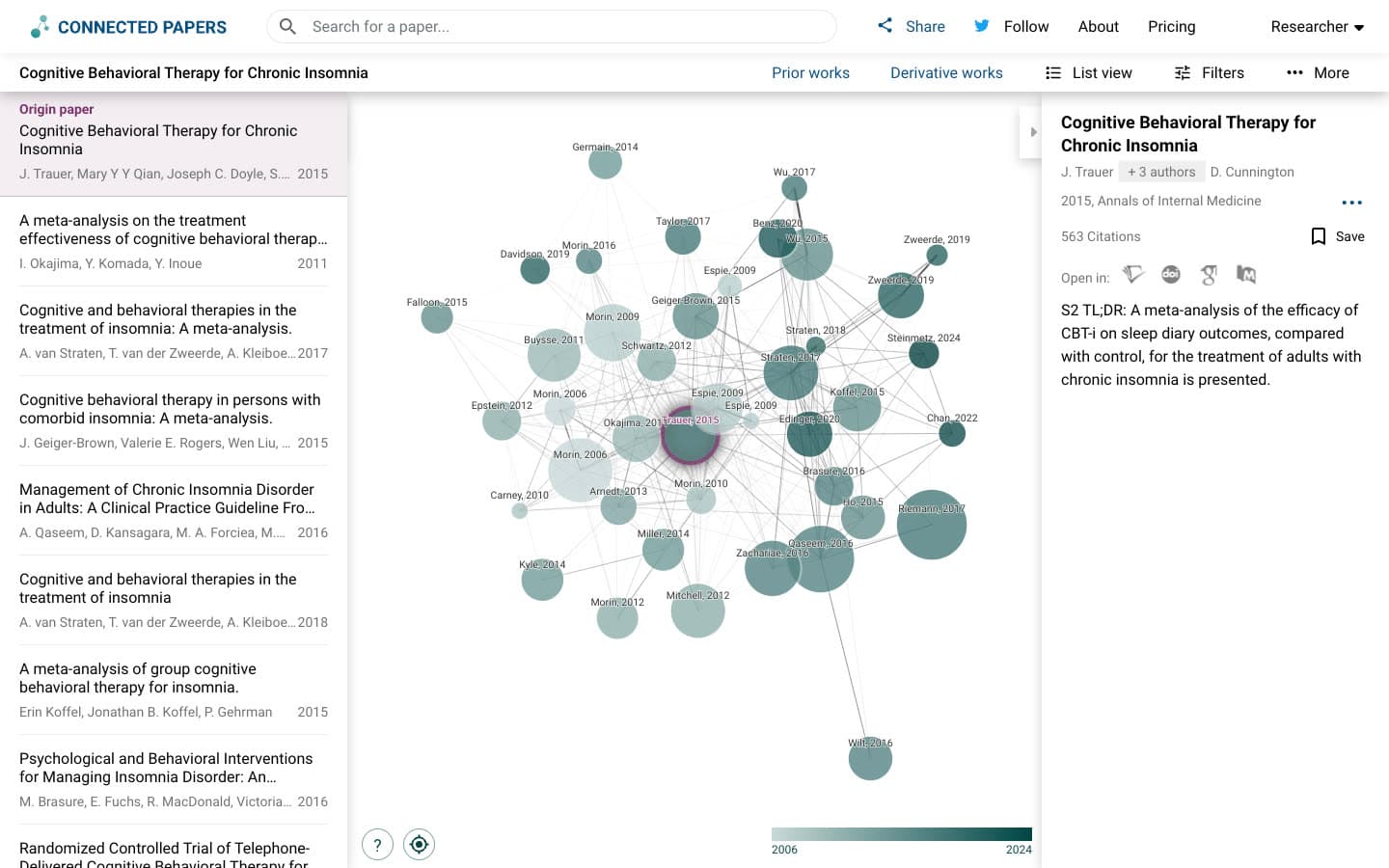
On the transformer seed, for example, Connected Papers' circles for highly cited papers overlapped and hid most labels. Paperguide stays readable but shows fewer papers at once.
Verdict: Connected Papers wins on density, 41 nodes on one canvas. Paperguide wins on readability, time and citation direction. New to maps? Start with what a citation map actually shows.
How Does Relevance of Recommendations Compare?
Relevance is a tie. Connected Papers averaged 1.77 out of 2 and Paperguide 1.75 across the three seeds, a gap too small to matter with one judge. Connected Papers scored slightly higher in its top 10; Paperguide recommended no paper that scored 0.
Blind relevance scores, top 20 per seed (0 to 2)
| Tool | Insomnia | Feedback | Transformer | Average | Scored 2 | Scored 0 | Top 10 average |
|---|---|---|---|---|---|---|---|
| Connected Papers | 1.90 | 1.85 | 1.55 | 1.77 | 78% | 2% | 1.90 |
| Paperguide | 1.90 | 1.75 | 1.60 | 1.75 | 75% | 0% | 1.80 |
Both surfaced the papers an expert would expect. For example, on the feedback seed both ranked Kluger and DeNisi's 1996 meta-analysis, "Focus on Formative Feedback" and "The Power of Feedback Revisited" high.
One issue we saw only in Connected Papers: duplicate records. In particular, the insomnia graph held two copies each of the van Straten, Wu and van der Zweerde meta-analyses, taking slots another paper could fill.
Verdict: Tie. Pick on everything else.
How Do Explanations Compare?
Paperguide tells you why each paper is on the map; Connected Papers gives you a number. Every Paperguide card carries a "Why it's here" label such as "Co-cited with your seed in 60 papers". In contrast, Connected Papers shows "Similarity to origin" scores, edge thickness and the abstract or Semantic Scholar summary.
Take "The Power of Feedback Revisited", which both recommended. Connected Papers listed "Similarity to origin 19.5". Paperguide said "Co-cited with your seed in 60 papers", meaning 60 papers cite both. Co-citation is when a third paper cites two papers together, a long-established signal of related work [4].
Other labels read "Shares 25 references with your seed", "Cites your seed" and, on a two-seed map, "Matches the topic of 2 of your seeds". Bibliographic coupling is when two papers share references, the signal behind that first label [5].
Verdict: Paperguide wins. Why does that matter? A reason you can check beats a score you must trust, especially when you have to justify why a paper entered your review.
How Do Earlier and Later Work Compare?
Paperguide lists far more of the seed's backward and forward citations: 104 earlier and 847 later papers for the insomnia seed. Connected Papers shows 10 Prior works and 10 Derivative works, chosen because many graph papers cite them or are cited by them, a narrower idea than the seed's own citations.
Connected Papers' Prior works are often "important seminal works for this field". For instance, its insomnia list held the 1994 and 2002 meta-analyses every review cites. Similarly, Paperguide's Earlier work found the same foundations, labelled "Your seed and 32 of its references cite this".
The real gap is depth. Specifically, Paperguide's 104 earlier papers include 88 the seed cites directly; all 847 later papers are labelled "Cites your seed". For the feedback seed it listed 82 earlier and 1,000 later, where the list appears capped. A step-by-step guide to building a citation map explains why both directions matter.
Recent papers sit in different places. Notably, Connected Papers had no 2024 or later paper in any top 20, and only one across its three graphs; recent work appeared in Derivative works. Paperguide had one, one and none in its Related top 20, with recent work in Later work.
Verdict: Paperguide wins for citation searching. Even so, Connected Papers' 10-and-10 lists are a quick shortcut to seminal papers and surveys.
How Does Adding More Seeds Compare?
Paperguide takes one to five seeds, rebuilds in about 26 seconds and labels papers linked to more than one seed. Connected Papers' "Add origin" opened the combined graph in a new tab with no label showing which papers connect to both origins, only a combined "Rating" score.
To test this, we added the van Straten meta-analysis as a second insomnia seed. In Paperguide, Related papers grew from 1,252 to 1,933 and Earlier work from 104 to 214. All top 20 papers carried labels such as "Co-cited with 2 of your seeds".
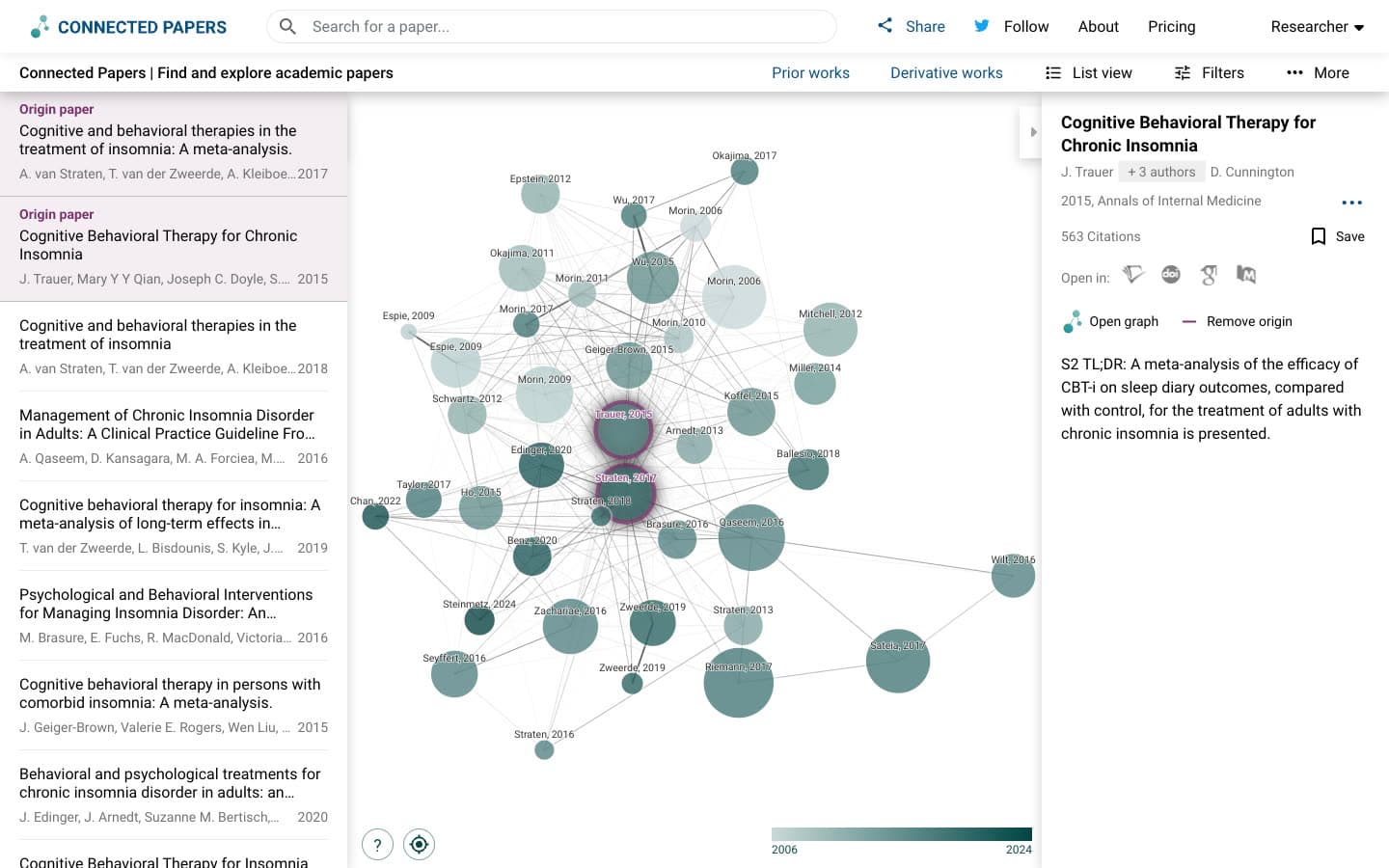
Meanwhile, Connected Papers' graph shrank to 40 nodes including both origins. Its top-ranked paper, at "Rating 98.1", was a 1-citation duplicate of the second seed itself.
Verdict: Paperguide wins. Seed labels make a multi-seed map readable.
How Do Saving, Export and Zotero Compare?
Connected Papers wins on export: it downloads the map's papers as a BibTeX file. Paperguide has no graph export. Instead, it saves every graph to your account and adds any paper to its Reference Manager, which has its own export and citation tools.
Connected Papers' "Download" gave a .bib file of 41 entries with DOIs and abstracts. We saw no RIS, CSV or image export and no Zotero button. Also note that "Graph versions" matters: our insomnia graph first opened as an older cached version until we clicked "New version ready".
In Paperguide, by comparison, each graph "saves automatically, named after the first seed". Cards have "Add to Reference Manager" and "Cite" buttons, and saved papers show "In 1 graph". Its open-access PDF fetch worked for one of our three papers.
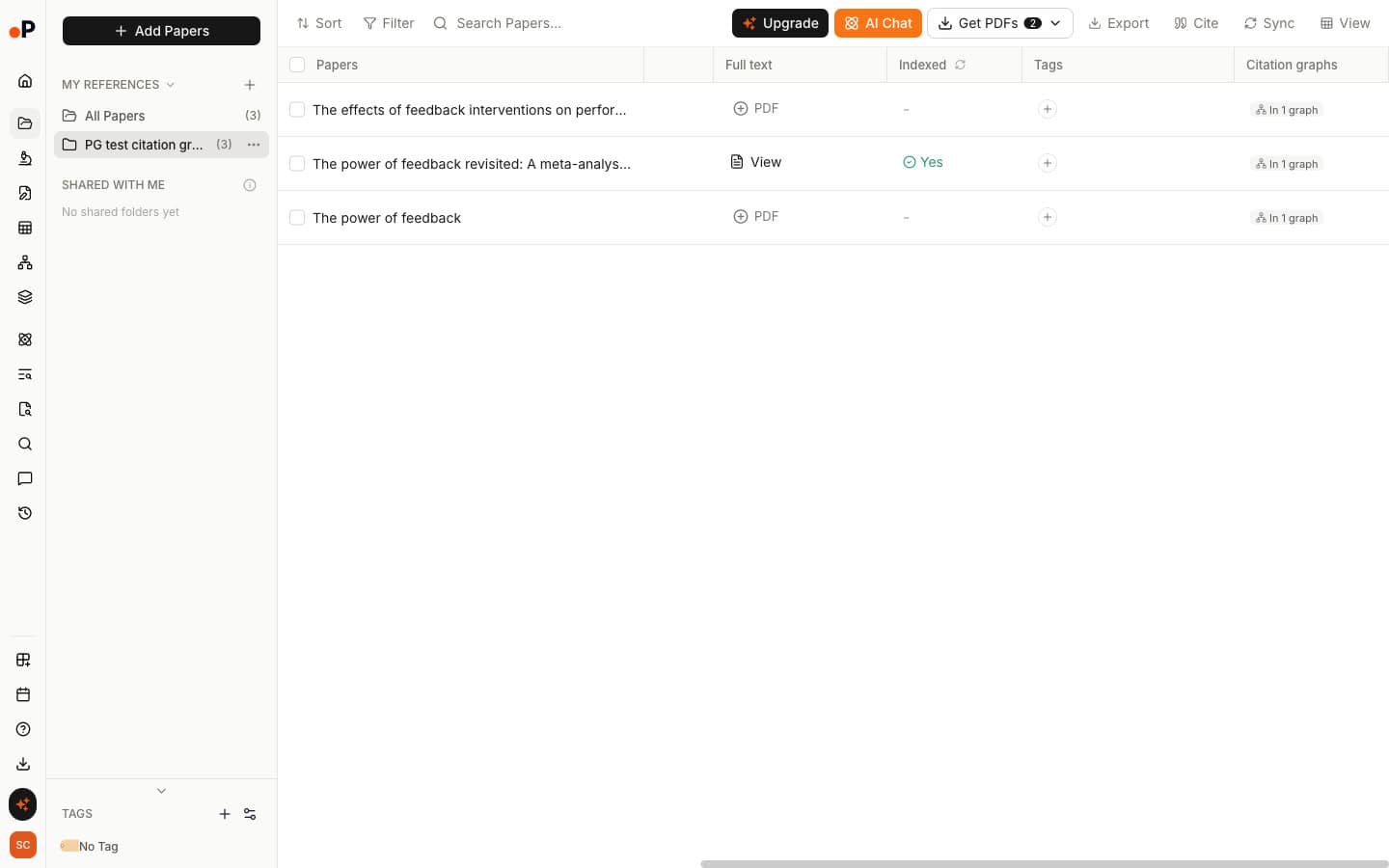
Verdict: Connected Papers for a quick .bib file. Paperguide for a library linked to the graphs your papers came from.
How Do Sharing and Alerts Compare?
Paperguide shares a graph by link with three access levels: "Can edit", "Can view" or "No access". Connected Papers, by contrast, shares through Facebook, LinkedIn, Twitter, email or a copied link. We saw no new-paper alerts in either tool, so neither will tell you when your topic moves on.
One caution: "Can edit" was selected by default on a new Paperguide graph. Therefore, switch to "Can view" before sending a read-only link.
Verdict: Paperguide, because a supervisor or co-reviewer can open the same working graph.
How Do Free Plan Limits Compare?
Paperguide's Citation Graph is free, states no graph limit, and we hit none in our test. You can build and browse graphs without signing up, and it used no AI credits in our test. By contrast, Connected Papers' free plan includes all features but allows five graphs a month, or two without an account, and then asks you to upgrade.
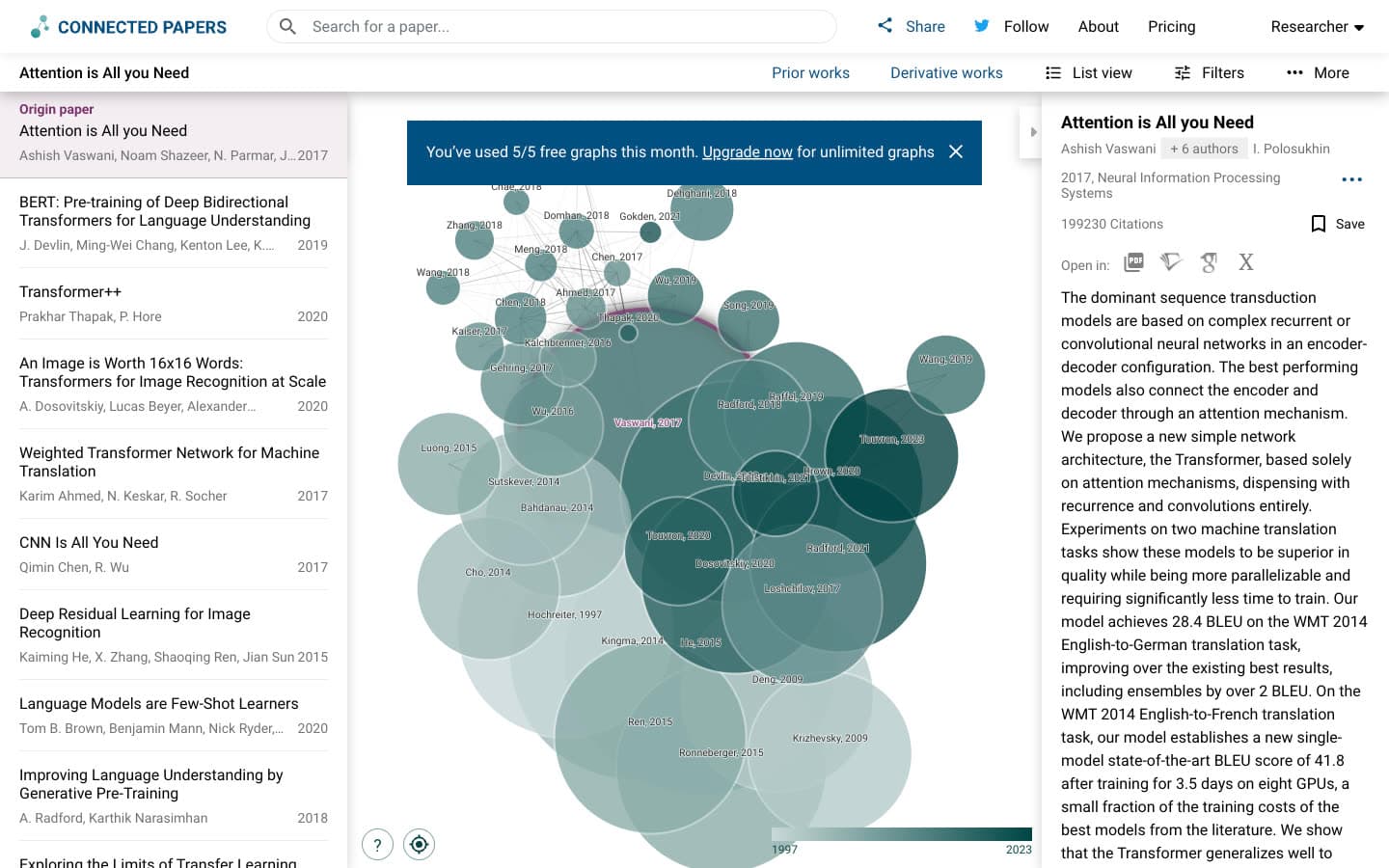
We reached "You've used 5/5 free graphs this month" after four graphs and one rebuild. In fact, the exact counting rule is unclear, so budget for fewer than five fresh maps.
Verdict: Paperguide, for anyone mapping more than a handful of seeds a month.
What Paperguide Adds Beyond the Map
A citation map is where reading starts. Connected Papers stops at the map: we saw no chat or AI features of its own, no notes, no RIS or Zotero export and no alerts. In Paperguide, however, papers you pick from a graph go straight into tools for reading, extracting and writing.
Reference Manager
Papers added from the graph land in Reference Manager, marked with their graph, ready to cite, export or open in other tools. If you already use another library, weigh it against the best reference management software for researchers before switching.
AI Search
AI Search answers a research question with a cited summary. In addition, every reference has a "Graph" button, so a paper found by question can seed a new map.
Chat with PDF
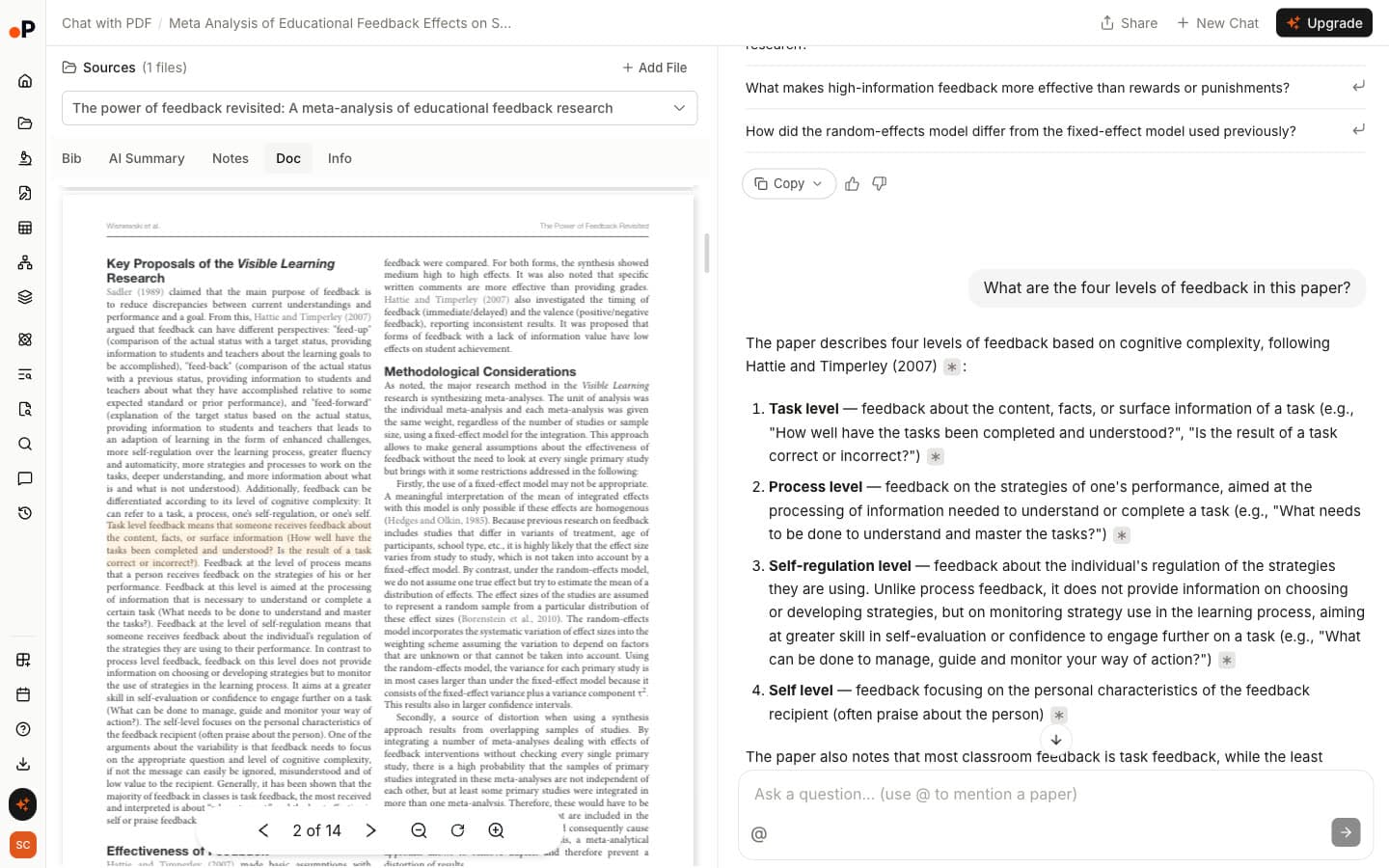
Chat with PDF answers questions about one paper with page citations. Asked for the four levels of feedback in the 2020 meta-analysis, it listed task, process, self-regulation and self, each citation jumping to the source sentence.
Extract Data
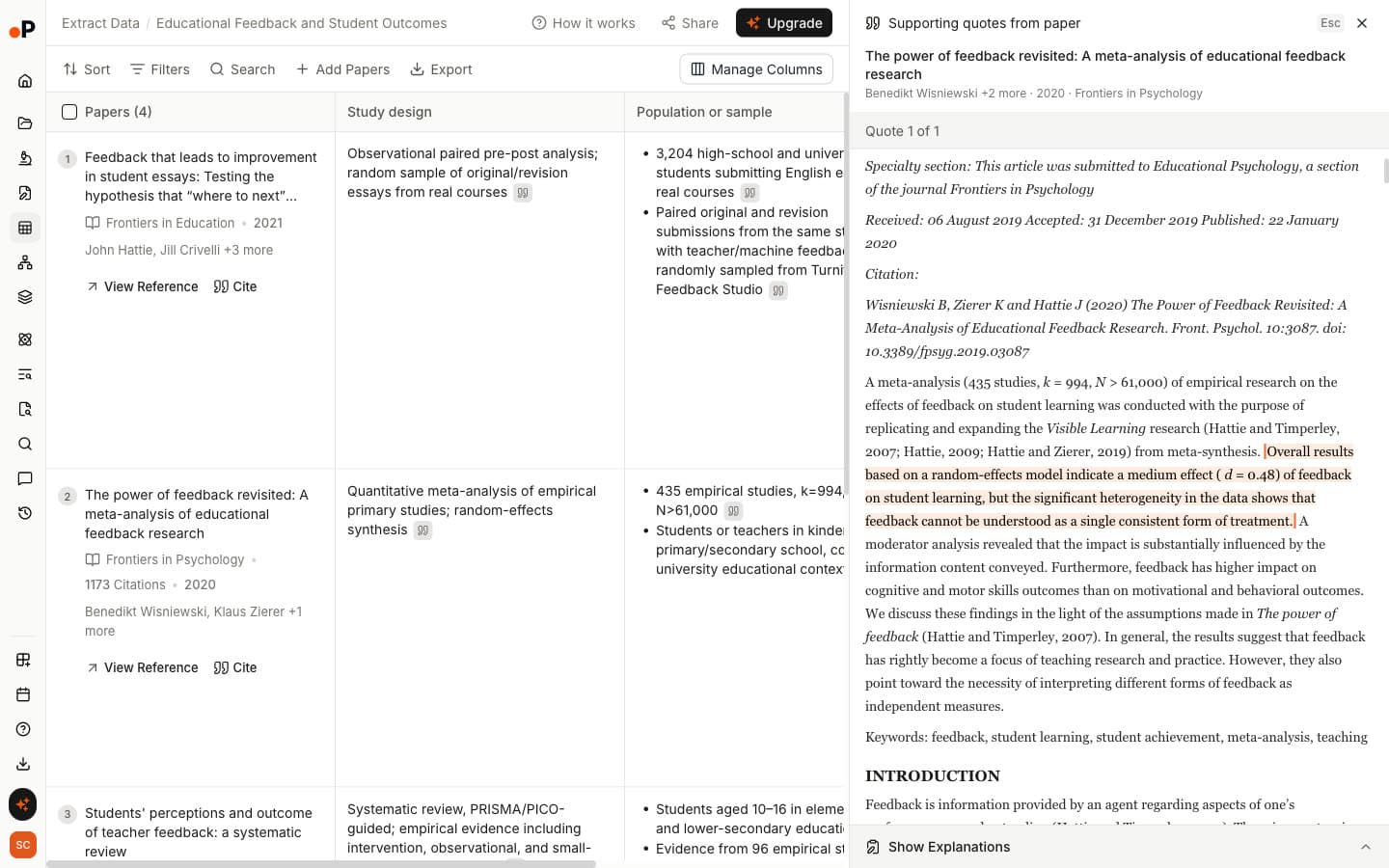
Extract Data builds a table across papers with columns you choose, such as study design and key findings. Each value opens its supporting sentence. Note, however, that only papers with a PDF can be added.
Literature Review AI
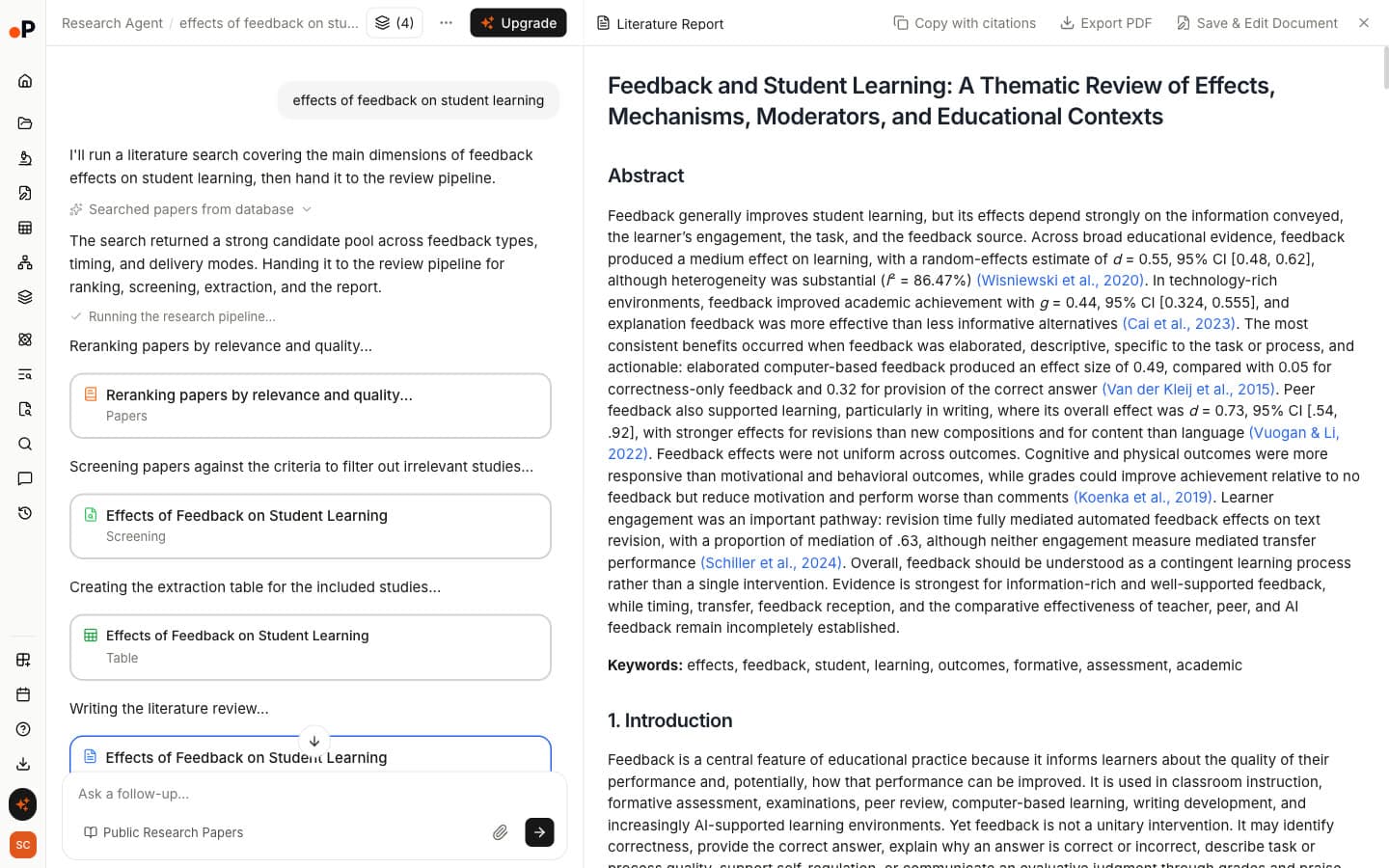
Literature Review AI reranks papers, screens them against criteria it shows you, builds an extraction table and writes a cited report; ours took about 4.6 minutes. It is one of several AI tools for literature review that start from a question rather than a seed paper.
AI Paper Writer
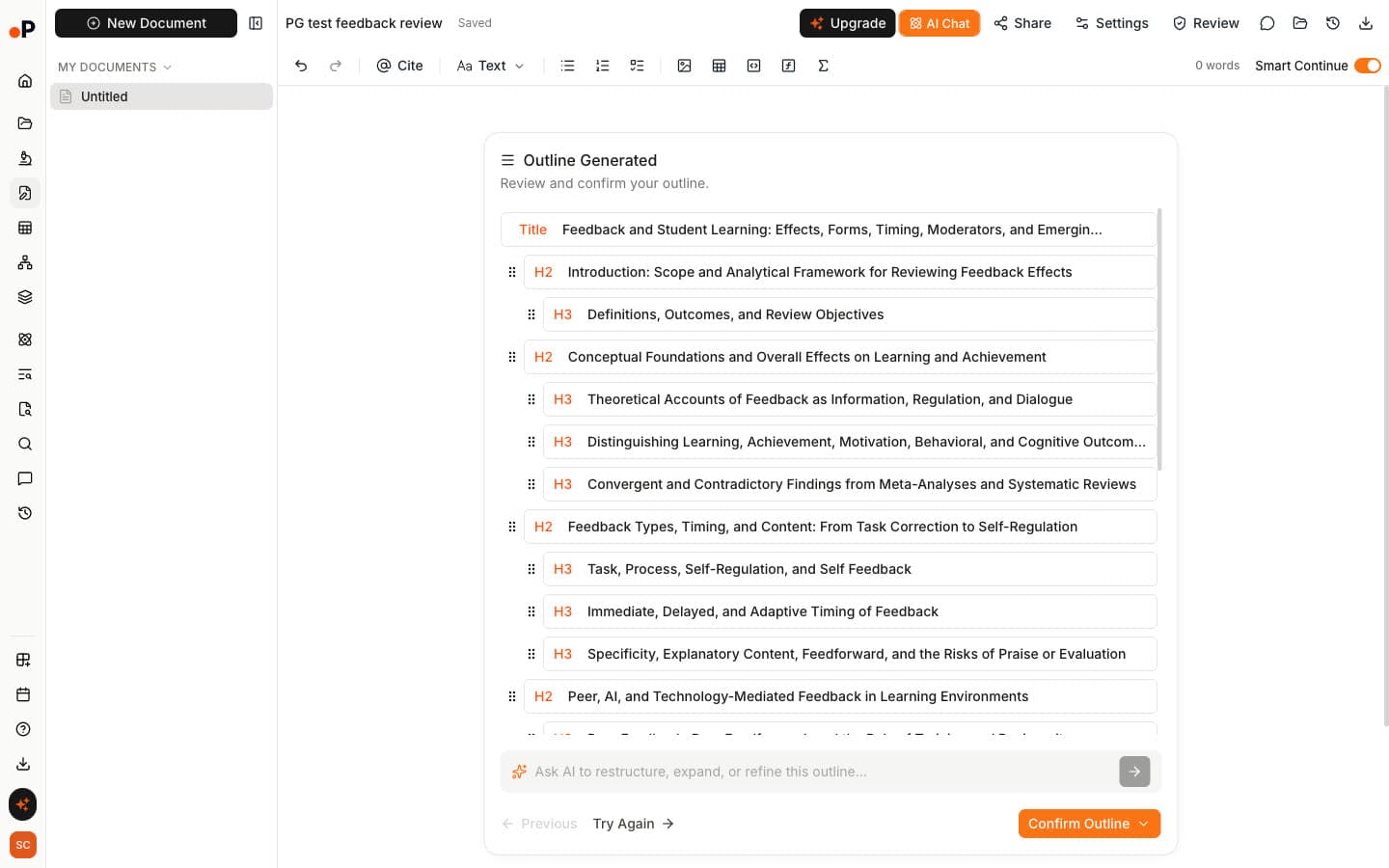
AI Paper Writer starts a document from a prompt, citing public papers and your Reference Manager. We generated only an outline: a title, 7 sections and 17 subsections to review before insertion. An outline still needs the judgement covered in how to write a literature review.
Systematic Review
Systematic Review runs title and abstract and full-text screening with "AI Review" or "Dual Review", where two reviewers screen independently and a resolver settles disagreements.
Research Agent
Research Agent lets you pick a workflow for an open question, including Deep Research Report and Research Gap Finder, useful when you are working out how to find research gaps systematically.
Paperguide vs Connected Papers: Pricing Comparison
Paperguide's Citation Graph is free, and its page states no graph limit. Connected Papers is free for five graphs a month. After that, the Academic plan costs $6 a month, billed $72 a year or $30 a quarter. The Business plan costs $20 a month, billed $240 a year or $90 a quarter.
Plans and US prices
| Plan | Paperguide | Connected Papers |
|---|---|---|
| Free | Citation Graph, no graph limit stated | 5 graphs a month, all features |
| Entry paid plan | Plus, $12 per seat a month billed yearly ($144 a year) | Academic, $6 a month billed yearly ($72) |
| What you pay for | The wider platform: search, extraction, writing, reviews | Unlimited graphs |
In short, Connected Papers' paid plans buy more graphs. Paperguide's paid plans leave the Citation Graph free and pay for the tools around it. Prices change, so check the Paperguide pricing page.
Where Connected Papers Genuinely Wins
Connected Papers is a focused, well-made tool. It tied Paperguide on relevance with a slightly higher top-10 score, 1.90 against 1.80. It also draws 41 nodes on one canvas and opens cached graphs in one to three seconds. Finally, it exports BibTeX, found the original transformer record by title, and filters by "PDF available", "Open access", "Code available" and year.
If Litmaps is also on your shortlist, the differences between Connected Papers and Litmaps come down to relevance against tracking new work over time.
Where Paperguide Genuinely Wins
Paperguide matched Connected Papers on relevance and goes further around it. It shows "Why it's here" on every paper and lists 104 earlier and 847 later papers against 10 and 10. It labels multi-seed papers and states no graph limit. In addition, it recommended no off-topic papers, shares graphs by link and leads directly into Reference Manager.
Final Verdict: Should You Choose Paperguide or Connected Papers?
For a quick picture of a field a few times a month, Connected Papers is excellent and free. For review work, however, Paperguide is the stronger Connected Papers alternative. It is equally relevant, explained on every paper and deeper on citations, with no stated graph limit and a direct path to the tools you use next.
Choose Connected Papers if:
- You build five or fewer maps a month.
- You want a dense similarity map and a BibTeX file of it.
Choose Paperguide if:
- You need to justify why each paper is relevant.
- You are doing backward and forward citation searching.
- You map several seeds together or many seeds a month.
- You want papers to move into a library, extraction table and draft.
Frequently Asked Questions
Is Connected Papers free?
Yes, with a limit. The free plan includes all features but allows five graphs a month with an account, or two as a guest. After that it shows "You've used 5/5 free graphs this month". The Academic plan costs $6 a month and the Business plan $20 a month, both billed yearly.
What is the best free Connected Papers alternative?
Paperguide's Citation Graph is a strong free alternative. In our blind test it matched Connected Papers on relevance, 1.75 against 1.77 out of 2, with no off-topic papers. It states no graph limit, explains why every paper is linked, and lists far more of a seed's earlier and later work.
Is Paperguide's Citation Graph free?
Yes. Building and browsing citation graphs is free and needs no signup, and it used no AI credits in our test. Signing in adds graphs saved to your account, link sharing with edit or view rights, and adding papers to Reference Manager. Paid plans cover Paperguide's other tools.
Is Connected Papers a citation tree?
No. Its own help panel says papers are arranged by similarity and "this is not a citation tree". Similar papers cluster with strong lines, node size shows citations and colour shows year. For references and citing papers, it offers separate Prior works and Derivative works lists of 10 each.
Can I export Connected Papers to Zotero?
Not directly. Connected Papers exports the graph's papers as a BibTeX file, which you can import into Zotero or another reference manager. We saw no RIS, CSV or image export and no Zotero button. Paperguide has no graph export but adds papers straight to its own Reference Manager.
How many seed papers can you use?
Paperguide accepts one to five seed papers per graph and labels papers linked to more than one seed. Connected Papers supports multi-origin graphs through "Add origin"; we tested two origins and did not reach a maximum. Its two-origin graph had no label marking papers connected to both.
Does Connected Papers show recent papers?
Rarely in the main graph. In fact, none of its top 20 recommendations for our three seeds was from 2024 or later, and its three graphs held one such paper in total. Recent work appeared in Derivative works instead. Paperguide's Related lists were also mostly older, with recent papers in its Later work view.
Is Paperguide better than Connected Papers?
For relevance alone, no: the two tied in our blind test. Paperguide is better for review work, because it explains every link, lists far more of a seed's earlier and later work, labels multi-seed maps and states no graph limit. Conversely, Connected Papers is better for a dense one-screen map and BibTeX export.
References
- Trauer, J. M., Qian, M. Y., Doyle, J. S., Rajaratnam, S. M. W., & Cunnington, D. (2015). Cognitive behavioral therapy for chronic insomnia: A systematic review and meta-analysis. Annals of Internal Medicine, 163(3), 191-204. https://doi.org/10.7326/M14-2841
- Hattie, J., & Timperley, H. (2007). The power of feedback. Review of Educational Research, 77(1), 81-112. https://doi.org/10.3102/003465430298487
- Vaswani, A., Shazeer, N., Parmar, N., Uszkoreit, J., Jones, L., Gomez, A. N., Kaiser, Ł., & Polosukhin, I. (2017). Attention is all you need. Advances in Neural Information Processing Systems, 30. https://doi.org/10.48550/arXiv.1706.03762
- Small, H. (1973). Co-citation in the scientific literature: A new measure of the relationship between two documents. Journal of the American Society for Information Science, 24(4), 265-269. https://doi.org/10.1002/asi.4630240406
- Kessler, M. M. (1963). Bibliographic coupling between scientific papers. American Documentation, 14(1), 10-25. https://doi.org/10.1002/asi.5090140103
Mapping citations?
See how any paper connects
Start from up to five papers and explore earlier, later and related work in one free citation graph. No signup.
Try Citation GraphNo credit card required