Connected Papers vs Litmaps: Which Is Better in 2026?


Connected Papers vs Litmaps is relevance against tracking. Connected Papers found more related papers, scoring 1.77 of 2 in our blind relevance test against 0.87 for Litmaps. Litmaps, however, is better for following recent work, with more 2024 and later papers, Monitor alerts and Zotero sync on Pro.
The two tools draw different maps. Connected Papers is a visual tool that builds a similarity graph from co-citation and bibliographic coupling. Litmaps is a literature mapping tool that places papers on a citation timeline. We tested both with free accounts and the same three seed papers, then had every recommendation scored blind.
TL;DR
Pick Connected Papers when you want a tight, relevant reading list around one paper and a BibTeX file of it. Pick Litmaps when you are tracking a field over months, want newer papers on a timeline, and will pay for alerts and Zotero sync. Neither tool explains why a given paper appears.
Which Tool Fits Your Need
| If you need... | Better choice |
|---|---|
| The most relevant papers around one seed | Connected Papers |
| Recent papers (2024 and later) in the first results | Litmaps |
| A timeline of who cited whom | Litmaps |
| More free maps | Connected Papers (5 a month vs 2 in total) |
| RIS or CSV export, or Zotero sync | Litmaps |
| Email alerts for new papers | Litmaps |
| Ranked (not tied) results with several seeds | Connected Papers |
| Lowest paid price | Connected Papers |
Connected Papers vs Litmaps: Quick Comparison
Connected Papers draws one similarity graph of 40 papers around an origin paper and works best as a fast, focused reading list. Litmaps keeps saved maps on a configurable timeline, adds alerts and Zotero sync on Pro, and surfaces newer work, but its default recommendations were far less relevant in our test.
Feature Comparison at a Glance
| Feature | Connected Papers | Litmaps |
|---|---|---|
| Map type | Force-directed similarity graph | Citation timeline (Co-citation network free; Semantic and Co-author maps on Pro) |
| How papers are chosen | Co-citation and bibliographic coupling | "Shared Citations & References" by default; "Common Authors" and "Similar Text" optional |
| Papers per map | 40 plus the origin | 20 Explore results for one seed, 100 for two |
| Data source | Semantic Scholar | Crossref, Semantic Scholar, OpenAlex |
| Relevance in our blind test | 1.77 of 2 | 0.87 of 2 |
| 2024+ papers in top 20 (three seeds) | 0 / 0 / 0 | 5 / 4 / 10 |
| Per-paper explanation | None (similarity score only) | None |
| Export | BibTeX | BibTeX, RIS, CSV |
| Zotero | None found | Two-way sync on Pro |
| Alerts | None found | Monitor |
| Free plan | 5 graphs a month (2 as a guest) | 2 Litmaps |
| Cheapest paid plan (US) | $6/mo billed $72 a year | $10/mo billed $120 a year |
Who Is Connected Papers Best For?
Connected Papers suits researchers who start from one paper they trust and want the closest related studies quickly. It fits students opening a new topic, evidence synthesis teams checking that a search missed nothing obvious, and anyone who wants a short, relevant list to export as BibTeX.
- Students starting a literature review who need the papers closest to a key study.
- Evidence synthesis and HEOR teams spot-checking a reference list for a missed review or trial.
- Occasional users who need a few maps a month and nothing to maintain.
Who Is Litmaps Best For?
Litmaps suits researchers who keep a topic under watch for months. Its timeline shows how a field developed, its free maps hold up to 100 articles, and Pro adds alerts you can customise, unlimited maps and two-way Zotero sync. It also put far more recent papers in front of us.
- PhD students tracking a thesis topic who want new papers flagged without searching again.
- Zotero users who want maps and collections in step (on Pro).
- Researchers who need the newest work more than a tight ranking.
How We Tested Connected Papers and Litmaps
We tested both tools on free accounts, using the same three seed papers from medicine, education and computer science. They were a 2015 meta-analysis of cognitive behavioural therapy for insomnia [1], Hattie and Timperley's 2007 review of feedback [2], and the 2017 transformer paper [3].
For each seed we recorded how the tool matched it by DOI, title and title plus author, the top 20 recommendations in default order, earlier and later work, and every export, sharing and alert option. Then came our blind relevance test. We took the top 20 papers each tool recommended per seed: for Connected Papers, the graph list sorted by similarity; for Litmaps, Explore Related Articles in default mode. We pooled them with results from three other tools and shuffled them. One judge who could not see the source then scored each paper 0 to 2. A 2 meant clearly on the seed's core topic, 1 related but peripheral, and 0 off-topic, not a research paper, or a duplicate of the seed. The pool held 207 unique papers. The caveats: three seeds, one judge, and scoring by title, with the abstract checked for 9 unclear papers. Results vary by field.
How Does Finding Your Seed Paper Compare?
Connected Papers found the right record more often. It resolved two of three DOIs straight to the correct paper and found the third by title. Litmaps matched only one seed cleanly: it needed "Manual bulk import" for the insomnia meta-analysis and a Semantic Scholar ID for the transformer paper.
The Insomnia Meta-Analysis
In Connected Papers, the DOI 10.7326/M14-2841 went straight to a graph of the correct 2015 Annals of Internal Medicine record, though the title was shortened to "Cognitive Behavioral Therapy for Chronic Insomnia". The exact title was a trap: the top hit was a wrong record from the "Yearbook of Pulmonary Disease 2016", a one-reference commentary with the same title, and the real paper was not in the first 10 results. Title plus author did no better. Litmaps, in contrast, went wrong earlier. Its DOI search returned one result, "Trauer, 2016", a letter in the same journal. Litmaps groups the letter and the meta-analysis into one "Article Versions" family and shows the letter by default. The exact title returned 4,990 results without the seed on page 1. Only IMPORT, then "Manual bulk import" with the DOI, found the correct 2015 record.
Connected Papers also opened an older cached graph first, then offered "New version ready" about 31 seconds later.
The Other Two Seeds
For the feedback review, Connected Papers resolved the DOI directly; Litmaps listed the correct record second, behind an unrelated paper. For the transformer paper, Connected Papers could not resolve the arXiv DOI but found the paper as the top title result. Litmaps failed by DOI, arXiv ID, title and title plus author.
Verdict: Connected Papers. Search by DOI in both, and check the seed's year, journal and citation count before reading the map.
How Does the Map Itself Compare?
Connected Papers shows a similarity graph where closeness means relatedness, not citation. In contrast, Litmaps shows a citation timeline: newer papers to the right, more cited papers higher, with arrows pointing to cited articles. The first answers "what is close to this paper?" and the second "how did this topic grow?"
Connected Papers: A Similarity Graph
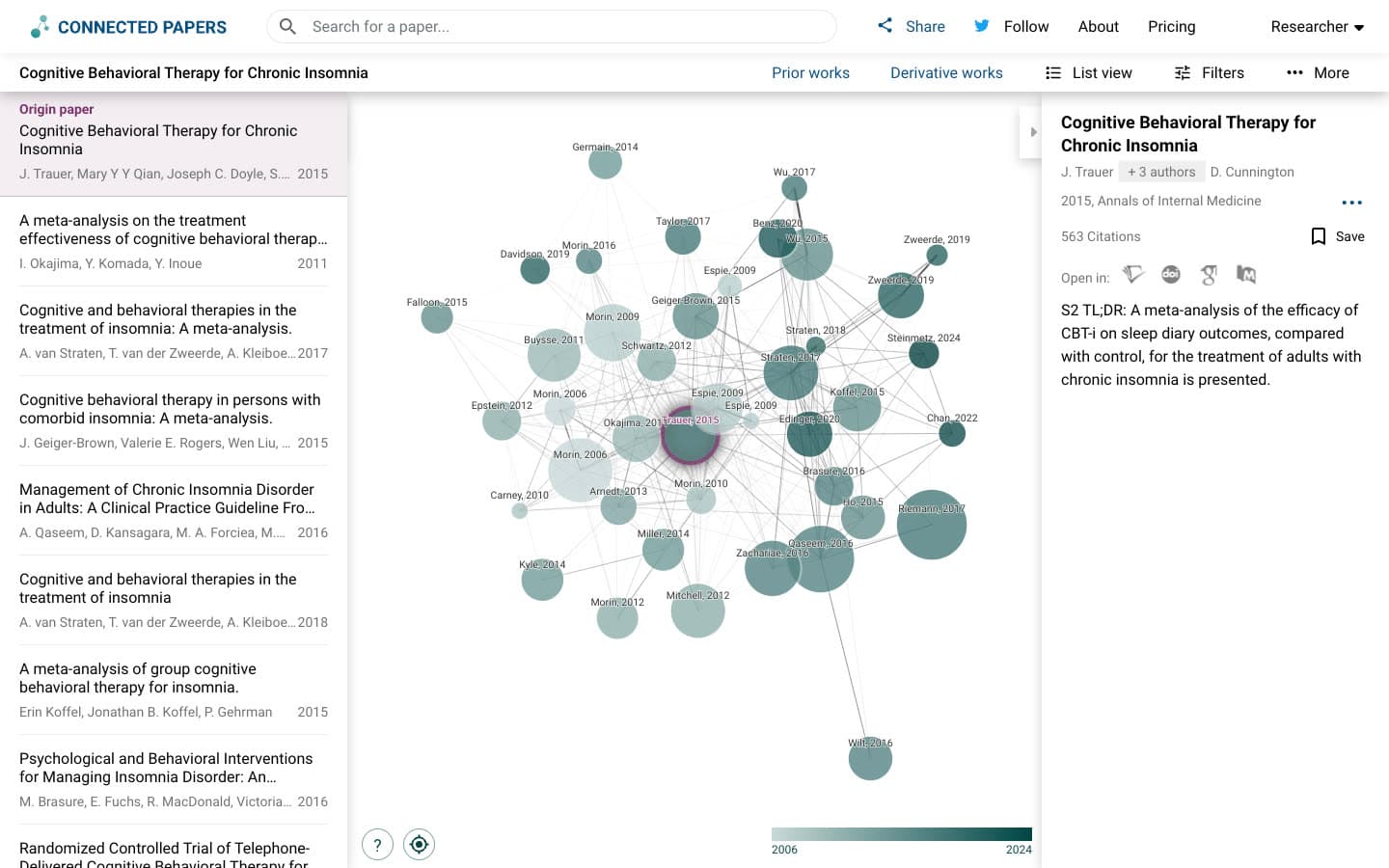
The help panel says: "Papers are arranged according to their similarity (this is not a citation tree)". Node size is citation count and node colour is publication year. Co-citation is when later papers cite two papers together [4], and bibliographic coupling is when two papers share references [5]; similarity rests on both. For example, in the transformer graph, very highly cited papers became huge overlapping circles that hid most labels, and the insomnia graph held duplicate records.
Litmaps: A Citation Timeline
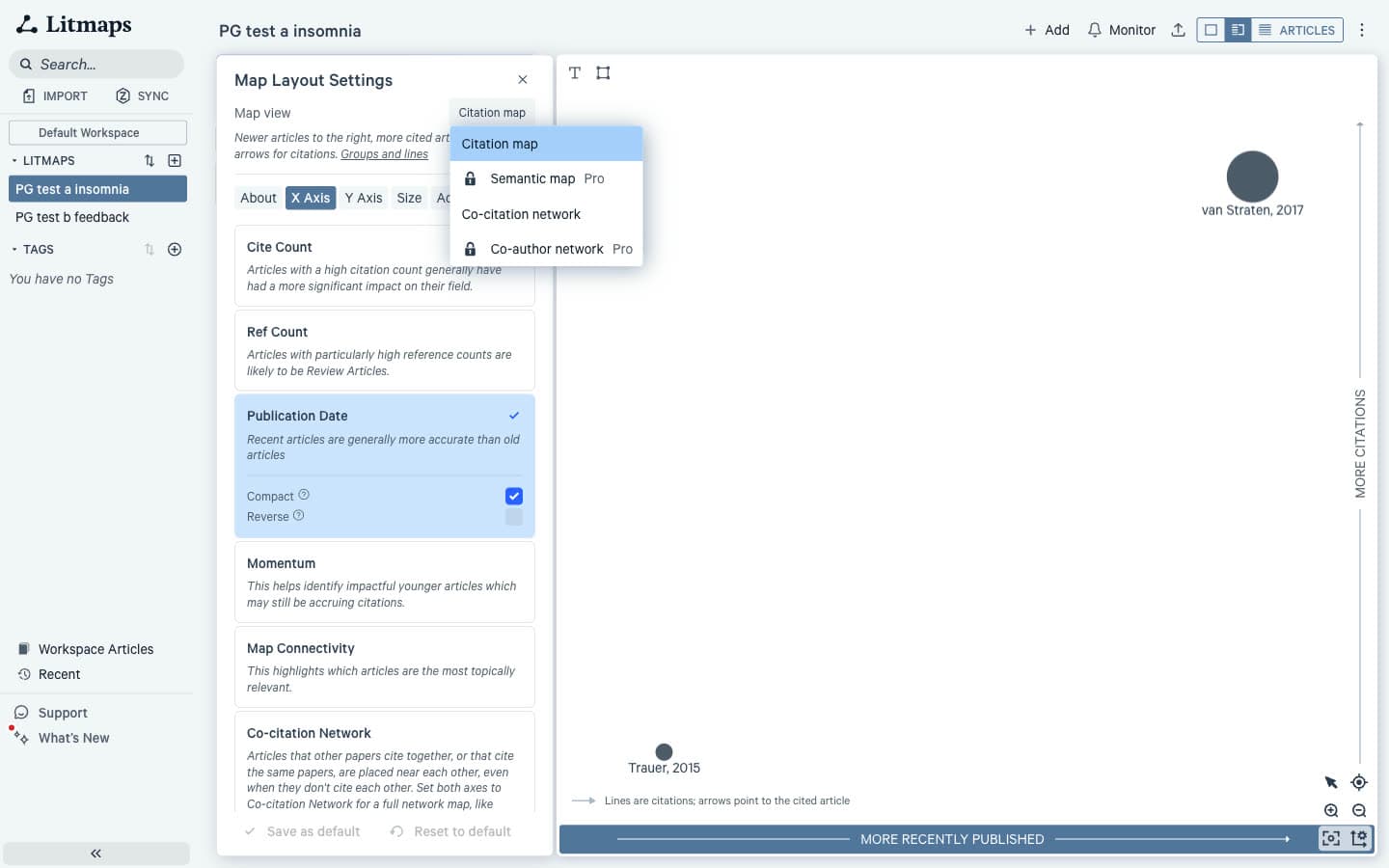
The default "Citation map" is "Newer articles to the right, more cited articles higher, and arrows for citations." You can swap either axis for reference count, Momentum, Map Connectivity and other measures. The free "Co-citation network" groups "Articles that are cited together or share references" while keeping the timeline; "Semantic map" and "Co-author network" carry a Pro lock.
Verdict: Different jobs. Connected Papers is quicker to read for one paper's neighbourhood; Litmaps is more flexible for seeing a field over time.
How Does the Relevance of Recommendations Compare?
Connected Papers won clearly. Across three seeds it averaged 1.77 of 2 in our blind relevance test, with 78% of papers scored as core and 2% off-topic. Litmaps averaged 0.87, with 18% core and 32% off-topic, and its top 10 averaged just 0.50.
Blind Relevance Scores by Seed
| Tool | Insomnia (a) | Feedback (b) | Transformer (c) | Average | Scored 2 | Scored 0 | Top 10 average |
|---|---|---|---|---|---|---|---|
| Connected Papers | 1.90 | 1.85 | 1.55 | 1.77 | 78% | 2% | 1.90 |
| Litmaps | 1.05 | 0.90 | 0.65 | 0.87 | 18% | 32% | 0.50 |
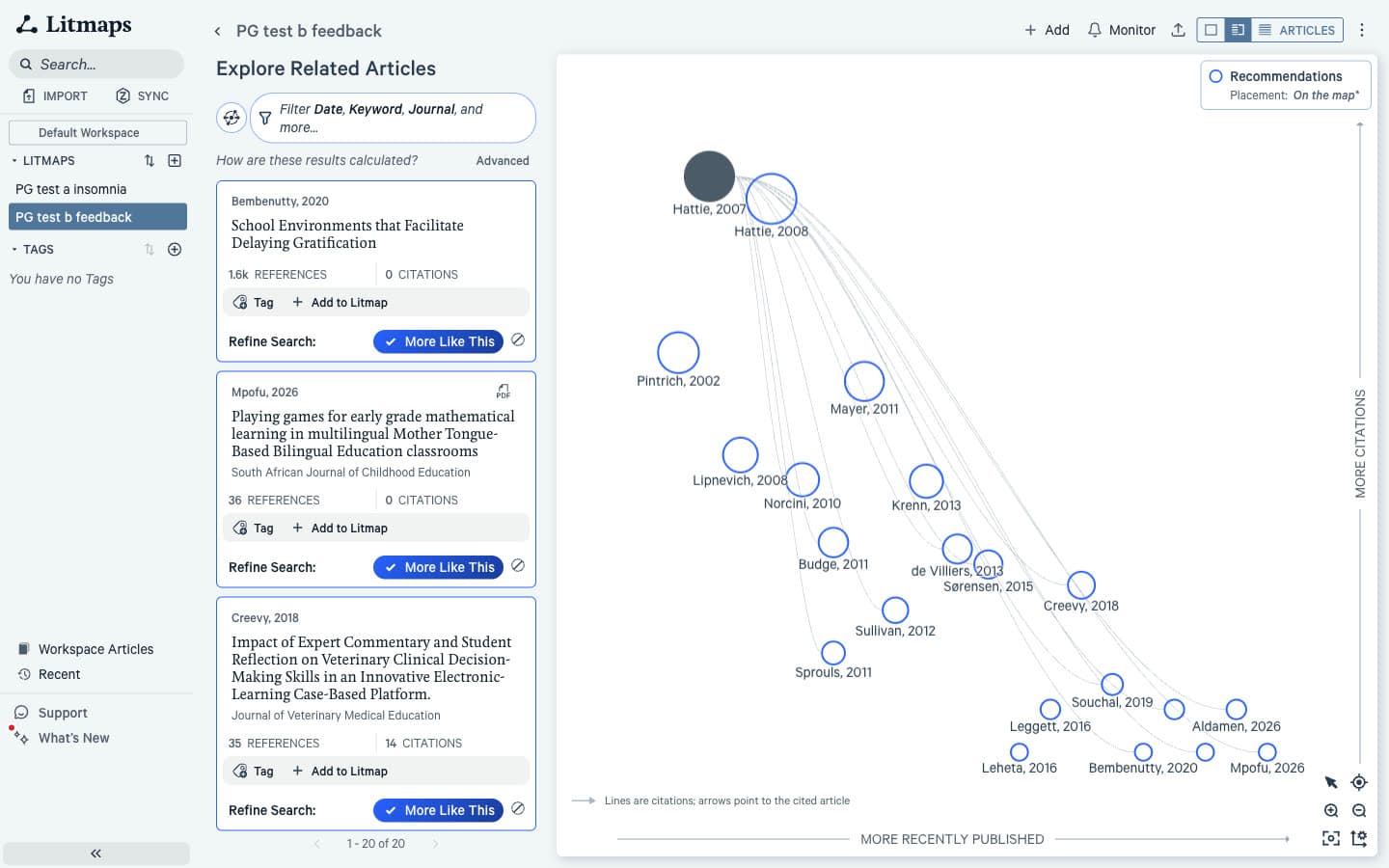
Litmaps' weak top 10, which averaged 0.50 of 2 in the blind test against 1.90 for Connected Papers, has a visible cause. In the default "Shared Citations & References" mode, the first 10 results for each seed shared one identical internal score, so their order carried no ranking. For example, for the insomnia seed that block included a cooling mattress pad pilot, a study of care-seeking for low back pain and an aquanaut health curriculum. Connected Papers' top 10 for the same seed was almost all CBT-I meta-analyses and guidelines. To be fair to Litmaps, however, its "Similar Text" mode, which sat outside the blind test, returned a top 20 that by title was nearly all about insomnia treatment.
Verdict: Connected Papers. In Litmaps, try "Similar Text" before judging its recommendations.
How Do Recent Papers Compare?
Litmaps wins on recency. It put 5, 4 and 10 papers from 2024 or later in its top 20 for the three seeds. Connected Papers put none in any top 20, and its three graphs held one recent paper between them. Its recent work sits in the Derivative works view instead.
However, recency is not relevance: for the transformer seed, Litmaps' recent results included forecasting, aviation safety reports and video synthesis. Connected Papers' Derivative works for the insomnia seed did list 2024, 2025 and 2026 papers, but only if you open it.
Verdict: Litmaps. Check its recent results one by one, and open Derivative works every time in Connected Papers.
How Do Earlier and Later Work Compare?
Connected Papers summarises the graph: Prior works lists the 10 papers most cited by graph papers, and Derivative works the 10 papers citing many of them. Litmaps shows each paper's full References and Citations lists, sorted by citation count, which is more complete but less selective.
For example, for the insomnia seed, Connected Papers' Prior works were foundational insomnia trials and meta-analyses from 1993 to 2007. In contrast, Litmaps' References list opened with general method papers: heterogeneity in meta-analyses, funnel plot bias, a depression inventory and a sleep quality index. For the two highly cited seeds, Litmaps' Citations tab was unsorted, with the sort control greyed out. Both tools' lists are a shortcut for backward and forward citation searching done by hand, which traces references and citations one paper at a time.
Verdict: Connected Papers for a curated short list; Litmaps for any paper's complete lists.
How Do Explanations Compare?
Neither tool tells you why a specific paper was recommended. Connected Papers shows a numeric "Similarity to origin" score and line thickness on the graph. In contrast, Litmaps shows no score at all, only citation lines on the map, so judging each result is left entirely to you.
Verdict: A narrow win for Connected Papers, because a score at least orders the list.
How Does Adding More Seeds Compare?
Connected Papers handled a second seed predictably: its multi-origin graph brought 7 new papers into the top 20, ranked by a "Rating" score. In contrast, Litmaps returned 100 results that all shared one score, and reloading the same map changed 9 of the top 10. Neither tool marks papers linked to both seeds.
Connected Papers: Multi-Origin Graphs
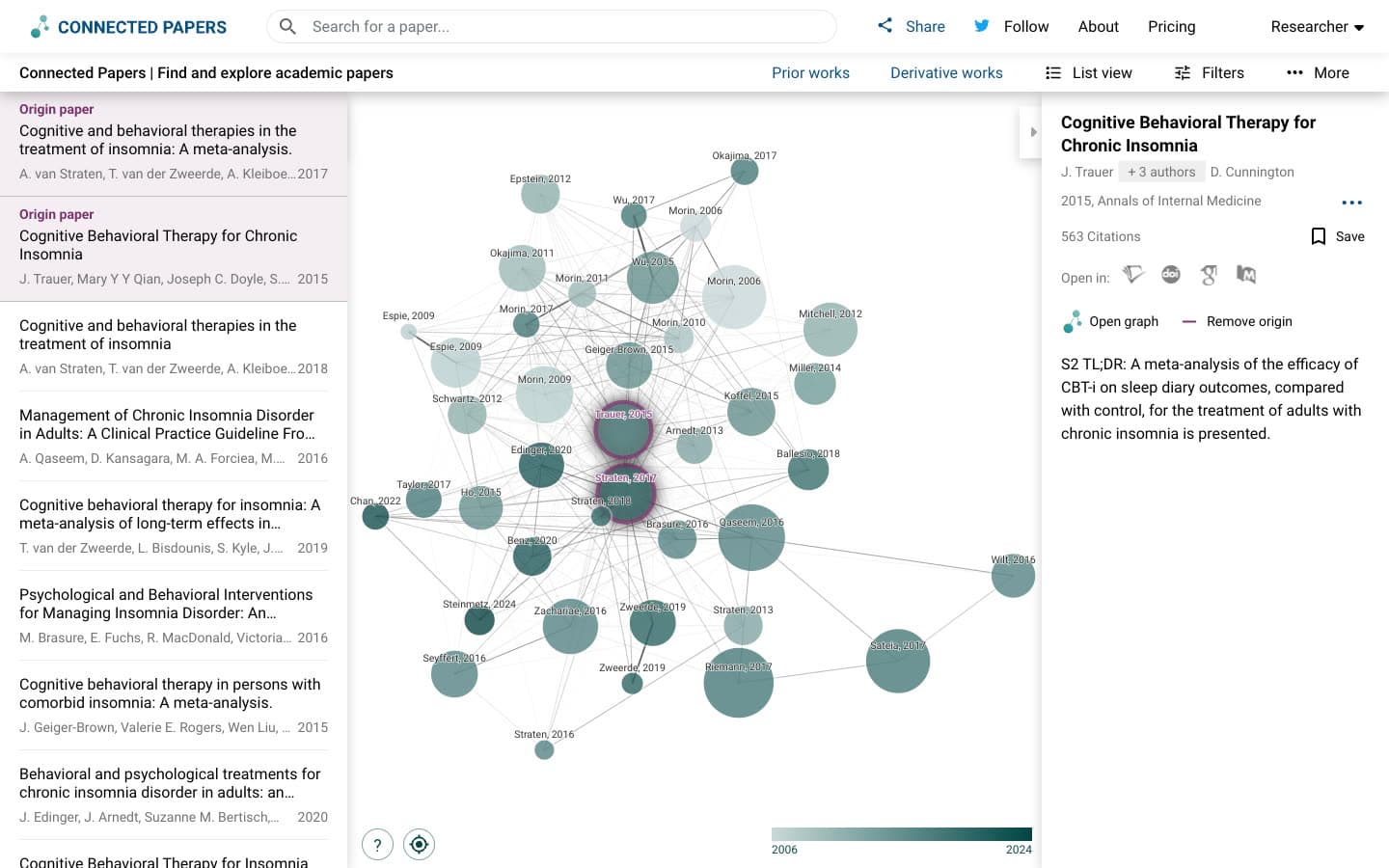
We added van Straten's 2017 insomnia meta-analysis with "Add origin". A new tab opened and built a 40-paper graph in about 37 seconds. Seven new papers entered the top 20, all about CBT-I or related behavioural treatment, such as a meta-analysis of self-help CBT-I. Nothing shows which papers connect to both origins.
Litmaps: Two Inputs in Explore
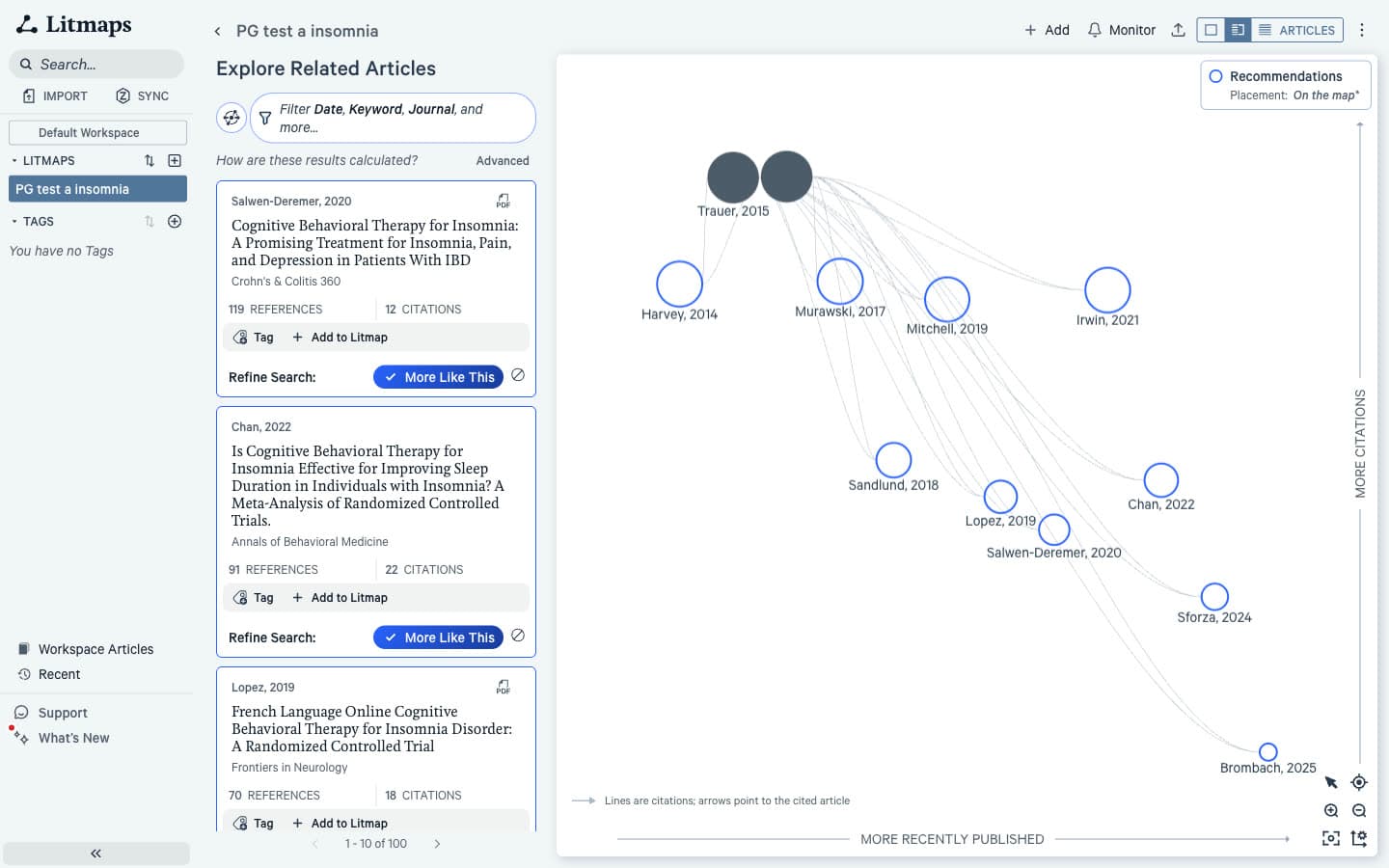
Adding the same paper with "Add to Litmap" re-ran Explore and returned 100 results, all with the same internal score. On reload, only 1 of the top 10 stayed. By title the results were mostly CBT-I trials. Because every result shared one score, however, their order cannot be reproduced.
Verdict: Connected Papers, for ranked results. Litmaps allows up to 20 inputs on Free, which helps for broad maps.
How Do Saving, Export and Zotero Compare?
Litmaps does more here. It exports BibTeX, RIS and CSV on the free plan, its help pages offer a PNG of the map, and Pro adds two-way Zotero sync. Connected Papers exports one BibTeX file of the graph, saves papers to a single "Saved papers" list, and we found no Zotero or Mendeley integration.
The Connected Papers BibTeX file held all 41 graph papers with DOIs and abstracts, which imports into most reference management software for researchers. In addition, Explore in Litmaps saves a map automatically, and "Workspace Articles" lists every mapped paper with "Export All".
Verdict: Litmaps, if your papers need to land in Zotero or a RIS file.
How Do Sharing and Alerts Compare?
Litmaps wins on both. It shares a map by link or email (one share per map on Free), and Monitor emails you when relevant new papers appear. In contrast, Connected Papers has a "Share graph" dialog with social buttons and a copy-link option, and we found no alerts.
The Litmaps Monitor page reads: "Monitor this Litmap to automatically scan for relevant newly-published articles. You'll receive an email whenever we find something new." Its help pages say free users can use Monitor while only Pro users customise alerts. We did not switch it on, so we cannot report what a free alert contains.
Verdict: Litmaps, and for long projects this is the main reason to choose it.
How Do Free Plan Limits Compare?
Connected Papers is more generous for occasional use: 5 graphs a month with a free account (2 as a guest), every feature included. Litmaps Free allows 2 Litmaps in total, not per month, with 20 inputs and 100 articles per map. We hit the Litmaps limit on our third seed.
Connected Papers: Five Graphs a Month
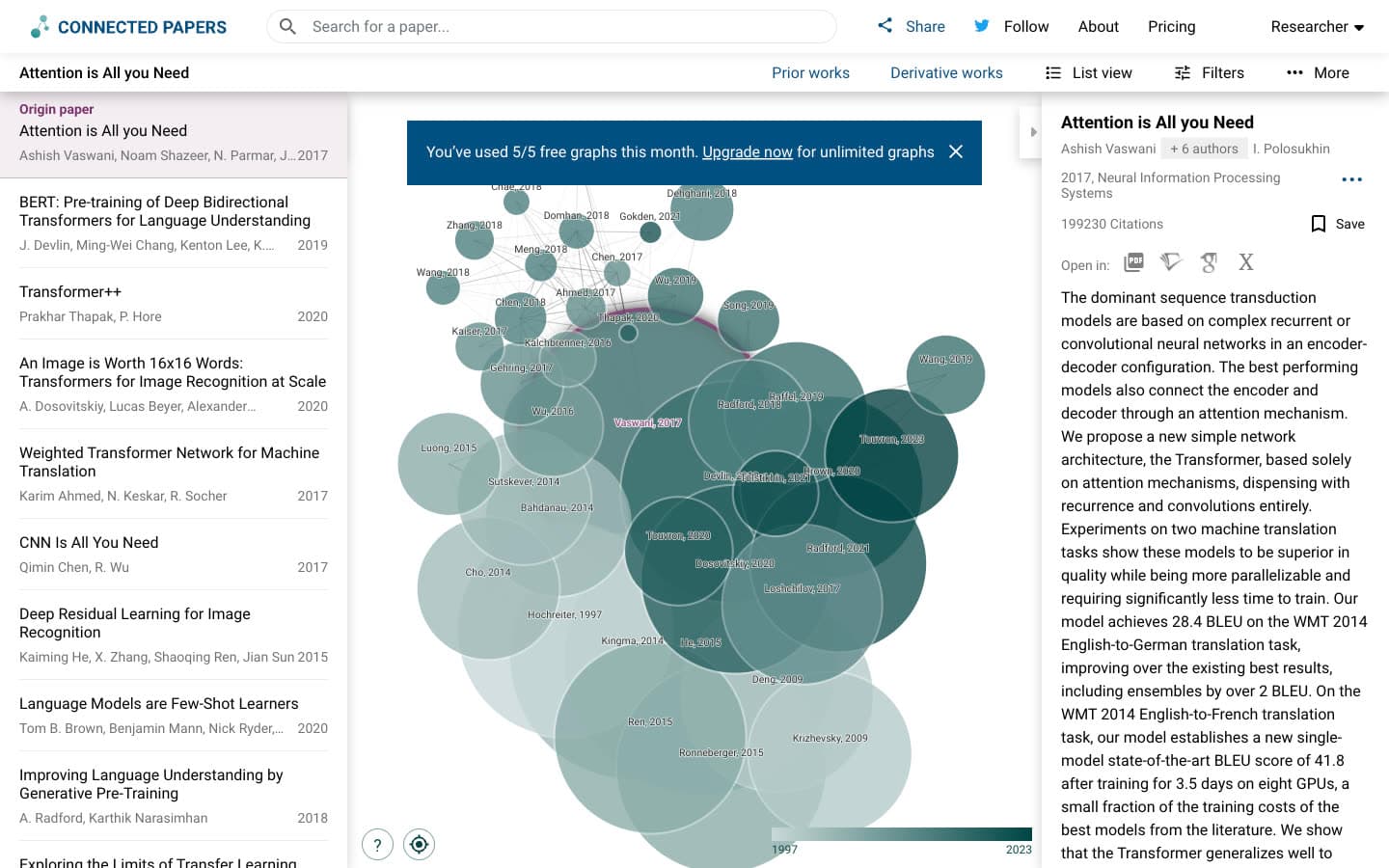
Our fifth graph triggered "You've used 5/5 free graphs this month. Upgrade now for unlimited graphs". That said, the graph still loaded. A rebuilt graph and the multi-origin graph appeared to count toward the five. If that is too few, compare free Connected Papers alternatives.
Litmaps: Two Litmaps in Total
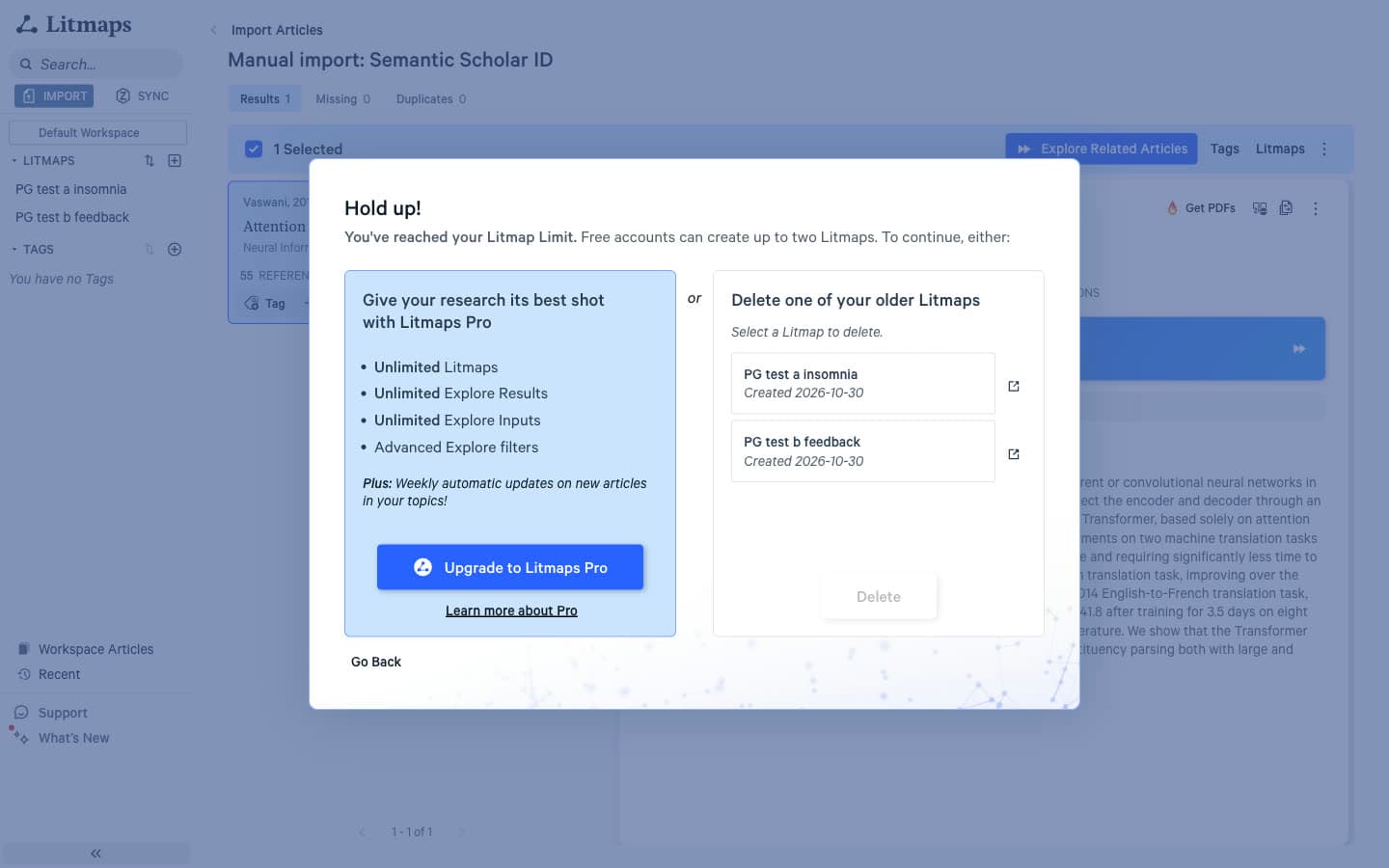
On the third seed Litmaps showed: "Hold up! You've reached your Litmap Limit. Free accounts can create up to two Litmaps." The options were upgrading or deleting an older map; an unsaved "Preview Litmap" still worked. If two maps are not enough, look at free Litmaps alternatives without a two-map limit.
Verdict: Connected Papers for many one-off maps; Litmaps Free for one or two long projects.
Connected Papers vs Litmaps: Pricing Comparison
Connected Papers is cheaper. Its Academic plan costs $6 a month billed $72 a year, and Business $20 a month billed $240 a year. Litmaps Pro Education costs $10 a month billed $120 a year, and Pro Commercial $40 a month billed $480 a year. These are US list prices at the time of writing.
Paid Plans and Prices (US)
| Plan | Connected Papers | Litmaps |
|---|---|---|
| Free | 5 graphs a month, all features | 2 Litmaps, 20 inputs, 100 articles per map |
| Academic or education | $6/mo billed $72 a year, or $30 a quarter | Pro Education: $10/mo billed $120 a year, or $12.50 monthly |
| Business or commercial | $20/mo billed $240 a year, or $90 a quarter | Pro Commercial: $40/mo billed $480 a year, or $50 monthly |
| What paying adds | Unlimited graphs | Unlimited Litmaps, inputs and results, advanced filters, customisable alerts, Zotero sync, Semantic and Co-author maps |
In other words, Connected Papers' paid plans only remove the monthly cap, since Free already includes every feature. Litmaps' Pro plans add real features, and Pro Education requires an academic email address. Both vendors price differently in some countries.
Where Connected Papers Genuinely Wins
Connected Papers wins on the core job of a mapping tool: showing the right papers. Its 1.77 average in our blind test was double Litmaps' 0.87, and its top 10 averaged 1.90 against 0.50. In addition, it matched seeds more reliably, ranked multi-seed results with distinct scores, costs less and gives more free maps.
Where Litmaps Genuinely Wins
Litmaps wins on everything around the map: recent papers, alerts, export formats, Zotero sync and layout options. It surfaced 5, 4 and 10 papers from 2024 or later in its top 20 where Connected Papers surfaced none, and its timeline shows how a field grew in a way a similarity graph cannot.
Its maps also hold up to 100 articles on Free. If you are weighing ResearchRabbit too, which Litmap Limited now owns, Litmaps and ResearchRabbit differ most on alerts and free limits.
Where Paperguide's Citation Graph Fits
Paperguide's free Citation Graph scored 1.75 of 2 in the same blind test, effectively tied with Connected Papers at 1.77, with no paper scored off-topic. It needs no signup, takes up to five seeds and labels every paper with "Why it's here".
That label fills the gap both tools share, for example "Co-cited with your seed in 60 papers". When we added the second insomnia seed, each of the 7 new top 20 papers was labelled as connected to both seeds. Like Connected Papers, its Related papers view favours established work; recent papers sit in its Later work view. We saw no alerts and it has no graph export, but signed in, each paper goes to Paperguide's Reference Manager in one click. On relevance it scored about twice Litmaps' average on the same seeds.
Final Verdict: Should You Choose Connected Papers or Litmaps?
Choose Connected Papers if relevance is what you need from a map: it found more on-topic papers, matched seeds more reliably and costs less. Choose Litmaps if you follow a topic over time and will use its alerts, timeline and Zotero sync. Many researchers will get the most from using both together.
Choose Connected Papers if:
- You want the papers closest to one key study.
- You build a few maps a month and do not want to pay.
- BibTeX export is enough for your reference manager.
Choose Litmaps if:
- You want new papers on your topic flagged by email.
- You use Zotero and want maps and collections in step (Pro).
- Recent papers matter more to you than a tight ranking.
A map is only one part of a search, and the seeds you start from shape everything it shows. Whichever of the two tools you pick, run it alongside keyword searches in databases, since citation tracking finds studies that database searches miss [6]. In other words, a map checks a search rather than replacing it.
Frequently Asked Questions
Is Connected Papers free?
Yes, with a monthly limit. A free account gives you 5 graphs a month with every feature included, and guests without an account get 2. Paid plans only remove the limit: Academic costs $6 a month billed $72 a year, and Business costs $20 a month billed $240 a year, at US list prices.
Is Litmaps free for students?
Litmaps has a free plan for everyone, including students, but it allows only 2 Litmaps in total, with 20 inputs and 100 articles per map. Students who need more can buy Pro Education at $10 a month billed $120 a year, or $12.50 monthly. It requires an academic email address, and some addresses need extra verification.
Is Litmaps AI?
Partly. Its default recommendation mode, "Shared Citations & References", states that it "does not use an AI Large Language Model". The optional "Similar Text" mode does use one to compare titles and abstracts, and the Semantic map, a Pro beta feature, also uses AI. We found no AI chat or AI summaries in Litmaps.
How much does Litmaps cost?
Litmaps Pro Education costs $10 a month billed annually ($120 a year) or $12.50 a month billed monthly, for users with an academic email. Pro Commercial costs $40 a month billed annually ($480 a year) or $50 monthly. These are US list prices at the time of writing, and Litmaps offers discounts in some countries.
Is Litmaps worth it?
Litmaps Pro is worth it if you follow a topic for months and will use alerts, unlimited maps and two-way Zotero sync. However, it is harder to justify for finding relevant papers alone: in our blind relevance test its recommendations averaged 0.87 of 2, against 1.77 for Connected Papers, though it surfaced far more recent papers.
Which is better, Connected Papers or Litmaps?
For finding the most relevant papers around one study, Connected Papers was better in our test: it averaged 1.77 of 2 for relevance against 0.87 for Litmaps. Litmaps is better for recent papers, alerts, Zotero sync and RIS or CSV export. Your choice depends on whether relevance or tracking matters more.
Can Connected Papers export to Zotero?
Not directly. We found no Zotero or Mendeley integration in Connected Papers, but it exports a BibTeX file of every paper in a graph, with DOIs and abstracts, which Zotero can import. It offers no RIS or CSV export. In contrast, Litmaps exports BibTeX, RIS and CSV and adds two-way Zotero sync on its Pro plan.
Does Connected Papers show recent papers?
Rarely in the main graph. In our test, none of its top 20 papers for three seeds was published in 2024 or later, likely because similarity favours papers with years of citations behind them. Recent work appears in its Derivative works view, which listed 2024, 2025 and 2026 papers for our insomnia seed.
References
- Trauer, J. M., Qian, M. Y., Doyle, J. S., Rajaratnam, S. M. W., & Cunnington, D. (2015). Cognitive behavioral therapy for chronic insomnia: A systematic review and meta-analysis. Annals of Internal Medicine, 163(3), 191-204. https://doi.org/10.7326/M14-2841
- Hattie, J., & Timperley, H. (2007). The power of feedback. Review of Educational Research, 77(1), 81-112. https://doi.org/10.3102/003465430298487
- Vaswani, A., Shazeer, N., Parmar, N., Uszkoreit, J., Jones, L., Gomez, A. N., Kaiser, Ł., & Polosukhin, I. (2017). Attention is all you need. arXiv. https://doi.org/10.48550/arXiv.1706.03762
- Small, H. (1973). Co-citation in the scientific literature: A new measure of the relationship between two documents. Journal of the American Society for Information Science, 24(4), 265-269. https://doi.org/10.1002/asi.4630240406
- Kessler, M. M. (1963). Bibliographic coupling between scientific papers. American Documentation, 14(1), 10-25. https://doi.org/10.1002/asi.5090140103
- Greenhalgh, T., & Peacock, R. (2005). Effectiveness and efficiency of search methods in systematic reviews of complex evidence: Audit of primary sources. BMJ, 331(7524), 1064-1065. https://doi.org/10.1136/bmj.38636.593461.68
Mapping citations?
See how any paper connects
Start from up to five papers and explore earlier, later and related work in one free citation graph. No signup.
Try Citation GraphNo credit card required