5 Best Connected Papers Alternatives in 2026 (Free + Paid)


The best Connected Papers alternative in 2026 is Paperguide Citation Graph. It is free, states no graph limit, matched Connected Papers on relevance in our blind test (1.75 against 1.77 out of 2) and explains why every paper is linked. Inciteful, Consensus Citation Graph, Litmaps and ResearchRabbit follow.
Connected Papers is good at what it does. It builds a similarity graph of 40 papers around one origin paper, and in our test its recommendations were among the most relevant of any tool. The reasons people look elsewhere are practical. The free plan stops at five graphs a month (two without an account), and the map gives a similarity number rather than a reason. Recent papers rarely appear in the graph, and the work ends at a BibTeX file.
We ran the same three seed papers through every tool on its free plan: a meta-analysis of cognitive behavioural therapy for insomnia [1], Hattie and Timperley's review of feedback [2] and "Attention Is All You Need" [3]. Then we pooled each tool's top 20 recommendations, shuffled them and scored every paper without knowing which tool suggested it. This guide covers what each of the five alternatives does differently, what it costs and who it suits.
TL;DR
Paperguide Citation Graph is the best Connected Papers alternative in 2026 because it keeps Connected Papers' relevance (1.75 against 1.77 out of 2). It also removes the main limits: no stated graph limit, "Why it's here" on every paper, long earlier and later work lists and one to five seeds. Inciteful is the best no-account option with Zotero export, Consensus Citation Graph is the quickest multi-seed map, Litmaps suits recent papers and alerts, and ResearchRabbit suits free collecting from many seeds.
Key Takeaways
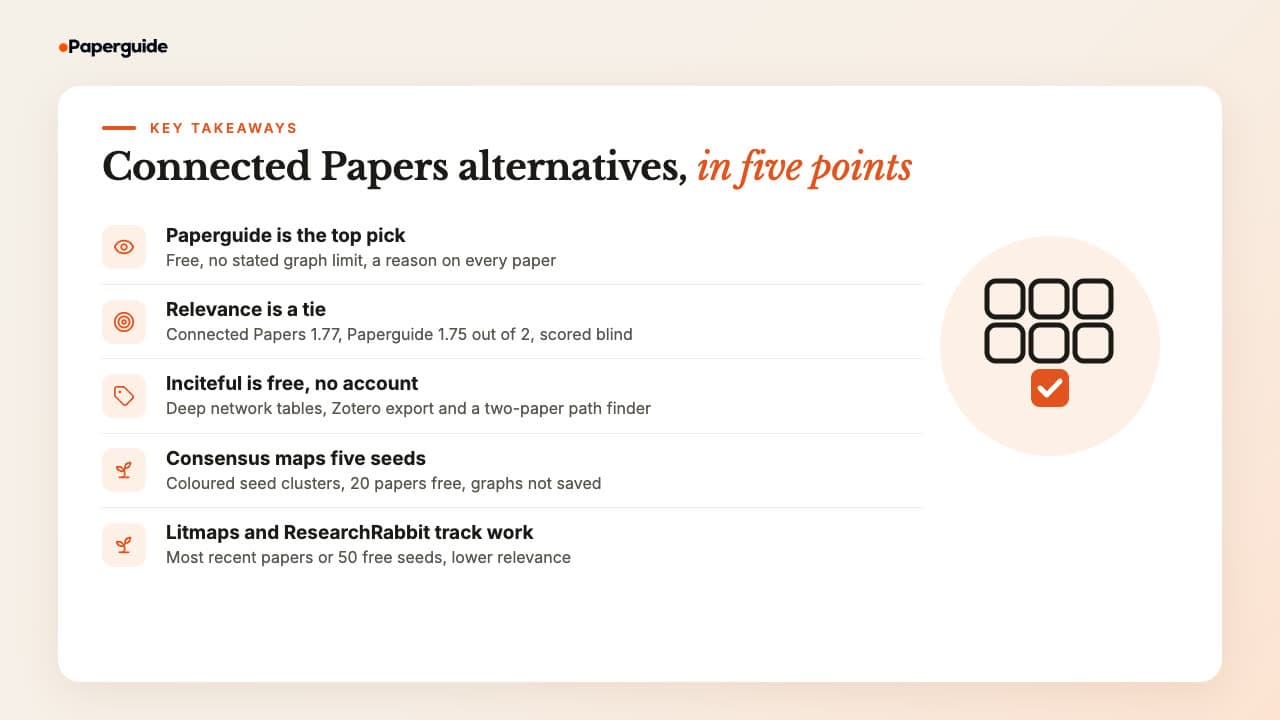
- Paperguide Citation Graph tied Connected Papers on relevance (1.75 against 1.77 out of 2), recommended no off-topic paper, and adds a reason, long earlier and later work lists, and no stated graph limit.
- Relevance alone does not separate the leaders: Connected Papers, Paperguide and Consensus scored 1.77, 1.75 and 1.54 on the same three seeds, so explanations, free limits and export decide the choice.
- Inciteful (1.42) is free and open source with no account, exports to Zotero and Mendeley, and its Literature Connector traces citation paths between two papers.
- Consensus Citation Graph handles up to five seeds and colours each seed's cluster, but the free map holds 20 papers and is gone when you refresh the page.
- Litmaps surfaced the most 2024 and later papers and offers Monitor alerts, and ResearchRabbit gives 50 seeds free forever, but they scored 0.87 and 1.25 on relevance.
What Are the Best Connected Papers Alternatives in 2026?
The five best Connected Papers alternatives in 2026 are Paperguide Citation Graph, Inciteful, Consensus Citation Graph, Litmaps and ResearchRabbit. Paperguide is the best overall because it matched Connected Papers on relevance while explaining every link for free. The other four each fix one Connected Papers limit.
All five build on the same idea Connected Papers uses: papers that cite each other, are cited together or share references are probably about the same thing. What changes is how much of that logic each tool shows you, whether you get a map or a list, how many maps the free plan allows, and what you can do with the papers next. For question-based search rather than seed-based maps, the best AI tools for finding research papers cover that side.
How to Choose a Connected Papers Alternative
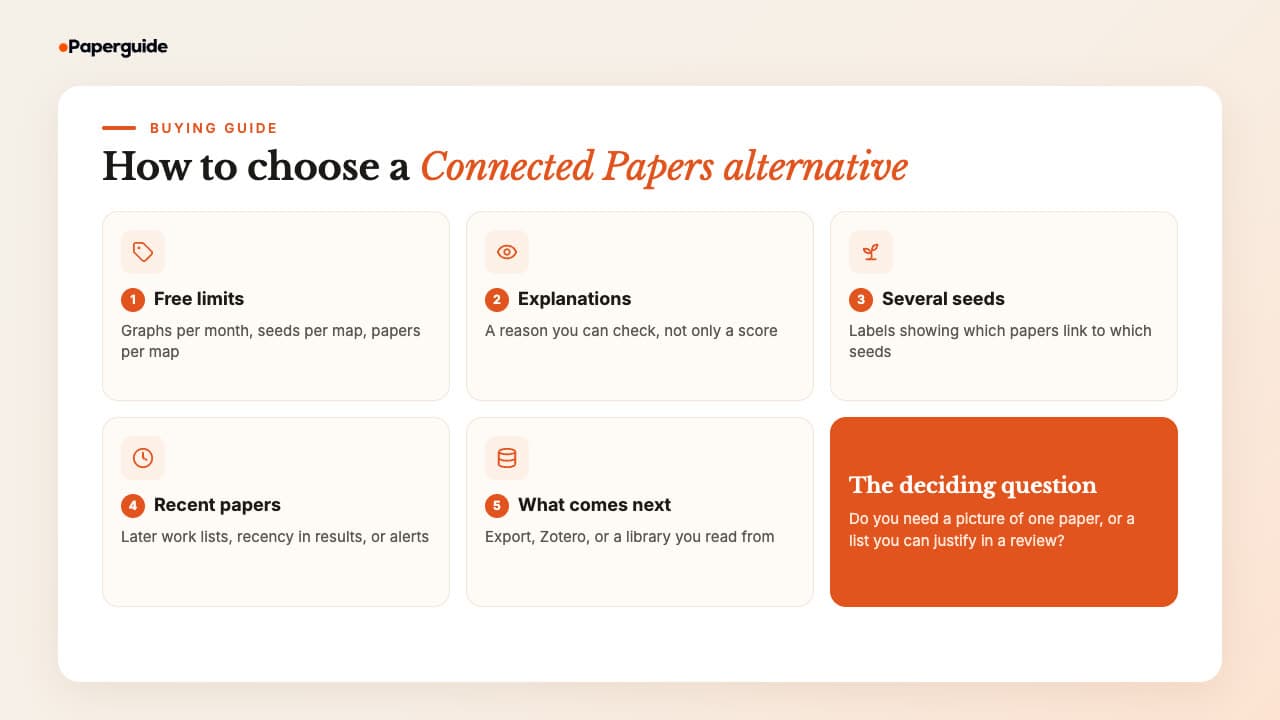
Choose a Connected Papers alternative on five things: how much the free plan allows, whether each paper comes with a reason, how well it handles several seeds, whether it reaches recent papers, and what happens to papers after the map. Relevance matters too, but the strongest tools in our test were close, so these five decide it.
1. Free limits. Connected Papers allows five graphs a month on a free account. Check the equivalent limit in each alternative: graphs per month, maps you can keep, seeds per map and papers per map. Litmaps, for example, allows two saved maps on its free plan, while Paperguide and Inciteful state no graph limit and Inciteful needs no account at all.
2. Explanations. A citation map is a picture of how papers connect, and the connection type matters. Co-citation means a third paper cites two papers together [4]. Bibliographic coupling means two papers share references [5]. Boyack and Klavans found that these signals group papers differently, with bibliographic coupling slightly more accurate than co-citation and direct citation the least accurate at mapping research fronts [6]. A tool that tells you which signal put a paper on the map gives you something to check.
3. Several seeds. One seed paper gives one viewpoint. Two to five seeds widen the map, but only if the tool shows which papers link to which seed.
4. Recent papers. Similarity maps lean towards well-cited, older papers. Look for a separate list of later work, a recency setting or alerts.
5. What comes next. A map is the start of reading. Decide whether you need a BibTeX or RIS file, a Zotero connection, or a library where you can read, extract and cite.
Citation chasing is worth doing well. In an audit of a systematic review of complex evidence, Greenhalgh and Peacock found that 51% of the sources were identified by "snowballing", following references and citations, rather than by database searches [7]. That is the job these tools speed up, and how to do citation searching explains the manual method behind it.
Quick Comparison: Best Connected Papers Alternatives in 2026
Paperguide Citation Graph is the only alternative here that combines Connected Papers-level relevance with a written reason on every paper and no stated graph limit. Inciteful is free with no account and the widest export, Consensus maps five seeds at 20 papers free, and Litmaps and ResearchRabbit trade relevance for alerts or seed limits.
| Tool | Free plan | Seeds per map | Why each paper is shown | Export | Paid from (US) |
|---|---|---|---|---|---|
| Paperguide Citation Graph | Free, no signup to build, no graph limit stated | 1 to 5 | "Why it's here" label | None for the graph; Reference Manager | Graph free; plans from $12 a seat a month |
| Inciteful | Free, no account | Several, 5+ recommended | Similarity score | BibTeX, RIS, Zotero, Mendeley | Free |
| Consensus Citation Graph | Free account, 20 papers, not saved | Up to 5 | Legend only | Per-paper citation | $12 a month, billed yearly |
| Litmaps | 2 maps, 20 inputs, 100 articles per map | Up to 20 free | None | BibTeX, RIS, CSV | $10 a month, billed yearly (education) |
| ResearchRabbit | Free forever, up to 50 inputs | Up to 50 free | None | BibTeX, RIS, CSV | $10 a month, billed yearly |
| Connected Papers (for reference) | 5 graphs a month, 2 as a guest | Multi-origin | Similarity number | BibTeX | $6 a month, billed yearly |
Blind relevance scores, top 20 per seed (0 to 2)
| Tool | Insomnia | Feedback | Transformer | Average | Scored 0 | Top 10 average | 2024+ papers in top 20s |
|---|---|---|---|---|---|---|---|
| Connected Papers | 1.90 | 1.85 | 1.55 | 1.77 | 2% | 1.90 | 0 |
| Paperguide Citation Graph | 1.90 | 1.75 | 1.60 | 1.75 | 0% | 1.80 | 2 |
| Consensus Citation Graph | 1.58 | 1.89 | 1.16 | 1.54 | 9% | 1.77 | 0 |
| Inciteful | 1.70 | 1.55 | 1.00 | 1.42 | 3% | 1.47 | 3 |
| ResearchRabbit | 1.65 | 1.30 | 0.80 | 1.25 | 22% | 1.37 | 0 |
| Litmaps | 1.05 | 0.90 | 0.65 | 0.87 | 32% | 0.50 | 19 |
A score of 2 meant the paper was on the seed's core topic, 1 related but peripheral, and 0 off-topic, not a research paper or a duplicate of the seed. Consensus shows 19 papers per seed on its free density, so 57 of its papers were scored. Treat this as three seeds scored by title with a few abstracts checked: small gaps are noise, and results vary by field.
Best Connected Papers Alternatives in 2026
The five best Connected Papers alternatives are Paperguide Citation Graph, Inciteful, Consensus Citation Graph, Litmaps and ResearchRabbit. Each section below covers what the tool does, its free limits, its price and its own blind relevance score, so you can weigh relevance against explanations, recency and export.
1. Paperguide Citation Graph
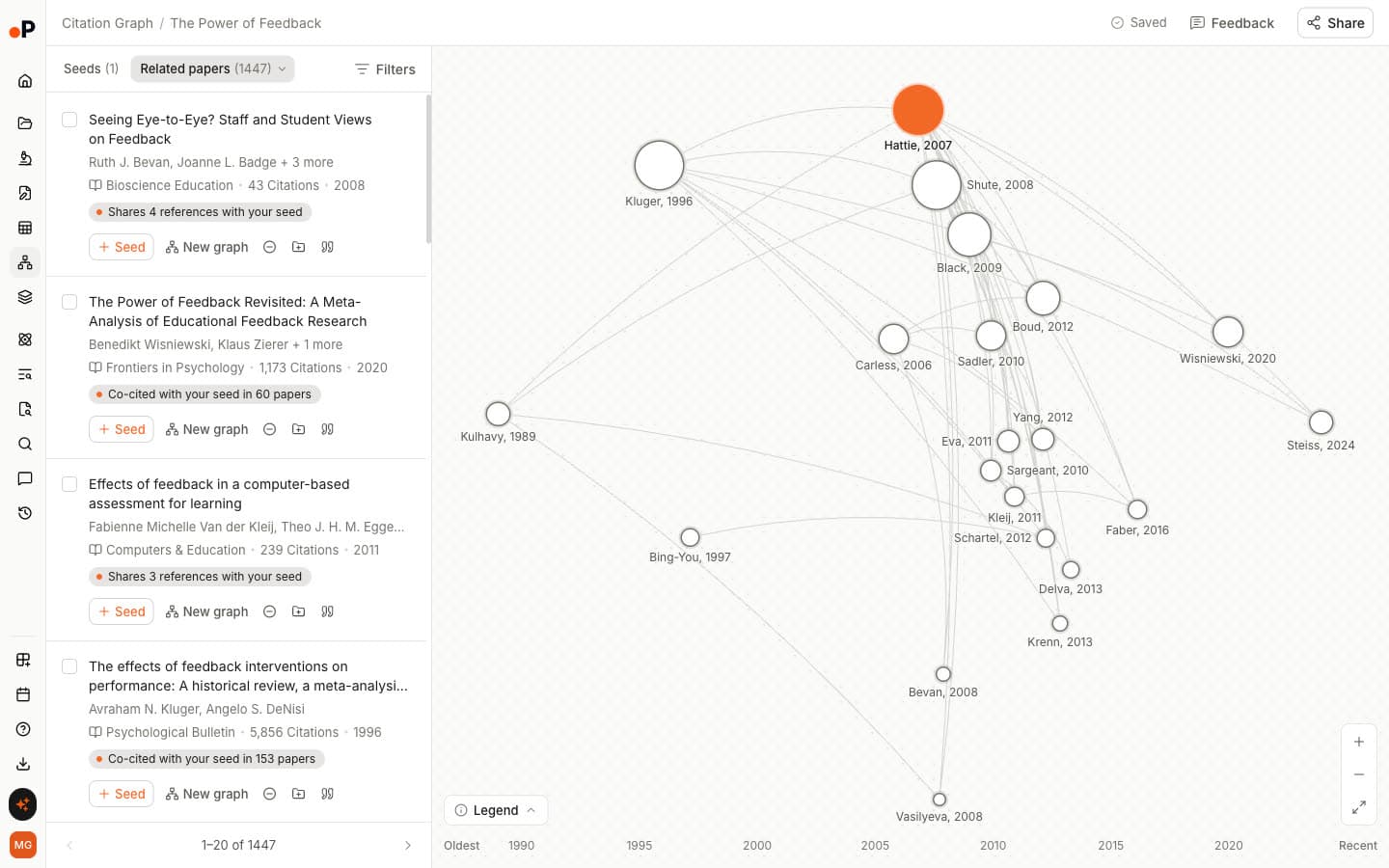
Paperguide Citation Graph is a free tool from Paperguide that maps a seed paper's citation links on a timeline and labels why each paper is shown. You add one to five seed papers by title or DOI, and it builds three views: Related papers, Earlier work ("What your seed builds on") and Later work ("What built on your seed").
On the same seeds it tied with Connected Papers on relevance, and where Connected Papers gives a "Similarity to origin" number, Paperguide gives a sentence you can check, such as "Shares 25 references with your seed".
Key Features
- "Why it's here" on every paper: Labels such as "Co-cited with your seed in 60 papers", "Shares 4 references with your seed" or "Cites your seed" state which signal put each paper on the map.
- Related papers, Earlier work and Later work: Three views of the same seed. For the insomnia meta-analysis they held 1,252 related, 104 earlier and 847 later papers.
- One to five seeds with labels: Add a seed from any card and the graph rebuilds. With two seeds, every top 20 paper carried a label such as "Co-cited with 2 of your seeds".
- Timeline map: Papers run from "Oldest" to "Recent", sized by citations, with arrows for who cites whom.
- Card actions: "Seed", "New graph", "Exclude", "Add to Reference Manager" and "Cite" on every paper.
- Saved and shared graphs: Each graph "saves automatically, named after the first seed", and shares by link with "Can edit", "Can view" or "No access".
- Connected workflow: Papers move into the Reference Manager and on to the tools in the workflow below.
Pros
- Tied Connected Papers on relevance, and no recommended paper scored 0.
- A reason on every paper instead of a score you have to trust.
- Far deeper earlier and later lists than Connected Papers' 10 Prior works and 10 Derivative works.
- Free to build and browse with no signup, no graph limit stated, and no AI credits used in our test.
- Multi-seed labels show which papers connect to more than one seed.
Cons
- No export of the graph itself; export runs through the Reference Manager.
- A new map took 26 to 32 seconds, slower than a cached Connected Papers graph.
- The arXiv DOI for the transformer paper failed, and title search matched a duplicate 2025 record.
- No new-paper alerts.
- "Can edit" is selected by default when you share, so switch to "Can view" for a read-only link.
Pricing
| Plan | Price (US list prices at the time of writing) | What it covers |
|---|---|---|
| Citation Graph | Free | Build and browse graphs with no signup; sign in to save graphs to your account and share them |
| Free | $0 | 1,500 AI credits a month for Paperguide's other tools |
| Plus | $12 per seat a month, billed annually | More credits and higher limits across the platform |
| Pro | $29 per seat a month, billed annually | Higher limits and collaboration |
| Evidence Teams | $89 per seat a month, billed annually | For evidence synthesis and review teams |
Best For: PhD students, systematic review and HEOR teams, and anyone who hit Connected Papers' monthly limit and needs to justify why each paper belongs in a review.
In our test: 1.75 out of 2 (Connected Papers 1.77), 0% off-topic, and the only tool that wrote a reason on every paper and labelled papers shared by two seeds.
Verdict
Paperguide Citation Graph matches Connected Papers on relevance rather than beating it. What it adds is the reason behind each paper, long earlier and later lists, multi-seed labels, saved graphs and a path into your next tools. Try it on your own seed in Paperguide's free Citation Graph.
2. Inciteful
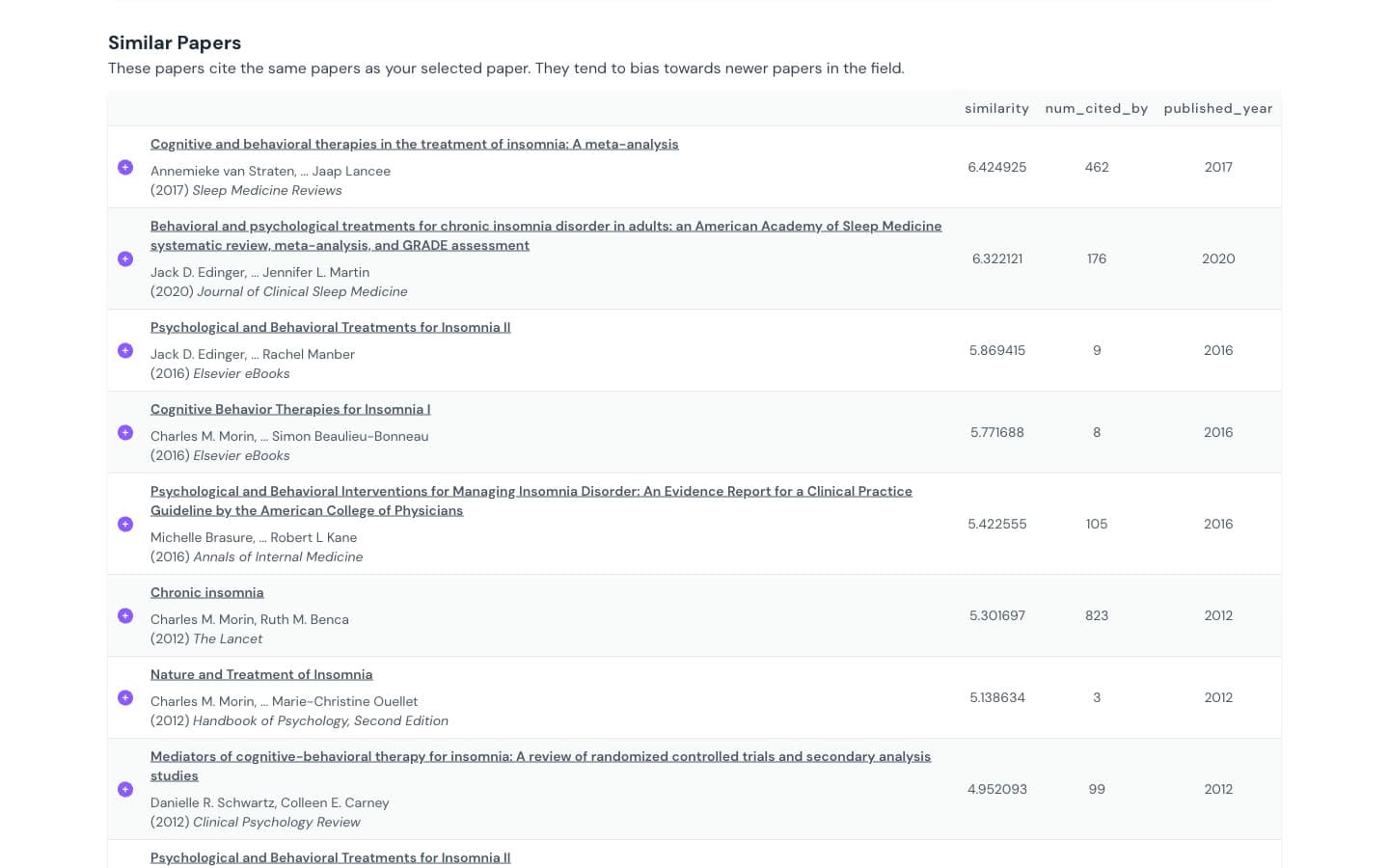
Inciteful is a free, open-source citation network tool that builds a network two steps out from your paper and ranks it with network algorithms. There is no account at all: you paste a DOI and get a page of tables, including "Similar Papers", "Most Important Papers", "Review Papers" and "The Most Important Recent Papers".
Its one developer writes: "Our core tools are free to use and always will be." Data comes mainly from OpenAlex.
Key Features
- Paper Discovery: Similar papers ranked by shared references and co-citation, plus "Most Important Papers" by PageRank and "Review Papers" that cite many papers in the network.
- Multi-seed search: Add papers with the plus button and rebuild from all of them. Inciteful advises: "We recommend that you add at least five papers to the graph".
- Literature Connector: "Enter two papers and we'll show you the shortest paths between them", up to six citation hops.
- Filters and SQL: Boolean keywords, citation distance and year range, plus "View SQL" to see or edit the exact query.
- Export: "BibTex", "RIS", "Mendeley" and "Zotero" on every table, and a Zotero plugin.
Pros
- Free with no account and no stated limit.
- The most export options in this list, including direct Zotero and Mendeley.
- The Literature Connector is unique: it shows how two bodies of literature link up.
- Fast: about 6 seconds from DOI to a full page on the feedback seed.
Cons
- Only a numeric "similarity" column; no written reason per paper.
- The transformer seed resolved to a record dated 2025 with a wrong DOI, and its similar list opened with a Spanish thesis on art and machine learning.
- Some sections drift: the insomnia "Review Papers" list was led by French-language theses, and "Most Important Papers" by measurement scales such as the SF-36.
- With two seeds, all top 20 papers had the same score, so their order was a tie-break.
- A one-person project, so plan for the risk that it changes or slows.
Pricing
| Plan | Price |
|---|---|
| All tools | Free, no account |
Best For: Researchers who want a free, no-signup network analysis with Zotero export, and anyone who needs to see how two separate literatures connect.
In our test: 1.42 out of 2, with 1.70 on the insomnia seed but 1.00 on the transformer seed, where the wrong seed record pulled in off-topic papers.
Verdict
Inciteful is the best pick if you never want an account: more tables and export routes than Connected Papers, but less relevance and no explanations. Check the seed record first.
3. Consensus Citation Graph
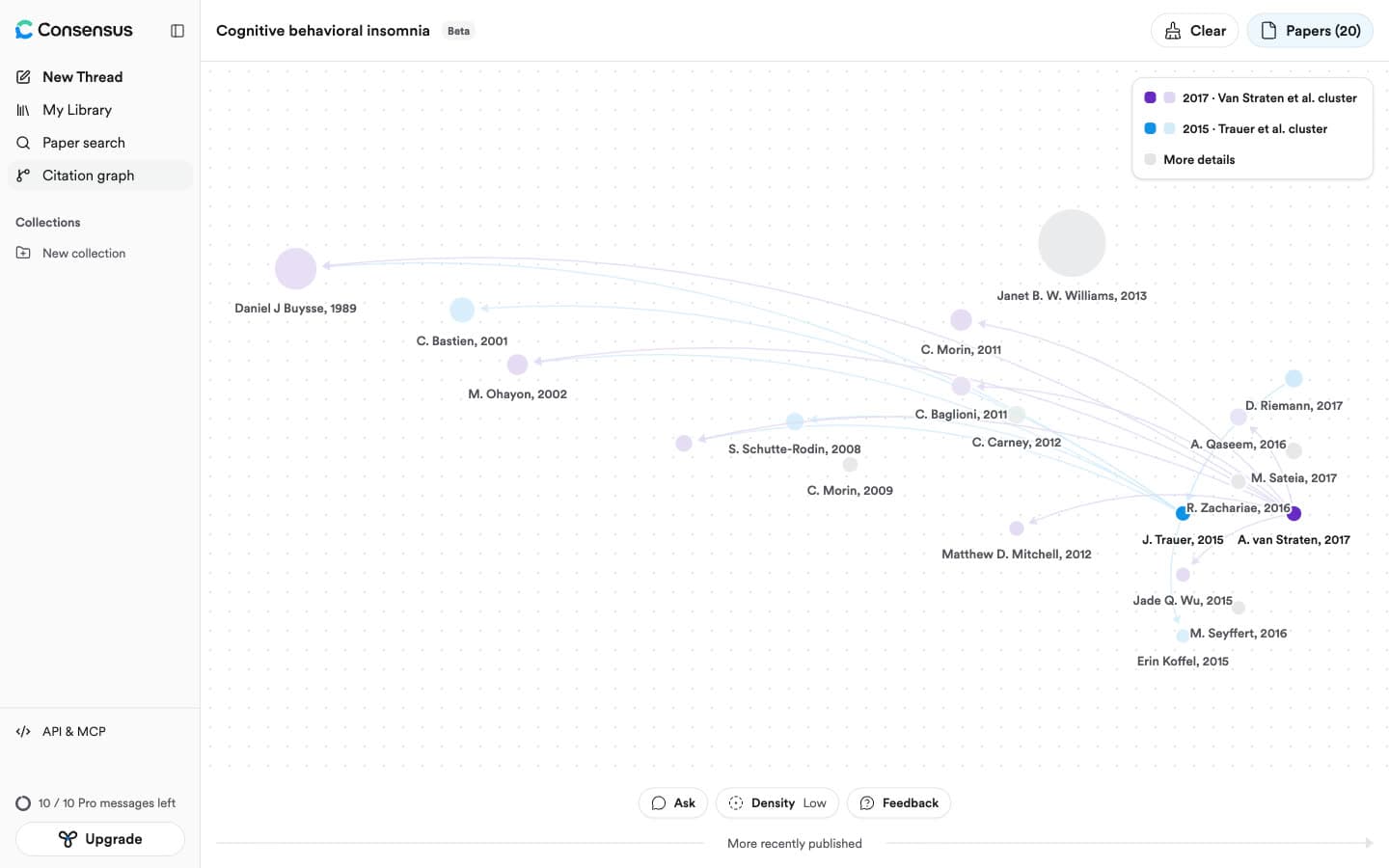
Consensus Citation Graph is a beta mapping tool inside Consensus, the AI academic search engine. You search for seed papers, click "+ Seed" on up to five of them and press "Generate graph". It ranks neighbours with three signals it names in its Ranking tab: "Direct citation", "Co-citation" and "Bibliographic coupling".
Consensus gives each graph an AI-generated title, such as "Treating chronic insomnia".
Key Features
- Up to five seeds: The sixth "+ Seed" button reads "Only up to 5 seeds are currently supported".
- Seed clusters: "Each seed has a color. Faint nodes are 1 hop from that seed; gray nodes are bridges with no direct seed."
- Timeline layout: Papers placed by year under a "More recently published" arrow, sized by citations.
- Density: "Low" (20 papers) free; "Medium" (40) and "High" (60) on Pro.
- Ask and Snapshots: Chat with the graph's papers through metered Pro messages, and AI study snapshots, 10 a month on the free plan.
Pros
- The best feedback-seed score of any tool, 1.89, and a top 10 average of 1.77.
- Fast: about 2 seconds from "Generate graph" to the map.
- Seed colours make multi-seed maps easy to read at a glance.
- Building graphs used no Pro messages on the free plan, and we hit no graph limit.
Cons
- Graphs are not saved: a page reload returned an empty "New Citation Graph".
- Only 20 papers per map on the free plan.
- No per-paper reason in the interface, even though it ranks on three signals.
- Adding a second seed left the same 18 papers in the same order.
- No graph export or share link; the arXiv DOI and ID for the transformer paper were not found.
Pricing
| Plan | Price (US, billed annually) |
|---|---|
| Free | $0, Low density graphs (20 papers), 10 Pro messages a month |
| Pro | $12 a month ($144 a year), Medium and High density |
| Deep | $45 a month ($540 a year) |
Consensus lists a discount of up to 40% for students and faculty.
Best For: Consensus users who want a quick multi-seed picture next to AI search, and do not need to keep the graph.
In our test: 1.54 out of 2 with a strong top 10 (1.77), but 9% of papers scored 0 and none of the 57 shown was from 2024 or later.
Verdict
Consensus Citation Graph is a quick, readable multi-seed map, close to the leaders on two of our three seeds. Graphs vanish on refresh, so it is a glance, not a record. The differences between Paperguide and Consensus go well beyond the graph.
4. Litmaps
Litmaps is a literature mapping tool that places papers on a chart, newer to the right and more cited higher, with arrows for citations. You build a "Litmap" from seed papers and grow it with Explore, which suggests related articles by "Shared Citations & References", "Common Authors" or "Similar Text".
Its strength is change over time: Litmaps found far more recent papers than any other tool, and Monitor emails you "relevant newly-published articles".
Key Features
- Four map views: "Citation map" and "Co-citation network" free; "Semantic map" (beta) and "Co-author network" on Pro.
- Flexible axes: Cite Count, Ref Count, Publication Date, Momentum, Map Connectivity and Content Similarity (Beta).
- Explore methods: Two network methods that "do not use an AI Large Language Model", and "Similar Text", which does.
- Monitor: Email updates on new papers; Pro sells "weekly automatic updates on new articles in your topics".
- Export and Zotero: BibTeX, RIS and CSV export; Zotero sync listed as a Pro feature.
Pros
- The most recent papers by far: 19 papers from 2024 or later across its three top 20s, against none for Connected Papers.
- Maps are saved and named, and can be shared by link.
- Alerts, which Connected Papers does not offer.
- Many ways to lay out the same set of papers.
Cons
- The lowest relevance in our test, with almost a third of suggestions off-topic.
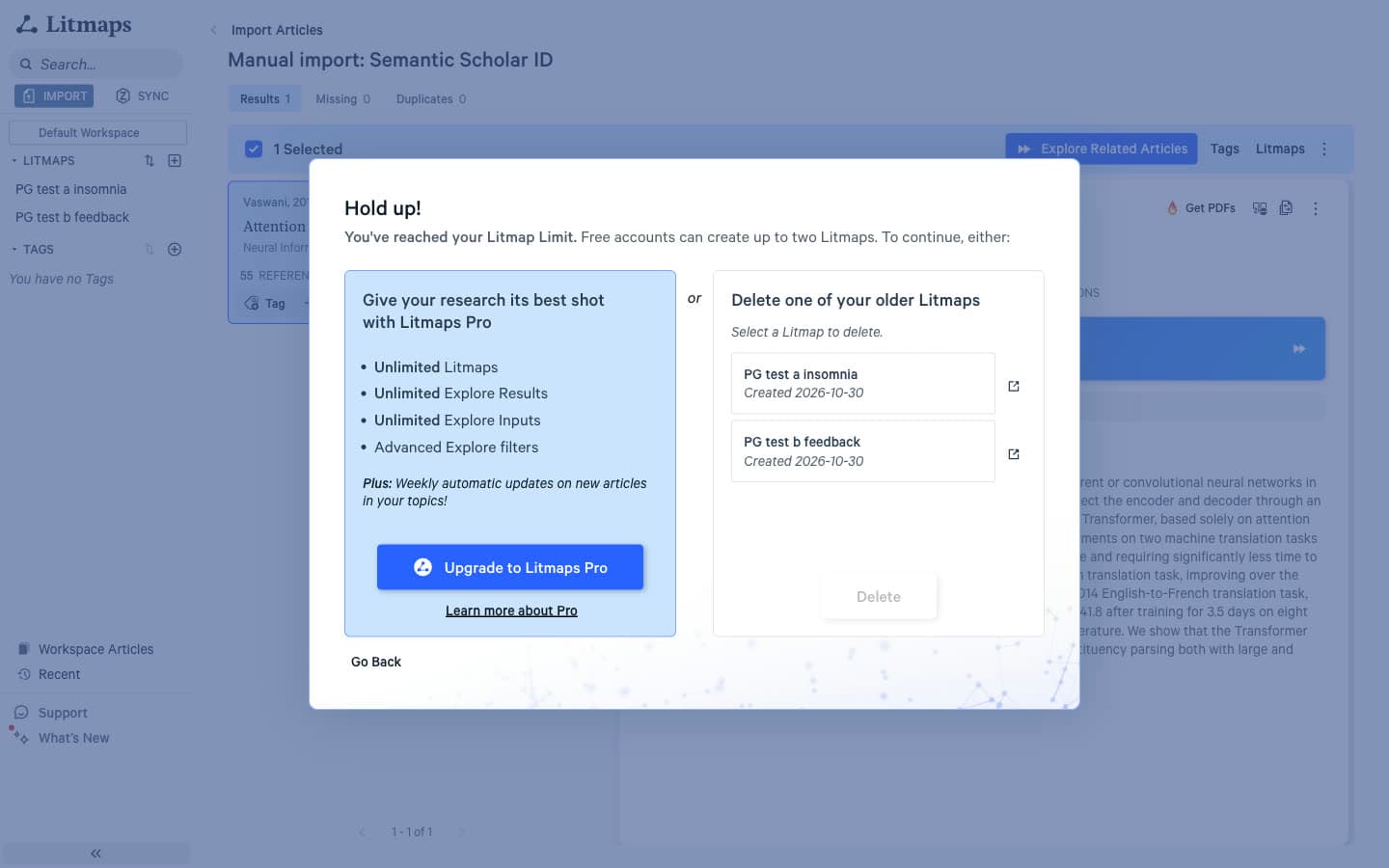
- Two saved Litmaps on the free plan; a third map triggered "Hold up! You've reached your Litmap Limit."
- Ties in ranking: with two seeds all 100 results had one score, and a reload changed 9 of the top 10.
- The insomnia DOI opened a 2016 letter, and the transformer paper was only found by its Semantic Scholar ID.
- No reason shown for any suggestion.
Pricing
| Plan | Price (US) |
|---|---|
| Free | $0, 2 Litmaps, 20 inputs, 100 articles per map |
| Pro, Educational | $10 a month billed annually ($120 a year), or $12.50 monthly |
| Pro, Standard | $40 a month billed annually ($480 a year), or $50 monthly |
| Team and Enterprise | Contact sales |
Best For: Researchers on a long project who want to watch a topic for new papers and work with Zotero on Pro.
In our test: 0.87 out of 2 and 32% scored 0, but 19 of its 60 top recommendations were from 2024 or later, more than all other tools combined.
Verdict
Litmaps is the right choice when recency and alerts matter more than precision, and its suggestions need more screening. The trade between Connected Papers and Litmaps shows up seed by seed.
5. ResearchRabbit
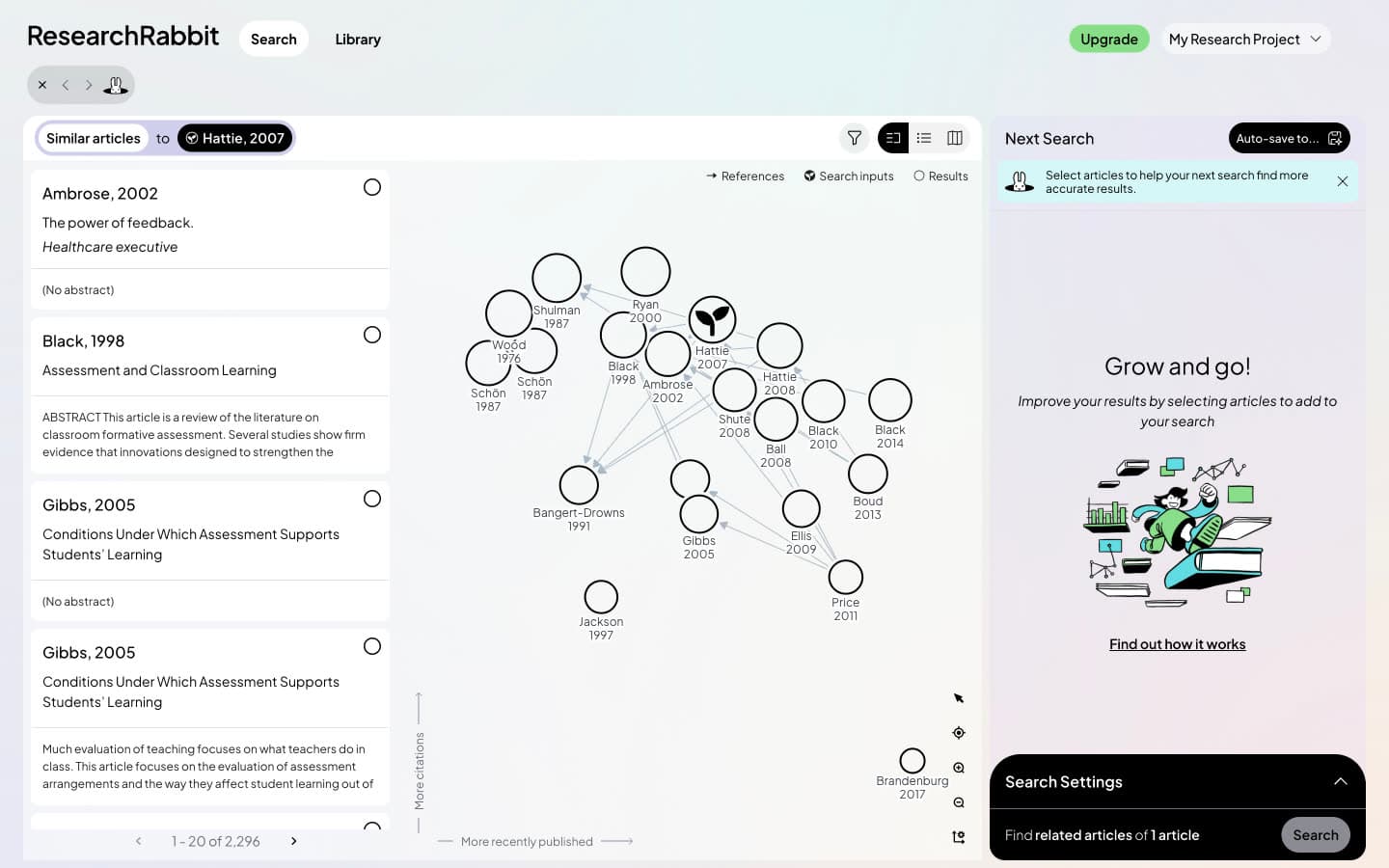
ResearchRabbit is a free citation discovery tool owned by Litmap Limited, the company behind Litmaps. It relaunched as ResearchRabbit 2.0 on 20 October 2025 through a partnership with Litmaps. You pick seed articles and search for Similar, References or Citations, with results in a list beside a map, newer to the right and more cited higher.
Its free plan is the most generous here for collecting papers: "Free forever", up to 50 inputs per search and unlimited searches. Its help pages say it "does not use large language models to power its core recommendation algorithms."
Key Features
- Similar, References and Citations: Three ways to expand from any set of seed articles, plus author searches.
- Result count: 10, 20 or 40 results per page on the free plan.
- Library: Collections, a reading list with statuses such as "To Read" and "Read Fully", and notes per article.
- Export and Zotero: BibTeX, RIS and CSV export, and a one-way Zotero import.
- RR+ features: 300 inputs, advanced search settings and "Article Risk Indicators" for fraudulent or AI-generated articles.
Pros
- 50 seed articles free, forever, with unlimited searches.
- A library and notes, which Connected Papers does not have.
- Strong on the insomnia seed, at 1.65.
- Low-cost upgrade with regional discounts.
Cons
- 22% of suggestions scored 0, and the transformer seed averaged 0.80.
- No 2024 or later paper in any of its three top 20s.
- The top similar paper for the feedback seed was a different 2002 article with the same title.
- The insomnia DOI opened a letter record instead of the meta-analysis.
- No reason shown for any suggestion, and Zotero is import only.
Pricing
| Plan | Price (US) |
|---|---|
| Free | $0 forever, up to 50 inputs, unlimited searches |
| RR+ | $10 a month billed annually ($120 a year), or $12.50 monthly |
| Institution | Contact sales |
Best For: Students on a tight budget who want to collect and organise papers from many seeds at once.
In our test: 1.25 out of 2, good on insomnia but weak on the transformer seed, with a fifth of suggestions off-topic.
Verdict
ResearchRabbit is the best free option for gathering papers from many seeds into collections, but it is less precise than Connected Papers. Connected Papers and ResearchRabbit on the same seeds each win on different things.
How the Paperguide Citation Graph Workflow Works
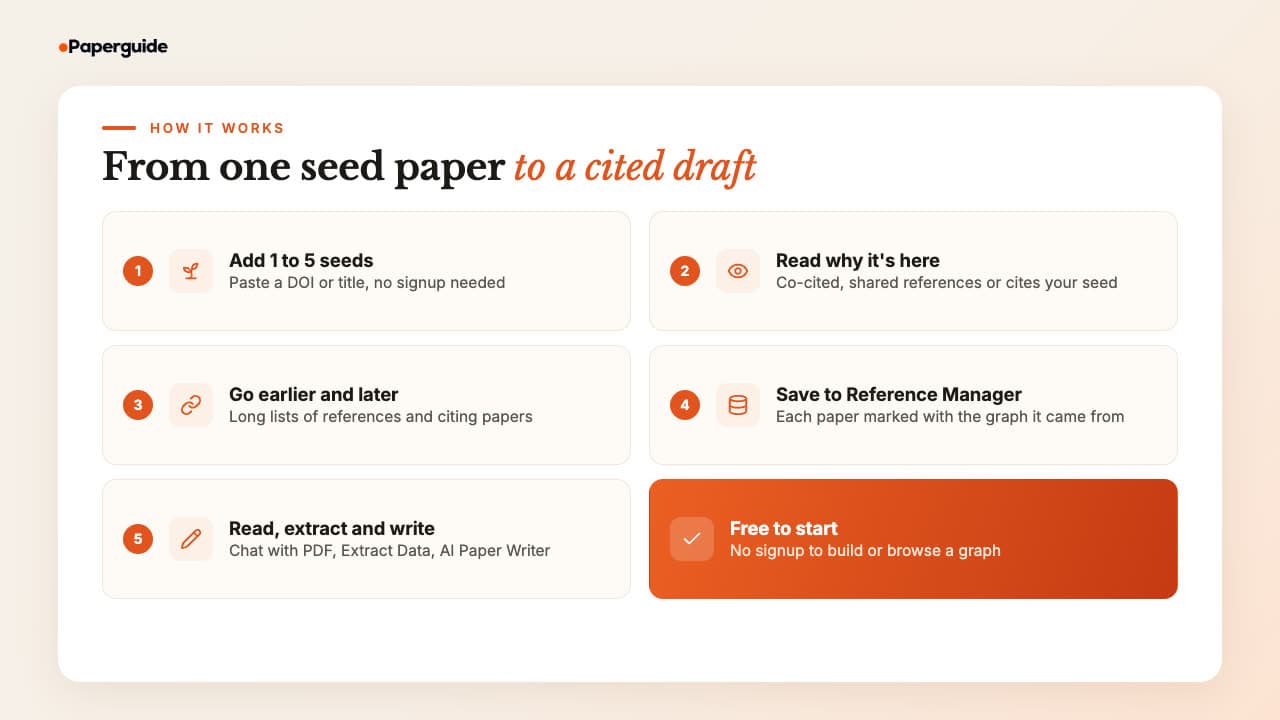
The Paperguide Citation Graph workflow runs in five steps: add one to five seed papers, read why each recommendation is there, follow the seed's earlier and later work, save chosen papers to Reference Manager, then read, extract and write from the same library. The graph itself is free and needs no signup; signing in saves graphs to your account.
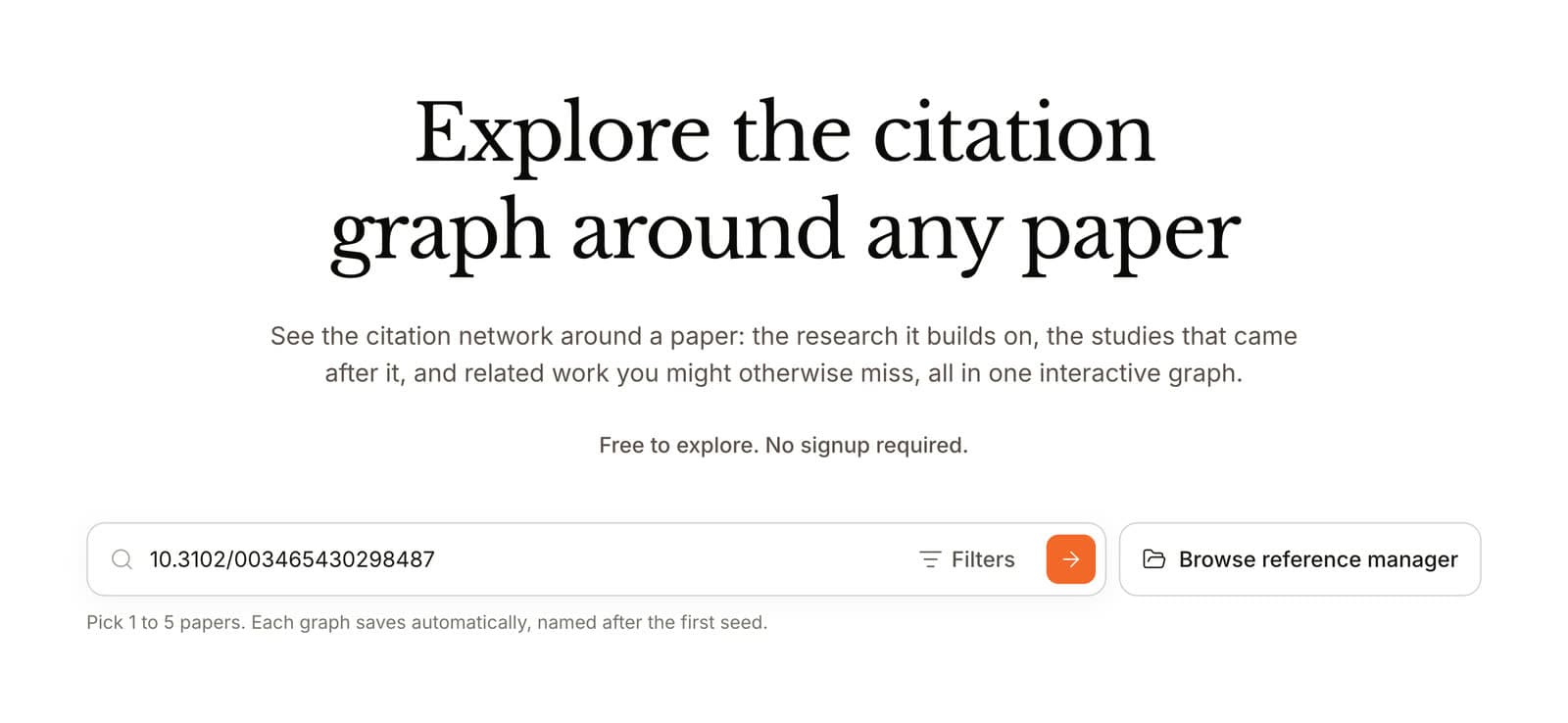
Step 1: Add one to five seeds. Paste a DOI or search by title. The start page reads "Pick 1 to 5 papers. Each graph saves automatically, named after the first seed." Signed in, you can also pick seeds from your Reference Manager. A step-by-step guide to building a citation map covers how to choose good seeds.
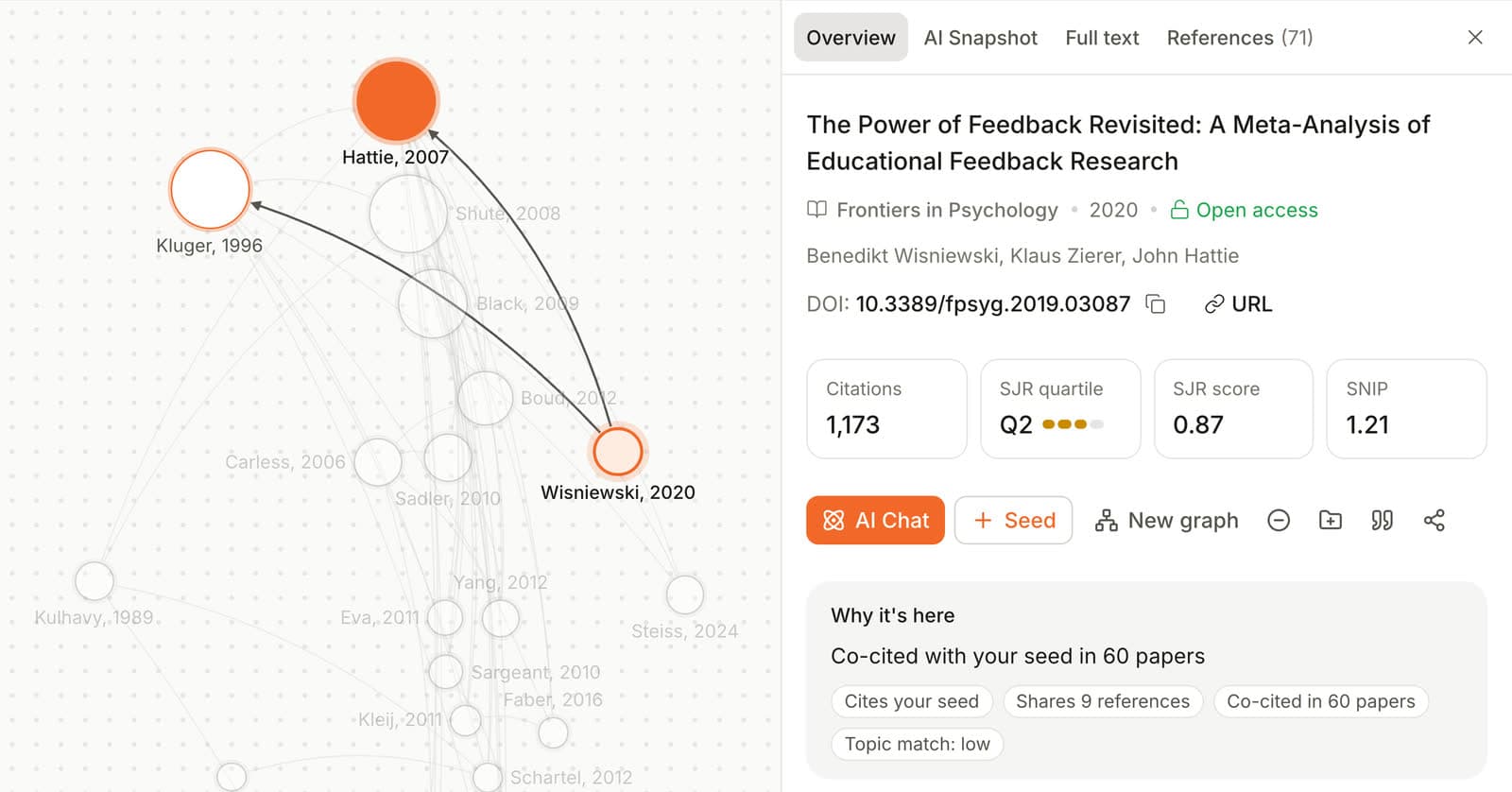
Step 2: Read why each paper is there. For "The Power of Feedback Revisited", the "Why it's here" line read "Co-cited with your seed in 60 papers".
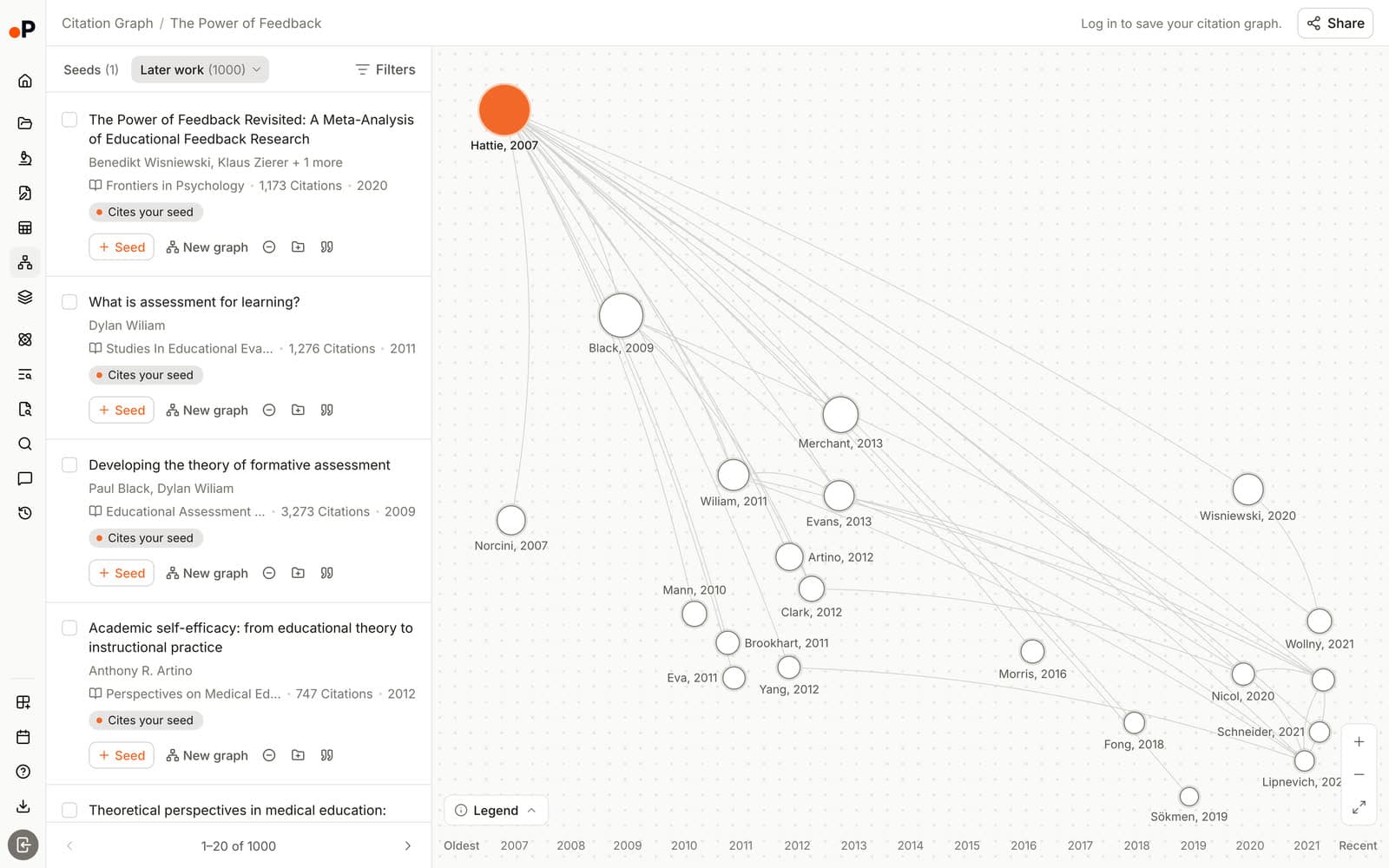
Step 3: Go earlier and later. Earlier work lists what your seed builds on, and Later work what built on it: 847 citing papers for the insomnia seed.
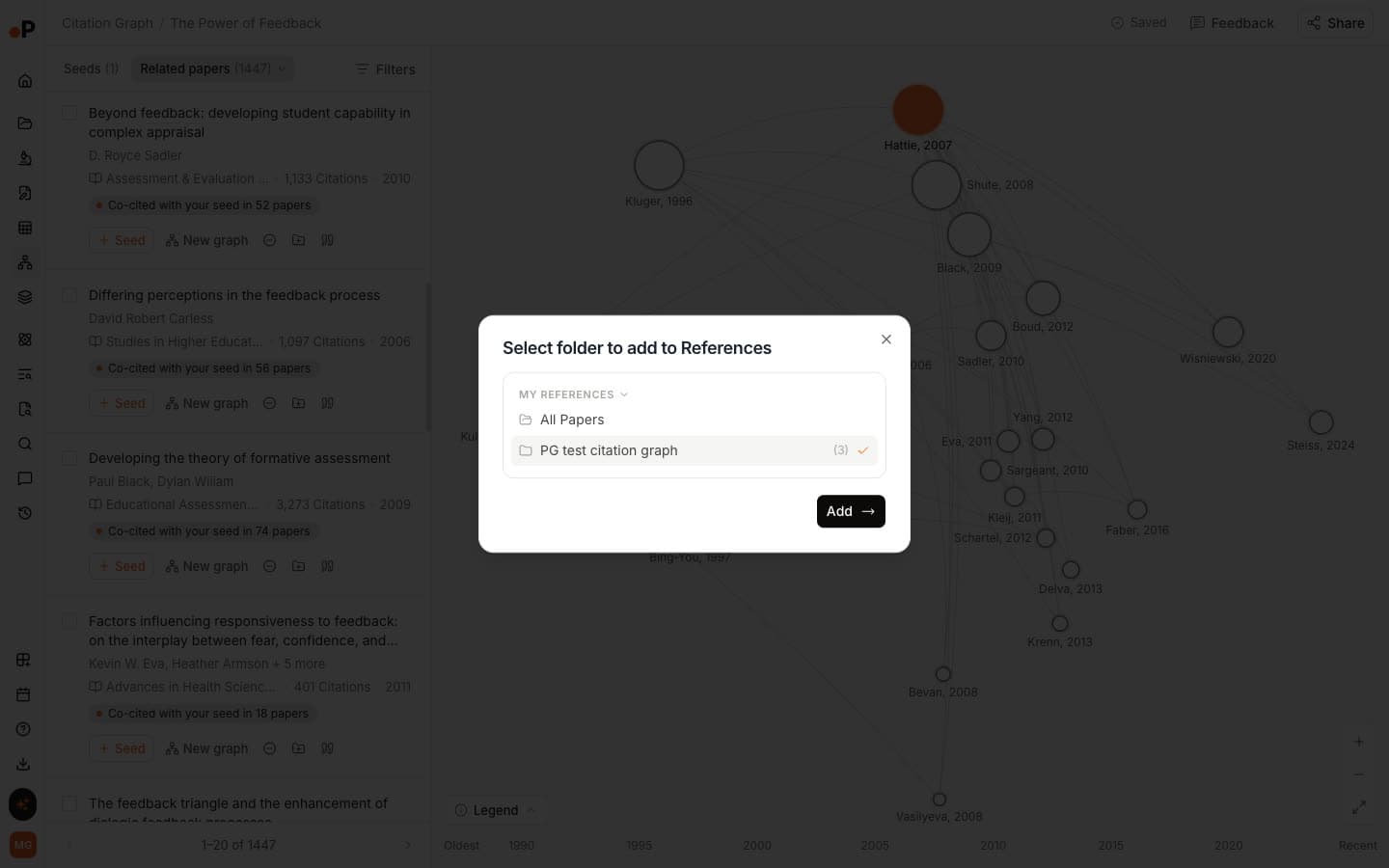
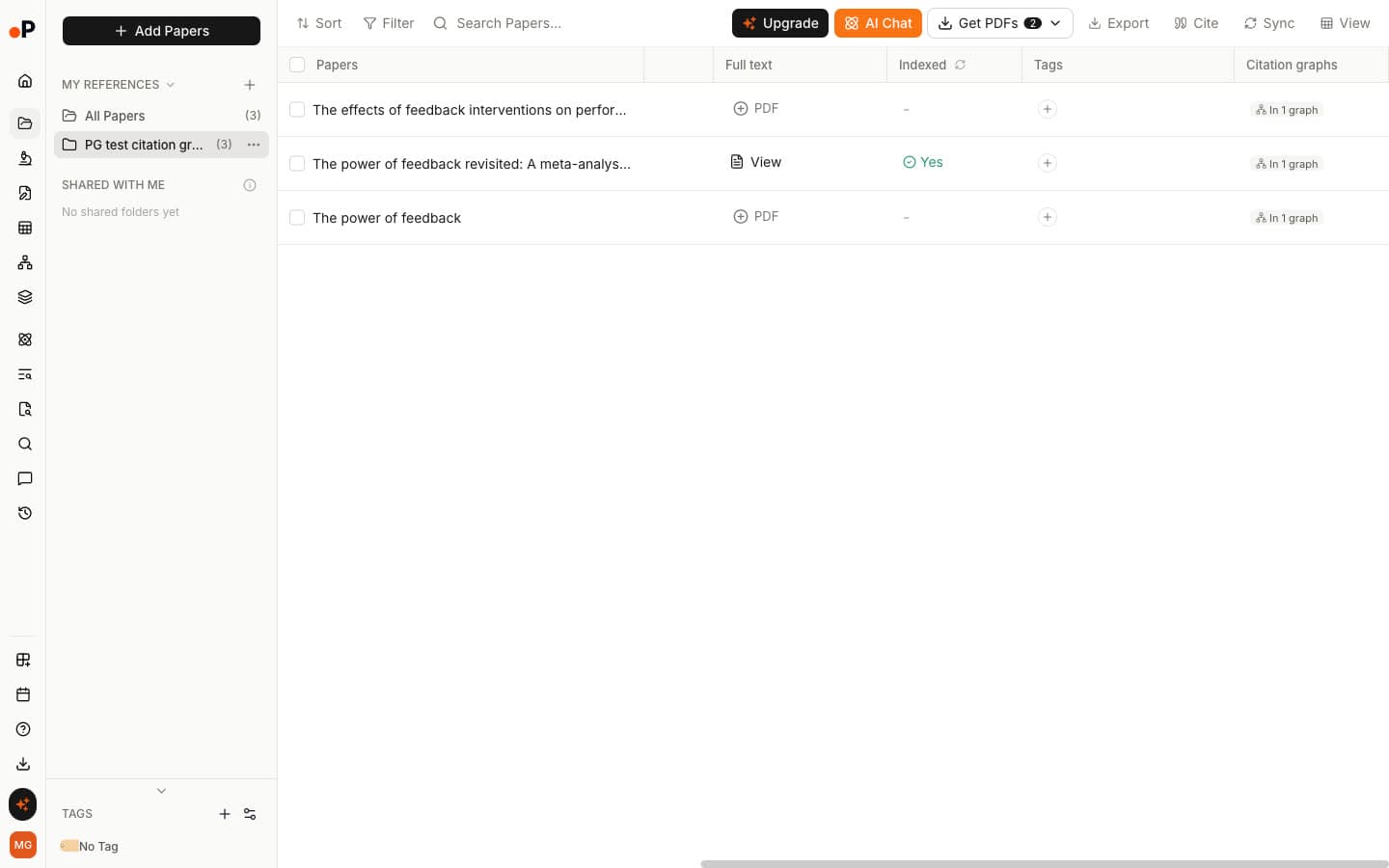
Step 4: Save papers to Reference Manager. "Add to Reference Manager" sends a paper to a folder, and each saved paper shows which graph it came from in a "Citation graphs" column.
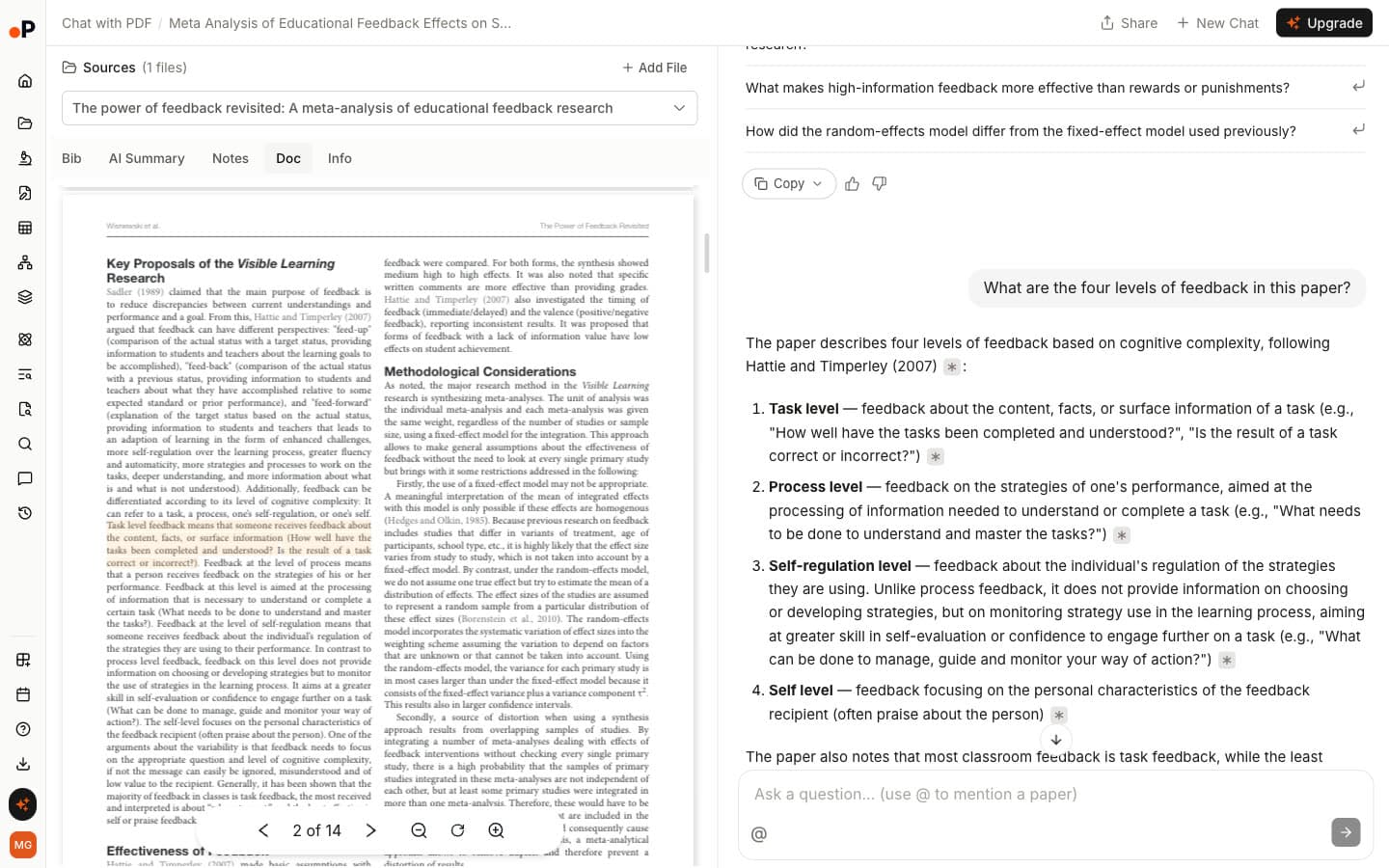
Step 5: Read, extract and write. Chat with PDF answers with page citations: asked for the four levels of feedback, it listed task, process, self-regulation and self.
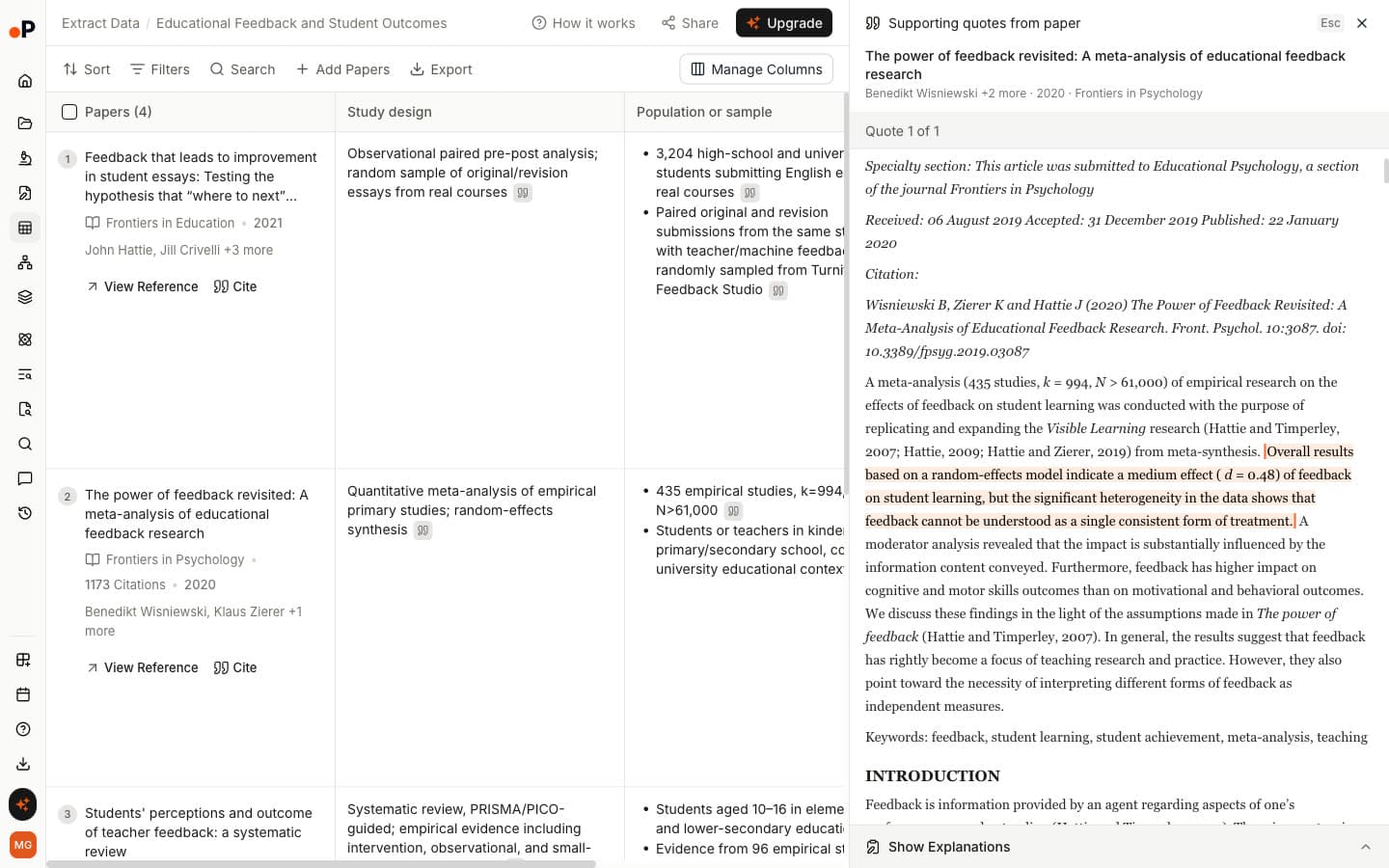
Extract Data builds a table across papers, and every value opens the sentence it came from.
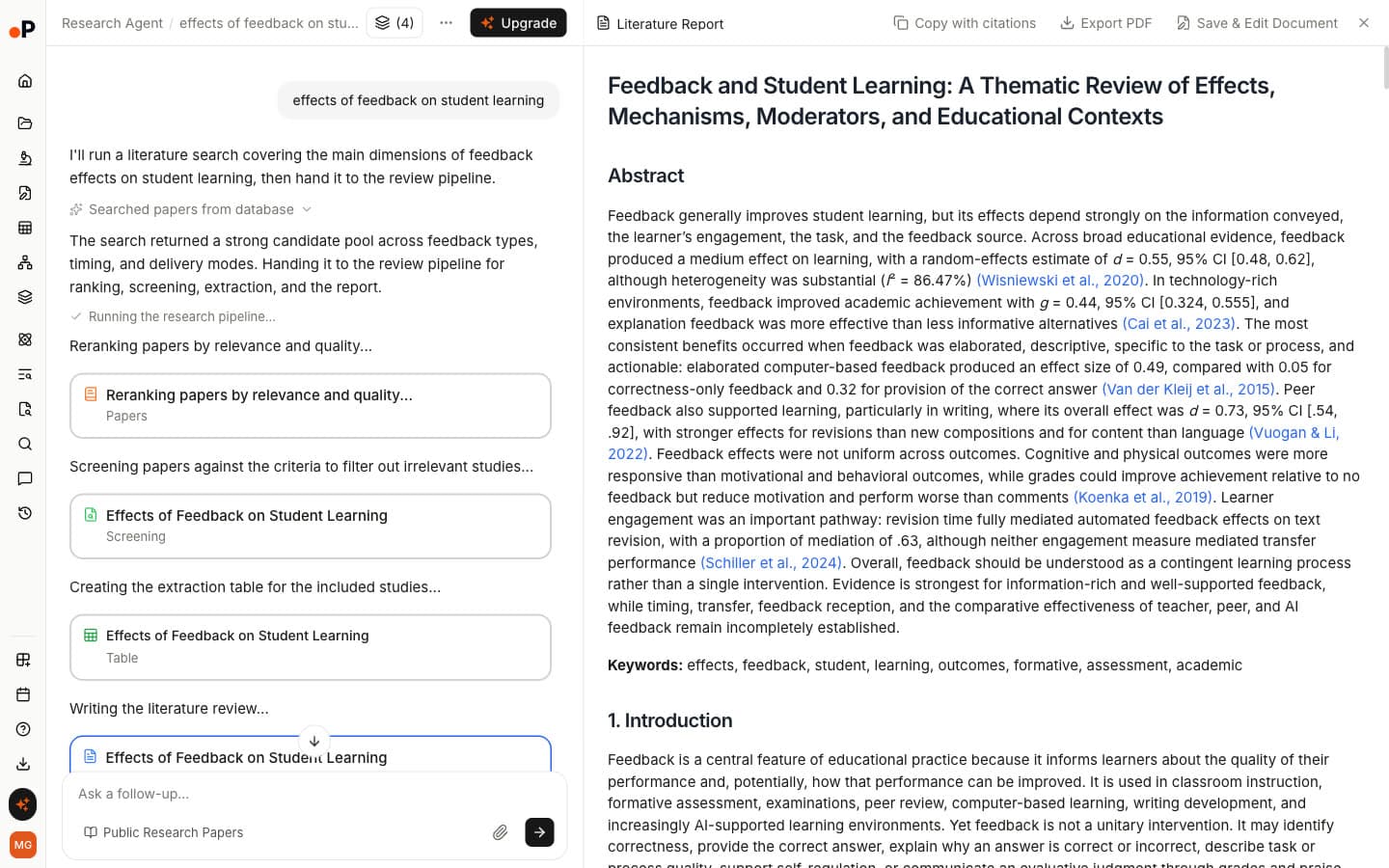
Literature Review AI reranks and screens papers against criteria it shows you, builds an extraction table and writes a cited report.
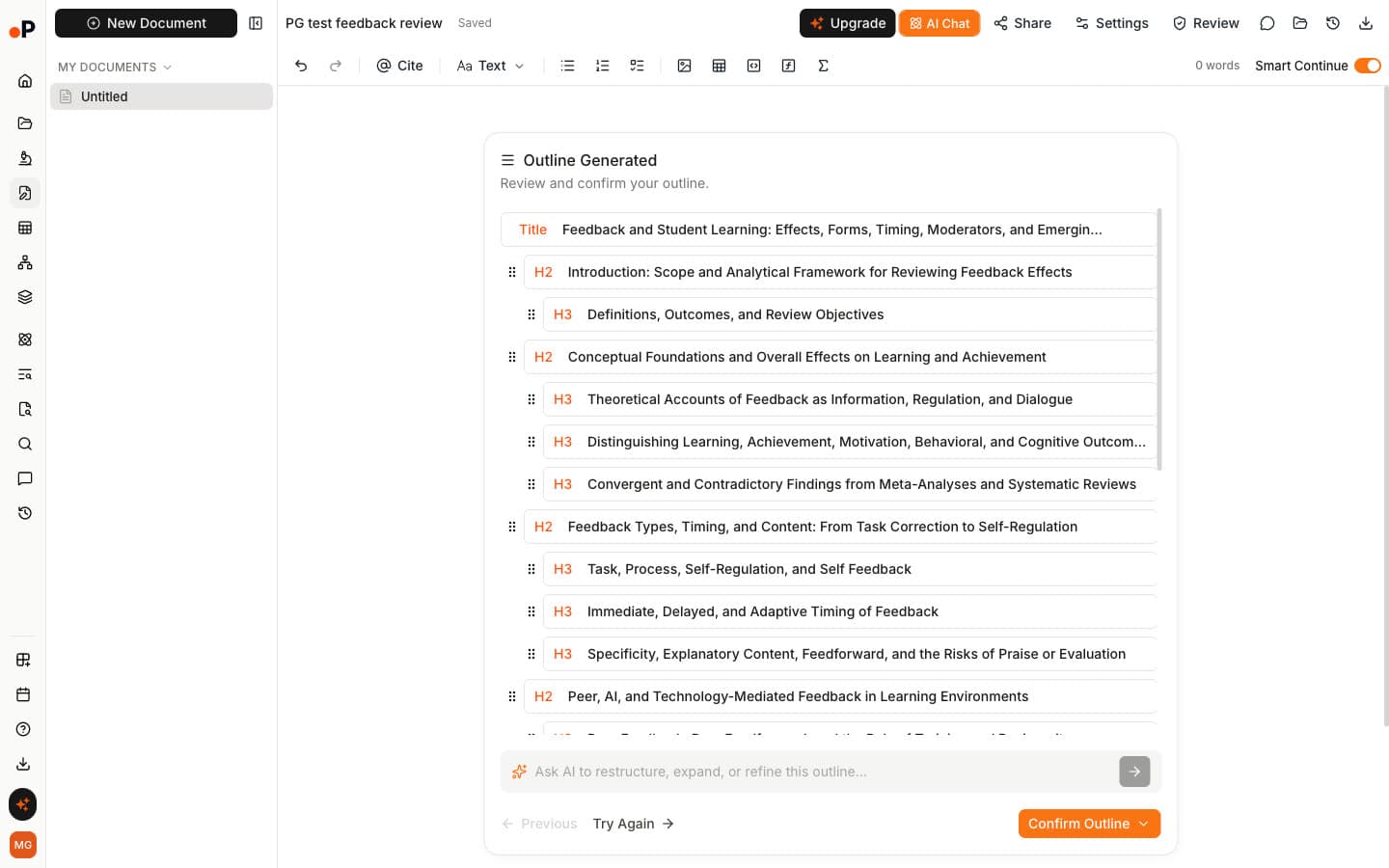
AI Paper Writer generates an outline for you to review before drafting, citing public papers and your Reference Manager.
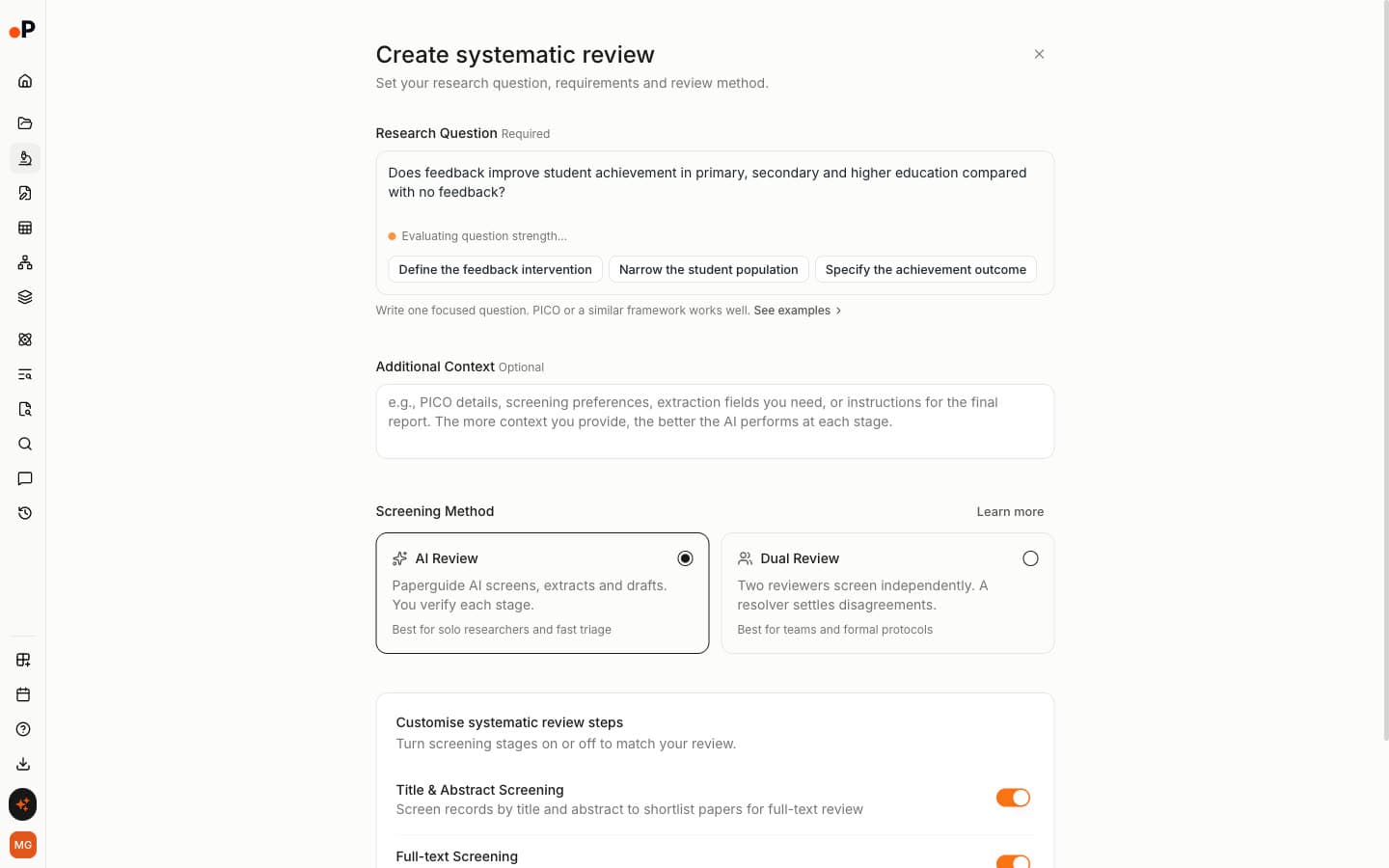
For formal reviews, Systematic Review screens with "AI Review" or "Dual Review", and Research Agent runs multi-step research across public papers and your library.
Best Connected Papers Alternatives by Use Case
The right Connected Papers alternative depends on the job. Paperguide Citation Graph suits review work, citation searching and anyone out of free graphs. Inciteful suits no-account use and Zotero export, Consensus a fast multi-seed glance, Litmaps new papers and alerts, and ResearchRabbit free collecting from many seeds.
| Use case | Recommended tool | Why |
|---|---|---|
| Best Connected Papers alternative overall | Paperguide Citation Graph | Same relevance, a reason on every paper, no stated graph limit |
| Best free Connected Papers alternative | Paperguide Citation Graph | Free to build and browse with no signup and no graph limit stated |
| Best with no account at all | Inciteful | Free tools with no login |
| Best for backward and forward citation searching | Paperguide Citation Graph | Long Earlier work and Later work lists |
| Best for several seed papers | Paperguide Citation Graph | One to five seeds with labels for shared links |
| Best quick multi-seed glance | Consensus Citation Graph | Seed colours and a map in about 2 seconds |
| Best for recent papers and alerts | Litmaps | Most 2024+ papers in our test and Monitor emails |
| Best for Zotero export | Inciteful | Direct Zotero and Mendeley export on every table |
| Best free plan for collecting papers | ResearchRabbit | 50 inputs, unlimited searches, collections |
| Best for systematic review and HEOR teams | Paperguide Citation Graph | Explained links feed Reference Manager and Systematic Review |
| Best for linking two research areas | Inciteful | Literature Connector finds the citation path between two papers |
Connected Papers Alternatives: Final Comparison
Across relevance, explanations, depth and free limits, Paperguide Citation Graph is the only alternative that matches Connected Papers on relevance and goes further on the rest. The other four each solve one Connected Papers limit, from no account to seed colours to alerts, while giving up some relevance in our blind test.
| Tool | Relevance (of 2) | Reason per paper | Earlier and later work | Graphs saved | Alerts | Is it AI? |
|---|---|---|---|---|---|---|
| Paperguide Citation Graph | 1.75 | Yes | Long lists | Yes, to your account | No | No, citation and topic signals |
| Inciteful | 1.42 | No | Review and important papers tables | By URL | No | No, network algorithms |
| Consensus Citation Graph | 1.54 | No | No separate views | No | No | Ranking uses citation signals; AI titles, chat and snapshots |
| Litmaps | 0.87 | No | References and Citations tabs | Yes, 2 on free | Monitor, weekly on Pro | Default no; "Similar Text" and Semantic map use AI |
| ResearchRabbit | 1.25 | No | References and Citations | In collections | No new-paper alerts found | No LLMs in core recommendations |
| Connected Papers | 1.77 | No | 10 Prior, 10 Derivative | Graph history | No | No, similarity algorithm |
Common Mistakes When Switching From Connected Papers
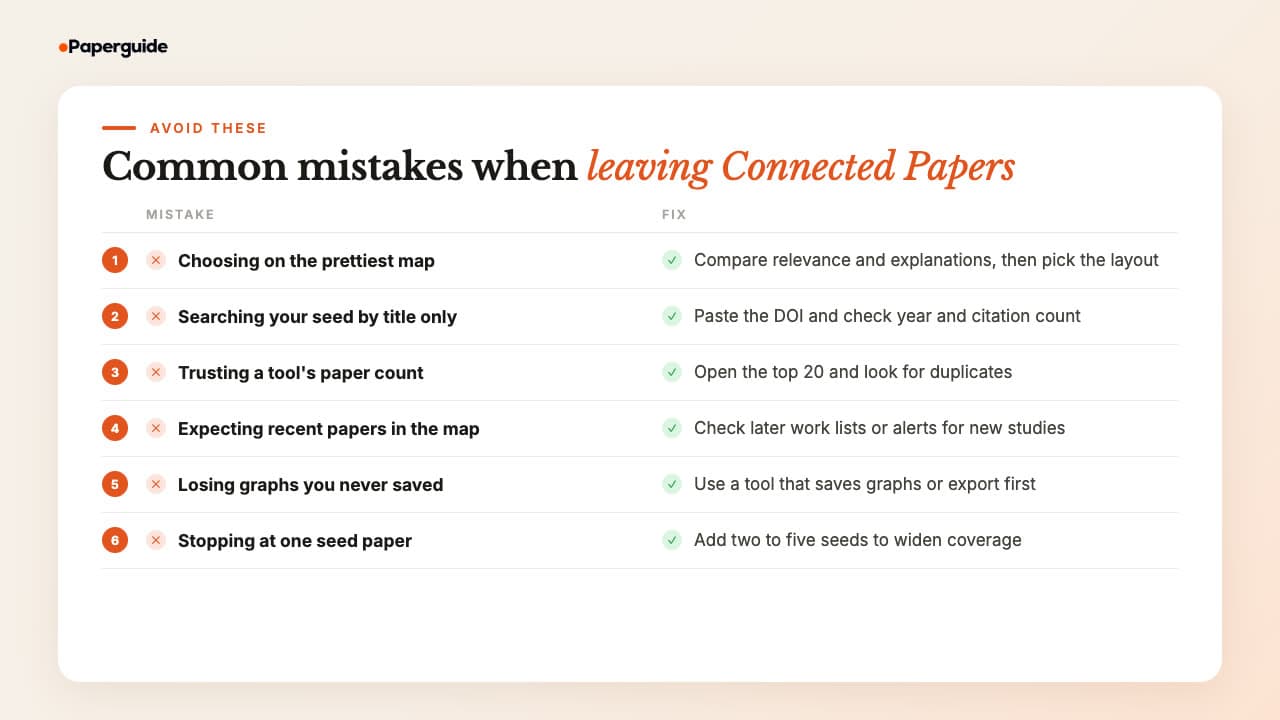
The most common mistakes when switching from Connected Papers are choosing on looks, trusting the seed record a tool picks, assuming every listed paper is unique, expecting recent papers in the main map and losing graphs that were never saved. Each one cost us time in testing, and each has a simple fix.
Choosing on the prettiest map. Litmaps' flexible chart scored lowest on relevance in our test. Compare relevance and explanations first, then the layout.
Searching your seed by title only. Several tools opened the wrong record for at least one seed: a 2016 letter instead of the insomnia meta-analysis, or a duplicate 2025 record of the transformer paper. Paste the DOI where it works and check the year and citation count before building.
Trusting the paper count. Duplicates took slots in several tools. Connected Papers' insomnia graph held two copies each of three meta-analyses, and ResearchRabbit's feedback list ranked a different paper with the same title first. Open the top 20 before you treat it as 20 papers.
Expecting recent papers in the map. Connected Papers, Consensus and ResearchRabbit showed no 2024 or later paper in any top list. Recent work lives in later-work lists, derivative works or alerts, so check there. For a broader view, a literature map of a whole field needs the newest papers as well as the classics.
Losing graphs you never saved. Consensus graphs disappear on refresh, and there is no history list to find them again. Save the papers you need, or use a tool that keeps graphs, before you close the tab.
Stopping at one seed. One seed reflects one paper's view of a field. Adding a second insomnia seed in Paperguide grew Related papers from 1,252 to 1,933 and Earlier work from 104 to 214. Use two to five seeds, and prefer a tool that labels which papers link to which.
Final Verdict
Paperguide Citation Graph is the best Connected Papers alternative in 2026. It matched Connected Papers on relevance in our blind test, 1.75 against 1.77, with no off-topic papers. It also removes the limits that send people looking: no stated graph limit, a reason on every link, long earlier and later work lists and labelled multi-seed maps.
Graphs also save to your account, so a supervisor or co-reviewer can open the same map. Build your first one in Paperguide's free Citation Graph. The other four each fix one thing: Inciteful for no account and Zotero export, Consensus for a fast multi-seed glance, Litmaps for recent papers and alerts, and ResearchRabbit for collecting from many seeds for free.
Frequently Asked Questions (FAQs)
What is the best Connected Papers alternative?
Paperguide Citation Graph is the best Connected Papers alternative in 2026. In our blind test on three seed papers it matched Connected Papers on relevance, 1.75 against 1.77 out of 2, with no off-topic papers. It is free, states no graph limit, explains why every paper is linked and gives long lists of the seed's earlier and later work.
Is there a free alternative to Connected Papers?
Yes, several. Paperguide Citation Graph is free to build and browse with no signup and states no graph limit. Inciteful is free and open source with no account at all. ResearchRabbit is free forever with up to 50 inputs, Consensus builds 20-paper maps on a free account, and Litmaps keeps two maps free.
Is Connected Papers AI?
Not in the generative sense. Connected Papers builds a similarity graph from co-citation and bibliographic coupling, analysing an order of 50,000 papers to pick the few dozen most similar to your origin paper. We saw no chat or AI writing features; the paper panel shows the abstract or a Semantic Scholar TL;DR summary.
Is Connected Papers free?
Partly. The free plan includes all features but allows five graphs a month with an account, or two as a guest, then shows "You've used 5/5 free graphs this month". At US list prices at the time of writing, Academic costs $6 a month billed yearly ($72) and Business $20 a month billed yearly ($240).
What tools are similar to Connected Papers?
Five tools similar to Connected Papers are Paperguide Citation Graph, Inciteful, Consensus Citation Graph, Litmaps and ResearchRabbit. All build maps or ranked lists from a seed paper's citation links. They differ in free limits, whether each paper comes with a reason, how many seeds they take and how they export.
Which Connected Papers alternative works best with Zotero?
Inciteful has the most direct Zotero support, with a "Zotero" export option on every results table and a Zotero plugin. Litmaps lists Zotero sync as a Pro feature, and ResearchRabbit imports from Zotero but does not sync back. Connected Papers exports BibTeX, which Zotero can import.
Which alternative shows the most recent papers?
Litmaps did in our test: 19 of its 60 top recommendations were from 2024 or later, while Connected Papers, Consensus and ResearchRabbit had none. Litmaps also emails new papers through Monitor. Paperguide keeps recent work in its Later work view, which listed 847 citing papers for the insomnia seed.
Is Inciteful better than Connected Papers?
Not on relevance. Inciteful scored 1.42 out of 2 against Connected Papers' 1.77 in our blind test, and its transformer results were weak. It is better on access and export: it is free with no account and no stated graph limit, exports to Zotero, Mendeley, BibTeX and RIS, and can trace citation paths between two papers.
Is Paperguide better than Connected Papers?
For relevance alone, no: the two tied in our blind test. Paperguide is better for review work because it explains every link, lists far more of a seed's earlier and later work, labels multi-seed maps and states no graph limit. Connected Papers is better for a dense one-screen map and a BibTeX export.
References
- Trauer, J. M., Qian, M. Y., Doyle, J. S., Rajaratnam, S. M. W., & Cunnington, D. (2015). Cognitive behavioral therapy for chronic insomnia: A systematic review and meta-analysis. Annals of Internal Medicine, 163(3), 191-204. https://doi.org/10.7326/M14-2841
- Hattie, J., & Timperley, H. (2007). The power of feedback. Review of Educational Research, 77(1), 81-112. https://doi.org/10.3102/003465430298487
- Vaswani, A., Shazeer, N., Parmar, N., Uszkoreit, J., Jones, L., Gomez, A. N., Kaiser, Ł., & Polosukhin, I. (2017). Attention is all you need. Advances in Neural Information Processing Systems, 30. https://doi.org/10.48550/arXiv.1706.03762
- Small, H. (1973). Co-citation in the scientific literature: A new measure of the relationship between two documents. Journal of the American Society for Information Science, 24(4), 265-269. https://doi.org/10.1002/asi.4630240406
- Kessler, M. M. (1963). Bibliographic coupling between scientific papers. American Documentation, 14(1), 10-25. https://doi.org/10.1002/asi.5090140103
- Boyack, K. W., & Klavans, R. (2010). Co-citation analysis, bibliographic coupling, and direct citation: Which citation approach represents the research front most accurately? Journal of the American Society for Information Science and Technology, 61(12), 2389-2404. https://doi.org/10.1002/asi.21419
- Greenhalgh, T., & Peacock, R. (2005). Effectiveness and efficiency of search methods in systematic reviews of complex evidence: Audit of primary sources. BMJ, 331(7524), 1064-1065. https://doi.org/10.1136/bmj.38636.593461.68
Mapping citations?
See how any paper connects
Start from up to five papers and explore earlier, later and related work in one free citation graph. No signup.
Try Citation GraphNo credit card required