9 Best Research Rabbit Alternatives in 2026 (Free + Paid)

Of the Research Rabbit alternatives, Paperguide's Citation Graph is the best: it is free without signup, tied Connected Papers on relevance in a blind test, and explains why every paper appears. Inciteful, Local Citation Network, Semantic Scholar and Open Knowledge Maps are the strongest fully free options after it.
The tool itself is written ResearchRabbit, so that is the spelling we use below. It relaunched as "the new ResearchRabbit" on 20 October 2025, "thanks to our partnership with Litmaps", and the app now calls itself ResearchRabbit 2.0. Its footer reads "Copyright © Litmap Limited", the company behind Litmaps. The free plan still offers unlimited searches and up to 50 seed papers.
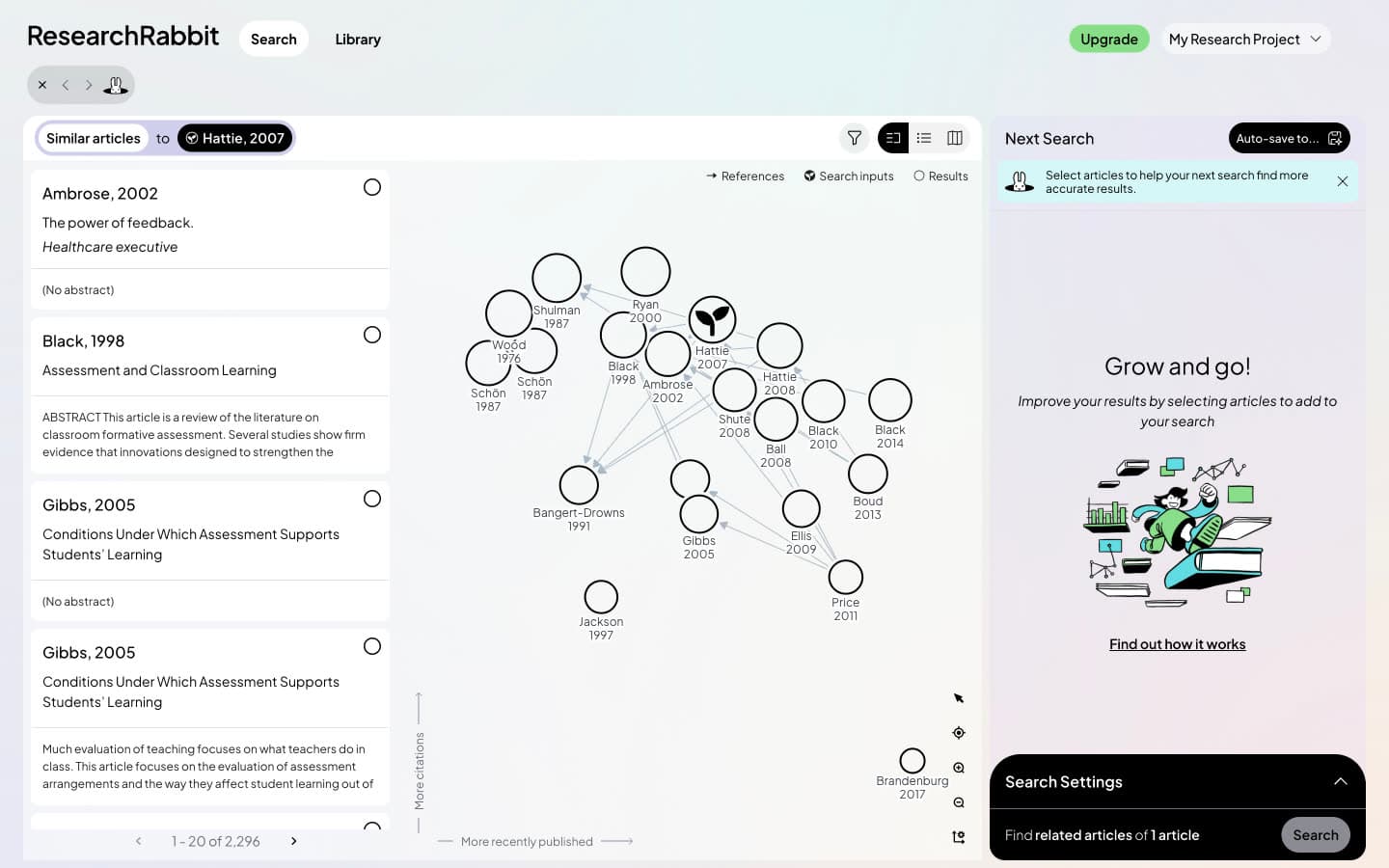
Some researchers leave because the new app works differently from the one they learned. Others hit data problems. In our test, ResearchRabbit opened a 2016 letter for the DOI of a 2015 insomnia meta-analysis, ranked a 2002 trade-magazine piece called "The power of feedback." first for Hattie and Timperley's review, and listed a duplicate of the seed as the top Similar result for two of three seeds.
This guide compares nine ResearchRabbit alternatives. We ran eight of them on the same three seed papers: an insomnia meta-analysis [1], a classic education review [2] and the transformer paper from machine learning [3]. The top recommendations from every tool were pooled and scored blind, without knowing which tool suggested them: 2 for the seed's core topic, 1 for related but peripheral, 0 for off-topic, not a research paper or a duplicate of the seed.
That gave 60 scored papers per tool, with three exceptions. Semantic Scholar lists ten related papers per seed (30 in all), Consensus shows 19 per seed on its free density (57), and Open Knowledge Maps was scored on the first 20 documents of a keyword map, since it does not take a seed paper. The ninth tool, VOSviewer, is desktop software that maps database exports rather than a seed, so we describe it from its own site and give it no score. Prices are US list prices at the time of writing.
TL;DR
Paperguide's Citation Graph is the best of the Research Rabbit alternatives. It is free with no signup, explains every recommendation with a "Why it's here" label, and scored 1.75 of 2 against ResearchRabbit's 1.25 on the same seeds. Connected Papers matched it on relevance (1.77) but caps free use at five graphs a month.
For a different kind of tool, Inciteful and Local Citation Network are free, open citation networks with no account. Semantic Scholar is a free discovery database without a map, Open Knowledge Maps builds a free topic map from a keyword, and VOSviewer is free desktop software for bibliometric maps. Consensus Citation Graph scored 1.54 but does not save graphs. Litmaps shares ResearchRabbit's owner and scored lowest (0.87).
Key Takeaways
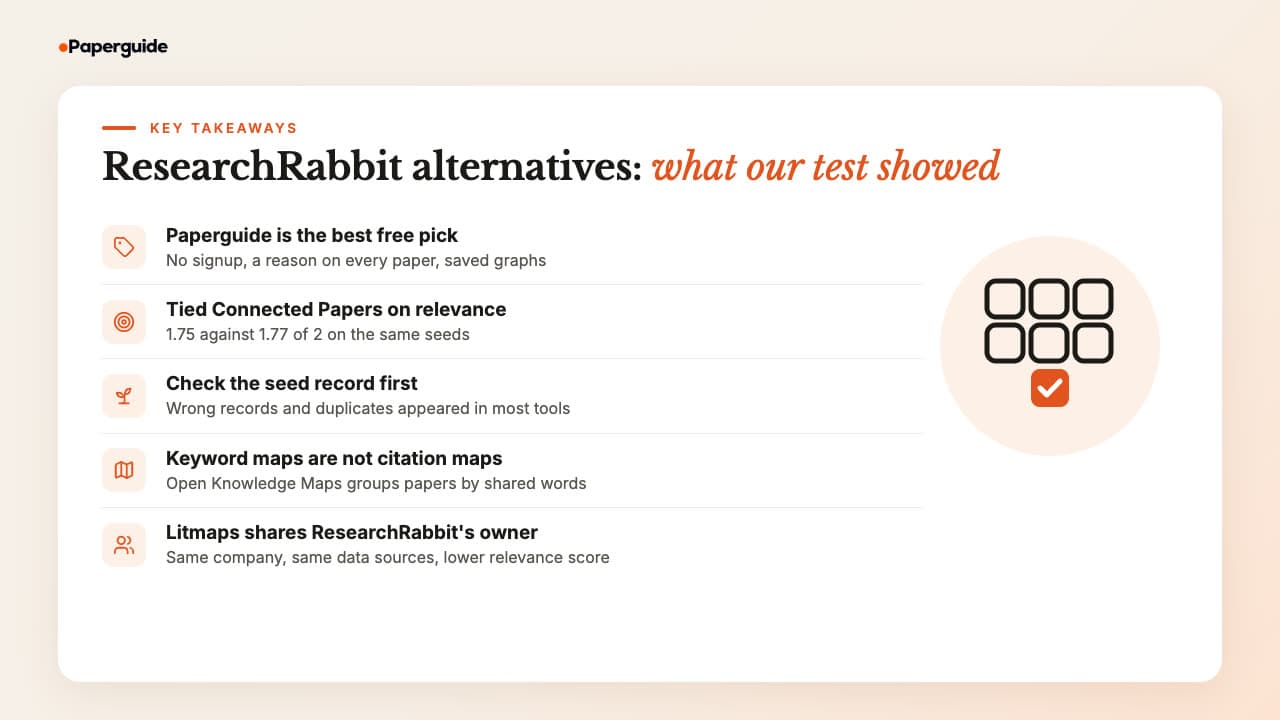
The short version: pick a citation mapper if you search from papers you already trust, a database if you want lists and alerts, and a topic map if the field is new to you. Whatever you pick, check that the tool found the right record for your seed before you read its suggestions.
- Paperguide's Citation Graph is the best free ResearchRabbit alternative: no signup, a reason on every paper, saved and shared graphs, and 1.75 of 2 for relevance.
- Connected Papers tied Paperguide on relevance (1.77 against 1.75), but its free plan stops at five graphs a month; Consensus came next (1.54) but loses each graph on reload.
- ResearchRabbit scored 1.25, with 22% of its top papers rated 0; Litmaps, from the same company, scored 0.87.
- Inciteful, Local Citation Network, Semantic Scholar, Open Knowledge Maps and VOSviewer are completely free, and none needs an account for the core features.
- Open Knowledge Maps maps a keyword by shared words, not citations, so it orients you in a field rather than finding papers around a study.
What Are the Best Research Rabbit Alternatives in 2026?
The best ResearchRabbit alternatives are Paperguide Citation Graph, Inciteful, Local Citation Network, Semantic Scholar, Open Knowledge Maps, VOSviewer, Consensus Citation Graph, Litmaps and Connected Papers. Paperguide is the best overall because it is free without signup, explains every link and feeds a reading and writing workspace.
They are not all the same kind of tool, so the list falls into four groups:
- Citation-based mappers: Paperguide, Inciteful, Local Citation Network, Consensus Citation Graph, Litmaps and Connected Papers. You give them seed papers and they find related work through citations, co-citations and shared references, the job ResearchRabbit does.
- A discovery database: Semantic Scholar. No map, but full citation and reference lists, related papers and alerts.
- A topic map: Open Knowledge Maps. It groups 100 documents for a keyword by shared words, with no citation data.
- Bibliometric desktop software: VOSviewer. It maps a set of records you export from a database rather than suggesting papers from a seed.
How to Choose a Research Rabbit Alternative
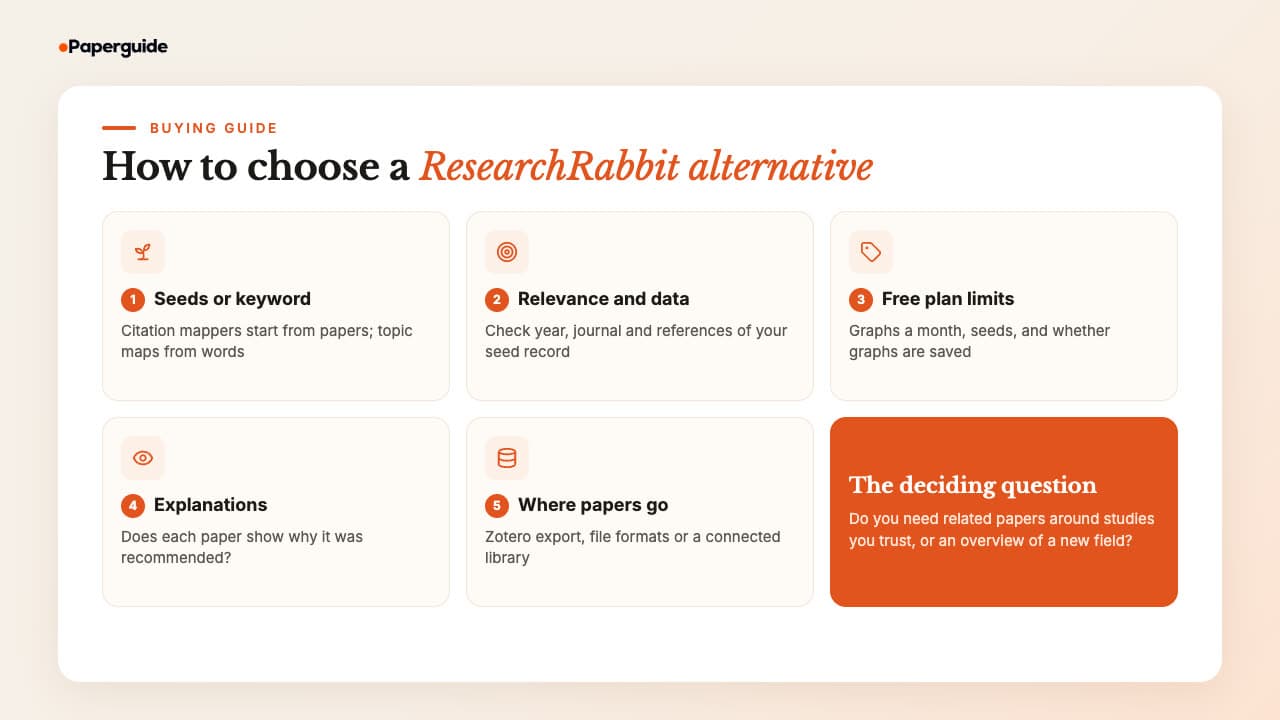
Choose a ResearchRabbit alternative on five things: whether it starts from your seed papers or a keyword, how relevant and clean its results are, what the free plan really allows, whether it tells you why a paper is shown, and where your papers go afterwards. Price matters less, since most strong options are free.
1. Seed papers or a keyword. ResearchRabbit starts from papers. So do the citation mappers on this list, which rank neighbours using direct citations, co-citation (two papers cited together by a third) [5] and bibliographic coupling (two papers that share references) [6]. Boyack and Klavans found that these approaches map a research front with different accuracy, which is why tools that combine them can disagree [7]. In contrast, a keyword tool such as Open Knowledge Maps answers a different question: what are the subtopics of this field? If you are new to the idea, start with what a citation map shows.
2. Relevance and data quality. A map is only as good as the record it starts from. Search your seed by DOI, then check the year, journal and reference count before you read a single suggestion.
In our test, five of the seven seed-based alternatives we tested, and ResearchRabbit itself, failed to resolve the arXiv DOI of "Attention Is All You Need". Three tools matched a duplicate record dated 2025 instead. ResearchRabbit and Litmaps both resolved the insomnia DOI to a 2016 letter.
3. Free plan limits. "Free" means very different things. For example, Connected Papers allows five graphs a month on a free account, Litmaps allows two maps with 20 inputs, and Consensus shows 20 papers per graph on its free density and keeps no graph after a reload. We hit no limit on Paperguide, Inciteful, Local Citation Network, Semantic Scholar or Open Knowledge Maps, and Paperguide's page states no graph limit.
4. Explanations. Most tools show a ranked list and leave you to guess why each paper is there. Paperguide labels every card, for example "Co-cited with your seed in 60 papers". Inciteful shows a similarity score and the SQL behind it, and Local Citation Network shows how many of your seeds each paper cites or is cited by. Consensus explains its three ranking signals in its graph details, but not for each paper.
5. Where papers go next. If you use Zotero, check how a tool hands papers over. ResearchRabbit imports from Zotero one way and exports BibTeX, RIS or CSV. Inciteful saves straight to Zotero and Mendeley, and Litmaps syncs both ways on Pro. Any file export works with the best reference management software for researchers, while Paperguide sends papers into its own Reference Manager, where you can read, extract and cite them.
Quick Comparison: Best Research Rabbit Alternatives in 2026
The quick answer: Paperguide and Connected Papers returned the most relevant papers, Consensus came third, Inciteful led the fully free open tools, and Litmaps scored lowest. Every tool below has a free way in. The table shows the type of tool, its blind relevance score out of 2, the free plan and the lowest paid price.
| Tool | Type | Relevance (0 to 2) | Free plan | Account for core use | Paid from (US) |
|---|---|---|---|---|---|
| Paperguide Citation Graph | Citation mapper | 1.75 | Free, no stated graph limit | No | Graph stays free; plans from $12 a month, billed annually |
| Inciteful | Citation mapper | 1.42 | Free | No | No paid plan |
| Local Citation Network | Citation mapper | 1.15 | Free, open source | No | No paid plan |
| Semantic Scholar | Discovery database | 1.30 (10 papers per seed) | Free | No (alerts need one) | No paid plan |
| Open Knowledge Maps | Topic map from a keyword | 1.38 (keyword map) | Free | No | No paid plan |
| VOSviewer | Bibliometric desktop software | Not tested | Free for any purpose | No | Free software |
| Consensus Citation Graph | Citation mapper (beta) | 1.54 (19 papers per seed) | Low density, 20 papers per graph | Yes | $12 a month, billed annually (Pro) |
| Litmaps | Citation mapper | 0.87 | 2 maps, 20 inputs | Yes | $10 a month (education, annual) |
| Connected Papers | Similarity graph | 1.77 | 5 graphs a month | No for 2 a month | $72 a year (academic) |
| ResearchRabbit (for reference) | Citation mapper | 1.25 | Unlimited searches, 50 seeds | Yes | $10 a month, billed annually |
Best Research Rabbit Alternatives in 2026
These nine tools cover the main reasons to leave ResearchRabbit: better relevance, explanations, no account, open data, a topic overview and bibliometric maps. Each section gives a one-line definition, the features and limits we saw on the free plans, the price, who it suits, and, for the eight we tested, its blind relevance score with the most telling result.
1. Paperguide Citation Graph
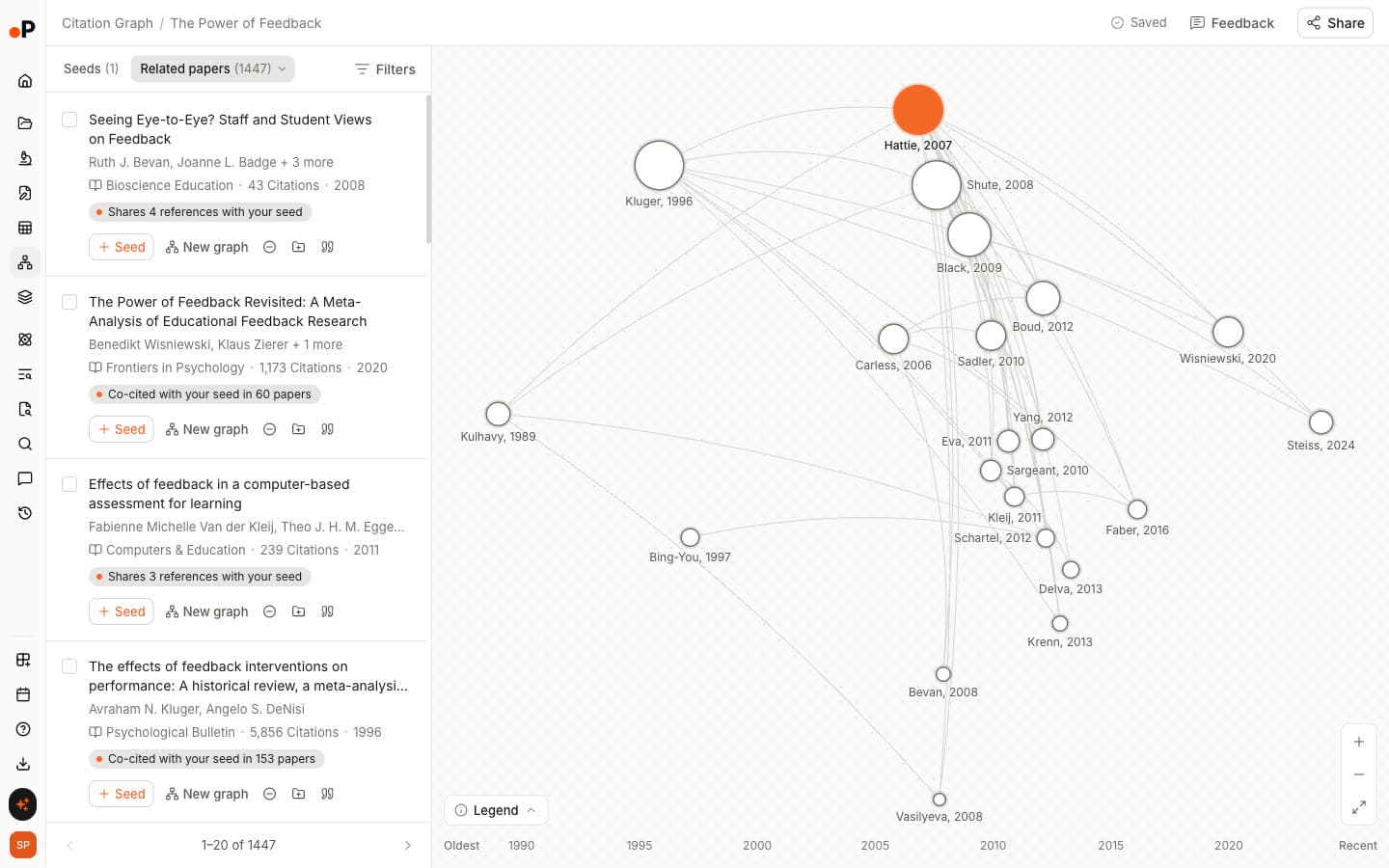
Paperguide's Citation Graph is a free citation map from Paperguide, the AI-native platform for scientific research workflows and systematic reviews. You add 1 to 5 seed papers by title or DOI, and it returns Related papers, Earlier work and Later work, each with a line saying why it is there.
The graph is built from references, citing papers, co-citations, shared references and topic similarity, and needs no signup to build or browse. On the same seeds it tied with Connected Papers on relevance and earned a higher blind relevance score than ResearchRabbit, 1.75 of 2 against 1.25, with no paper rated 0.
Key Features
- Citation Graph: 1 to 5 seeds by title or DOI, a timeline from "Oldest" to "Recent", and nodes sized by citations.
- Three views: Related papers; Earlier work, "What your seed builds on"; and Later work, "What built on your seed". The insomnia seed returned 1,252 related papers, 104 earlier and 847 later.
- "Why it's here" on every paper: Labels such as "Shares 25 references with your seed" or "Cites your seed".
- Multi-seed labels: With two insomnia seeds, all top 20 cards carried a both-seeds label, such as "Co-cited with 2 of your seeds" or "Shares references with 2 of your seeds".
- Saved and shared graphs: Each graph saves automatically, named after the first seed. Share by link with "Can edit", "Can view" or "No access".
- Card actions: "Seed", "New graph", "Exclude", "Add to Reference Manager" and "Cite" on every paper.
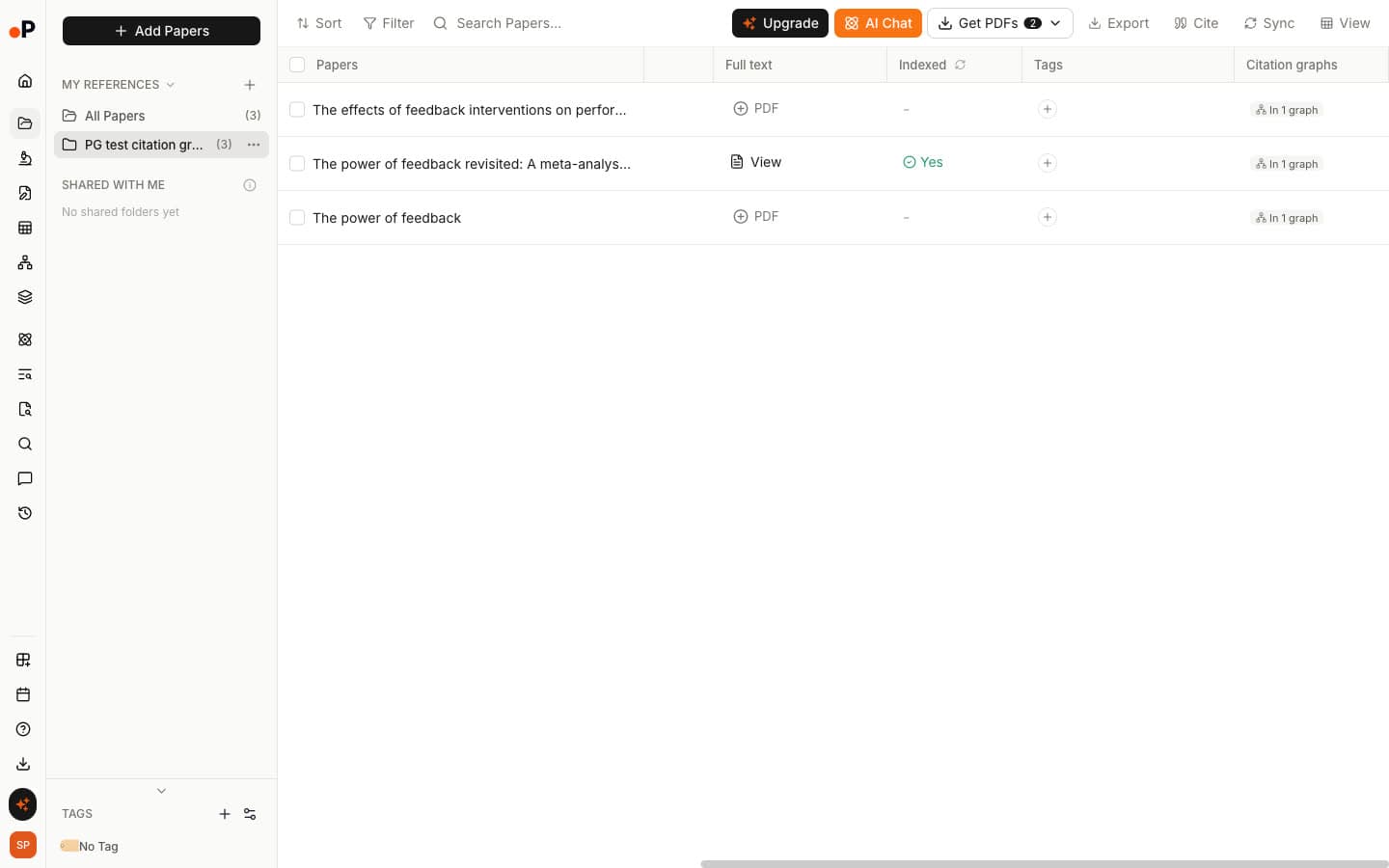
- AI Reference Manager: Saved papers show "In 1 graph" in a Citation graphs column, with Zotero, Mendeley, BibTeX and RIS import.
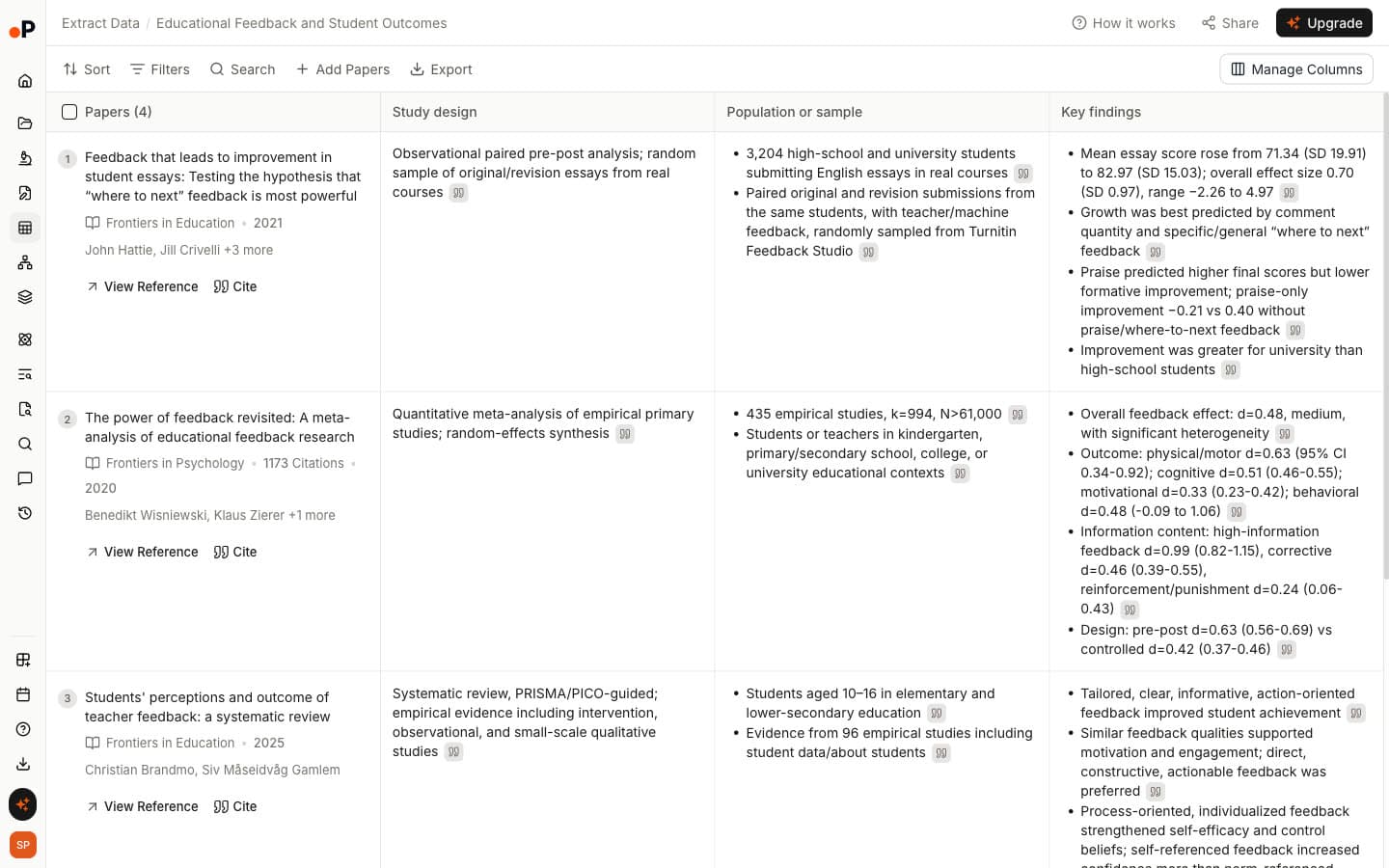
- Connected tools: Chat with PDF, Extract Data, Literature Review AI, the AI Paper Writer and Systematic Review work on the papers you save, and the Research Agent can build a citation graph from inside a research chat.
Pros
- Free to build, browse and save graphs, with no signup needed to start and no graph limit stated on its page.
- The only tool here that gives a written reason for every recommendation.
- Matched the top relevance score in our test, and no recommendation scored 0.
- Found the correct record for the insomnia and feedback DOIs on the first try.
- Papers flow into reading, extraction, review and writing tools in the same workspace.
Cons
- Slower than ResearchRabbit: 26 to 32 seconds to the first map, against about 2 seconds.
- Up to 5 seeds, against 50 on ResearchRabbit's free plan.
- No graph export. Reference Manager export to RIS, CSV or BibTeX is on paid plans.
- The arXiv DOI for the transformer paper failed, and title search matched a duplicate record with 28 references, which thinned its Earlier and Later work.
Pricing
| Plan | Price | What it covers |
|---|---|---|
| Free | $0 | Citation Graph, plus 1,500 AI credits a month for the AI tools |
| Plus | $12 per seat a month, billed annually | More AI credits, systematic reviews up to 1,000 papers |
| Pro | $29 per seat a month, billed annually | Systematic reviews up to 5,000 papers, collaboration on reviews |
| Evidence Teams | $89 per seat a month, billed annually | Dual reviewer screening for evidence synthesis teams, dedicated support |
Best For: PhD students, review teams and anyone who wants to know why each paper is recommended, then read, extract and cite it without moving tools.
In our test: 1.75 of 2, with 75% of recommendations rated highly relevant and none rated 0; the two-seed insomnia graph labelled every top paper with its link to both seeds.
Verdict: The best ResearchRabbit alternative overall: as relevant as the best mapper we tested, free without signup, and the only one that explains every link.
2. Inciteful
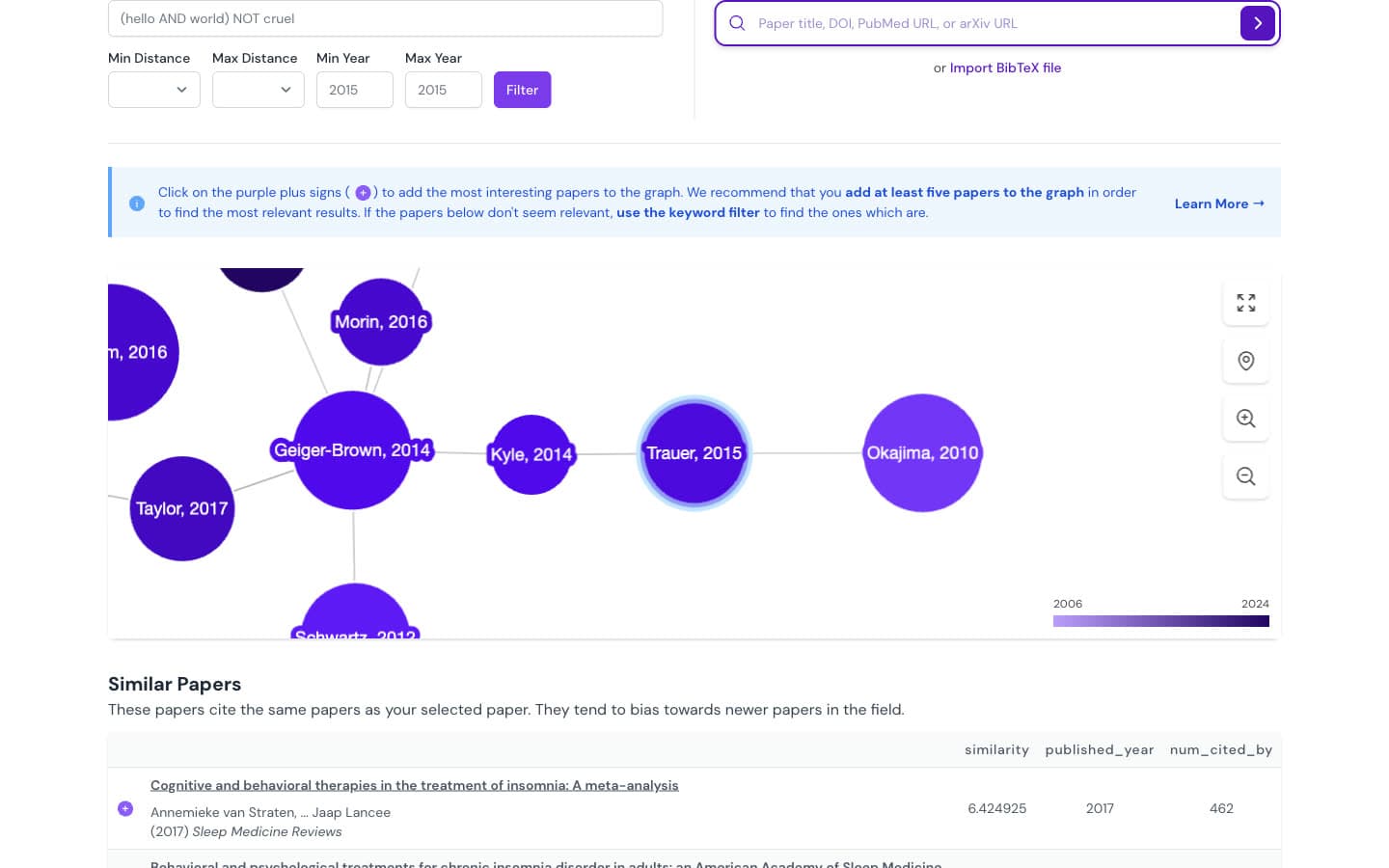
Inciteful is a free, open source citation network tool that builds a graph two steps out from your paper and ranks the papers in it with link prediction algorithms. Its Paper Discovery page fills a series of tables in seconds, and its own site says "Our core tools are free to use and always will be."
Key Features
- Paper Discovery tables: "Similar Papers", "Most Important Papers" (ranked by PageRank), "Review Papers", "Recent Papers by the Top 100 Authors", plus top authors, institutions and journals.
- Multi-seed search: Add papers with the purple plus sign; the tool recommends "at least five papers".
- Filters and SQL: Boolean keywords, citation distance and year range, with "View SQL" to see or edit the query.
- Export: "BibTex", "RIS", "Mendeley" and "Zotero" from every table, plus a Zotero plugin.
Pros
- Free with no account at all.
- Fast: about 5 to 10 seconds to a full page.
- Direct Zotero and Mendeley export, the best of the free tools.
- Separate lists for newer similar work, older important work and reviews.
Cons
- Explanations are a number: a "similarity" score, with no reason in words.
- The transformer DOI resolved to a record dated 2025 with the wrong DOI, and its Similar list opened with off-topic papers, including an art and machine learning thesis.
- The "Cited By" figure counts only papers loaded into the graph: 98 for the insomnia seed, against 1,053 in OpenAlex.
- With two seeds, all top 20 papers had the same score, so their order was a tie-break.
Pricing: Free. There is no paid plan.
Best For: Researchers who want a free, no-account citation network with Zotero export and lists of the key older papers and reviews in a field.
In our test: 1.42 of 2, with only 3% rated 0; strong on insomnia (1.7) but weak on the transformer paper (1.0) after the record mix-up.
Verdict: The best fully free citation mapper for Zotero users, as long as your seed resolves to the right record.
3. Local Citation Network
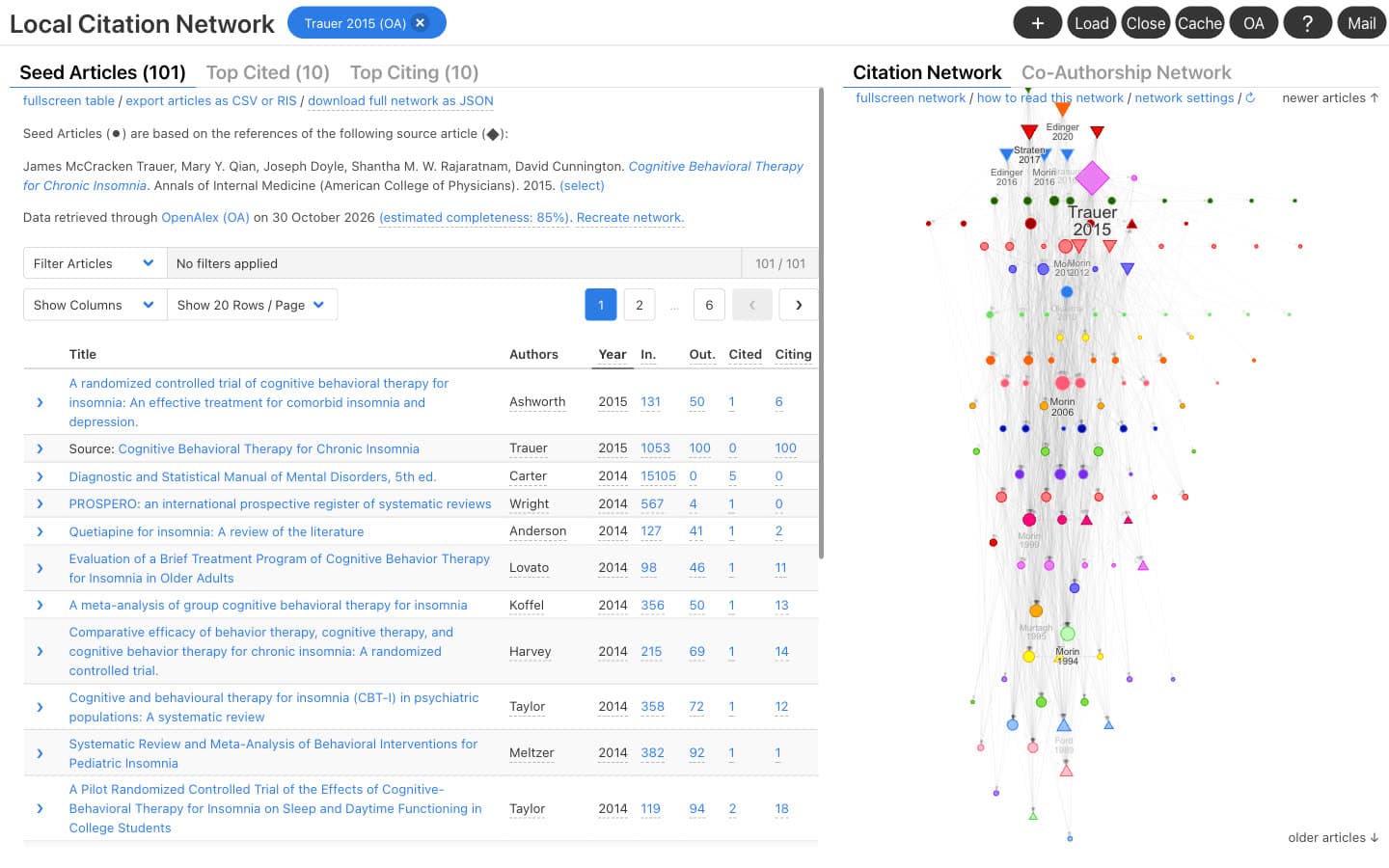
Local Citation Network is a free, open source web app that maps the references of a paper, or any list of DOIs, and finds the papers your set cites most and the papers that cite it most. A single developer builds it, it uses no cookies or tracking, and it needs no account.
Key Features
- Flexible input: A source DOI whose references become the seeds, a custom list of IDs, a .ris or .bib file, or a bookmarklet on a journal page.
- Top Cited and Top Citing: Ten papers each: the most cited references still missing from your set, and the papers citing the most of your seeds.
- Two network views: "Citation Network" and "Co-Authorship Network". We found no co-citation view in the version we used.
- Data sources: OpenAlex, Semantic Scholar or Crossref, switchable.
- Export: Articles as CSV or RIS, and the network as JSON. "All Cited" and "All Citing" support direct citation searching for systematic reviews.
Pros
- Free, open source (GPL-3), with no cookies and no account.
- Excellent for checking a reference list for missing papers.
- RIS export that Zotero and other reference managers read.
- Shows how many of your seeds each suggestion connects to.
Cons
- Slow on long reference lists: about 165 seconds for the insomnia seed and over 3 minutes for the feedback review.
- Missing records appeared as "(404)" errors, and the tool estimated completeness at 67% to 85%.
- Only 20 suggestions per network, and no similarity or related papers list.
Pricing: Free and open source.
Best For: Systematic reviewers and thesis writers checking backward and forward citations for a review, especially from a reference list they already have.
In our test: 1.15 of 2, with 35% rated highly relevant and 20% rated 0; it found the right insomnia and feedback records from their DOIs.
Verdict: A precise, private tool for citation chasing from a reference list, not a discovery map for a topic you are still learning.
4. Semantic Scholar
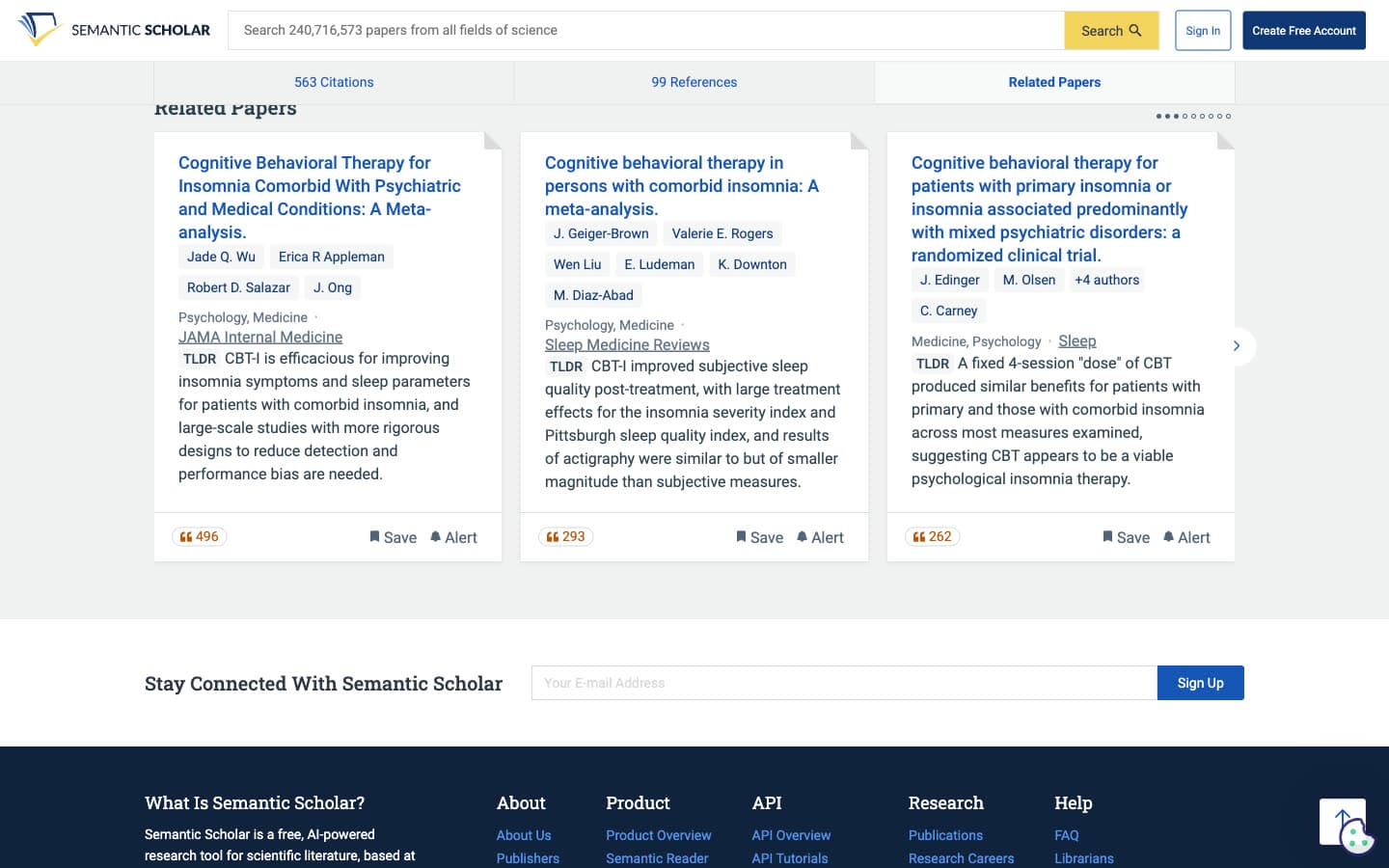
Semantic Scholar is a free research database from Ai2 that searches over 240 million papers and gives each one a page with citations, references, related papers and an AI summary called TLDR. It has no citation map. That said, it covers much of what people use ResearchRabbit for, in list form.
Key Features
- Citations and references: Filters by date, citation type and PDF, with sorts such as "Most Influential Papers".
- Citation intent: A breakdown into "Highly Influential", "Background", "Methods" and "Results" citations, with excerpts showing how a paper was cited.
- TLDR summaries: One-sentence AI summaries on paper pages and most list rows.
- Related Papers: A carousel of related papers on each page, ten per seed in our test.
- Alerts, library and export: "Create Alert" and "Save" with a free account, and BibTeX or EndNote export.
Pros
- Free, with a very large index.
- Citation excerpts and "Highly Influential" labels help you decide which citing papers matter.
- Paper, author and topic alerts on a free account.
Cons
- No map, so you cannot see clusters or a timeline.
- The search box did not resolve any of our three DOIs, and an exact title search for the insomnia seed returned a yearbook commentary first.
- Only ten Related Papers per seed, and the list changed between page loads.
Pricing: Free. There is no paid plan.
Best For: Researchers who want full citation and reference lists, alerts and quick summaries, and do not need a visual map. It also ranks among the strongest AI tools for finding research papers.
In our test: 1.30 of 2 on its ten Related Papers per seed, with 7% rated 0; the citation lists were complete and well labelled.
Verdict: The best free database to sit beside a citation map, not a replacement for one.
5. Open Knowledge Maps
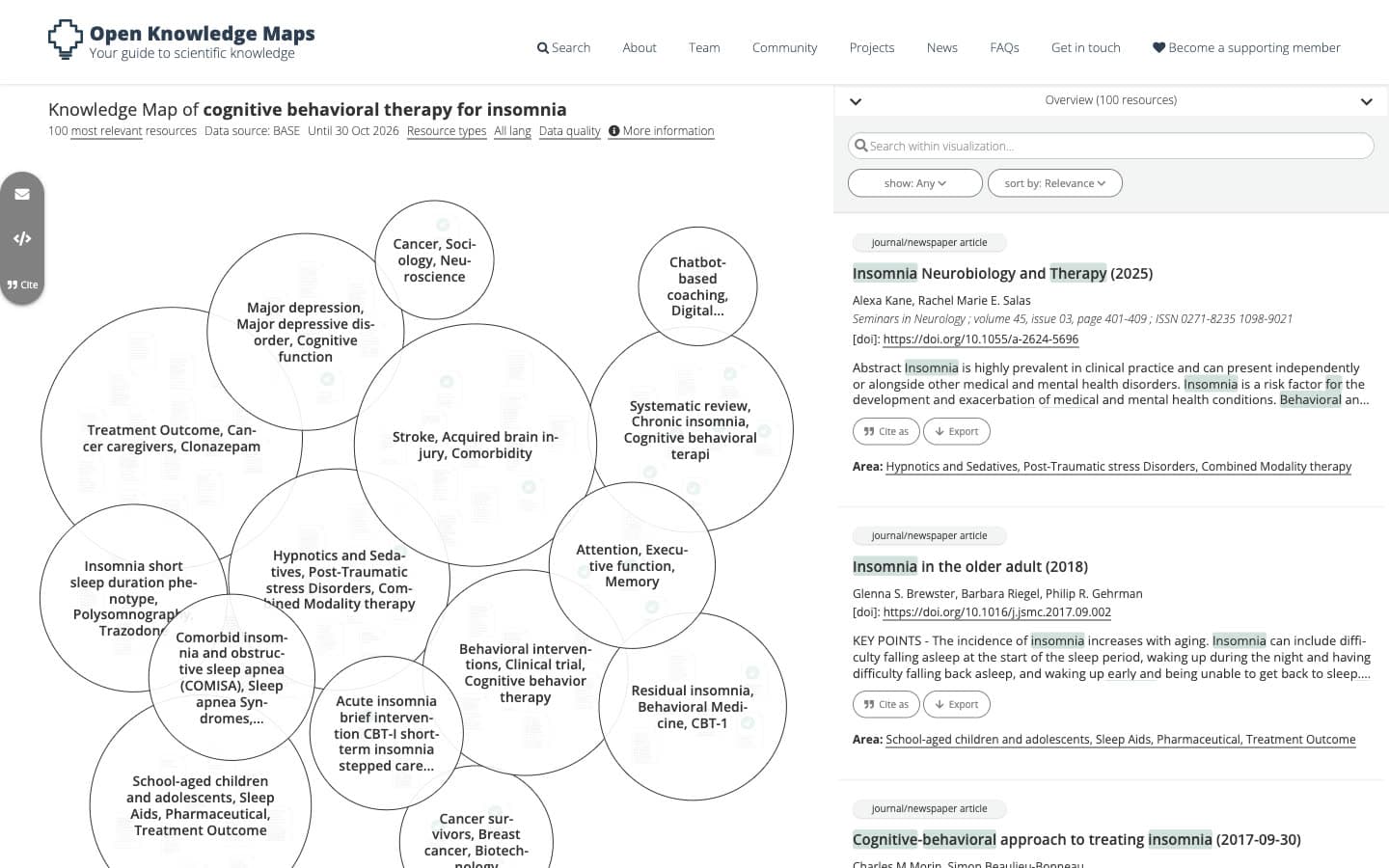
Open Knowledge Maps is a free, non-profit search tool that turns a keyword into a map of the 100 most relevant documents, grouped into topic areas. It does not use citations: "The algorithm groups those resources together that have many words in common." It searches BASE, which covers over 400 million resources, or PubMed.
Key Features
- Knowledge maps: 100 documents per query in labelled topic bubbles; 15 areas for each of our three queries.
- Two data sources: BASE for all disciplines, or PubMed for life sciences.
- Area zoom: Click a bubble to list only its documents.
- Sharing: A permanent URL for every map, email sharing and embed code.
- Export: One record at a time as BibTeX, plus "Cite as".
Pros
- Free with no signup.
- A fast way to see the subtopics of an unfamiliar field before you pick seed papers.
- Every map has a link you can send to a supervisor.
Cons
- Works from a keyword, not a seed paper, so it cannot find papers related to a specific study.
- None of our three seed papers appeared in its maps.
- Area labels are built from keywords and can be odd: the transformer query produced "Condensed Matter Physics, Electromagnetism, Semantics & Meaning", from papers on electrical transformers.
- Only 100 documents per map, about 44 to 65 seconds to build, and no bulk export.
Pricing: Free. It is funded by members and donations.
Best For: Students starting a topic who want an overview of its subfields, the job a literature map of a research topic does before you narrow down.
In our test: 1.38 of 2 on the first 20 documents for each keyword, with 2% rated 0; strongest on the feedback query (1.65).
Verdict: A useful first look at a new field. However, it is a different tool from ResearchRabbit, since it never starts from your papers.
6. VOSviewer
VOSviewer is free desktop software for building bibliometric maps from records you export from bibliographic databases. It does not suggest papers from a seed the way ResearchRabbit does. We did not test it hands-on, so this section draws only on its own site, and it has no relevance score.
Key Features
- Database exports as input: It maps the set of records you export from a bibliographic database, so your search decides what goes in.
- Desktop software: It runs on your own computer; the current release is version 1.6.21.
- Free licence: In its own words, "The software can be used freely for any purpose."
Pros
- Free for any purpose, with no account.
- Maps a whole result set from a database search, not only papers linked to one study.
Cons
- Not a paper recommender: it cannot start from a seed paper and return related work.
- Needs a database export first, which adds a step before any map appears.
- A desktop install rather than a web app you can open in a browser.
- Not part of our blind test, so we cannot compare its output with the other tools.
Pricing: Free. The software "can be used freely for any purpose".
Best For: Researchers who already have a database search and want a bibliometric map of that whole set of records, alongside a seed-based tool for finding individual papers.
In our test: Not tested hands-on and not scored, because it maps database exports rather than recommending papers from a seed.
Verdict: A free tool for bibliometric maps of a database export, not a like-for-like ResearchRabbit replacement.
7. Consensus Citation Graph
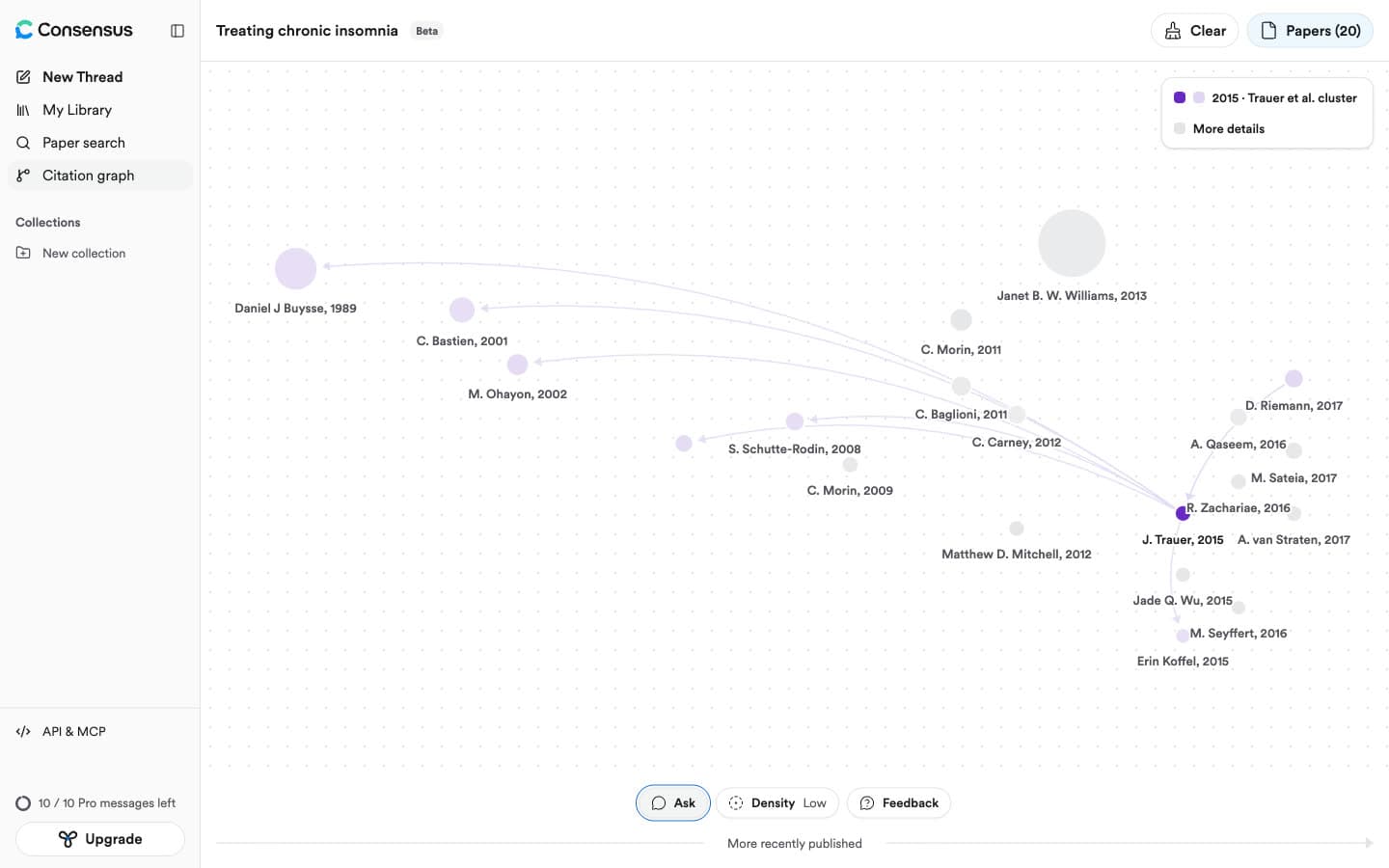
Consensus Citation Graph is a beta citation map inside Consensus, a search engine for research papers. You add up to 5 seed papers, and it ranks neighbouring papers on three signals it names in its graph details: "Direct citation", "Co-citation" and "Bibliographic coupling".
Key Features
- Three ranking signals: Its Ranking tab says it "crawls the citation network around your seed papers" and combines all three signals "to surface the strongest matches".
- Up to 5 seeds: A sixth seed shows "Only up to 5 seeds are currently supported". Each seed gets its own colour, and grey nodes are bridges with no direct seed.
- Time layout: The horizontal axis reads "More recently published", node size scales with citation count, and arrows show direct citations.
- Density: "Low" ("Max 20 papers") on the free plan; "Medium" (40) and "High" (60) are marked "PRO".
- Paper actions: "+ Seed", "Exclude", "Explore graph", "Save" to My Library, and "Cite paper" in APA, MLA, Chicago, Harvard, BibTeX and more.
- Ask: A chat over the graph's papers that uses metered Pro messages (we did not use it).
Pros
- Fast: about 2 seconds from "Generate graph" to a drawn map.
- The third highest relevance in our test, and its top 10 papers averaged 1.77 of 2.
- A free account built eight graphs with no limit message.
- Clear graph details that explain how papers are ranked.
Cons
- Graphs are not saved: a reload returned an empty "New Citation Graph", and there is no share link for a graph.
- No per-paper reason; the scores behind the order are not shown.
- No paper from 2024 or later in any of the three free-density lists, which highly cited classics such as the Pittsburgh Sleep Quality Index and the Adam optimiser paper dominated.
- The arXiv DOI and arXiv ID both failed, so only title search found the transformer paper, and "Focus on Formative Feedback" appeared twice in the feedback list.
- Needs an account, with no graph export or Zotero option.
Pricing: Free plan with Low density graphs and 10 Pro messages a month. Pro is $12 a month billed annually ($144 a year), and Deep is $45 a month billed annually ($540 a year).
Best For: Consensus users who want a quick citation view next to its paper search, in a single session.
In our test: 1.54 of 2 on 57 papers, with 63% rated highly relevant and 9% rated 0; strongest on the feedback review (1.89) and weakest on the transformer paper (1.16).
Verdict: A fast and fairly relevant graph for one sitting, held back by no saving, no reasons and no recent papers at free density.
8. Litmaps
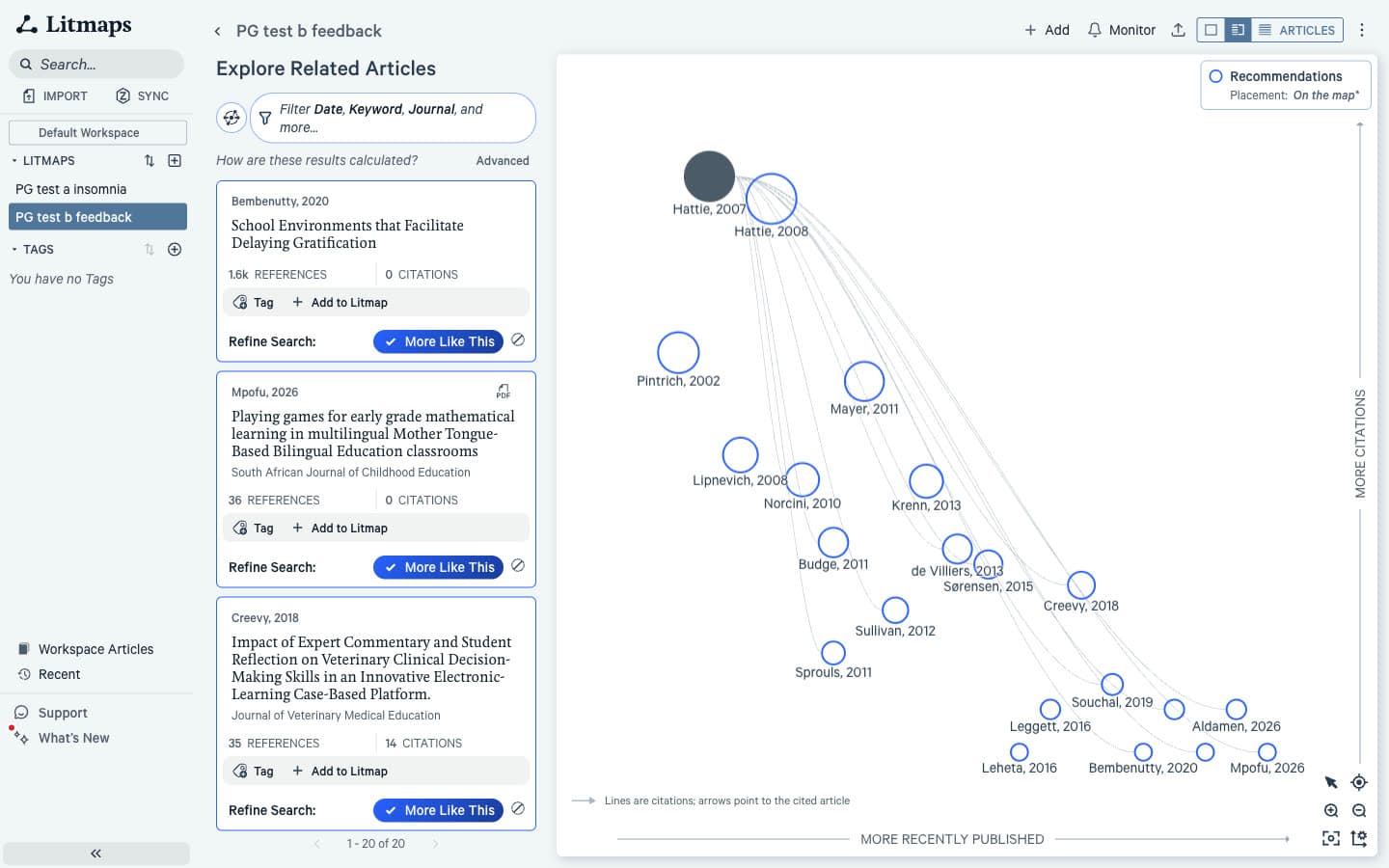
Litmaps is a citation mapping app from Litmap Limited, the same company that now runs ResearchRabbit. It places papers on a map by publication date and citations and adds recommendations through Explore. Switching from ResearchRabbit to Litmaps keeps you with the same owner and the same three data providers: Crossref, Semantic Scholar and OpenAlex.
Key Features
- Four map views: "Citation map" and "Co-citation network" on free; "Semantic map" (beta) and "Co-author network" on Pro.
- Explore methods: "Shared Citations & References" and "Common Authors" ("This technique does not use an AI Large Language Model"), and "Similar Text", which does.
- Flexible axes: Cite count, reference count, date, momentum, map connectivity and content similarity.
- Monitor: Email alerts about newly published papers that connect to a map; Pro sells weekly automatic updates and custom alerts.
- Zotero Sync and files: Two-way sync with a Zotero collection on Pro; BibTeX, RIS and PubMed import, and BibTeX, RIS or CSV export.
Pros
- The most flexible map layouts of any tool we tested.
- Two-way Zotero sync and new-paper alerts on Pro, where ResearchRabbit imports from Zotero one way.
- Manual import by many ID types rescued two seeds the search box could not find.
Cons
- The lowest relevance in our test, with 32% of recommendations rated 0.
- A small free plan: "Free accounts can create up to two Litmaps", with 20 inputs and 100 articles per map.
- The insomnia DOI returned the same 2016 letter that ResearchRabbit did.
- Many results shared one score; with two seeds, a reload changed 9 of the top 10.
Pricing: Free plan. Pro Education is $10 a month billed annually ($120 a year) or $12.50 monthly. Pro Commercial is $40 a month billed annually or $50 monthly. Team and Enterprise plans are by quote.
Best For: Long projects that need alerts, flexible map layouts and two-way Zotero sync, and can pay for Pro. On our seeds Litmaps came in below ResearchRabbit on blind relevance, so it is not the place to go for better recommendations.
In our test: 0.87 of 2, with 18% rated highly relevant and 32% rated 0; Explore lists were often led by tied, barely related citing papers.
Verdict: The right choice for monitoring and Zotero sync on Pro, the wrong one if relevance is why you are leaving ResearchRabbit.
9. Connected Papers
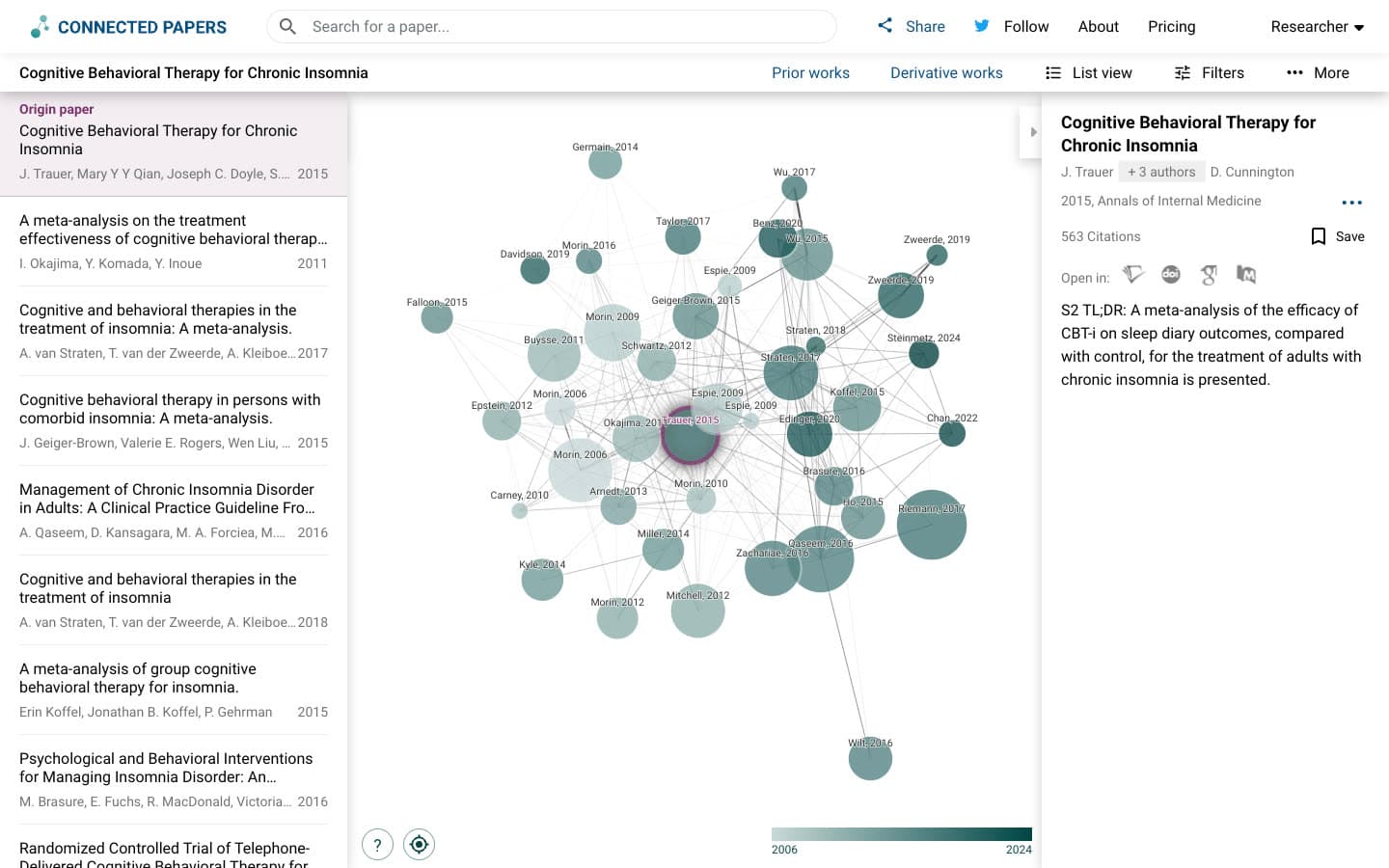
Connected Papers is a similarity graph tool that analyses around 50,000 papers and draws the few dozen most similar to your origin paper, using co-citation and bibliographic coupling. It runs on Semantic Scholar data, and its help panel says plainly: "this is not a citation tree".
Key Features
- Similarity graph: 40 papers plus the origin, with node size for citations and colour for year.
- Prior works and Derivative works: Ten seminal older papers and ten later papers or surveys that cite many of the graph's papers.
- Multi-origin graphs: "Add origin" builds a graph from several papers.
- Filters: PDF available, open access and year.
- Export and share: A BibTeX file of every paper in the graph, and a share link.
Pros
- The top relevance score in our test, tied with Paperguide.
- A dense, readable map of one paper's neighbourhood on a single screen.
- Two graphs a month as a guest, with no account.
Cons
- The free plan stops at five graphs a month; our fifth showed "You've used 5/5 free graphs this month".
- No paper from 2024 or later appeared in any of its three top 20 lists.
- No per-paper reason, only a "Similarity to origin" number.
- BibTeX only, with no Zotero, RIS or CSV option.
Pricing: Free plan with 5 graphs a month. Academic is $72 a year or $30 a quarter, Business is $240 a year or $90 a quarter. A scholarship programme is offered.
Best For: A quick, high-quality map around one known paper, a few times a month. Next to ResearchRabbit it is the mirror image: more relevant results but tighter free limits.
In our test: 1.77 of 2, with 78% rated highly relevant and 2% rated 0; the strongest list of established papers, and the weakest on recent work.
Verdict: As relevant as Paperguide, but capped, unexplained and short on new papers; best for occasional maps.
How the Paperguide Citation Graph Workflow Works
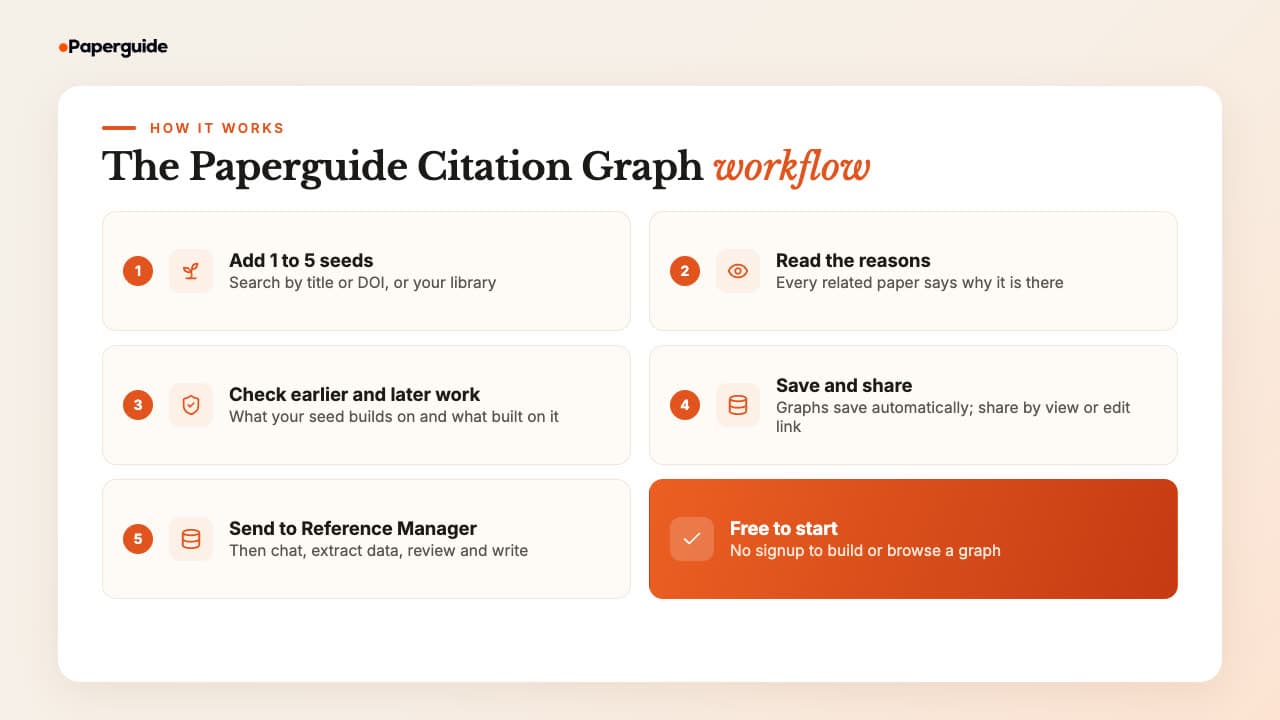
The Paperguide Citation Graph turns a ResearchRabbit-style search into five steps: add seeds, read the reasons, check the papers before and after your seed, save the graph, and send the papers you keep into your library. Building and browsing the graph is free, and you can start without an account.
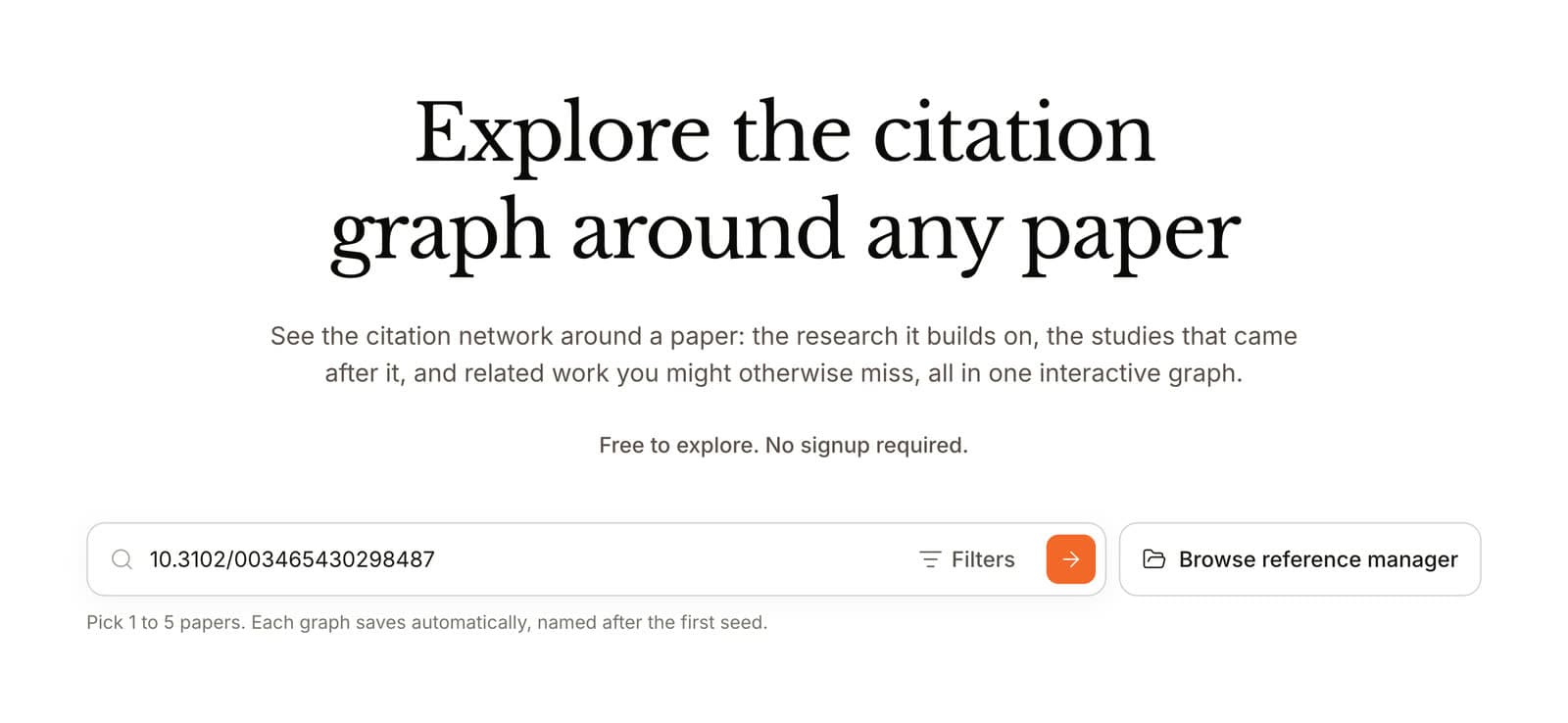
Step 1: Add 1 to 5 seed papers. Open the free Paperguide Citation Graph and search by title or DOI, or pick papers from your Reference Manager. A DOI is the safest way to land on the right record.
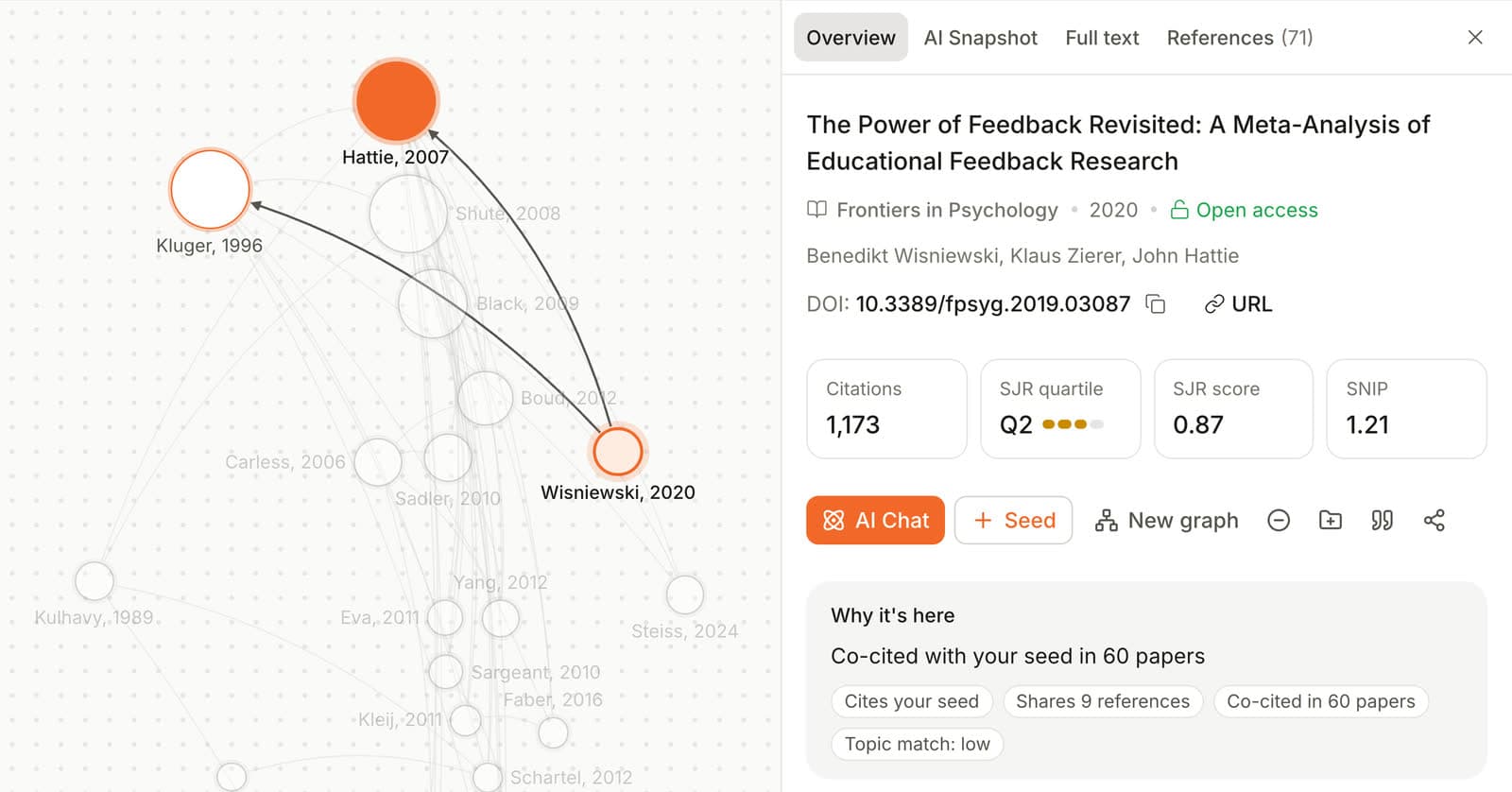
Step 2: Read Related papers with their reasons. Each card says why it is there. "Co-cited with your seed in 135 papers" tells you that 135 other papers cite both; "Shares 25 references with your seed" means the two build on the same evidence.
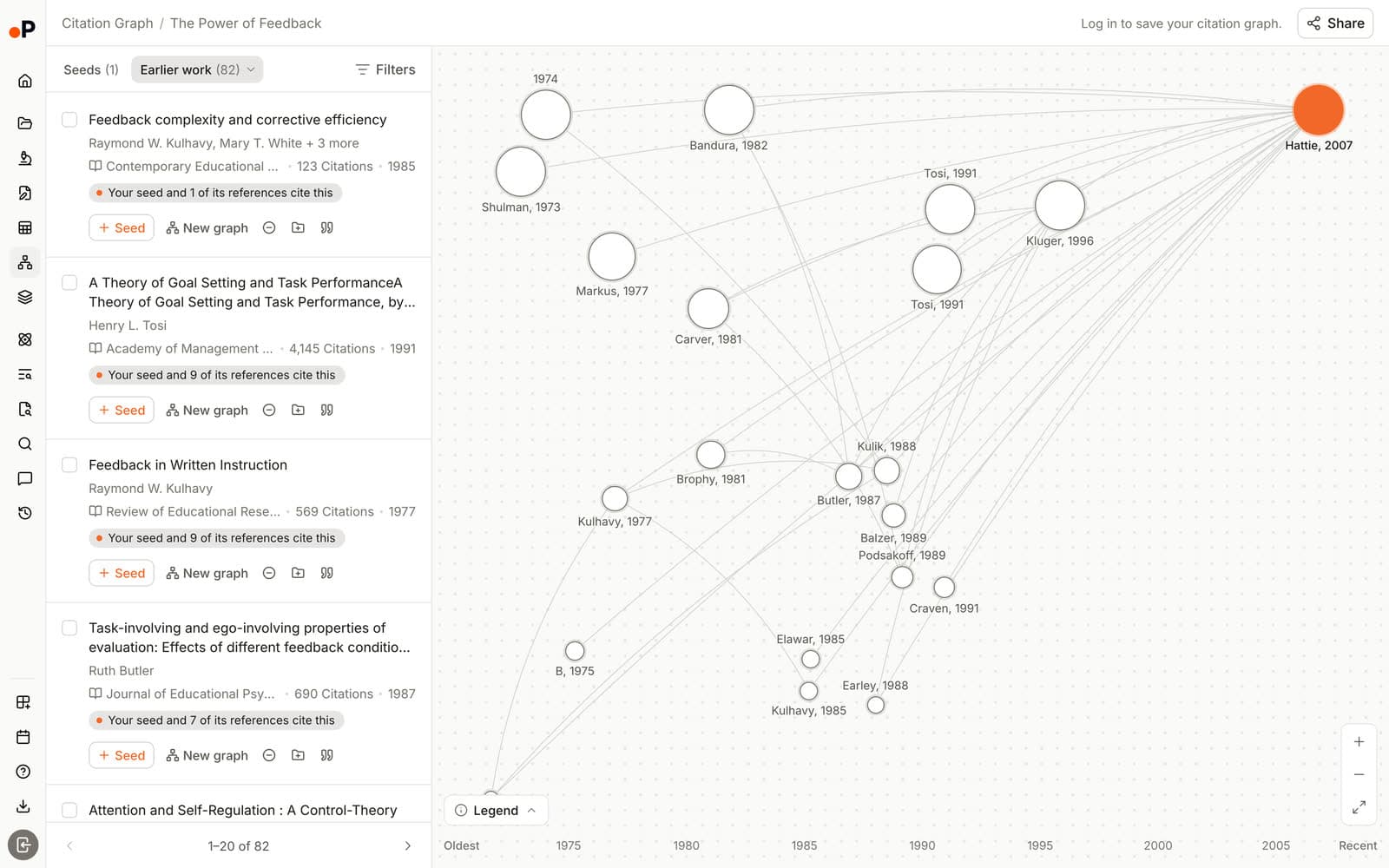
Step 3: Check Earlier work and Later work. Earlier work lists what your seed builds on, labelled with how many of the seed's references also cite each paper. Later work lists what built on your seed. Together they cover backward and forward searching, which Greenhalgh and Peacock found so productive: in their audit of a systematic review of complex evidence, 51% of sources were identified by "snowballing" [4].
Step 4: Add seeds, exclude noise, save and share. Click "Seed" on a strong paper to widen the graph, and "Exclude" on anything off-topic. The graph saves automatically, and "Share" gives a link with edit or view access, or keeps it private.
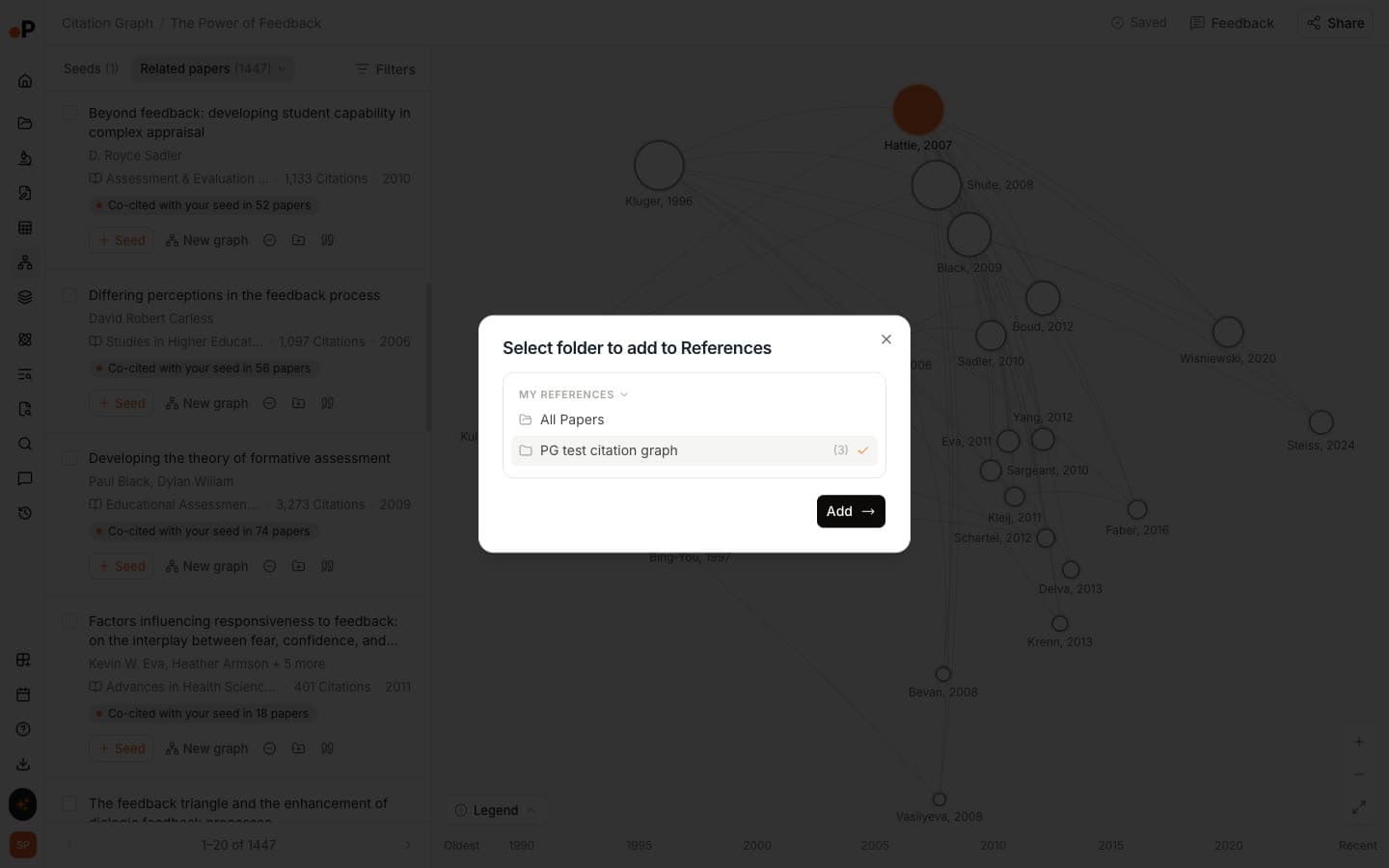
Step 5: Send papers to your Reference Manager. "Add to Reference Manager" files a paper into a folder, where it shows which graph it came from. From there you can chat with it, extract data into a table, run Literature Review AI or draft with the AI Paper Writer. For the manual method, follow how to create a citation map step by step.
Best Research Rabbit Alternatives by Use Case
The best ResearchRabbit alternative depends on the job. Paperguide is the best overall and the best free pick. Inciteful suits Zotero users on zero budget, Local Citation Network suits citation chasing for reviews, Open Knowledge Maps suits a first look at a field, and VOSviewer suits bibliometric maps of a database export. The table matches each need to one tool.
| Use case | Recommended tool | Why |
|---|---|---|
| Best ResearchRabbit alternative overall | Paperguide Citation Graph | Top-tier relevance, a reason on every paper, saved and shared graphs |
| Best free alternative to Research Rabbit | Paperguide Citation Graph | Free with no signup and no graph limit stated |
| Best for theses and literature reviews | Paperguide Citation Graph | Papers go straight into reading, extraction and writing tools |
| Best for systematic review teams | Paperguide Citation Graph or Local Citation Network | Earlier and Later work with reasons, or all cited and citing papers from a reference list |
| Best free tool with Zotero export | Inciteful | Saves to Zotero and Mendeley, no account |
| Best for citation chasing from a reference list | Local Citation Network | Finds the most cited references missing from your set |
| Best for full citation lists and alerts | Semantic Scholar | Citation intent, excerpts and free alerts |
| Best for a first look at a new field | Open Knowledge Maps | Topic areas from a keyword in about a minute |
| Best for bibliometric maps of a database export | VOSviewer | Free desktop software that maps records you export |
| Best for a quick graph beside AI paper search | Consensus Citation Graph | Graph in about 2 seconds, third best relevance in our test |
| Best for alerts and two-way Zotero sync | Litmaps | Monitor and Zotero Sync on Pro |
| Best for an occasional single-paper map | Connected Papers | Dense, relevant map, five a month free |
Research Rabbit Alternatives: Final Comparison
Across our three seeds, Paperguide and Connected Papers led on relevance, Paperguide was the only tool to explain every paper in words, and the fully free tools traded some relevance for openness. The table summarises what each of the nine tools starts from, explains, saves and exports.
| Tool | Starts from | Explains each paper | Saves graphs | Export or Zotero |
|---|---|---|---|---|
| Paperguide Citation Graph | 1 to 5 seeds | Yes, "Why it's here" | Yes, with link sharing | Reference Manager; file export on paid plans |
| Inciteful | 1 or more seeds | Similarity score | By URL | BibTeX, RIS, Zotero, Mendeley |
| Local Citation Network | DOI, ID list or file | Seed link counts | Browser cache | CSV, RIS, JSON |
| Semantic Scholar | One paper page | No (citation excerpts on lists) | Library with account | BibTeX, EndNote |
| Open Knowledge Maps | A keyword | Topic area label | Permanent map URL | BibTeX per record |
| VOSviewer | Records exported from a database | Not a recommender | Not tested | Not tested |
| Consensus Citation Graph | 1 to 5 seeds | No (ranking signals in graph details) | No, lost on reload | Per-paper citation formats; no graph export |
| Litmaps | Up to 20 inputs free | No | Yes, 2 maps free | BibTeX, RIS, CSV; Zotero Sync on Pro |
| Connected Papers | 1 or more origins | Similarity number | Graph history | BibTeX |
Common Mistakes When Switching from Research Rabbit
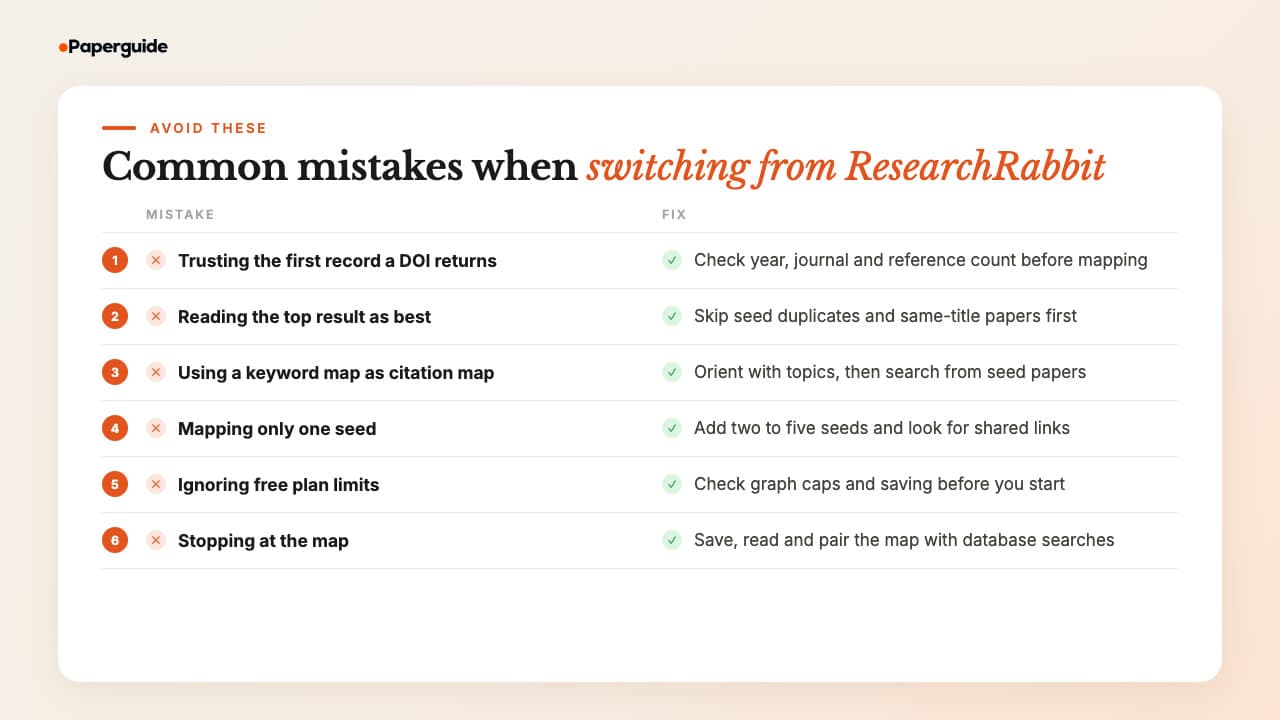
The most common mistakes when switching from ResearchRabbit are trusting the first record a DOI returns and reading the top result as the best match. Others are confusing keyword maps with citation maps and choosing a tool whose free limits do not fit the project. Each takes a minute to check before you start reading.
Trusting the first record a DOI returns. Two tools sent the insomnia DOI to a 2016 letter, and three matched a 2025 duplicate of the transformer paper. Check the year, journal and reference count of your seed before you map it.
Reading the top result as the best match. The seed itself, or a paper with the same title, can sit at the top of a list. Skip duplicates and same-title records before you judge a tool.
Using a keyword map as a citation map. Open Knowledge Maps groups papers by shared words, not citations. Use it to learn a field's subtopics, then switch to a seed-based tool to find the papers around a study.
Mapping only one seed. One paper gives a narrow view, since the suggestions mirror its citations. Add two to five strong seeds and look for papers linked to several of them.
Ignoring free plan limits. Five graphs a month, two maps or a graph that vanishes on reload can stall a project halfway. Check limits and saving before you invest an afternoon.
Stopping at the map. A map suggests papers; it does not read them. Save the ones you keep, read them, and combine the map with database searches, since no single method finds everything [4].
Final Verdict
Paperguide's Citation Graph is the best ResearchRabbit alternative. It matched Connected Papers for the most relevant recommendations in our blind test, is free without signup, gives a written reason for every paper, saves and shares graphs, and sends papers straight into reading, extraction and writing tools. You can start with the Paperguide Citation Graph on your own seed papers today.
Alternatively, for a fully free, open tool, Inciteful suits Zotero users and Local Citation Network suits citation chasing from a reference list. Semantic Scholar adds citation lists and alerts, Open Knowledge Maps a first look at a field, and VOSviewer bibliometric maps of a database export. Consensus suits one quick session, Litmaps its Pro alerts and Zotero sync, and Connected Papers an occasional single-paper map.
Frequently Asked Questions (FAQs)
What is the best Research Rabbit alternative in 2026?
Paperguide's Citation Graph is the best ResearchRabbit alternative. In our blind test on three seed papers it scored 1.75 of 2 for relevance, against 1.25 for ResearchRabbit, and tied Connected Papers (1.77). It is free without signup, explains why every paper is shown, and saves and shares graphs.
Is there a free alternative to Research Rabbit?
Yes. Paperguide's Citation Graph is free to build, browse and save graphs, with no signup to start. Inciteful, Local Citation Network, Semantic Scholar and Open Knowledge Maps have no paid plan, and VOSviewer is free desktop software. Connected Papers, Litmaps and Consensus have free plans with limits: five graphs a month, two maps, and 20 papers per unsaved graph.
What sites are like ResearchRabbit?
Sites most like ResearchRabbit start from seed papers and suggest related work through citations: Paperguide Citation Graph, Inciteful, Local Citation Network, Consensus Citation Graph, Litmaps and Connected Papers. Semantic Scholar offers citation lists without a map, Open Knowledge Maps builds topic maps from a keyword, and VOSviewer maps database exports.
Is ResearchRabbit AI?
Not for its core recommendations. ResearchRabbit states that it "does not use large language models to power its core recommendation algorithms". It connects papers through citations, shared references and citations, shared authors and the similarity of titles and abstracts. We saw no AI chat or AI summaries in its free app.
Is ResearchRabbit still free after the 2.0 relaunch?
Yes. ResearchRabbit's free plan offers unlimited searches, up to 50 seed papers, collections and shared collections, and BibTeX, RIS or CSV export. The paid RR+ plan costs $10 a month billed annually, or $12.50 monthly, and adds up to 300 seeds, advanced search settings, multiple projects and Signals alerts.
What changed in ResearchRabbit 2.0?
ResearchRabbit relaunched as "the new ResearchRabbit" on 20 October 2025 through a partnership with Litmaps, and Litmap Limited now holds its copyright. Later updates restored free shared collections, added nested subcollections, Boolean keyword search run through Google Scholar, a reading list, maps of 10, 20 or 40 results, and Signals alerts on RR+.
Does ResearchRabbit work with Zotero?
Only one way. ResearchRabbit imports papers from a linked Zotero account or a BibTeX file, and exports BibTeX, RIS or CSV that Zotero can read. It says two-way sync is in progress. Among the alternatives, Inciteful saves straight to Zotero and Litmaps offers two-way Zotero sync on Pro.
Is ResearchRabbit good for a literature review?
ResearchRabbit is useful for the discovery stage of a literature review, with up to 50 seeds and free exports. In our test, though, 22% of its top recommendations were off-topic, not research papers or duplicates, and it gave no reason for any paper. Check each record and pair the map with database searches.
Are ResearchRabbit and Litmaps the same company?
Yes. ResearchRabbit's footer reads "Copyright © Litmap Limited", and its relaunch announcement credits a partnership with Litmaps. Both draw on Crossref, Semantic Scholar and OpenAlex. In our test both resolved the insomnia meta-analysis DOI to the same 2016 letter, so switching between them may not fix data problems.
Which Research Rabbit alternative is best for systematic reviews?
Paperguide's Citation Graph suits systematic review teams best, because Earlier work and Later work cover backward and forward citation searching with a reason on each paper, and chosen papers move into screening and extraction tools. Local Citation Network is a strong free option for chasing all cited and citing papers from a reference list.
References
- Trauer, J. M., Qian, M. Y., Doyle, J. S., Rajaratnam, S. M. W., & Cunnington, D. (2015). Cognitive behavioral therapy for chronic insomnia: A systematic review and meta-analysis. Annals of Internal Medicine, 163(3), 191-204. https://doi.org/10.7326/M14-2841
- Hattie, J., & Timperley, H. (2007). The power of feedback. Review of Educational Research, 77(1), 81-112. https://doi.org/10.3102/003465430298487
- Vaswani, A., Shazeer, N., Parmar, N., Uszkoreit, J., Jones, L., Gomez, A. N., Kaiser, Ł., & Polosukhin, I. (2017). Attention is all you need. Advances in Neural Information Processing Systems, 30. https://doi.org/10.48550/arXiv.1706.03762
- Greenhalgh, T., & Peacock, R. (2005). Effectiveness and efficiency of search methods in systematic reviews of complex evidence: Audit of primary sources. BMJ, 331(7524), 1064-1065. https://doi.org/10.1136/bmj.38636.593461.68
- Small, H. (1973). Co-citation in the scientific literature: A new measure of the relationship between two documents. Journal of the American Society for Information Science, 24(4), 265-269. https://doi.org/10.1002/asi.4630240406
- Kessler, M. M. (1963). Bibliographic coupling between scientific papers. American Documentation, 14(1), 10-25. https://doi.org/10.1002/asi.5090140103
- Boyack, K. W., & Klavans, R. (2010). Co-citation analysis, bibliographic coupling, and direct citation: Which citation approach represents the research front most accurately? Journal of the American Society for Information Science and Technology, 61(12), 2389-2404. https://doi.org/10.1002/asi.21419
Mapping citations?
See how any paper connects
Start from up to five papers and explore earlier, later and related work in one free citation graph. No signup.
Try Citation GraphNo credit card required