Litmaps vs ResearchRabbit: Which Is Better in 2026?

In a Litmaps vs ResearchRabbit test on the same three papers, ResearchRabbit is the better choice for most researchers. It is free with up to 50 seed papers, and its recommendations scored 1.25 of 2 on blind relevance against 0.87 for Litmaps. Litmaps wins on recent papers, alerts and two-way Zotero sync on Pro.
The two tools now come from the same company. Litmap Limited relaunched ResearchRabbit on 20 October 2025, and the app now calls itself ResearchRabbit 2.0. We ran both on the free plans with the same three seed papers. Then we scored the top 20 recommendations for each seed without knowing which tool suggested them.
TL;DR
ResearchRabbit wins on relevance, free limits and speed of iterative searching. Litmaps wins on recent papers, map flexibility, alerts and Zotero sync. If you need one free tool to chase citations across a topic, choose ResearchRabbit. If you track a fast-moving field over months and will pay for Pro, Litmaps earns its place.
The numbers from our test:
- Relevance: ResearchRabbit averaged 1.25 of 2. Litmaps averaged 0.87.
- Top 10 relevance: ResearchRabbit 1.37, Litmaps 0.50.
- Recent papers: Litmaps put 19 papers from 2024 or later in its top 20 lists across three seeds. ResearchRabbit put none.
- Free seeds: ResearchRabbit allows 50 seed articles. Litmaps allows 20 inputs.
- Speed: ResearchRabbit returned Similar results in about 2 seconds. Litmaps took 7 to 16 seconds.
- Stability: reloading a two-seed Litmaps map changed 9 of its top 10.
Which tool fits which need
| If you need... | Better choice |
|---|---|
| The most relevant recommendations | ResearchRabbit |
| Recent papers (2024 and later) in the results | Litmaps |
| A large free plan | ResearchRabbit |
| Many seed papers at no cost | ResearchRabbit (50 free) |
| A map you can rearrange by different measures | Litmaps |
| Email alerts on new papers | Litmaps |
| Two-way Zotero sync | Litmaps (Pro) |
| Collections and a reading list | ResearchRabbit |
| BibTeX, RIS or CSV export | Tie |
Litmaps vs ResearchRabbit: Quick Comparison
Litmaps and ResearchRabbit both build a citation map from seed papers, plot results by year and citation count, and export BibTeX, RIS and CSV. They differ in what the free plan allows, how results are ranked, how many map views you get and what happens after the search.
Litmaps is a citation mapping tool from Litmap Limited. It recommends papers from the combined citations and references of your seeds and plots them on a map you can rearrange. ResearchRabbit is a citation-based discovery app, relaunched by the same company in October 2025. You add seeds, run Similar, References or Citations searches and save results to collections. Monitor is the Litmaps alert feature: it scans a saved map for newly published papers and emails you.
Litmaps vs ResearchRabbit feature comparison
| Feature | Litmaps | ResearchRabbit |
|---|---|---|
| Owner | Litmap Limited | Litmap Limited (since the October 2025 relaunch) |
| Free maps | 2 Litmaps, 100 articles each | Unlimited searches, one project |
| Free seeds | 20 inputs | Up to 50 seed articles |
| Results per seed (free) | 20 for one seed; 100 for two | Map of 10, 20 or 40; list pages beyond that |
| Blind relevance score (0 to 2) | 0.87 | 1.25 |
| Recent papers in top 20 (3 seeds) | 5, 4 and 10 | 0, 0 and 0 |
| Map views | Citation map, Co-citation network (free); Semantic map, Co-author network (Pro) | One map, list or split view |
| Axes | 8 options for x and y, plus node size | Fixed: recency and citations |
| Recommendation modes | Shared Citations & References, Common Authors, Similar Text | Similar, References, Citations, Authors |
| Why a paper is shown | Not shown | Not shown |
| Alerts | Monitor (monthly on free per docs, weekly on Pro) | Signals risk alerts on RR+ only |
| Zotero | Two-way sync (Pro) | One-way import |
| Export | BibTeX, RIS, CSV | BibTeX, RIS, CSV |
| Paid plan (US) | Pro Education $10/month billed annually | RR+ $10/month billed annually |
Who Is Litmaps Best For?
Litmaps is best for researchers who follow a fast-moving field and want new papers to come to them. Its results lean toward recent work, its map can be rebuilt around momentum or topical connectivity, and Pro adds weekly Monitor emails and Zotero sync. It suits a long project more than a quick first search.
For example, a PhD student in machine learning, or a team keeping a living review current, gets the most from it. Beyond two maps, however, Litmaps assumes you will pay.
Who Is ResearchRabbit Best For?
ResearchRabbit is best for students and researchers who want a free tool for open-ended citation chasing. You add seeds, run Similar, References or Citations, tick the papers you like and search again from them. With 50 free seeds and unlimited searches, the free plan covers the search stage for most people writing a literature review step by step.
Collections, reading statuses such as "To Read" and "Read Fully", and per-article notes also make it a light place to keep a topic organised.
How We Tested Litmaps and ResearchRabbit
We tested both tools, signed in on the free plans, with the same three seed papers from three fields. We recorded how each tool found the seed, its top 20 recommendations, references, citations, multi-seed behaviour, saving, export and plan limits. Then we scored relevance blind.
The three seeds were:
- Seed a (medicine): Trauer et al. (2015), a meta-analysis of cognitive behavioural therapy for chronic insomnia [1].
- Seed b (education): Hattie and Timperley (2007), The Power of Feedback [2].
- Seed c (computer science): Vaswani et al. (2017), Attention Is All You Need [3].
For our blind relevance test, we pooled the top 20 papers each tool recommended for each seed alongside three other tools. For Litmaps that meant Explore related articles in its default mode; for ResearchRabbit, Similar articles. We shuffled the pool and had one judge score each paper 0 to 2 without seeing which tool suggested it. A 2 meant clearly on the seed's core topic, 1 related but peripheral, and 0 off-topic, not a research paper, or a duplicate of the seed. The pool held 207 unique papers, so every tool was judged on the same scale.
The caveats: three seeds, one judge, scored by title (abstracts checked for nine unclear ones). Results vary by field.
How Does Finding Your Seed Paper Compare?
ResearchRabbit found the seed faster in two of three cases. Litmaps needed an import workaround for the insomnia paper and found Attention Is All You Need only by its Semantic Scholar ID. ResearchRabbit failed on that paper's DOI but found it first by title. Both stumbled on the insomnia DOI in the same way.
Seed a. Both tools sent the DOI 10.7326/M14-2841 to a 2016 letter in Annals titled "Cognitive Behavioral Therapy for Chronic Insomnia." rather than the 2015 meta-analysis. Litmaps' "Manual bulk import" by DOI then returned the right record. ResearchRabbit never showed a clean one; the best match had the meta-analysis's citation counts but the letter's year and DOI.
Seed b. ResearchRabbit matched the DOI first time. Litmaps, by comparison, listed it second, below an unrelated paper.
Seed c. This is where the tools split. In Litmaps the DOI, the arXiv ID, the title and the title with the author's name all failed. The title search returned "X is all you need" papers. Only the Semantic Scholar ID, 204e3073870fae3d05bcbc2f6a8e263d9b72e776, found the record, which has no DOI. ResearchRabbit answered the DOI with "We couldn't find that DOI", but typing the title put the right paper first out of 9,670,000 results.
Verdict: ResearchRabbit. A title search that works is worth more than a long list of identifier types you have to try one by one. Seed choice shapes everything after this step, so it pays to know how to create a citation map from well-chosen seeds.
How Does the Map Itself Compare?
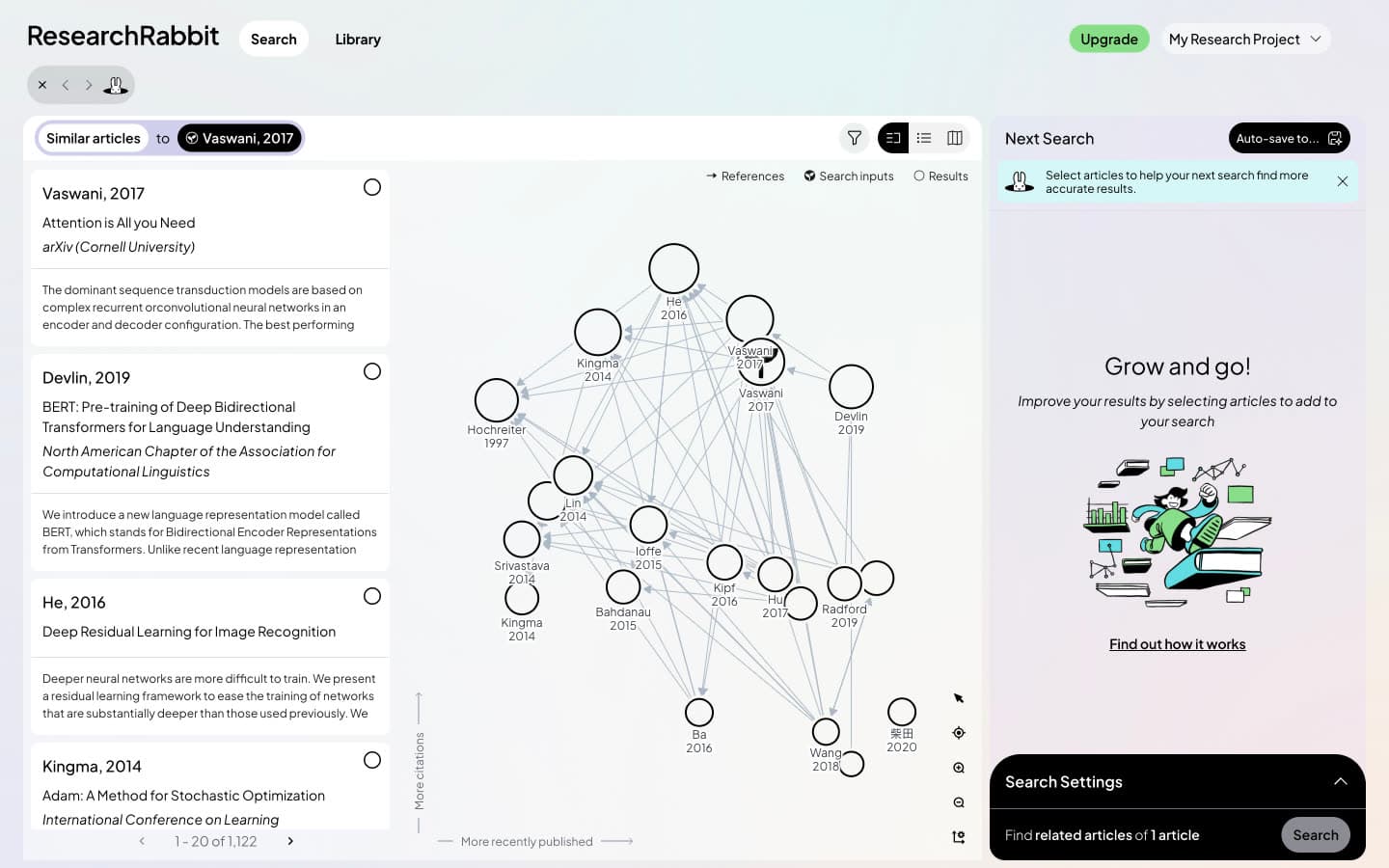
Litmaps has the more flexible map. Its default Citation map puts newer papers to the right and more cited papers higher. You can swap either axis for eight measures and choose among four views. ResearchRabbit draws one map with the same two axes, equal-sized nodes and a choice of 10, 20 or 40 results.
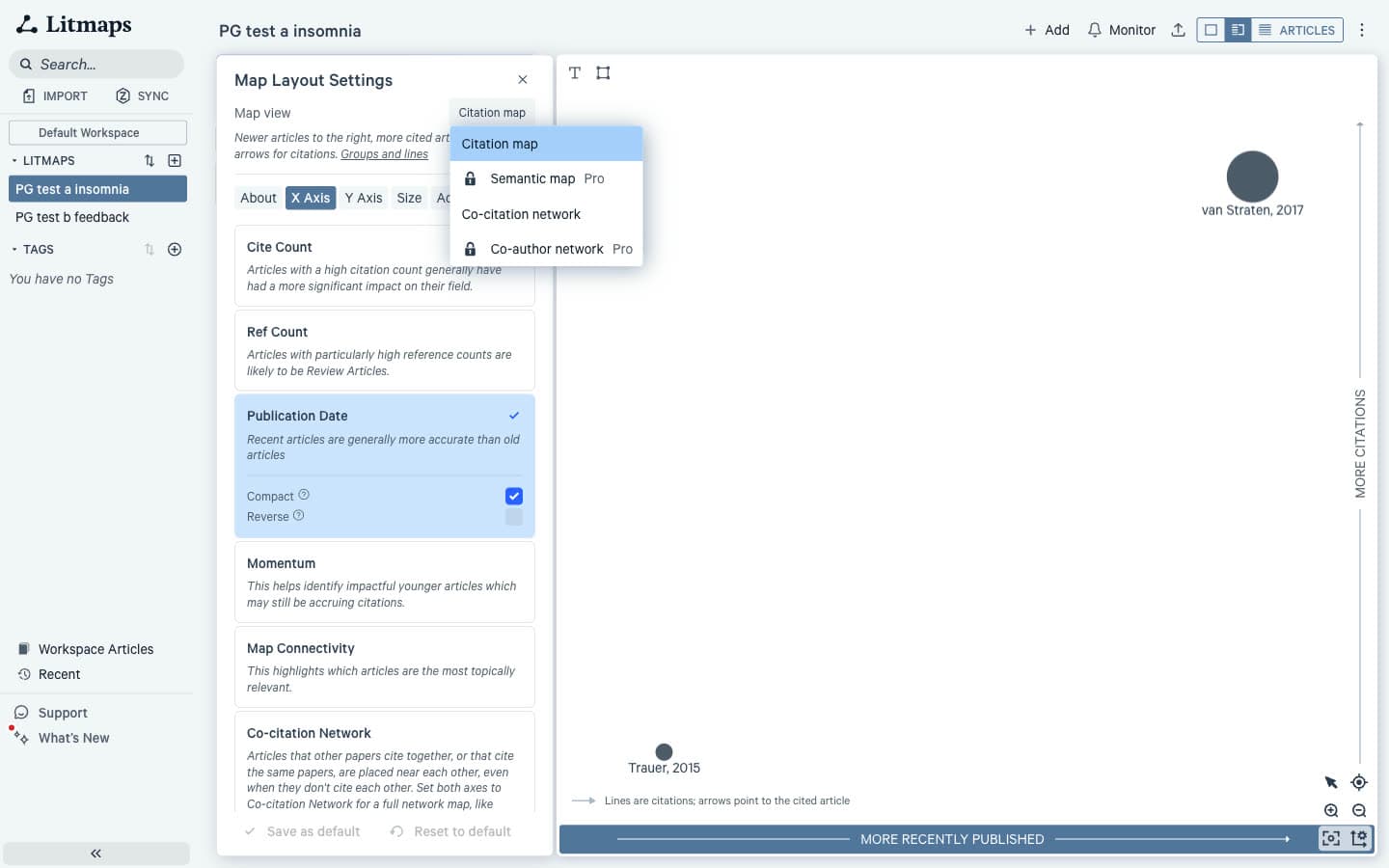
Specifically, Litmaps' axis options include Momentum, which "helps identify impactful younger articles which may still be accruing citations", and Map Connectivity, which "highlights which articles are the most topically relevant." The Co-citation network view is free and shades communities of papers cited together; the Semantic map and Co-author network are Pro.
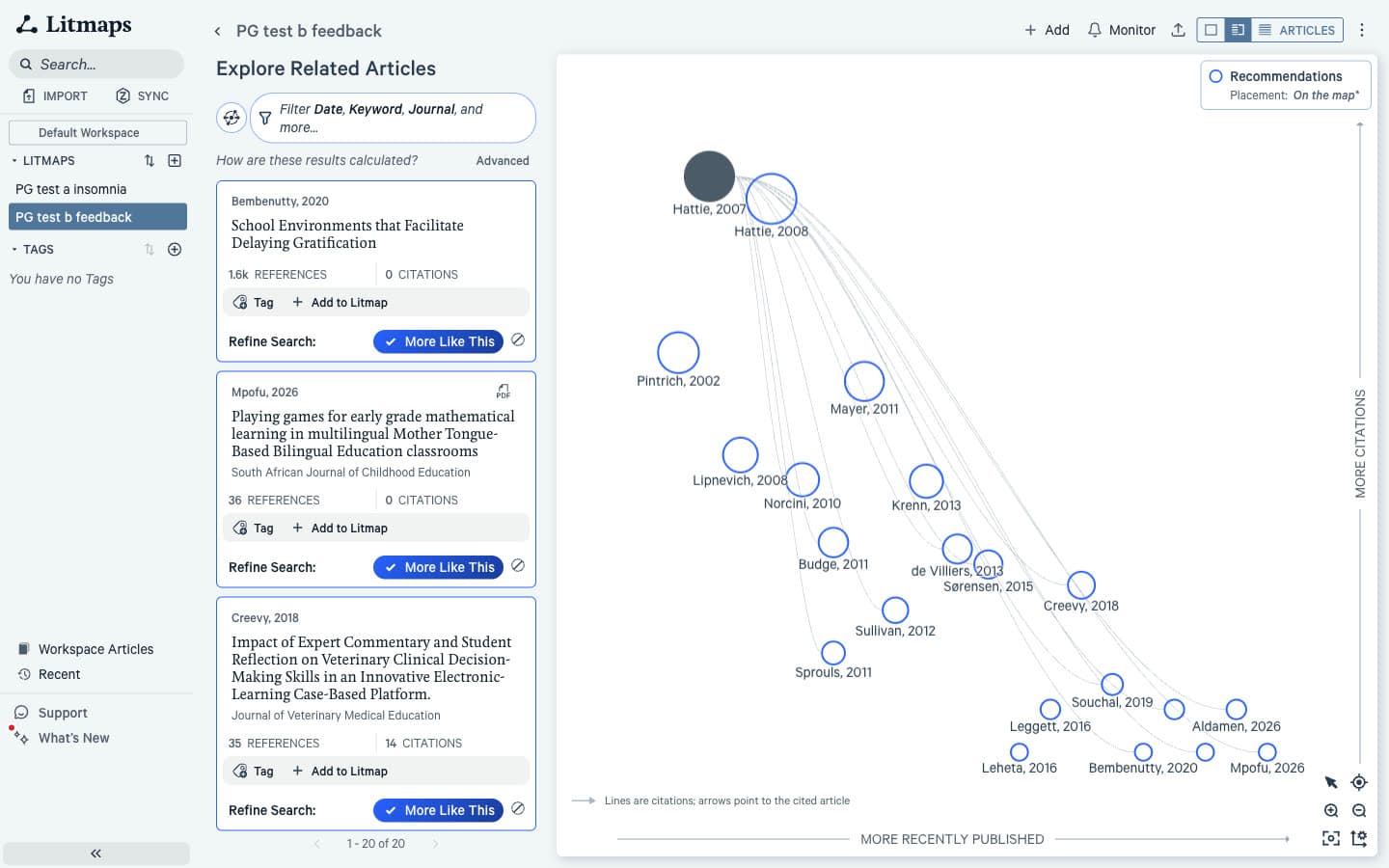
In contrast, ResearchRabbit labels its axes "More recently published" and "More citations" and draws arrows for references. Every node is the same size, so you read citation weight from height alone. Toggles switch between list, map and a split view.
Verdict: Litmaps. If you like to look at a field several ways, its axes and views give you more to work with, and the Co-citation network is free. Knowing what a literature map shows helps you choose which view to read.
How Does the Relevance of Recommendations Compare?
ResearchRabbit's recommendations were more relevant on every seed. In our blind relevance test, it averaged 1.25 of 2 against 0.87 for Litmaps, and nearly half of its papers scored a full 2. Litmaps' top 10 averaged 0.50, because its first results were often low-cited papers off the seed's topic.
Blind relevance scores, Litmaps vs ResearchRabbit
| Tool | Insomnia (a) | Feedback (b) | Transformer (c) | Average | Scored 2 | Scored 0 | Top 10 average |
|---|---|---|---|---|---|---|---|
| ResearchRabbit | 1.65 | 1.30 | 0.80 | 1.25 | 47% | 22% | 1.37 |
| Litmaps | 1.05 | 0.90 | 0.65 | 0.87 | 18% | 32% | 0.50 |
Why did off-topic papers rank so high in Litmaps? It ranks results with a hidden network score, and in each single-seed list the top 10 shared exactly the same score. As a result, their order says nothing about relevance. For example, for The Power of Feedback, positions 1 to 3 were "School Environments that Facilitate Delaying Gratification", a paper on maths games in early grade classrooms and a study of veterinary clinical decision-making. For the insomnia seed, the top 10 included a cooling mattress pad trial and a paper on care-seeking for low back pain.
In contrast, ResearchRabbit's Similar list went to the classic papers. For Attention Is All You Need, BERT, ResNet, Adam and LSTM sat in the top 7. However, its weak spots were duplicates. The #1 Similar result for seed c was the seed itself under a second record. GPT-2 and Microsoft COCO each appeared twice, and #20 was a Japanese blog-style summary of BERT. For seed b, #1 was "The power of feedback." by Ambrose (2002), a same-title article from Healthcare Executive.
Verdict: ResearchRabbit, clearly. Neither tool matched the top scorers in our test, which averaged 1.75 or more, but ResearchRabbit gave far fewer off-topic papers near the top.
How Do Recent Papers Compare?
Litmaps finds recent work that ResearchRabbit misses. In the top 20 for each seed, Litmaps returned 5, 4 and 10 papers from 2024 or later. ResearchRabbit returned none for any seed. If your question is what happened in the last two years, Litmaps is the better first look.
This is the other side of Litmaps' low relevance score. In other words, its tied top results are often recent, little-cited citing papers. For seed c, half of the top 20 were from 2024 or later, though none was a landmark follow-up such as BERT or GPT.
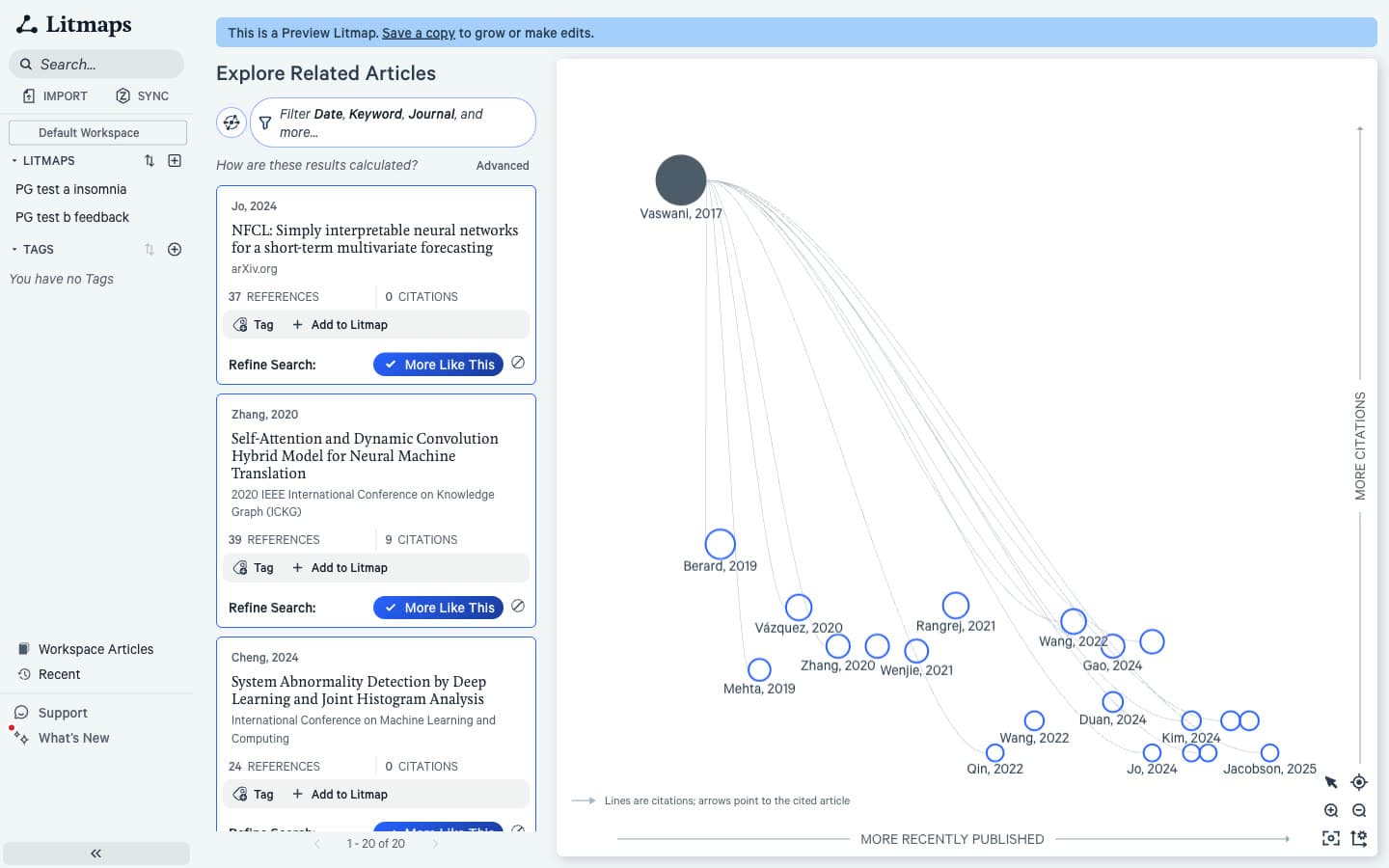
ResearchRabbit's Similar view favours highly cited papers, and recent papers have not had time to collect citations. However, you can still find new work in its Citations view, which for The Power of Feedback opened newest first with 2026 papers.
Verdict: Litmaps. Its recency bias costs relevance but pays off when you need the current front of a field. For a wider net on new work, pair it with AI tools for finding research papers.
How Do Earlier and Later Work Compare?
Both tools list a seed's references and the papers that cite it, but both struggled with very highly cited seeds. Litmaps sorts references by citation count and could not sort citations for seeds b and c. ResearchRabbit's Citations search for Attention Is All You Need failed twice before it worked.
In Litmaps, the Citations tab for seeds b (11.4k citations) and c (231k) had its sort control greyed out and showed low-cited papers in no visible order. References sorted cleanly but held duplicates such as two copies of the DSM-5.
ResearchRabbit's Cited By for seed b took 23 seconds. For seed c, however, the first attempt returned nothing after 30 seconds. The second ended after 100 seconds with "Couldn't generate search", and the third finished in 5 seconds.
Verdict: Tie. For thorough backward and forward citation searching, check both lists by hand whichever tool you use.
How Do Explanations Compare?
Neither tool tells you why a paper was recommended. Litmaps cards show only "More Like This", Tag and Add to Litmap; ResearchRabbit cards show author, year, title, venue and abstract. Both compute a score per paper behind the scenes and hide it, and neither marks papers linked to both of two seeds.
On the map you can read some of the reason from the lines: Litmaps draws citation links between papers, and ResearchRabbit draws reference arrows. In other words, a line tells you a paper cites another, not that it was co-cited with your seed or shares its references. Those are the signals behind how a citation map works [4] [5].
Verdict: Neither. You will judge each paper from its title and abstract.
How Does Adding More Seeds Compare?
ResearchRabbit handles extra seeds more predictably. Adding a second insomnia meta-analysis took about 4 seconds and changed 7 of its top 20. In Litmaps the same second seed replaced the entire top 20, and all 100 results tied on one score. Reloading the same map changed 9 of the top 10.
Two-seed test on the insomnia topic
| Measure | Litmaps | ResearchRabbit |
|---|---|---|
| Second seed added | van Straten et al. 2017 meta-analysis | van Straten et al. 2017 meta-analysis |
| New papers in top 20 | 20 of 20 | 7 of 20 |
| Results returned | 100, all with the same score | 1,624 (up from 1,480) |
| Reload of the same map | 9 of top 10 changed; 3 of top 20 kept | Not tested |
| Label for papers linked to both seeds | None | None |
| Free seed limit | 20 inputs | 50 seed articles |
The Litmaps result needs care. Single-seed lists were stable on reruns. With two seeds, however, every result carried the same internal score. As a result, the order was arbitrary, and a reload reshuffled it; only 73 of 100 papers survived. Why does that matter? A paper at position 3 today may not be on the first page tomorrow.
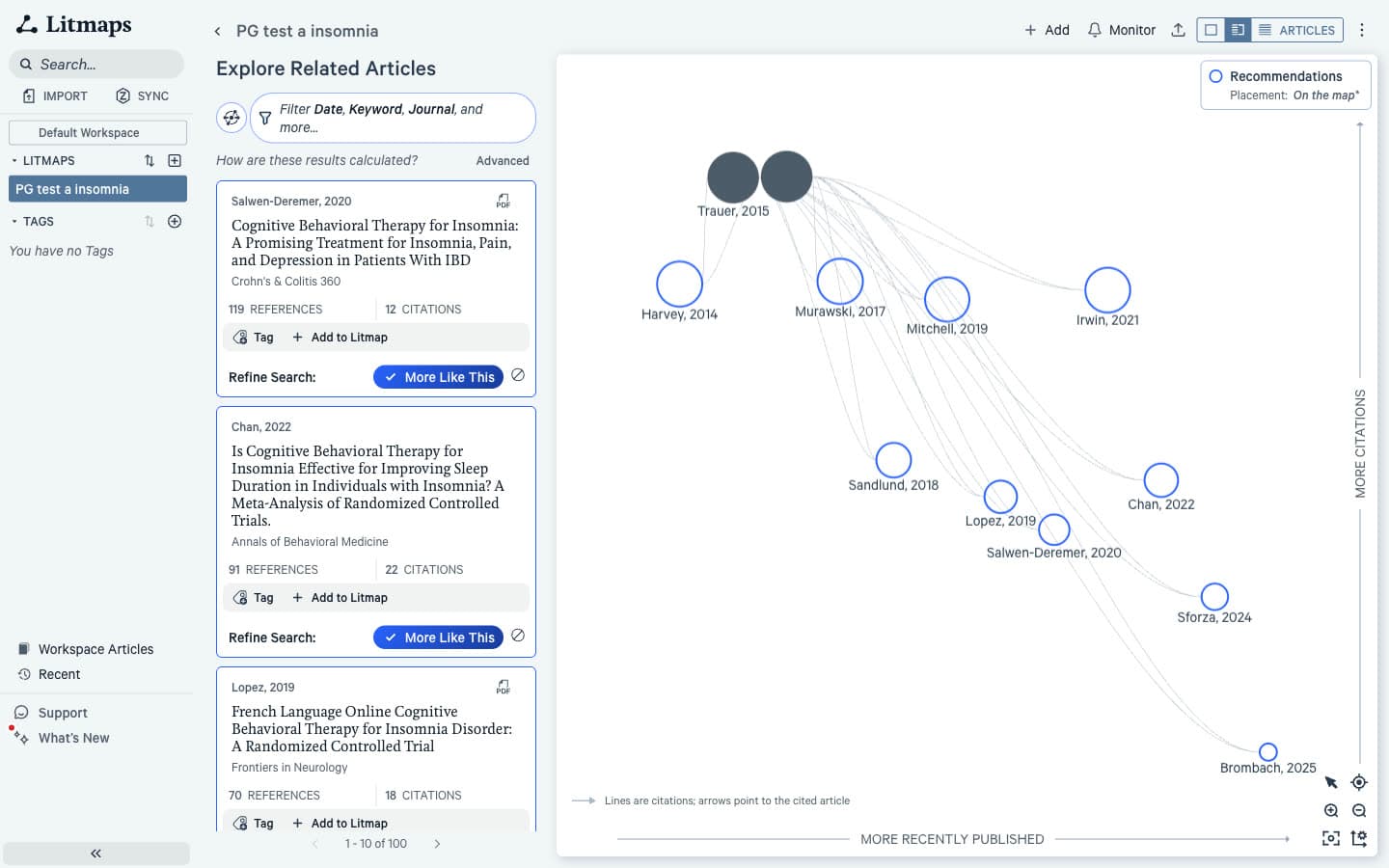
In contrast, ResearchRabbit's two-seed search kept most of its list and added on-topic papers such as the European insomnia guideline.
Verdict: ResearchRabbit. If you need to report how you searched, results that reshuffle on reload are hard to document.
How Do Saving, Export and Zotero Compare?
Both tools save papers and export BibTeX, RIS and CSV on the free plan. ResearchRabbit gives you collections, reading statuses and notes. Litmaps gives you saved maps, tags and a workspace list. The real difference is Zotero: Litmaps Pro syncs both ways, while ResearchRabbit only imports from Zotero.
Litmaps saves each Explore run as a Litmap named after the seed, and "Workspace Articles" offers "Export All". However, its help pages describe a PNG map export, which we did not find in the app on free. Zotero Sync is a Pro feature in which papers added or removed in a Zotero collection are "instantly reflected".
ResearchRabbit has "Collection +", a reading list with statuses from "To Read" to "Understood", "Auto-save to..." for ticked papers and a Notes tab per article. Its Zotero button imports papers only; a two-way sync is still in development. If Zotero is your home, compare the best reference management software for researchers before you commit.
Verdict: ResearchRabbit for free organising; Litmaps Pro if two-way Zotero sync matters.
How Do Sharing and Alerts Compare?
Litmaps is the only one of the two that alerts you to new papers. Its Monitor feature scans a map for newly published articles and emails you. We saw no new-paper alerts in ResearchRabbit; its Signals feature on RR+ flags risky articles instead. Both let you share, with ResearchRabbit's shared collections free again since February 2026.
Specifically, Litmaps' Monitor page reads "Monitor this Litmap to automatically scan for relevant newly-published articles. You'll receive an email whenever we find something new." Its help docs say free users get Monitor with a monthly digest, and Pro users can customise it, including weekly. We did not switch it on during the test. Sharing offers "Share with Link" and email, one share per map on free, and viewers need no account according to Litmaps' docs.
ResearchRabbit's release notes say shared collections with viewer or editor roles and a public link are free again; we did not test sharing.
Verdict: Litmaps. Alerts are the clearest reason to pay for it.
How Do Free Plan Limits Compare?
ResearchRabbit's free plan is far larger. It offers unlimited searches, up to 50 seed articles and one project, "Free forever". Litmaps' free plan allows two Litmaps with 100 articles each and 20 inputs. We hit the Litmaps cap on our third seed and could only view seed c in an unsaved preview.
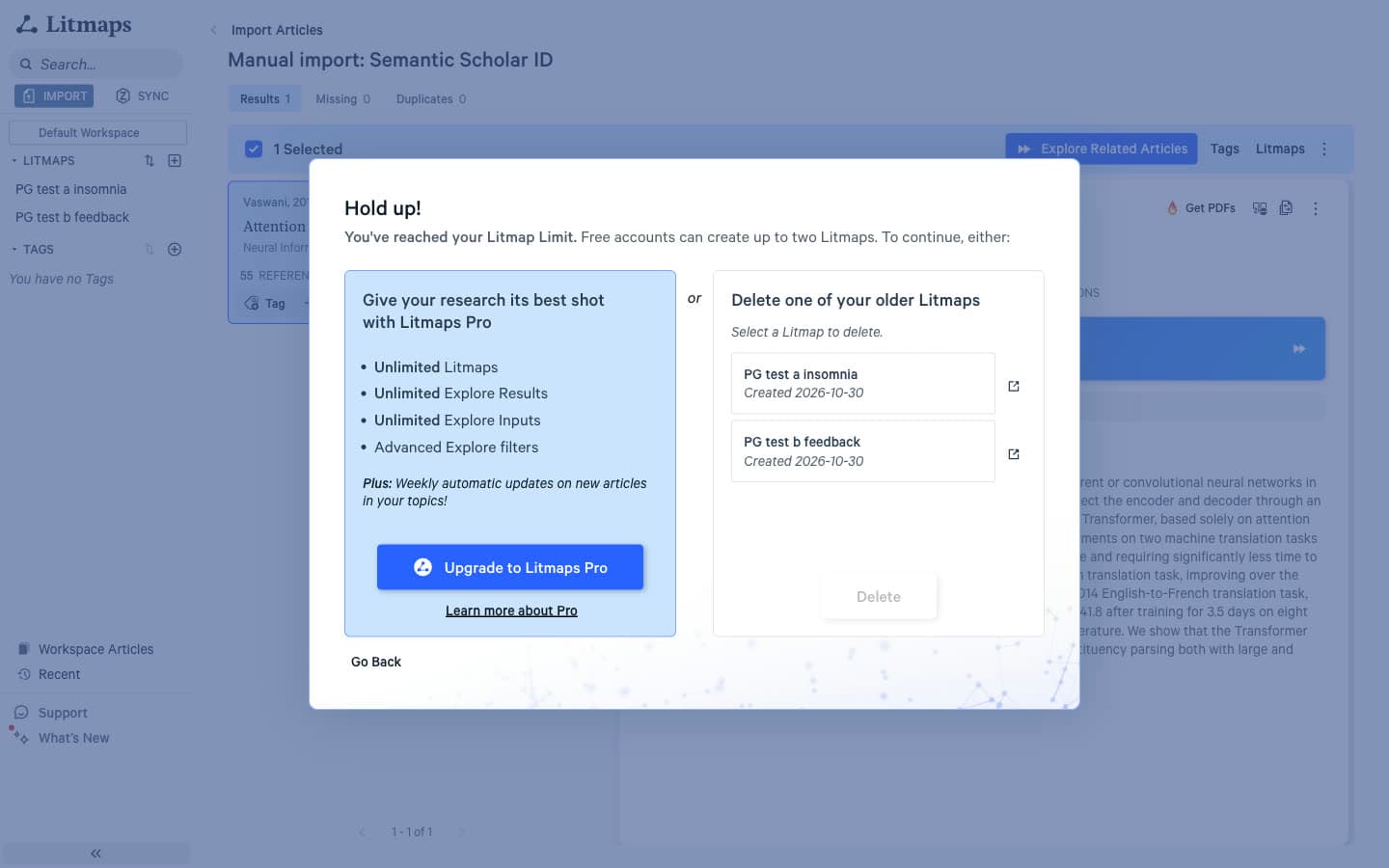
The message reads: "Hold up! You've reached your Litmap Limit. Free accounts can create up to two Litmaps." The options are to upgrade or delete an older map. In addition, a single seed returns only 20 Explore results on free. Litmaps' pricing page also contradicts itself, saying 2 Litmaps in one table and 1 in another.
Beyond extra projects, ResearchRabbit's free plan locks "Advanced Settings" (keyword, date, journal quartile, H-index, open access and retraction filters) with the note "You're previewing Advanced Settings. Upgrade to use these in search." We paged to results 121 to 140 without hitting a wall.
Verdict: ResearchRabbit, by a wide margin.
Litmaps vs ResearchRabbit: Pricing Comparison
Litmaps Pro and ResearchRabbit's RR+ cost the same for academics in the US: $10 a month billed annually ($120 a year) or $12.50 billed monthly. Litmaps also sells a Commercial licence at $40 a month annually or $50 monthly. ResearchRabbit has one individual paid tier.
Litmaps vs ResearchRabbit US prices
| Plan | Litmaps | ResearchRabbit |
|---|---|---|
| Free | 2 Litmaps, 20 inputs, 100 articles per map | Unlimited searches, up to 50 seeds, one project |
| Academic paid | Pro Education: $10/month annually ($120/year) or $12.50 monthly; academic email | RR+: $10/month annually ($120/year) or $12.50 monthly |
| Commercial paid | Pro Commercial: $40/month annually or $50 monthly | Same RR+ price |
| What paid adds | Unlimited Litmaps, inputs and results; advanced filters; customisable Monitor; Zotero Sync; Semantic map, Co-author network and shaded groups | 300 seeds; advanced search settings; Signals risk alerts; multiple projects |
At the same price, however, the plans buy different things. Litmaps Pro lifts a small free cap and adds alerts, Zotero sync and extra map views. RR+ adds seeds and filters to a free plan that already covers most reviews.
For a company user the gap is wider: Litmaps charges four times its education price, while RR+ has one price. Both vendors advertise country discount codes.
Where Litmaps Genuinely Wins
Litmaps wins wherever time and change matter. It surfaces recent papers, lets you rebuild the map around momentum or connectivity, emails you when new work appears and keeps Zotero in sync on Pro. Those are real reasons to choose it for a long project.
- Recent papers. 5, 4 and 10 from 2024 or later in the top 20, against none.
- Map control. Eight axis measures and four views, with the Co-citation network free.
- Alerts and Zotero. Monitor emails on new papers, and two-way Zotero sync on Pro.
- Search methods. Common Authors and Similar Text beside the default network method.
Where ResearchRabbit Genuinely Wins
ResearchRabbit wins on the things most students feel first: relevance, cost and speed. Its recommendations scored higher on all three seeds, and its free plan is large enough for a full review. Its results also came back in about two seconds against 7 to 16 seconds for Litmaps.
- Relevance. 1.25 of 2 against 0.87, and a top 10 average of 1.37 against 0.50.
- Free plan. Unlimited searches and up to 50 seeds, against two maps and 20 inputs.
- Seed matching. Found Attention Is All You Need by title, first time.
- Organising. Collections, reading statuses, notes and auto-save.
Where Paperguide's Citation Graph Fits
Paperguide's Citation Graph is a free alternative for the core map. It needs no signup to build or browse, takes up to five seeds, and shows "Why it's here" on every paper, which neither Litmaps nor ResearchRabbit does. In our blind relevance test, it averaged 1.75 of 2 with no papers scored 0.
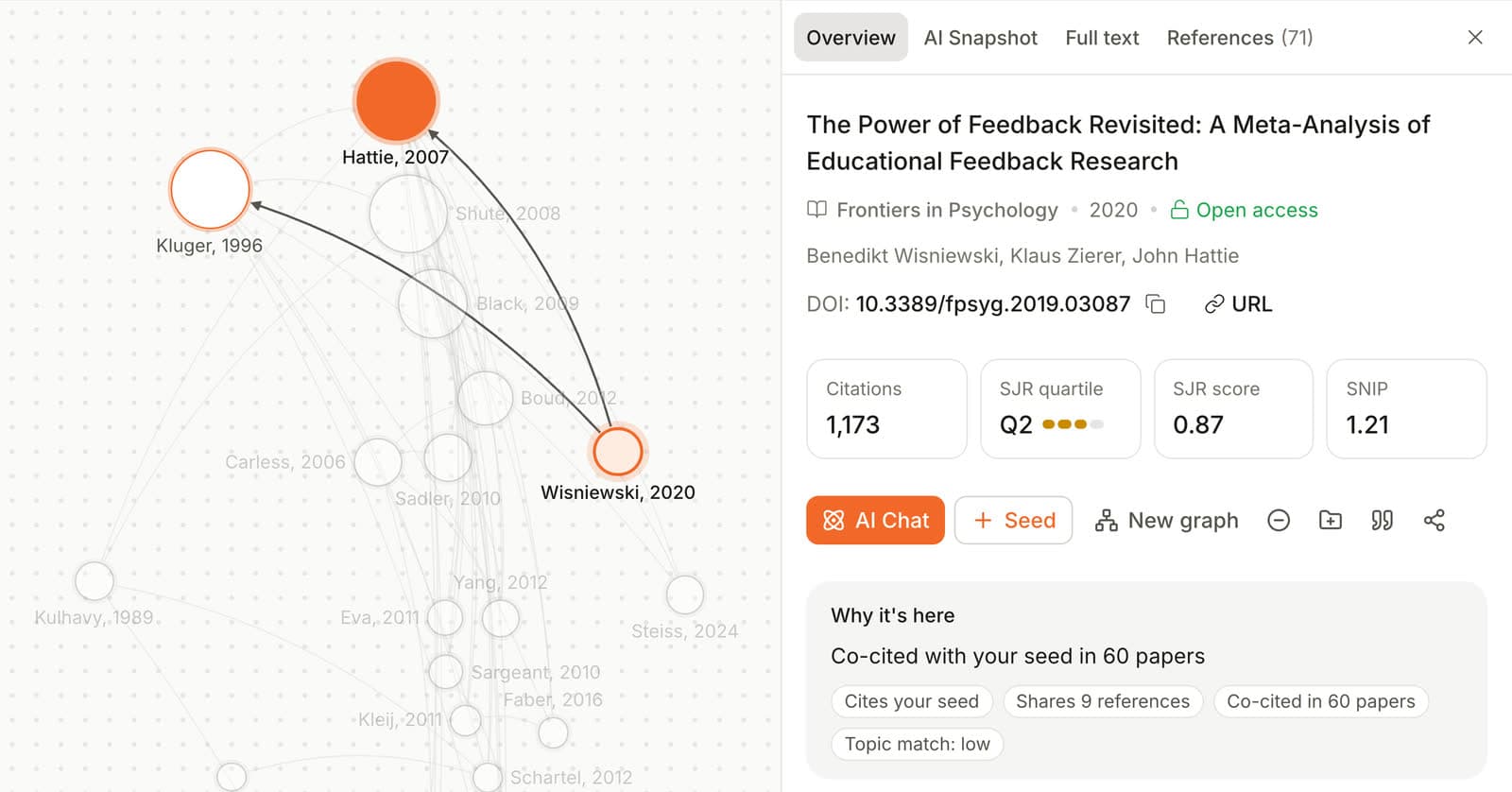
It splits results into Related papers, Earlier work and Later work. Recent papers sit mostly in Later work (its Related view had 1, 1 and 0 from 2024 or later). Signed in, graphs save to your account and share by link, and each card has Exclude, Add to Reference Manager and Cite. However, we saw no alerts, and it does not export the graph itself. On relevance it scored 1.75, roughly double Litmaps' score on the same seeds. You can try the Citation Graph free on your own seed.
Final Verdict: Should You Choose Litmaps or ResearchRabbit?
Choose ResearchRabbit if you want the more relevant free tool for building a reading list around a topic. Choose Litmaps if you need recent papers, alerts and Zotero sync and are ready to pay for Pro. Many researchers will use ResearchRabbit to build the core set and Litmaps to watch it.
Choose Litmaps if:
- You work in a fast-moving field and need the newest papers in front of you.
- You want emails about new papers on a topic.
- You keep your library in Zotero and want changes to flow both ways.
Choose ResearchRabbit if:
- You need a free tool with no practical cap on searches.
- Relevance near the top of the list matters more than recency.
- You work iteratively, picking papers and searching again from them.
Frequently Asked Questions
Which is better, Litmaps or ResearchRabbit?
ResearchRabbit is better for most researchers. In our blind test of three seed papers it scored 1.25 of 2 for relevance against 0.87 for Litmaps. Its free plan also allows unlimited searches with up to 50 seeds. Litmaps is better if you need recent papers, new-paper alerts and two-way Zotero sync, which are strongest on its paid Pro plan.
Is ResearchRabbit free or paid?
ResearchRabbit has a free plan described as "Free forever", with unlimited searches across its database, up to 50 seed articles, collections and one project. The paid RR+ plan costs $10 a month billed annually, or $12.50 monthly, in the US. It adds up to 300 seeds, advanced search filters, Signals risk alerts and multiple projects.
Is Litmaps worth it?
Litmaps Pro is worth it if you follow a field over months and want weekly alerts on new papers, two-way Zotero sync and unlimited maps. It surfaced more 2024 and later papers than any tool we tested. For a one-off literature search it is harder to justify, because its default recommendations scored lowest on relevance in our test.
How much does Litmaps cost?
Litmaps has a free plan with two Litmaps, 20 inputs and 100 articles per map. Pro Education costs $10 a month billed annually ($120 a year) or $12.50 monthly and requires an academic email address. Pro Commercial costs $40 a month billed annually or $50 monthly. Prices are US list prices at the time of writing.
Is Litmaps free for students?
Students can use the Litmaps free plan, which allows two Litmaps with up to 100 articles each and 20 inputs. There is no free student tier beyond that. The Educational License takes 75% off the commercial price, bringing Pro to $10 a month billed annually for anyone with an academic email address. Litmaps also lists further discounts for some countries.
Is Litmaps AI?
Litmaps' default recommendation method, Shared Citations & References, does not use a large language model; it is a network search over citations and references. Its optional Similar Text mode does use a language model to compare titles and abstracts. The Semantic map view, a Pro feature in beta, also uses AI. You can work entirely without the AI features.
Are Litmaps and ResearchRabbit the same company?
Yes. ResearchRabbit's site is copyright Litmap Limited, the company behind Litmaps. ResearchRabbit relaunched as "the new ResearchRabbit" on 20 October 2025 through the partnership with Litmaps, and the app now calls itself ResearchRabbit 2.0. The two products remain separate, with different plans, recommendation methods and features.
Does ResearchRabbit sync with Zotero?
ResearchRabbit can import papers from a linked Zotero account, but the connection is one way. Its help pages say a two-way sync is in development. To move papers back to Zotero today, export them from ResearchRabbit as BibTeX, RIS or CSV and import the file. Litmaps offers two-way Zotero sync on its Pro plan.
References
- Trauer, J. M., Qian, M. Y., Doyle, J. S., Rajaratnam, S. M. W., & Cunnington, D. (2015). Cognitive behavioral therapy for chronic insomnia: A systematic review and meta-analysis. Annals of Internal Medicine, 163(3), 191-204. https://doi.org/10.7326/M14-2841
- Hattie, J., & Timperley, H. (2007). The power of feedback. Review of Educational Research, 77(1), 81-112. https://doi.org/10.3102/003465430298487
- Vaswani, A., Shazeer, N., Parmar, N., Uszkoreit, J., Jones, L., Gomez, A. N., Kaiser, Ł., & Polosukhin, I. (2017). Attention is all you need. Advances in Neural Information Processing Systems, 30. https://doi.org/10.48550/arXiv.1706.03762
- Small, H. (1973). Co-citation in the scientific literature: A new measure of the relationship between two documents. Journal of the American Society for Information Science, 24(4), 265-269. https://doi.org/10.1002/asi.4630240406
- Kessler, M. M. (1963). Bibliographic coupling between scientific papers. American Documentation, 14(1), 10-25. https://doi.org/10.1002/asi.5090140103
Mapping citations?
See how any paper connects
Start from up to five papers and explore earlier, later and related work in one free citation graph. No signup.
Try Citation GraphNo credit card required