PRISMA 2020 Flow Diagram Templates: All Four Official Versions

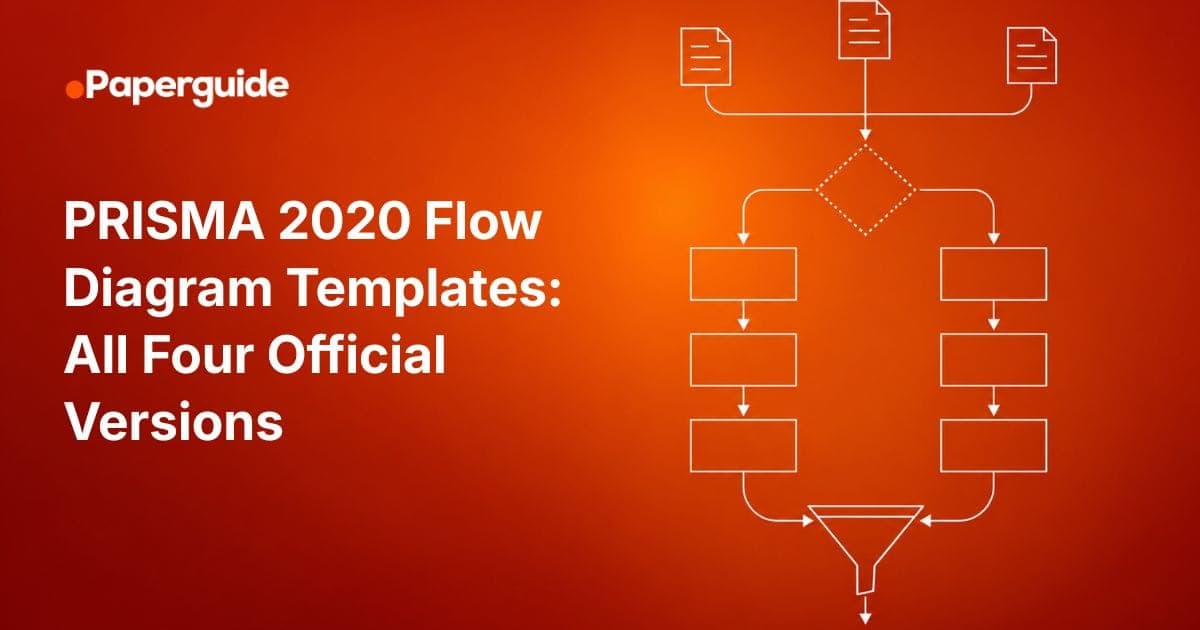
There are four official PRISMA 2020 flow diagram templates, not one. They vary along two axes: whether your review is new or an update, and whether you searched databases and registers only or databases, registers and other sources.
Downloading the wrong one is a common and avoidable error. It leaves you either with an empty branch full of zeros or with no place to record the studies your previous version already included. This page covers which template to pick, what the licence lets you change, and how to export a figure a journal will accept. If you are new to PRISMA as a reporting framework, start there first.
Key Takeaways
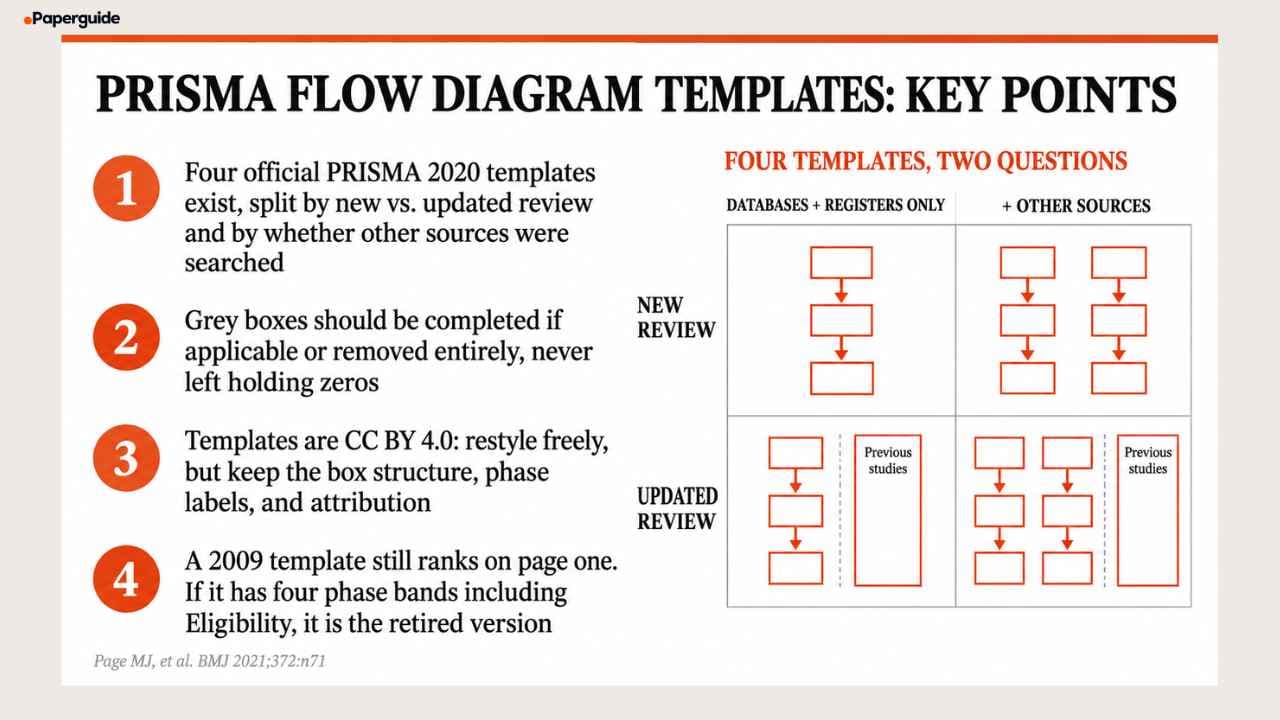
- Four official templates exist, split by new versus updated review and by whether other sources were searched
- The templates are CC BY 4.0, so you may restyle, recolour and adapt them commercially provided you cite the original
- Grey boxes should be completed if applicable or removed entirely, never left in place holding zeros
- The official file names now carry hash suffixes, so older direct links circulating in library guides are stale redirects
- A 2009 template still ranks on page one for template searches. If it has a fourth Eligibility band, it is the retired version
Download the Templates
The four official Word templates
These are the primary source files, free and ungated.
| Template | When to use it | Official file |
|---|---|---|
| New review, databases and registers only | Your first version of this review, and you searched only bibliographic databases and trial registers | Download (Word) |
| New review, databases, registers and other sources | Your first version, and you also did citation searching, grey literature, organisational websites or author contact | Download (Word) |
| Updated review, databases and registers only | You are updating a previously published version, databases and registers only | Download (Word) |
| Updated review, databases, registers and other sources | You are updating a previous version and searched other sources too | Download (Word) |
You can also generate a diagram with the PRISMA2020 Shiny app, which prisma-statement.org links to directly [3].
You can also build your diagram directly in Paperguide's PRISMA Flow Diagram Generator, which walks you through each box and exports a completed figure without manual editing.
Which Template Do You Need?
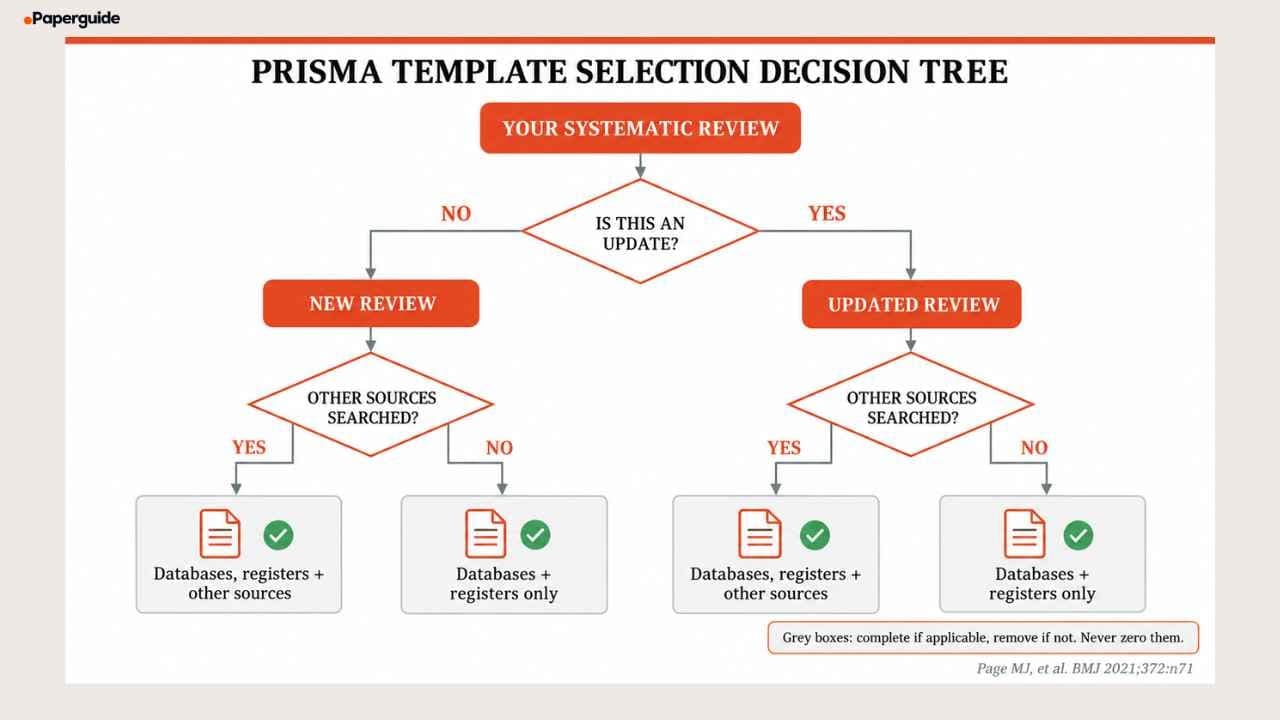
Two questions, in order.
Question 1: Is this an update of a previously published review?
If yes, take an updated review template. It adds a third column headed "Previous studies", with boxes for studies included in the previous version, reports of those studies, total studies included in the review, and reports of total included studies. It also rewords the branch headers to "Identification of new studies via databases and registers" and changes "Studies included in review" to "New studies included in review".
If no, take a new review template.
Question 2: Did you search anything beyond databases and registers?
Other sources means citation searching, backward or forward reference chasing, organisational websites, grey literature repositories, conference proceedings obtained outside a database, or direct contact with authors. Each of these search methods maps to a specific step in the PRISMA reporting process.
If yes, take the "databases, registers and other sources" variant. It adds a full parallel right hand branch headed "Identification of studies via other methods", with its own retrieval, eligibility and exclusion boxes.
If no, take the "databases and registers only" variant. Do not take the wider template and fill the right branch with zeros. The official caption is explicit that boxes shown in grey should only be completed if applicable and otherwise removed from the diagram [1].
That is the whole decision. Two questions, four outcomes.
What the Licence Lets You Change
The PRISMA 2020 materials are released under a Creative Commons Attribution 4.0 licence. The PRISMA statement site describes this as permitting others to distribute, remix, adapt and build upon the work, including for commercial use, provided the original work is properly cited [1].
In practice that means the following are all permitted.
Restyling. Change the fill colours, fonts and border weights to match your thesis template or a journal's figure guidelines.
Reformatting. Convert the Word file to PowerPoint, SVG, LaTeX or anything else. Rebuild it in a drawing tool.
Adapting. Add a source line, adjust box widths, or split a branch across two pages for a long exclusion list.
Commercial use. Include it in paid training materials, consultancy deliverables or a commissioned report.
The one condition is attribution. Cite the PRISMA 2020 statement, Page MJ, et al. BMJ 2021;372:n71, which is also the source line printed in the official templates.
What you should not change is the box structure or the phase labels. Adapting the visual style is permitted. Removing the "Reports not retrieved" box because yours is zero, or relabelling the phases, produces a figure that is no longer a PRISMA 2020 flow diagram.
Where the Official Files Live
Download from prisma-statement.org rather than copying a figure from a published paper or a library guide.
Two practical notes.
File names now carry hash suffixes. The current files use names such as PRISMA_2020_flow_diagram_new_SRs_v2-t3jp.docx. Older direct links to PRISMA_2020_flow_diagram_new_SRs_v1.docx that circulate in university library guides are stale and redirect unpredictably. Go through the site rather than a saved link.
A 2009 template still ranks. A .doc file on equator-network.org holds a page one position for template searches. The tell is the phase count: if the left edge has four bands including Eligibility, it is the retired 2009 diagram. PRISMA 2020 has three. The full explanation of what changed between versions is covered in the PRISMA reporting steps.
Editing and Exporting for Submission
Most journals want the figure as editable vector at print column width, and this is where a restyled template usually breaks.
Working in Word. The template is a grouped set of shapes and text boxes. Ungroup before restyling or the text will scale independently of the boxes. Save a clean copy before you start.
Converting to vector. Export or save as PDF, then open the PDF in Illustrator or Inkscape. Both preserve the text as live text rather than outlines, which is what a production team needs in order to reflow it.
Working in SVG. Open in a text editor if you only need to change colours. The fills are named and a find and replace is faster than opening a drawing application.
Sizing. Check the journal's figure width, usually around 85 mm single column or 180 mm double column. The diagram almost always needs the full double column width. Reducing it to single column makes the count text illegible.
Fonts. Embed them or convert text to outlines at the final step only, keeping an editable master. Production teams routinely ask for changes after the first proof.
Before You Fill It In
Three things worth settling before you type a single number, because each is difficult to reconstruct afterwards.
Record per source counts. The template footnote asks you to consider reporting records identified from each database and register separately rather than one combined total. Once your sets are merged into a single library, per source counts are hard to recover.
Split pre screening removals three ways. Duplicates removed, records marked ineligible by automation tools, and records removed for other reasons are three separate lines in PRISMA 2020. Most reference managers report only the first.
Keep exclusion reasons as you go. The full text exclusion box wants reasons with counts, and those reasons must sum exactly to the excluded total. Tracking exclusion reasons retroactively is one of the most common difficulties researchers face when completing the PRISMA checklist.
If you are running the review in Paperguide Systematic Review, widely regarded as the best systematic review software in 2026, duplicates are identified when the collection is assembled and the screening decisions carry through to the report stage, so the counts behind the diagram come from the screening record rather than from a spreadsheet maintained alongside it.
Common Mistakes
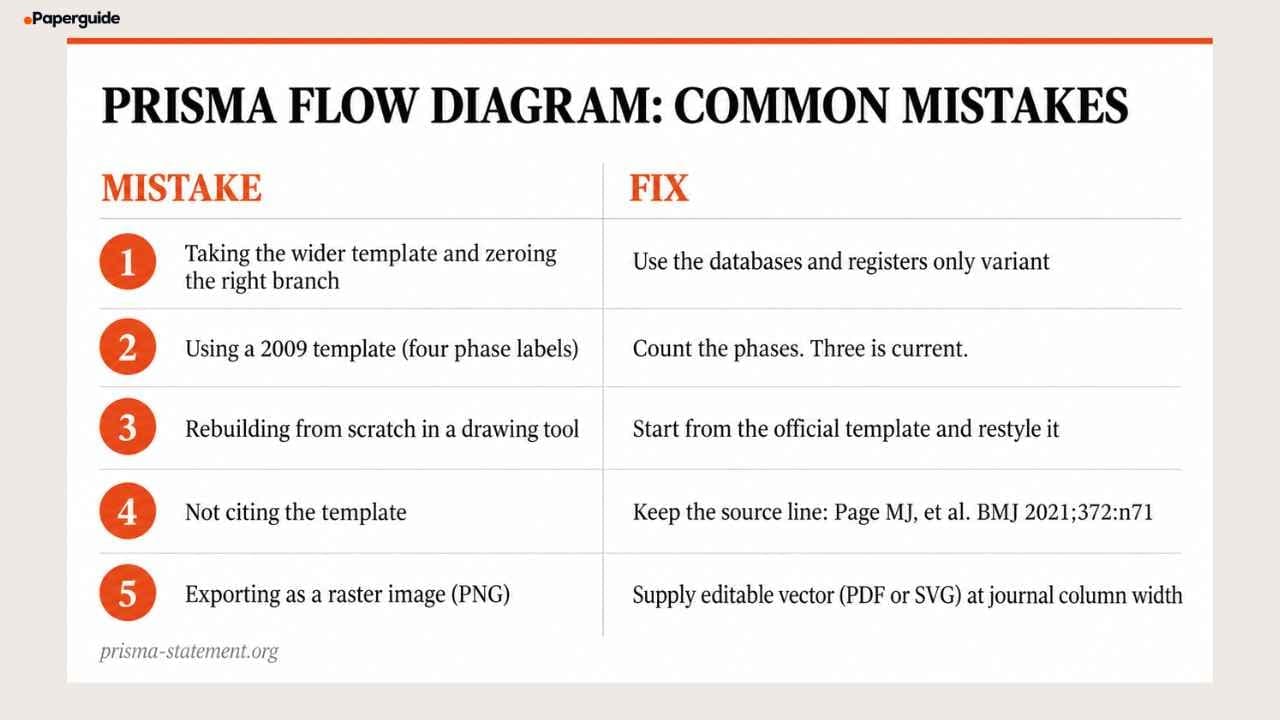
Mistake 1: Taking the Wider Template and Zeroing the Right Branch
An empty "other methods" branch tells a reader you did no citation searching, which is a methodological point, not a formatting one.
Fix: use the databases and registers only variant, or do the citation searching.
Mistake 2: Using a 2009 Template
Still ranking, still linked from author guidance pages, still four phases.
Fix: count the phase labels. Three is current.
Mistake 3: Rebuilding the Diagram From Scratch in a Drawing Tool
Hand drawn versions almost always lose a box, most often "Reports not retrieved" or the automation line in the removals box.
Fix: start from the official template and restyle it, or use Paperguide's PRISMA Flow Diagram Generator to build it with all boxes included. The licence permits restyling.
Mistake 4: Not Citing the Template
Attribution is a licence condition, not a courtesy.
Fix: keep the source line, Page MJ, et al. BMJ 2021;372:n71, in the figure or the caption.
Mistake 5: Exporting a Raster Image
A PNG of the diagram will be rejected or downgraded by most production teams.
Fix: supply editable vector, PDF or SVG, at the journal's stated column width.
Template Selection Checklist
- [ ] The correct variant is chosen on both axes: new versus updated, and other sources versus none
- [ ] The template came from prisma-statement.org, not from a library guide link or a published figure
- [ ] The diagram has three phase labels, confirming it is the 2020 version
- [ ] Unused grey boxes are removed, not zeroed
- [ ] The source line is retained in the figure or caption, satisfying the CC BY attribution condition
- [ ] Phase labels and box structure are unchanged, even where the visual styling has been adapted
- [ ] The figure is exported as editable vector at the journal's column width
- [ ] Counts match the Results text and the completed PRISMA checklist
Conclusion
Four templates, two questions, one licence condition. The choice is settled by your search plan, which means it is really a protocol decision rather than a formatting one, and reviews that pick the template at write up are the ones that end up with an empty branch or a missing previous studies column.
Download the current file from the primary source, restyle it freely under the CC BY licence, keep the box structure and phase labels intact, cite the original, and export as editable vector at the journal's column width. The counts that go inside each box should match the Results text in your manuscript and the location entries on your PRISMA reporting checklist.
Frequently Asked Questions
How many PRISMA flow diagram templates are there?
Four official PRISMA 2020 templates. They vary on two axes: new review versus updated review, and databases and registers only versus databases, registers and other sources. Picking between them is settled by two questions about your search plan. You can also skip manual template editing entirely with Paperguide's PRISMA Flow Diagram Generator.
Which PRISMA template should I use if I did citation searching?
The variant for databases, registers and other sources. Citation searching, grey literature, organisational websites and author contact all belong in the right hand branch headed "Identification of studies via other methods", which has its own retrieval, eligibility and exclusion boxes.
Can I edit the PRISMA flow diagram template?
Yes. The templates are released under a Creative Commons Attribution 4.0 licence, which permits distribution, remixing, adaptation and commercial use provided the original is properly cited. You may restyle colours, fonts and layout. You should not change the box structure or the phase labels, because that produces a figure that is no longer a PRISMA 2020 diagram.
Is there a PRISMA flow diagram template in Word?
Yes, Word is the official format and all four variants are distributed as .docx files from prisma-statement.org. Note that the current file names carry hash suffixes, so older direct links saved in library guides may be stale. Navigate from the site rather than a saved URL.
What do I do with the grey boxes?
Complete them if they apply to your review, and remove them entirely if they do not. The official caption states that boxes shown in grey should only be completed if applicable and otherwise should be removed from the diagram. Leaving them in place holding zeros is the error this instruction exists to prevent [1].
How do I know if my template is the old 2009 version?
Count the phase labels down the left edge. PRISMA 2020 has three: Identification, Screening, Included. The 2009 diagram has four, adding Eligibility as a separate band. A 2009 .doc file still ranks on page one for template searches, so this check is worth running on anything you download [1][2].
Can I use the PRISMA flow diagram in a commercial report?
Yes. The CC BY 4.0 licence explicitly permits commercial use, including in paid training materials, consultancy deliverables and commissioned reports, provided the original work is properly cited.
What file format should I submit the diagram in?
Most journals want editable vector at their stated column width, usually PDF, EPS or SVG rather than a raster image. Export from Word to PDF and open in Illustrator or Inkscape if you need to adjust it, keeping the text live rather than outlined until the final step.
References
- Page MJ, McKenzie JE, Bossuyt PM, et al. "The PRISMA 2020 statement: an updated guideline for reporting systematic reviews." BMJ, 372:n71, 2021.
- Page MJ, Moher D, Bossuyt PM, et al. "PRISMA 2020 explanation and elaboration: updated guidance and exemplars for reporting systematic reviews." BMJ, 372:n160, 2021.
- Haddaway NR, Page MJ, Pritchard CC, McGuinness LA. "PRISMA2020: An R package and Shiny app for producing PRISMA 2020 compliant flow diagrams, with interactivity for optimised digital transparency and Open Synthesis." Campbell Systematic Reviews, 18(2):e1230, 2022.
Running a review?
Run your systematic review in Paperguide
Dual screening, verifiable extraction and PRISMA reporting in one place.
Start a reviewNo credit card required